Key Takeaways
- You can pay for transfers with your Wise account balance, a credit/debit card, bank transfer, or a number of local third-party payment methods, depending on your country of residence;
- Wise card comes with an allowance of two free cash withdrawals under $100 per month, after which you'll have to pay an additional withdrawal fee;
- Check your transaction status on the Wise dashboard and take steps to cancel your payment if needed.
If you're looking for a powerful and versatile money transfer service that can handle just about any type of online payment you could throw at it, Wise is more than up to the task. However, a lot of new users find its vast range of options and features a bit overwhelming a first. In this guide, I'll explain all you need to know about how to transfer money from Wise to a bank account.
We'll go through the ins and outs of Wise's transfer fees, limits, payment methods, and troubleshooting common issues, with comprehensive tutorials to see you through every step of the way.
Need a simpler and more intuitive alternative for withdrawing money to your bank account? Try Ogvio, a new money transfer app that supports bank transfers with some of the lowest fees in the market!

Did you know?
Subscribe - We publish new crypto explainer videos every week!
What is Balancer in Crypto? Beginner Friendly BAL Explainer


Table of Contents
- 1. Key Features of Wise Transfers
- 2. Transfer Preparation Checklist
- 2.1. Add a Connected Payment Method
- 2.2. Add a Recipient
- 3. How to Transfer Money from Wise to Bank Account
- 4. Wise Transfer Options: A Country-by-Country Guide
- 5. Wise Transfer Fees & Limits
- 6. Wise Card Withdrawals
- 7. Troubleshooting Common Issues
- 7.1. Lost or Delayed Transfers
- 7.2. Cancelling a Transfer
- 7.3. Cash Withdrawal Issues
- 8. Conclusions
Key Features of Wise Transfers
Before I show you how to withdraw money from Wise or transfer it to a bank account, let's kick it off with a quick intro to this platform's transfer features. Here's what Wise brings to the table:
Latest Changelly Coupon Found:- Multiple Funding Methods. You can pay for your transactoin with your Wise balance, a credit/debit card, a bank transfer, a mobile wallet (Apple/Google/Samsung Pay), and a number of local third-party payment methods in certain countries (e.g., iDEAL in the Netherlands or POLi in New Zealand).
- Integration with Local Banking Platforms. Wise supports Faster Payments and CHAPS in the UK, Interac and ETF in Canada, and other local banking systems, depending on your country.
- Multi-Currency Support. You can deposit, transfer, or withdraw any of the 40+ supported currencies on Wise, which is great for digital nomads or expats who have bank accounts in multiple countries.

- Exchange Rate Lock-In. As long as Wise receives your money right away, you'll be guaranteed a fixed exchange rate for up to 48 hours (except during periods of high volatility).
- Scheduled & Recurring Transfers. Postpone your payment to a specific date or set up repeating transfers at regular intervals.
- Wise Card. A multi-currency debit card for in-store or online payments and ATM withdrawals.
As you can see, Wise definitely offers plenty of flexibility, no matter what your exact use case is.
📚 Learn More: Wise Review
Looking for more in-depth information on related topics? We have gathered similar articles for you to spare your time. Take a look!



Transfer Preparation Checklist
Can you withdraw money from Wise to a bank account right away after signing up? Yes and no. The platform itself is ready to go whenever you are, but there are still a few things to tick off before you proceed.
If you've used any other money transfer service before, you're probably aware that they typically require KYC verification. However, Wise handles it a bit differently. Unlike many similar apps, it won't badger you with that pesky verification banner the moment you sign up. How and when you'll be asked to verify your identify depends on:
- The amount you want to send;
- The currency you send;
- How many transfers you've made.
In short, transfer cases and user profiles that are deemed higher risk might be required to submit some extra documentation, such as proof of address (e.g., a utility bill), while most other users will only have to upload a photo of their official ID, such as a passport or a driver's license. Have these documents at hand in case Wise asks you for verification.
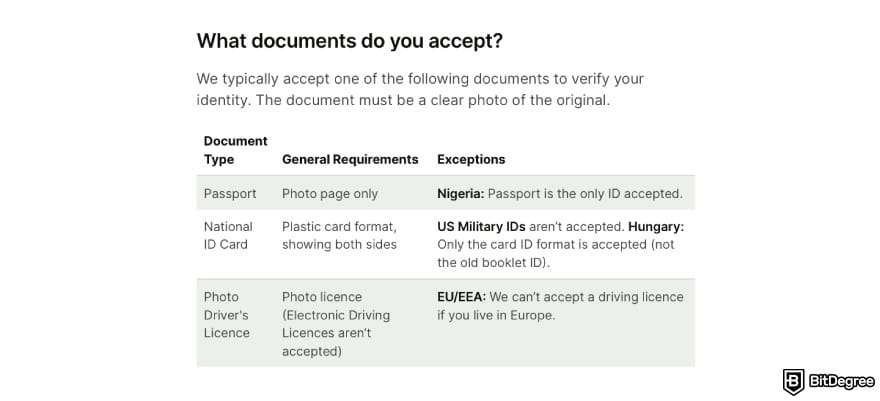
That said, if withdrawing money to your own bank account is your first Wise transaction, you might not need to pass KYC at all. In some cases, Wise can automatically verify your identify by matching the name on your personal bank account with your Wise account name.
This verification method can only be applied to transfers under $15,000 in certain currencies.
Another detail to double-check is your balance. Decide how you're going to fund your transfer (and in what currency) and make sure you have enough money in your Wise balance, debit card, or another source of funds to cover it.
Keep the recipient's bank account details at hand, too. Wise offers an easy setup for linking your card or bank account as a payment method and adding recipients to your contact list. You'll have to enter the IBAN/bank account number for domestic transfers and SWIFT/BIC code for international transfers.
Add a Connected Payment Method
Nobody likes having to enter the payment details over and over again. Fortunately, Wise lets you save your bank account or credit/debit card information as a linked payment method.
Well, with some caveats. The linked bank account feature is only supported in the United Kingdom, the United States and Canada. Those in other countries will have to make do with adding their card details.
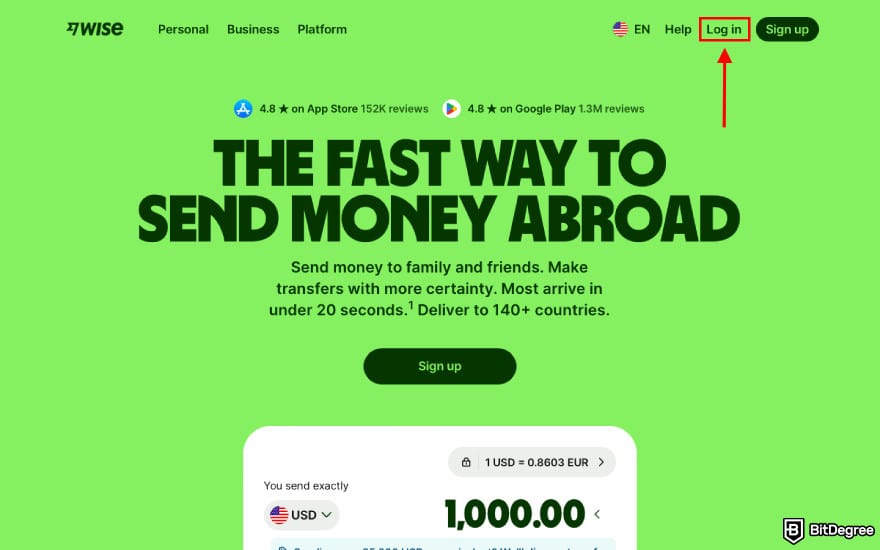
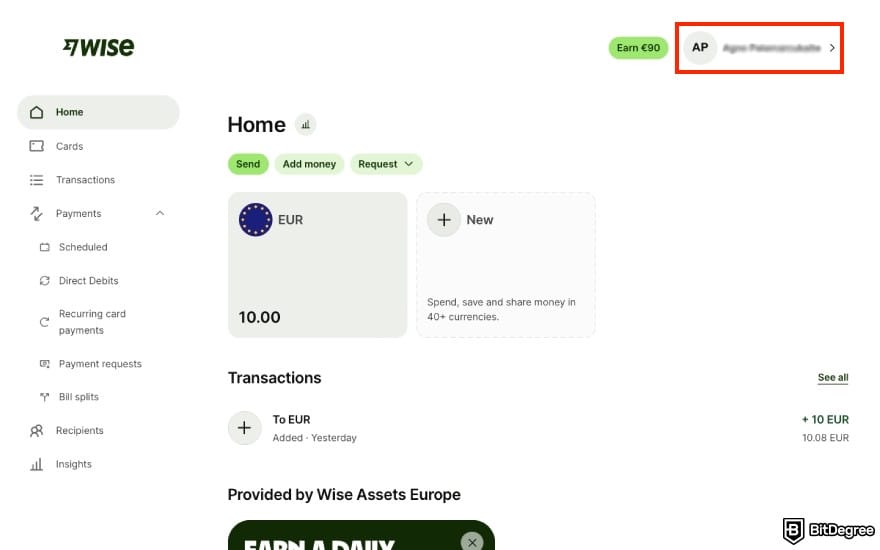
If you're a resident of one of the three, here's how to link your bank account:
![How to withdraw money from Wise to bank account: click [Payment methods].](https://assets.bitdegree.org/images/how-to-withdraw-money-from-wise-to-bank-account-payment-methods.jpg "How to withdraw money from Wise to bank account: click [Payment methods].")
![How to withdraw money from Wise to bank account: click [Connected bank accounts].](https://assets.bitdegree.org/images/how-to-withdraw-money-from-wise-to-bank-account-connected-bank-accounts.jpg "How to withdraw money from Wise to bank account: click [Connected bank accounts].")
![How to withdraw money from Wise to bank account: click [Connect your bank account].](https://assets.bitdegree.org/images/how-to-withdraw-money-from-wise-to-bank-account-connect-your-bank-account.jpg "How to withdraw money from Wise to bank account: click [Connect your bank account].")
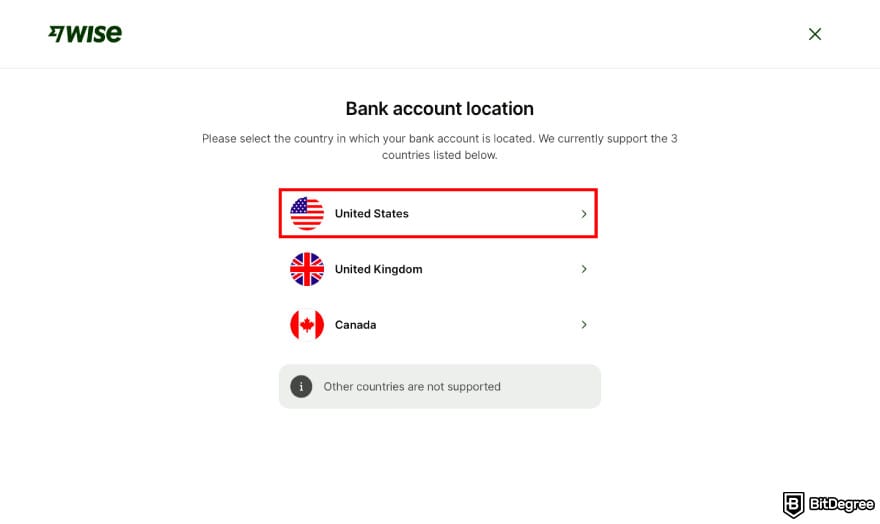
![How to withdraw money from Wise to bank account: click [Instant verification].](https://assets.bitdegree.org/images/how-to-withdraw-money-from-wise-to-bank-account-instant-verification.jpg "How to withdraw money from Wise to bank account: click [Instant verification].")
![How to withdraw money from Wise to bank account: click [Continue].](https://assets.bitdegree.org/images/how-to-withdraw-money-from-wise-to-bank-account-continue.jpg "How to withdraw money from Wise to bank account: click [Continue].")
That's it! As for linking your credit/debit card, the process is much simpler. Go to [Payment methods] and choose [Saved bank cards] this time around, then enter your card number, expiration date, and CVV.
You can delete your saved payment methods or add new ones on the same "Payment methods" panel on Settings.
Add a Recipient
Adding a connected payment method is all well and good - but is there a way to streamline the process of how to transfer money from Wise to a bank account on the other end, too? Absolutely! If you're going to be withdrawing money from this platform on a regular basis, here's how you can add a recipient to your contact list:
![How to withdraw money from Wise to bank account: click [Recipients].](https://assets.bitdegree.org/images/how-to-withdraw-money-from-wise-to-bank-account-recipients.jpg "How to withdraw money from Wise to bank account: click [Recipients].")
![How to withdraw money from Wise to bank account: click [Add recipient].](https://assets.bitdegree.org/images/how-to-withdraw-money-from-wise-to-bank-account-add-recipient.jpg "How to withdraw money from Wise to bank account: click [Add recipient].")
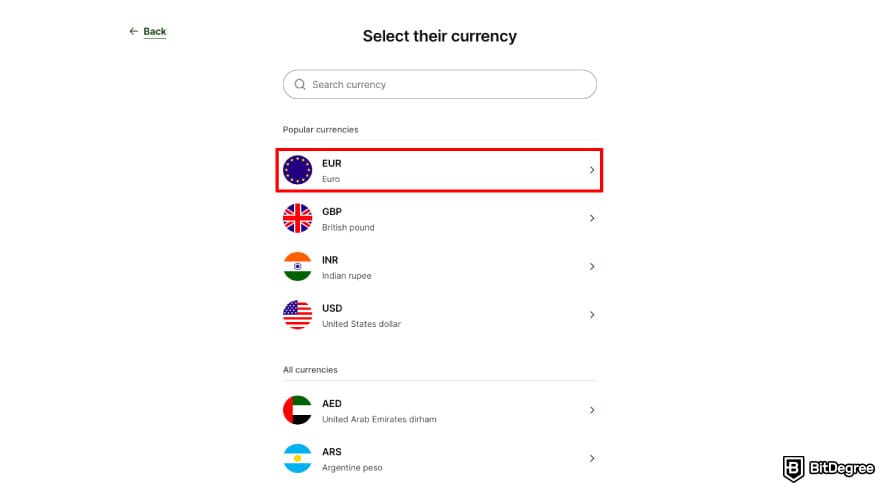
![How to withdraw money from Wise to bank account: click [Bank details].](https://assets.bitdegree.org/images/how-to-withdraw-money-from-wise-to-bank-account-bank-details.jpg "How to withdraw money from Wise to bank account: click [Bank details].")
![How to withdraw money from Wise to bank account: click [Myself].](https://assets.bitdegree.org/images/how-to-withdraw-money-from-wise-to-bank-account-myself.jpg "How to withdraw money from Wise to bank account: click [Myself].")
![How to withdraw money from Wise to bank account: enter your bank details and click [Continue].](https://assets.bitdegree.org/images/how-to-withdraw-money-from-wise-to-bank-account-card-details.jpg "How to withdraw money from Wise to bank account: enter your bank details and click [Continue].")
If you entered the details correctly, you should see a green check mark with the name of the bank.
How to Transfer Money from Wise to Bank Account
You're all set and ready to go - time to see what the actual withdrawal looks like. Adding the payment method and the recipient's account details in advance trims down the number of steps in the process, so the withdrawal itself should be a breeze.
Let's get on with it:
![How to withdraw money from Wise to bank account: click [Send].](https://assets.bitdegree.org/images/how-to-withdraw-money-from-wise-to-bank-account-send.jpg "How to withdraw money from Wise to bank account: click [Send].")
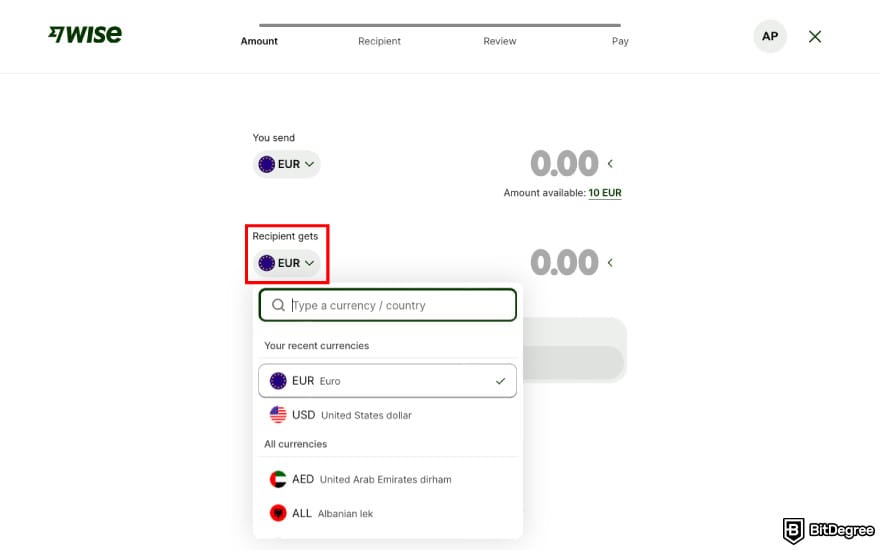
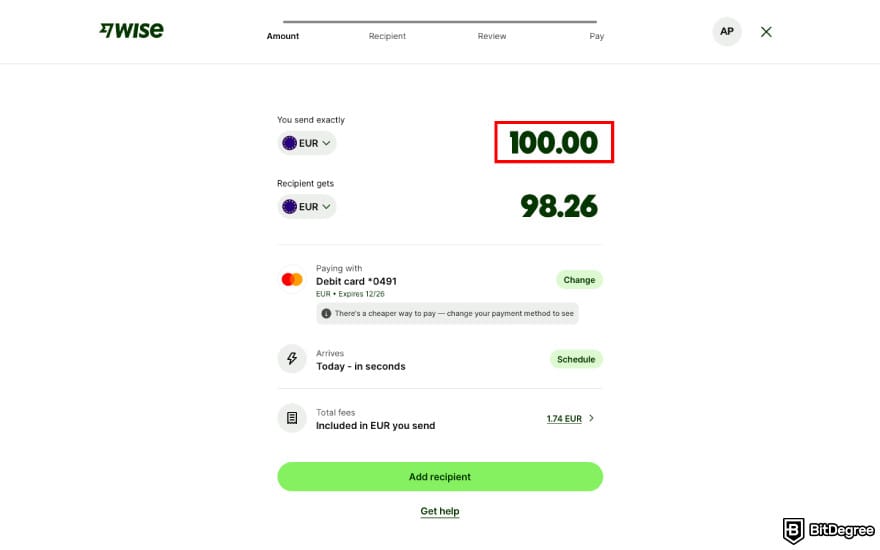
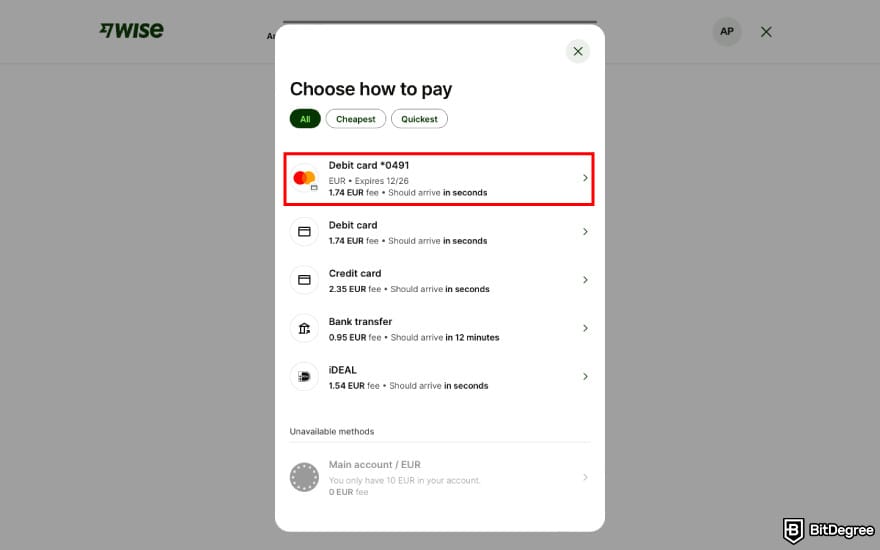
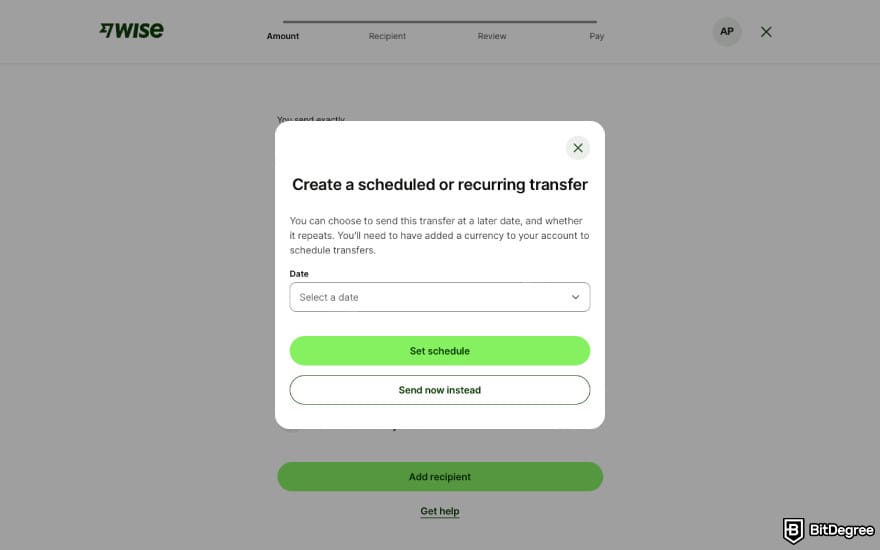
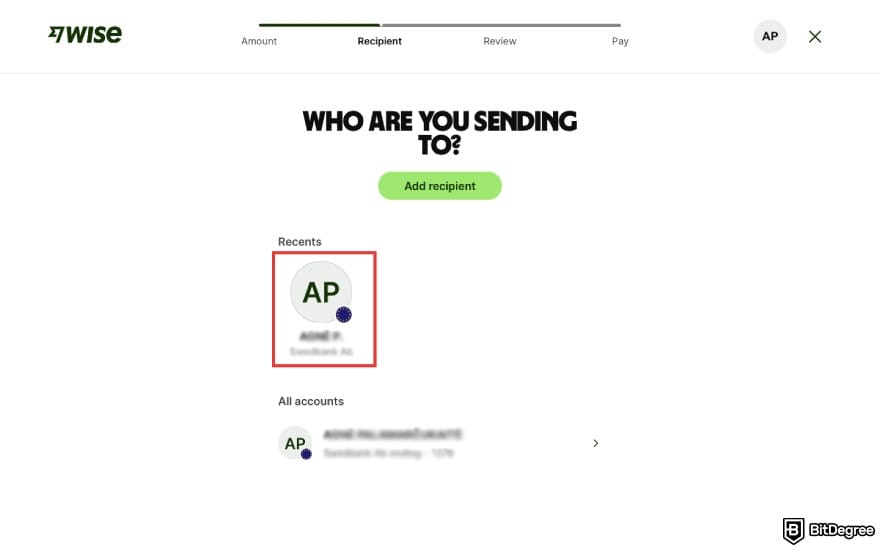
All done! You'll now see your withdrawal in the "Transactions" section on the dashboard.
Wise Transfer Options: A Country-by-Country Guide
Wise offers a pretty wide range of payment methods and bank transfer types, and the specifics of how to transfer money from Wise to a bank account will look slightly different depending on the country you're sending to and from (or, more accurately, what currency you're transferring).
You can explore your options by playing around with the platform's fee calculator on the website - or take a look at this overview covering the five most popular currencies on Wise:
Payment Methods | Supported Transfers | Required Information | Restrictions | |
|---|---|---|---|---|
USD | Wise account balance (USD), bank debit, ACH transfer, wire transfer, mobile wallets, credit/debit card | Any bank account in the US that accepts ACH or SWIFT transfers | Full name, address, 4–17 digit bank account number, ACH or wire 9 digit routing number, account type. | No USD transfers to a brokerage account or an intermediary bank No For Further Credit (FFC) payments |
MXN | Wise account balance (MXN), bank transfer | Most banks in Mexico, except for the following: BanCoppel, Caja Popular de Mexico, Banco Azteca, CI Banco S.A., Institución de Banca Múltipe, Institución de Banca Múltiple, Vector Casa de Bolsa S.A. de C.V., Banco Regional de Monterrey S.A. | Full name, address when sending from certain currencies (e.g., USD) and 18-digit CLABE. | - |
CAD | Wise account balance (CAD), direct debit (EFT), online bill payment, credit-debit card, mobile wallets, wire transfer, Interac e-Transfer | Any bank account in Canada via an EFT bank transfer, or Interac for supported accounts. | Full name, 3-digit bank institution number, 5-digit transit number, 7–12 digit account number, email address (for Interac transfers) | No CAD transfers to Canada-based USD accounts |
EUR | Wise account balance (EUR), SEPA bank transfer, SWIFT transfer, credit/debit card, mobile wallets, iDEAL, Trustly, PISP | Any bank account that supports SEPA or SWIFT transfers | Full name and IBAN; also SWIFT code for international transfers | - |
GBP | Wise account balance (GBP), bank transfer (manual or simplified), credit/debit card, mobile wallets, SWIFT | Any UK bank account connected to the Faster Payments Scheme or CHAPS The Channel Islands, Isle of Man, and Gibraltar, using an IBAN starting with GB Countries outside the UK using the SWIFT network | Full name, 6-digit sort code and 8-digit bank account number (or, alternatively, IBAN) | No transfers to accounts that only support Bacs or cheque payments |
INR | Wise account balance (INR), bank transfer (only from a personal bank account through IMPS, NEFT, and RTGS payment networks) | Most bank accounts in India, including NRE and NRO accounts, or a UPI ID | Full name, 5–20 digit account number, IFSC, purpose of the payment (choose from the list) | You may need a Foreign Inward Remittance Certificate (FIRC) for transfers to India KYC verification required |
CNY | Wse account balance (CNY), bank transfer, Alipay | UnionPay, Alipay, Weixin | Full name, phone number, email (for Alipay or Weixin), Chinese national ID number | You can only send CNY to CIPS member banks KYC verification required |
BRL | Wise account balance (BRL), TED bank transfer, Pix | Any personal bank account in Brazil | Full name, 4–12 digit local account number and account type, 4–5 digit branch code, bank name and 3 digit bank code, 11-digit tax ID/CPF | KYC verification required |
Table: country-specific overview of Wise payment and bank transfer methods
In a nutshell, the exact process and options of how to transfer money from Wise to a bank account differ for each country and currency, so if yours aren't on this list, head over to Wise's help center and check the relevant details.
Wise Transfer Fees & Limits
As soon as you initiate the transaction, you'll be asked to choose a payment method to fund it - which also happens to be one of the main factors that will determine the costs of your transfer.
To that end, here's an overview of Wise transfer fees based on your chosen currency, amount, and payment method:
Payment Method | Transfer Fee | Wise Fee | Total Fee | |
|---|---|---|---|---|
100 USD | Wise account balance (USD) | 0 USD | 1.13 USD | 1.13 USD |
Debit card | Up to 1.23 USD | 2.92 USD | 4.15 USD | |
Credit card | Up to 6.16 USD | 2.92 USD | 9.08 USD | |
Connected bank account (ACH) | 0.17 USD | 2.92 USD | 3.09 USD | |
Wire transfer | 6.11 USD | 2.92 USD | 9.03 USD | |
100 EUR | Wise account balance (EUR) | Free | Free | Free |
Debit card | Up to 0.79 EUR | 0.95 EUR | 1.74 EUR | |
Credit card | Up to 1.40 EUR | 0.95 EUR | 2.35 EUR | |
Bank transfer | 0 EUR | 0.95 EUR | 0.95 EUR | |
iDEAL | 0.59 EUR | 0.95 EUR | 1.54 EUR | |
Trustly | 1.43 EUR | 0.95 EUR | 2.38 EUR | |
100 GBP | Wise account balance (GBP) | Free | Free | Free |
Debit card | Up to 0.66 GBP | 0.61 GBP | 1.27 GBP | |
Credit card | Up to 2.23 GBP | 0.61 GBP | 2.84 GBP | |
Bank transfer | 0 GBP | 0.61 GBP | 0.61 GBP | |
SWIFT transfer | 0 GBP | 0.61 GBP | 0.61 GBP | |
100 CAD | Wise account balance (CAD) | 0 CAD | 1.21 CAD | 1.21 CAD |
Debit card | Up to 1.32 CAD | 2.07 CAD | 3.39 CAD | |
Credit card | Up to 2.64 CAD | 2.07 CAD | 4.71 CAD | |
Direct debit | 0.31 CAD | 2.07 CAD | 2.38 CAD | |
Domestic wire transfer | 0.31 CAD | 2.07 CAD | 2.38 CAD | |
Interac e-Transfer | 4.97 CAD | 2.07 CAD | 7.04 CAD | |
10,000 INR | Wise account balance (INR) | 0 INR | 54.55 INR | 54.55 INR |
Bank transfer | 0 INR | 386.09 INR | 386.09 INR | |
1,000 CNY | Wise account balance (CNY) | 0 CNY | 20.77 CNY | 20.77 CNY |
Bank transfer | 0 CNY | 45.93 CNY | 45.93 CNY | |
Alipay | 13.32 CNY | 45.93 CNY | 59.25 CNY |
Table: Wise withdrawal fees (2026)
As you can see, Wise withdrawal fees are the lowest when taking out money directly from your account balance. When using any other payment method, you can expect to pay anywhere between 0.6% and 9.08% per transfer. Bank transfers are the second cheapest alternative, while paying with a credit card comes with the highest fees.
A lot of users are probably wondering: is there a way how to transfer money from Wise to a bank account with reduced fees? I have both good and bad news here. Wise does offer fee discounts for high transaction volume - but it only applies to payments that involve currency conversion (e.g., USD to EUR). Withdrawals in the same currency aren't eligible.
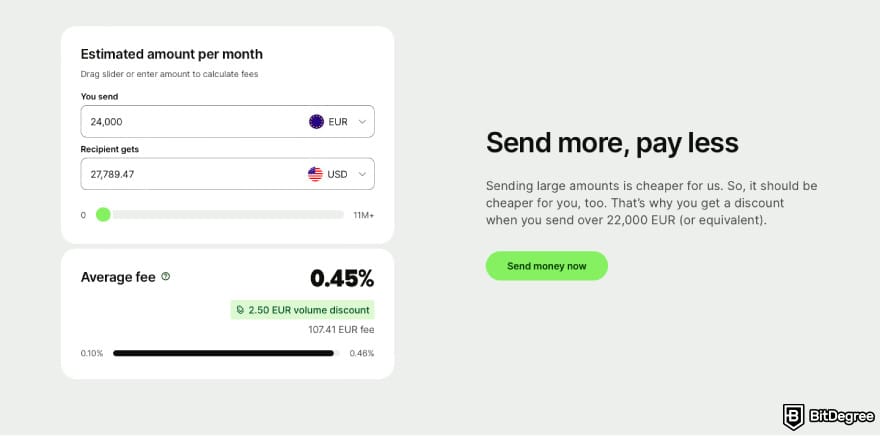
While this feature was clearly designed with international payments in mind, some users will still be able to take advantage of it for withdrawals, too. Let's say you're a digital nomad working abroad and have two bank accounts: one in a local bank and another one in your home country, and you need a way to move your funds between them on a regular basis.
Wise's fee discount is based on the total amount of money you send or convert within a calendar month. When your transaction volume passes a specific threshold, any additional amount over that limit will have a discount applied. Here's what this system looks like:
GBP | NZD | AUD | CAD | SGD | EUR | CHF | USD | |
|---|---|---|---|---|---|---|---|---|
0% | < 20,000 | < 44,000 | < 40,000 | < 35,000 | < 30,000 | < 22,000 | < 20,000 | < 25,000 |
0.10% | 20,000 to 30,000 | 44,000 to 650,000 | 40,000 to 600,000 | 35,000 to 530,000 | 30,000 to 500,000 | 22,000 to 325,000 | 20,000 to 300,000 | 25,000 to 375,000 |
0.15% | 300,000 to 500,000 | 650,000 to 1.1 million | 600,000 to 1 million | 530,000 to 900,000 | 500,000 to 850,000 | 325,000 to 550,000 | 300,000 to 500,000 | 375,000 to 625,000 |
0.16% | 500,000 to 1 million | 1.1 million to 2.2 million | 1 million to 2 million | 900,000 to 1.8 million | 850,000 to 1.7 million | 550,000 to 1.1 million | 500,000 to 1 million | 625,000 to 1.25 million |
0.17% | > 1 million | > 2.2 million | > 2 million | > 1.8 million | > 1.7 million | > 1.1 million | > 1 million | > 1.25 million |
Table: Wise fee discount system
Regardless of which currencies you withdraw, your total transaction volume gets converted to your profile's currency to determine your discount rates.
Unfortunately, Wise's fee discount system is limited to only the currencies on the table above and the following: AED, ARS, BGN, BRL, CNY, CZK, DKK, HKD, HUF, IDR, ILS, INR, JPY, MYR, NOK, PHP, PLN, RON, SEK, TRY, UAH, MXN, and THB.
The discount rates for the above-mentioned currencies are the same as for USD.
Let's wrap up this section with a note on the limits. How much you can withdraw from Wise depends on the currency and your chosen transfer method. For USD, EUR, and GBP, the maximum limit is 20 million per transfer, but for withdrawals over 1 million USD/GBP or 1.2 million EUR, the only payment option is your Wise account balance.
Some other payment methods have their own limitations, as well. Just to name a few: EUR withdrawals have a cap of 10,000 when paying by card, 50,000 when paying with iDEAL, and 1.2 million when paying by Trustly, while USD withdrawals are capped at 10,000 when using domestic ACH transfer as a payment method.
Wise Card Withdrawals
Hopefully, the previous part of this guide answered most of your questions about how to withdraw money from Wise to a bank account - but let's not forget another popular type of withdrawal. Like many of its competitors, Wise offers its own prepaid debit card that lets you take out the money in your account balance as cash.
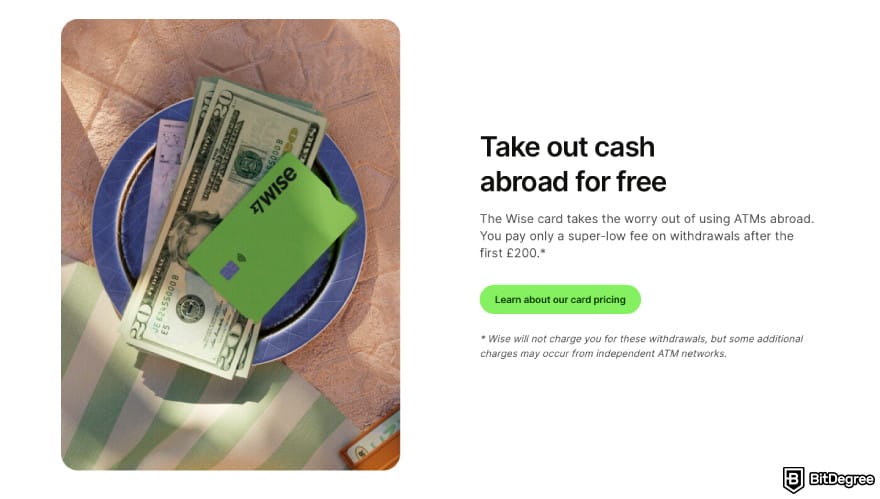
Just like the Wise account, this card supports storing multiple currencies. If you try to withdraw money in a currency that's not currently in your balance, Wise's Smart Conversion technology will automatically select the currency with the lowest conversion fees or the best exchange rate.
Unfortunately, Wise doesn't allow selecting a default currency for your card, but you can exclude a specific currency from being spent by adding money to a Jar instead (a savings vault on Wise account).
Wise card is available in the following countries and regions, but some of its withdrawal and ATM features are limited in certain locations:
Withdraw Locally | Withdraw Internationally | Check Your Currencies | Change Your PIN | |
|---|---|---|---|---|
Australia | ✓ | ✓ | ✓ | Can only change your PIN at a supported ATM in the EEA/UK, but not at local ATMs |
Brazil | Typically only supported at Rede Banco 24-Hour ATMs | ✓ | ✓ | Can only change your PIN at a supported ATM in the EEA/UK, but not at local ATMs |
Canada | ✗ | ✓ | ✓ | ✓ |
EEA | ✓ | ✓ | ✓ | ✓ |
Japan | Typically only supported at AEON, E-net, and Daily Yamazaki ATMs | ✓ | ✓ | Can only change your PIN at a supported ATM in the EEA/UK, but not at local ATMs |
Malaysia | ✓ | ✓ | ✓ | Can only change your PIN at a supported ATM in the EEA/UK, but not at local ATMs |
New Zealand | ✓ | ✓ | ✓ | Can only change your PIN at a supported ATM in the EEA/UK, but not at local ATMs |
Philippines | ✓ | ✓ | ✓ | ✓ |
Singapore | ✗ | ✓ | ✓ | Can only change your PIN at a supported ATM in the EEA/UK, but not at local ATMs |
UK | ✓ | ✓ | ✓ | ✓ |
US | ✓ | ✓ | ✓ | ✓ |
Table: Wise card features and geographical availability
Wise withdrawal fees are pretty generous: every Wise card comes with an allowance of 2 free withdrawals of up to $100 per month. Withdrawing a higher amount costs 2% of the additional amount, and once you use up the limit, any further withdrawals have a fee of $1.5 (when withdrawing up to $100) or $1.5 + 2% (of the additional amount over $100).
As for the limits, they differ for every country. US cardholders can withdraw up to $1,000 per transaction or per day and a maximum of $6,000 per month. You can check your card limits or set a lower custom limit by logging into your Wise account and going to [Cards]. Then, choose your card and click [Limits for this card].
As a side note, here's a tip on how to withdraw money from Wise without a card: add your Wise card to a mobile wallet, and you'll be able to take out cash from cardless ATMs. Instead of entering the PIN code, you'll verify the transaction through biometric security, NFC, or other authentication methods.[1]
📚 Learn More: How to Withdraw Money From a Prepaid Card Online
Troubleshooting Common Issues
Learning how to transfer money from Wise to a bank account is easy enough, but things might still get tricky down the road. Time to address a few common pitfalls users might encounter.
Lost or Delayed Transfers
How long do Wise transfers take? That mainly depends on your chosen payment method. Transfers funded by your account balance or a debit card are usually instant, while bank transfers can take 1-6 working days to arrive, since they're processed in batches and usually settled once per day.[2] Wise's fee calculator and the transfer panel display a rough estimate of when you can expect the payment to come through.
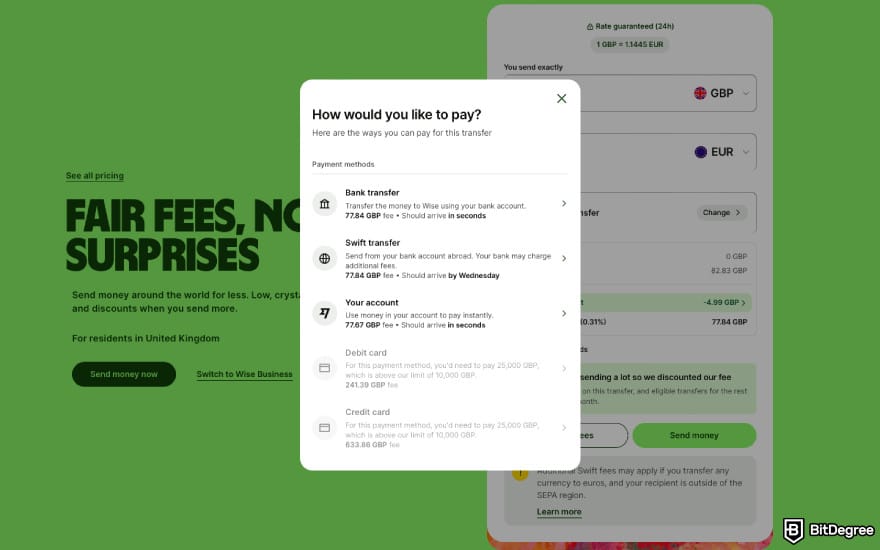
Wise transfers go through three stages:
- Your money is on its way to Wise;
- Wise processes your transfer;
- Your money is on its way to the recipient.
You can check which stage your transfer is at by going to your Wise dashboard and clicking [Transactions] on the left-hand sidebar menu.
Transfers can get stuck in any of these stages for different reasons. Unless you're withdrawing money directly from your Wise account, your funds will first have to be transferred to Wise from one of your bank accounts. Then, the platform processes the transfer by performing security checks and currency conversion if needed.
Finally, the money is sent to your receiving bank account, during which stage, the receiving bank is the one responsible for any holdups.

If your withdrawal is running late, don't panic just yet. One of the most common yet overlooked causes is making a transfer on weekends or public holidays, when most banks are closed. Wise's time estimates only count working days.
Remember that Wise can only start processing your transfer once you pay for it. If the platform doesn't receive the funds within 2 weeks, the transfer will be cancelled.
Transfers can get stuck during the middle stage if Wise requires some additional verification. In that case, you'll receive an email asking for more information (such as an ID or proof of where the money came from).
Finally, if the transfer seems to be "frozen" in the third stage with zero progress, there might have been a mistake in the recipient's details. In this scenario, the receiving bank will either take longer to process the payment or reject it and send it back to Wise.
Go to the [Transactions] panel, find your transfer, and click on the three-dots icon next to it, then select [Get transfer confirmation], so you can check if your recipient's details were correct.
Cancelling a Transfer
If you've made a mistake with your transfer, the best course of action is to simply cancel it and send a new one. You'll find the [Cancel] button on a menu under the three-dot icon next to the transfer.
Wise only allows cancelling a transfer if:
- You haven't paid for it yet. In other words, if its status still says "Your money is on the way to Wise".
- You've paid, but the status hasn't updated yet. This often happens with slower payment methods, such as bank transfers.
As soon as your transfer enters the second state, you'll no longer see the [Cancel] button, but cancellation might still be possible if you contact Wise's customer support before the platform has finished processing the order.
Your money will be refunded to the same payment method and in the same currency you picked for your transfer. Here's an estimate of how long it will take:
How Long It Takes | |
|---|---|
Credit/Debit Card | Up to 10 working days |
Bank Transfer | 0-3 working days |
Wise Balance | Instant if the money hasn't been sent yet |
Other Payment Methods | Varies by currency |
Table: Wise transfer refund times
In theory, Wise doesn't place any limits on the number of cancellations, but keep in mind that if you cancel your transfers too often, you'll lose access to guaranteed exchange rates.
Did you know?
Subscribe - We publish new crypto explainer videos every week!
How to Learn Crypto The Easy Way? (Trending Beginners' Strategy)

Cash Withdrawal Issues
When it comes to withdrawal options, ATM withdrawals definitely top the list for convenience and ease of use, but they come with their own package of potential problems. Thankfully, most are pretty easy to solve. Here's some advice on how to withdraw money from Wise card if you run into any of these issues:
- The ATM asks for a 5 or 6-digit PIN. Try entering your regular 4-digit PIN first, and if that doesn't work, add an extra “0” or “00” at the end.
- The ATM asks if your Wise card is a debit or credit card. ATMs in Singapore, Australia or New Zealand might not have a debit card option, in which case, choose "credit card".
- An ATM asks you to convert currencies. Wise recommends refusing conversion, as ATMs often charge marked-up exchange rates. Choose withdrawals in the local currency instead of your home currency.
Don't forget to check your card's balance before trying to withdraw.
Browse our collection of the most thorough Crypto Exchange related articles, guides & tutorials. Always be in the know & make informed decisions!



Conclusions
Even if you're mainly using Wise for sending payments directly to other users, knowing how to transfer money from Wise to a bank account still comes in handy. This platform supports a wide selection of payment methods and pretty much any currency combination among the available 40+ currencies, as well as easy ATM withdrawals with Wise card.
Wise's transfer workflow allows saving your preferred payment method and the recipient's account or card details to speed up the process. And in the case of any glitches, there's an option to cancel a transfer that hasn't been paid for yet and have your money refunded.
Check out Ogvio, a promising new alternative to Wise that supports several top-up and withdrawal methods (including crypto transfers) at unbeatably low fees.
Scientific References
1. Zheng M. C,, Lay J. M. N., Chen C.: 'Pursuing Flawless Experience Starts with the Adjustment of the Visual Layout: ATM Cardless Cash Withdrawal Services Study';
2. Górka J.: 'The rise of instant payments: a cross-country comparison'.
Send Money Worldwide
Check out the best ways to send money to other countries quickly, safely, and with minimal fees.



































About Article's Experts & Analysts







