Key Takeaways
- Credit card transfers are entirely impossible on their own, and you'll need a P2P money transfer service to act as the middleman;
- Platforms like Ogvio allow credit card payments with instant settlement and pathways to trim costs;
- Using a credit card comes with the risks of high fees, immediate interest charges, and the potential for mounting debt, so carry on cautiously.

A credit card is mainly known as a convenient method for checkout at point-of-sale (POS) systems, both online and offline. More cards today entice people with bigger savings and new feature rollouts. And if you’re all about cashing in on all these perks, learning how to send money with a credit card might be to your advantage.
On its own, a credit cards are not designed to send funds. That’s why you’ll need a third-party money transfer gateway, such as Ogvio.
And if you’ve heard that credit card transfers tend to be expensive, well, I can’t deny that such a claim holds true to some extent. But if you know the right workarounds, you’ll discover some ways to keep your costs low.

Did you know?
Subscribe - We publish new crypto explainer videos every week!
What Are Crypto Quests? EASIEST Ways to Earn Rewards Explained


Table of Contents
- 1. Can You Send Money With a Credit Card?
- 2. How to Send Money With a Credit Card
- 2.1. How to Send Money With a Credit Card Using Ogvio
- 2.2. How to Send Money With a Credit Card Using Paysend
- 3. Best Apps to Send Money With a Credit Card
- 3.1. Ogvio
- 3.2. Western Union
- 3.3. PayPal
- 3.4. Revolut
- 3.5. Paysend
- 4. Other Possible Methods to Send Money With a Credit Card
- 4.1. Cash Advance
- 4.2. Wire Transfer
- 5. Considerations Before Sending Money With a Credit Card
- 6. Conclusions
Can You Send Money With a Credit Card?
Before getting into how to send money with a credit card, it’s important to first understand if it’s even possible in the first place.
Latest Changelly Coupon Found:And yes, you can send money with a credit card, but not in the same way that a debit card can directly send money. As previously iterated, credit cards are mainly for spending. Flight tickets, groceries, retail purchases… the list goes on.
Due to its focus on spending, most cards don’t come with a built-in feature for transferring money, but the doors aren’t closed for good. There’s one way around this, and that’s by connecting your credit card to money transfer services.
Put simply, they’re third-party gateways that open up wider possibilities. Thanks to these solutions, you can use your credit card balance for more than just a means to settle payments.

For one, they connect you to local and global markets, enabling quick fund transfers and even cross-border remittances. So, if you have family, pals, or colleagues halfway across the world, you can send money with a credit card instantly.
These are all made possible with your credit card networks, such as VISA or Mastercard, working quietly in the background. They serve as a bridge connecting you to money transfer services.
After you deposit some cash and set up the transfer, it’s the remittance provider’s duty to make sure the funds reach the destination. They use their own network of payout partners to handle the final settlement.
Since many transfer systems still rely on banks, transactions often stretch out due to rigid processing times. Some solutions, though, bypass this with real-time payment rails.

Ogvio, for instance, delivers your money in seconds instead of days. This factor of timeliness, combined with convenience,[1] is one of the many reasons why remittance solutions are gaining traction in recent years.
📚 Read More: Ogvio Review
So, can you send money with a credit card? It’s apparent that you can, though this method alone won’t do the trick.
Using it alongside a money transfer service, on the other hand, lets you deliver funds to bank accounts, digital wallets, or cash pickup locations around the globe.
Looking for more in-depth information on related topics? We have gathered similar articles for you to spare your time. Take a look!



How to Send Money With a Credit Card
Now that you know a credit card is not only for spending, but also for sending (with a workaround in place), let’s break down the steps to make that happen.
First of all, you’ll need to check if your card issuer actually supports money transfers. Some classify them as a standard purchase, while others treat them as a cash advance, which may trigger higher fees and instant interest.
How to Send Money With a Credit Card Using Ogvio
The farther your money travels, the more value it loses along the way. More often than not, processing fees and FX markups take out a huge chunk of what the recipient will receive on the other end.
Worst of all, many platforms hide these charges until it’s too late. Ogvio is a new player that brings full transparency and fair rates to every transfer.
 | |
|---|---|
| |
| Per-transaction | |
| | |
| A global money transfer service with an additional volatile currency rate pegging to USD or EUR. | |
| Visit site Read review |
Table: Ogvio's main features
Best of all, Ogvio supports an extensive network of payments, including credit cards. I'll show you how to first top up money with your credit card, and use your loaded balance to initiate the transfer:
![How to send money with credit card: the [Get Started] button on Ogvio's homepage.](https://assets.bitdegree.org/images/how-to-send-money-with-credit-card-start-now.jpg "How to send money with credit card: the [Get Started] button on Ogvio's homepage.")
Once you're signed up, you can either complete the KYC process or move ahead with the card payment.
![How to send money with credit card: selecting [Card Payment] as a method to add money on Ogvio.](https://assets.bitdegree.org/images/how-to-send-money-with-credit-card-card-payment.jpg "How to send money with credit card: selecting [Card Payment] as a method to add money on Ogvio.")
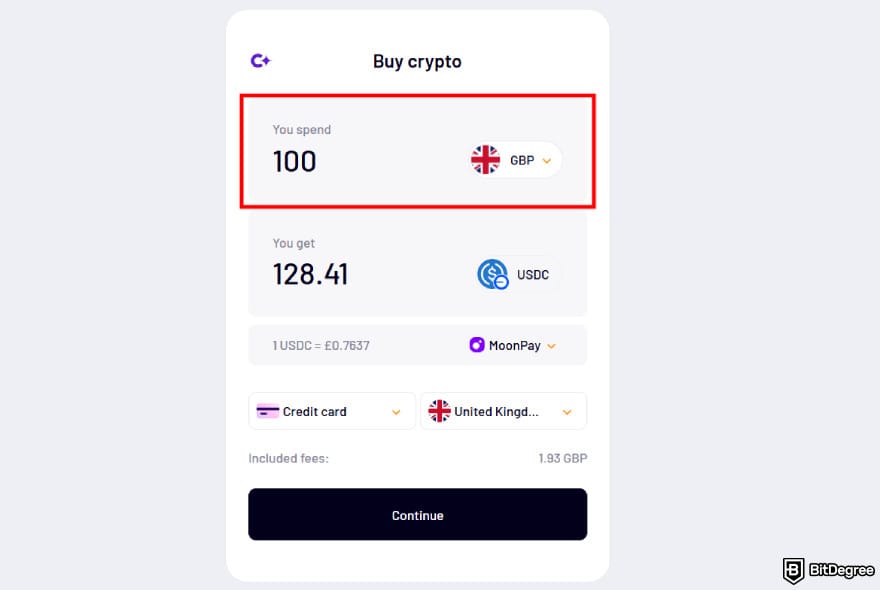
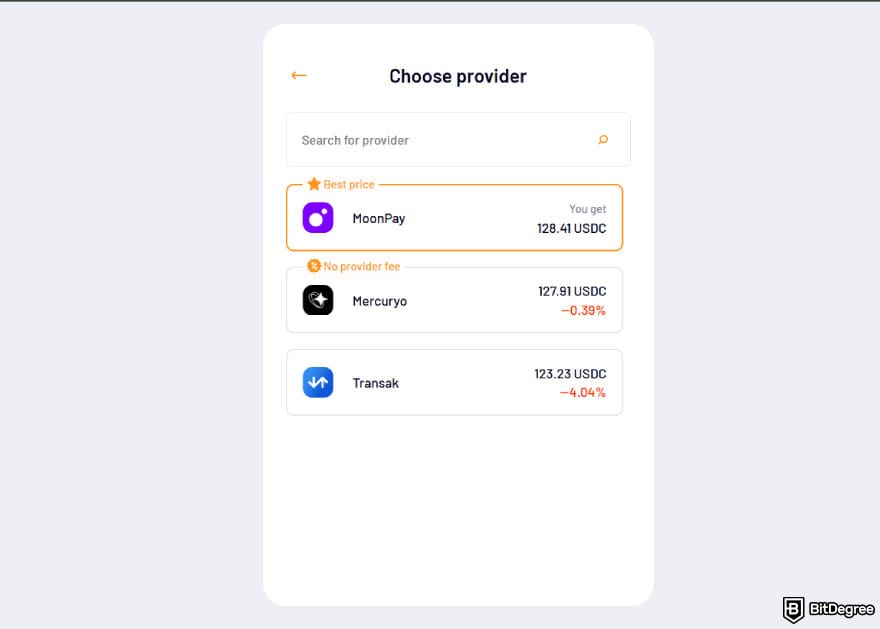
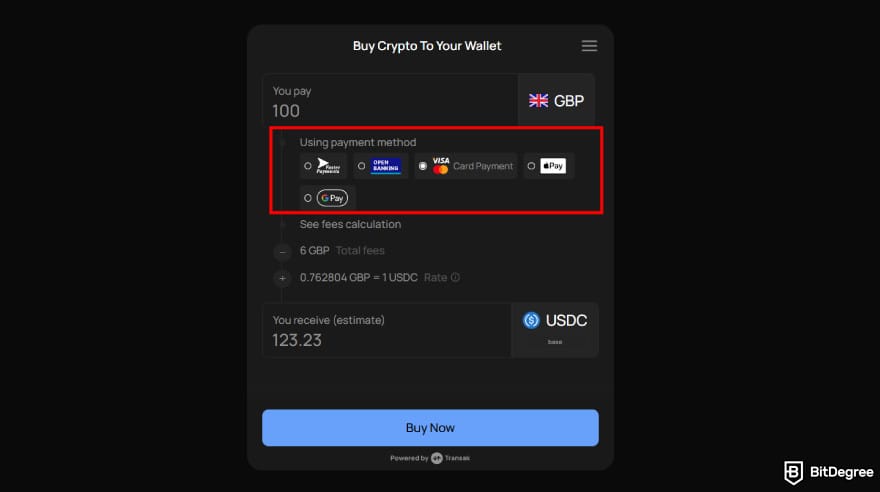
![How to send money with credit card: choosing [Credit card] as the payment method.](https://assets.bitdegree.org/images/how-to-send-money-with-credit-card-credit-card-method.jpg "How to send money with credit card: choosing [Credit card] as the payment method.")
![How to send money with credit card: the [Plus] icon next to who you are sending to on Ogvio.](https://assets.bitdegree.org/images/how-to-send-money-with-credit-card-who-you-are-sending-to.jpg "How to send money with credit card: the [Plus] icon next to who you are sending to on Ogvio.")
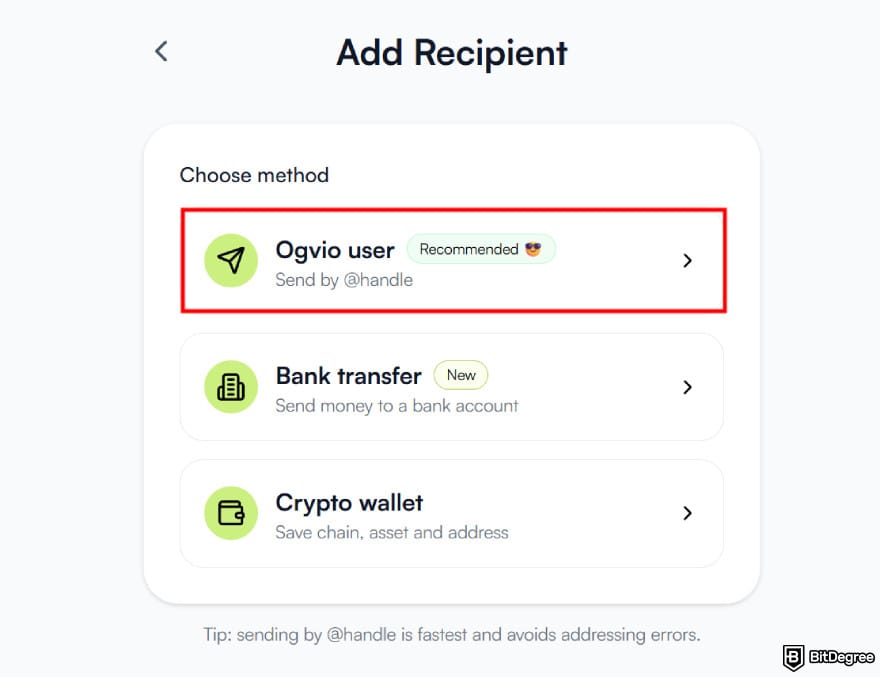
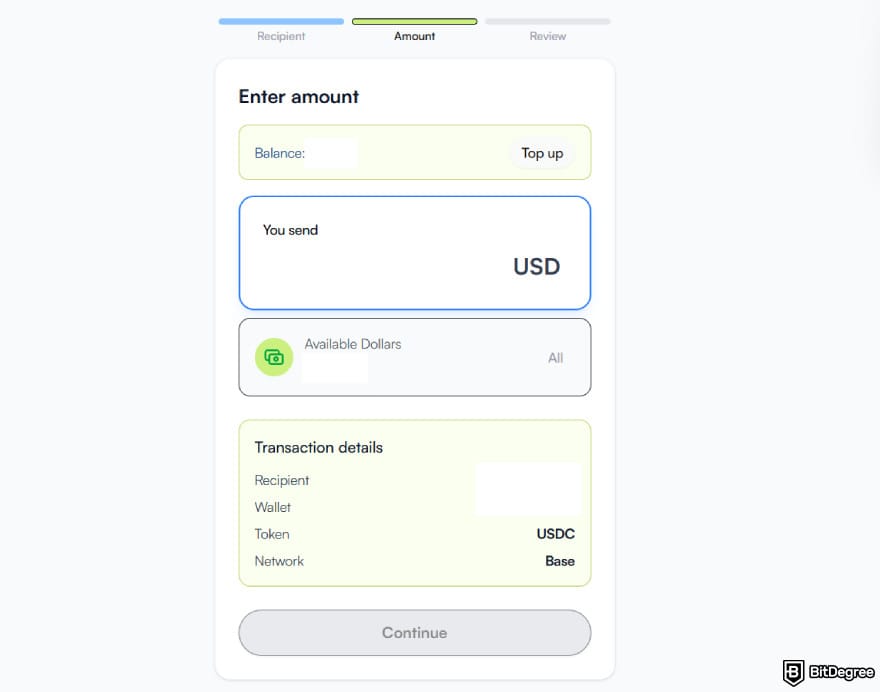
Ogvio is perhaps one of the few platforms that let you reduce costs when sending money with a credit card. First, you can do that by selecting an on-ramp provider that gives the best rates. Depending on the platform, KYC or platform login prompts may pop up.
Then, you can cut expenses further by transferring to a fellow Ogvio user, which carries zero fees. Better yet, the platform will cover any network fees for you.
📚 Read More: Ogvio Review
How to Send Money With a Credit Card Using Paysend
Paysend is another popular alternative, especially for cross-border remittances. The platform has a minimalistic, clutter-free layout that makes navigating it a breeze.
Disclaimer: I will focus on how to send money from a credit card to a bank account. Nevertheless, the steps below will easily work on any other methods, though the specifics will vary.
Now, let's get into the step-by-step.
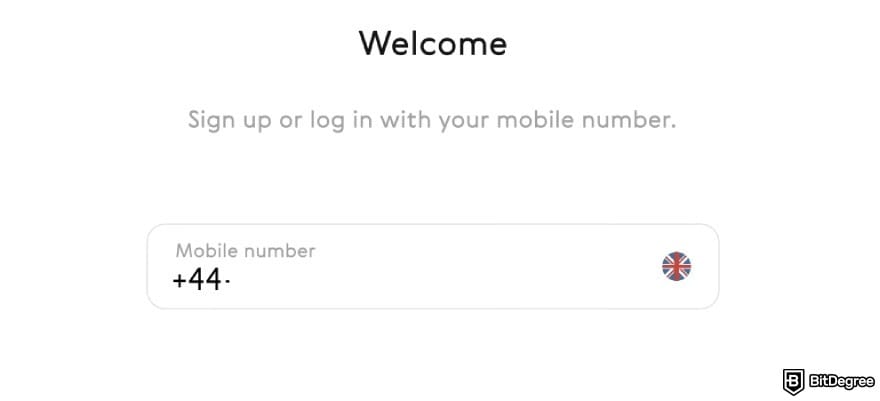
![How to send money with credit card: the [Transfers] menu on the sidebar of Paysend with the [New transfer] button highlighted.](https://assets.bitdegree.org/images/how-to-send-money-with-credit-card-transfer.jpg "How to send money with credit card: the [Transfers] menu on the sidebar of Paysend with the [New transfer] button highlighted.")
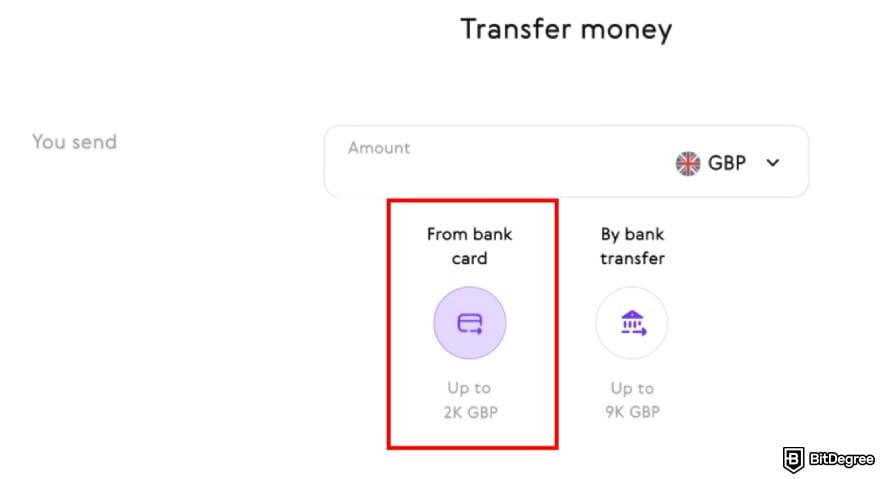
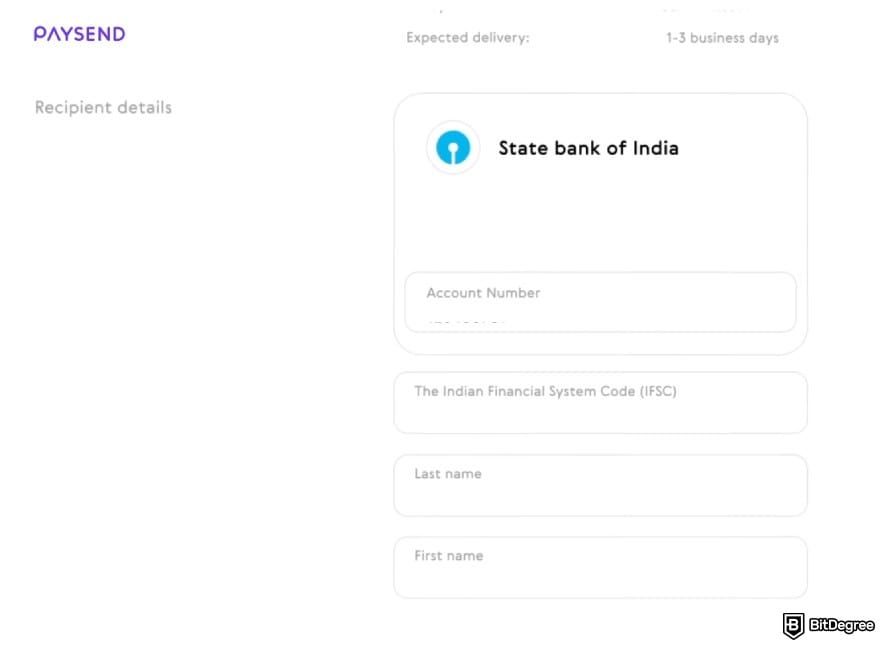
And that's how to send money from credit card to bank account. Hopefully, all goes well. If the money gets stuck, don’t panic, and reach out to the customer support team to resolve the issue right away.
Best Apps to Send Money With a Credit Card
At this point, it becomes clear that money transfer apps are crucial if you want to send money with a credit card, and earlier, we've looked into how several solutions make that possible. Nevertheless, there's more to these platforms than what's visible on the surface.
Based on my personal testing and user feedback, here are the names I’d truly recommend for their timeliness, budget-friendliness, etc:
Ogvio

Ogvio is new, and that’s why it's innovative. Most services charge you higher for faster transfers, but Ogvio takes a different and fresh approach:
Money Deserves the Journey. Not the Fees.
The platform skips slow bank processing times and instantly makes your funds available to the destination where you’d like to transfer them. In most scenarios, the transfer rates are groundbreakingly low. No unfair conversion rates involved!
On top of that, your funds are pegged to USD and EUR, which are among the world’s most stable currencies. This helps preserve your savings’ real value over time, shielding them from the impact of local currency inflation.
Fees | Mostly free or very low in certain circumstances |
|---|---|
Transfer Speed | Instant settlement |
Global Coverage | Pakistan, India and 160 more |
Supported Currencies | USD, EUR, and 40 more |
Fund Security | Biometric access and 256-bit AES encryption |
Extra Features | @Tag functionality as a social touch for transferring money to a fellow Ogvio user |
Table: Ogvio's strengths
Ogvio’s focus is to provide you with one of the easiest ways to send money with a credit card. It connects you to 7k+ banks, including credit card networks like VISA and Mastercard. The list is lengthy, so you practically don’t have to worry about payment gateway compatibility issues down the line.
And there’s always excitement with starting out anew. Ogvio’s roadmap teases a card launch for global spending, business features, and more to come.
So, sign yourself up and experience how low-cost, lightning-speed transfers can redefine your overall user flow.
Western Union
Western Union might be known for its cash pickup services, but it’s also gaining ground for enabling convenience through digital or alternative methods, such as sending funds with a credit card to another bank account.

Many WU users tap into this approach for speed and convenience. Nevertheless, you’ll need to be mindful of any extra charges incurred. Credit card transfers are categorized as a cash advance, which can be hefty on its own.
Now, how to send money with a credit card with Western Union? Before that, you might wonder if such an action will impact your credit score. Thankfully, there’s no direct effect. That said, you should still monitor any potential interest charges, which can otherwise influence your financial health.
Fees | Depends on the country and the method |
|---|---|
Transfer Speed | Within minutes for credit card transfers |
Global Coverage | AU, RSA, and 198 more |
Supported Currencies | HKD, CHF, and 127 more |
Fund Security | Encryption, multi-factor authentication (MFA), and fraud hotline |
Extra Features | Offline money transfer services |
Table: Western Union's strengths
Once you understand the risks, you can start the process through WU’s Send Money page. Create an account if you haven’t yet, and simply follow the on-screen prompts, from entering your transfer details to confirming the transaction.
What’s neat is that WU will give you a tracking code to keep an eye on the progress of your transfer, so you don’t have to sit with the uncertainty of waiting without updates. Using a credit card for money transfers also gives you the chance to accumulate rewards through cashback, points, interest, and more. Nevertheless, fees and interest rates may fluctuate from time to time, so take them into consideration.
Did you know?
Subscribe - We publish new crypto explainer videos every week!
What is VeChain? VeChain Coin Explainer (ANIMATED)

PayPal
Whether you’re a remote worker, a small business owner, a millennial, or a Gen Z, you’ve likely heard of PayPal. It’s the go-to payment solution for many people all around the world.

PayPal is much like a superapp. Shopping and rewards become much more flexible with Buy Now, Pay Later, though there are significant risks entailed. The provider also has their own debit and credit cards, which come in handy for spending or traveling, with a potential of 3% in cash back.
Fees | 1.75% for instant card withdrawals; 3.9% to 5.4% for domestic transfers; 3.4% to 5.39% for international transfers (fixed fees may apply) |
|---|---|
Transfer Speed | Within minutes for instant settlements |
Global Coverage | JP, SK, and 198 more |
Supported Currencies | DKK, MYR, and 23 more |
Fund Security | 2FA, MFA, limit and card controls |
Extra Features | Savings with a 3.8% APY (T&Cs apply) |
Table: PayPal's strengths
And yes, you can send money with a credit card using PayPal, and setting it up is simple. After your account is ready and all verified, link your credit card to PayPal and then transfer the funds, either to an internal user or to your personal banking account. More often than not, the money will arrive instantly, but there are cases when you’ll need to wait for a few days.
PayPal makes moving your funds effortless, but its hefty fees can be a deal-breaker, especially for cross-border remittances. The platform charges FX rates above the mid-market standards, and plenty of users complain about receiving less than expected post-conversion.
Nevertheless, PayPal is still a consumer’s favorite, since it gives an all-in-one access to your financial needs, from sending and requesting to pooling and donating money.
Revolut
Revolut is available in quite a lot of countries, except for Canada, some parts in Asia, and a few others. In the EEA, it’s even recognized as a banking solution.

This platform earns praise for offering an easy way to send money with a credit card. First, download the Revolut app, and click on [Payments]. Tap on the [+] icon in the top right corner, then input your recipient’s 16-digit card number. Afterward, simply enter the amount and select the currency, and you’re done.
Fees | Mostly free for Revolut transfers; bank transfer fees vary (around $1) |
|---|---|
Transfer Speed | Instant for Revolut transfers; 24h for bank transfers |
Global Coverage | UK, AU, and 40 more |
Supported Currencies | AUD, EUR, and 23 more |
Fund Security | 2FA, card fees and limits, alerts, etc |
Extra Features | Joint accounts, teen accounts, professional accounts, etc |
Table: Revolut's strengths
Best of all, Revolut never sleeps, and you can make your transfer 24/7. For example, if your family abroad needs emergency funds late at night, you can use your credit card balance to send money instantly with Revolut, and there’s no need to wait for the bank to open.
And before initiating your transfer, you’ll always know how much to pay. Revolut provides a breakdown of card transfer fees, conversion charges, and exchange rates. For the time being, converting AUD to USD will trigger zero transfer fees (A$1.80 for bank transfers) and an exchange rate of 0.64902, which falls slightly below the current market rate of 0.65.
It’s easy to see why Revolut is one of the most recommended apps to send money with a credit card. Unfortunately, Canadian users wanting to move money to the US will need to find alternatives.
📚 Read More: Revolut Alternatives
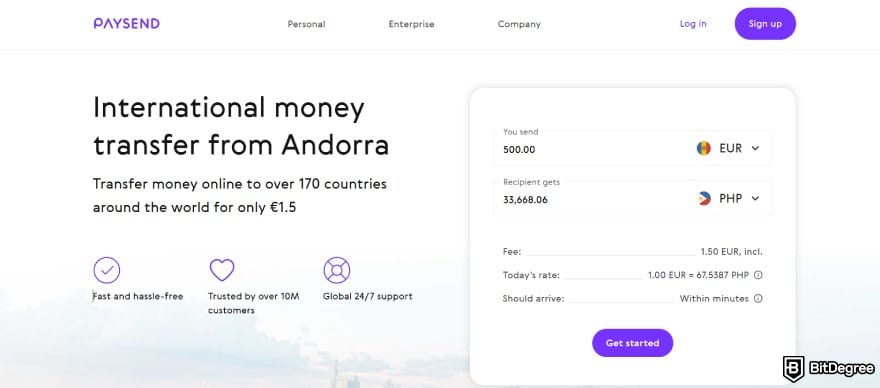
Paysend
If you want to transfer funds to another bank account with a credit card to support family or friends, Paysend can help with that.
Essentially, you’ll need to perform a balance transfer, or when you move what you owe on one credit card to another or a different account. This can be helpful for paying off debt efficiently, since most services offer 0% interest for this.
Fees | Fixed fees (shown before you hit [Confirm and Send]) |
|---|---|
Transfer Speed | Within seconds or up to 3 days |
Global Coverage | MX, US, and 47 more (for sending) |
Supported Currencies | GBP, EUR, and 10 more |
Fund Security | FCA and PCI-DSS |
Extra Features | Paysend Enterprise as an extension for business money transfers |
Table: Paysend's strengths
But before you go on with how to send money with a credit card using Paysend, you’ll need to understand the costs involved. Paysend typically keeps fees low at $1.99 per transfer, but it depends on the transfer method and the destination.
To proceed, as usual, sign up for an account. Gather some basic account information from your recipient, and enter the data into Paysend. Follow the rest of the steps to complete your money transfer journey, and that’s that.
Paysend might not be as big as other names on this list, but it stands out for its low fees, though it’ll only disclose how much you’ll pay during the pre-checkout stage. I’d also give it an extra point for accessibility, since you can access PaySend through a mobile app (iOS- and Android-friendly) or the web browser.
Other Possible Methods to Send Money With a Credit Card
Transferring money with a credit card alone is a rather unlikely scenario, since you’ll need the help of money transfer services, also known as peer-to-peer (P2P) payment apps. Aside from the names above, though, it’s hard to find a solution that actually allows you to link your credit card as a payment method.

If you’re stuck, there are other methods on how to transfer money with a credit card that you can try out:
Cash Advance
A cash advance simply means using your credit card to withdraw funds from an ATM or a bank teller. It works like a quick loan as you borrow some amount directly from your card’s credit limit. If you remove the walking distance to the ATM, it’s as convenient as sending money online, providing rapid access when cash is urgently needed, such as when you’re on a trip abroad.
But a cash advance doesn’t stop there. It also covers the following transactions:
1
Sending money from your credit card to another account
.

2
Receiving money transfers or traveller’s cheques
.
No matter how you intend to use a cash advance, the fees and rates you pay are often notably higher than typical purchases. To give an illustration, the Commonwealth Bank of Australia charges $4 or roughly 3% of the transaction amount, or a maximum of $300. Some cards also add interest rates to the mix, up to 30% variable APR. Since there’s no grace period, the amount borrowed will accrue interest immediately.
Meanwhile, the limits for cash advance are typically 30% greater than the cardholder’s total credit limit. The percentage may vary depending on the issuer’s policies.
If you decide to take out a cash advance, to protect your credit score, don’t forget to pay it back immediately. The faster you repay, the healthier your financial standing remains. Repayment works just like a regular credit card payment, with the added benefit of flexibility, since you can do it online, by phone, or even through email.
Wire Transfer
A wire transfer can also be a quick option for how to send money with a credit card. If you’re not familiar with what a wire transfer is, it simply refers to the process of electronically moving funds[2] from one individual or organization to another.
When both bank accounts are within the same country, it’s considered a domestic wire transfer. It’s also possible to do an international wire transfer, such as transferring money to Mexico or other places.

Admittedly, a wire transfer can be slightly more expensive, but if you are able to find a provider that offers good terms, it’s possible to save up. Check out my tutorial below for more information.
📚 Read More: How to Wire Money
Considerations Before Sending Money With a Credit Card
Not everyone keeps enough cash in their bank account, and that’s when using a credit card provides a quick solution to bridge short-term cash gaps. And sure, credit cards lure you with their endless reward stream. Points, miles, and cashback might be up for grabs, but remember, your credit is on the line here.
Even if a credit card transfer seems like an idea that’s too good to be true, let’s sit down for a while and ponder over a few aspects:
- High Fees. Credit card transfers are generally more expensive compared to debit or bank account transfers. They also charge transfer fees, usually as a percentage of the amount sent instead of a flat rate, and higher interest rates or cash advance APRs.
- Debt Accumulation. In most cases, credit card transfers have no grace period, meaning that they accrue interest effective immediately. If you don’t properly manage your repayment, your debt can quickly pile up.

- Credit Score Effect. Every time you send money with a credit card, it’ll affect the percentage of available credit you can use. If you don’t pay off your credit quickly, higher utilization will only drag down your score over time.
As you can see, it’s not all sunshine and rainbows. Before going with a credit card, truly compare all the available methods, like bank transfers, debit remittances, or specialized low-fee platforms. If you’re not ready for the burden of high interest or fees, treat credit card transfers only as a backup plan, not your first choice.
Browse our collection of the most thorough Crypto Exchange related articles, guides & tutorials. Always be in the know & make informed decisions!


Conclusions
How to send money with a credit card can be an enticing option since it gives you instant access to funds without extra hassle. However, you can’t actually initiate a transfer using your credit card alone, as you’ll need a third-party P2P transfer solution.
Once you have access to a reliable app, sign up and link your credit card. Then, set up your transfer by entering the recipient’s details, which can either be your personal or another person’s bank account. Finally, select the destination country, the currency you’d like to convert into, and don’t forget to check the details before hitting [Send]. Congratulations, you’ve successfully figured out the process!
Credit card transfers can be expensive, but with Ogvio, they don’t have to be. Sign up and claim your first free transfers today.
Scientific References
1. MacIsaac S.: 'Remittance Modality: Unpacking Canadian Money Transfer Mechanism Choices';
2. Silva T. C., Amancio D. R., Tabak B. M.: 'Modeling Supply-Chain Networks With Firm-To-Firm Wire Transfers'.
Send Money Worldwide
Check out the best ways to send money to other countries quickly, safely, and with minimal fees.



































About Article's Experts & Analysts






