Key Takeaways
- You can add money to Revolut using a bank transfer, debit card, e-wallet, or a payment link;
- Using a local bank deposit can help you avoid fees, but it may take a bit longer to arrive;
- Revolut uses daily, weekly, and annual top-up limits that reset on a rolling basis.

Revolut makes transactions so convenient you forget cash is a thing, well, at least until you’re stranded somewhere with nothing but a zero on your screen. That’s why knowing how to add money to Revolut can save you in a pinch, earning you a thank-you to the past you for bookmarking my article.
Transferring money to a digital account sounds dead simple on paper. You’ve probably done it a hundred times, so how hard can it be? But with Revolut, the fine details behind each method can pile up fast and make you long for a more no-nonsense money app.
Either way, it’s nothing to worry about. Let’s go through how to deposit money in Revolut in a way that keeps things simple from start to finish.

Did you know?
Subscribe - We publish new crypto explainer videos every week!
Best Types of Blockchains Revealed (5 Animated Rules)


Table of Contents
- 1. Ways to Add Money to Revolut
- 2. How to Add Money to Revolut: Step-By-Step
- 2.1. Using Bank Transfer
- 2.2. Using a Debit Card
- 2.3. Using Apple Pay / Google Pay
- 2.4. Using a Payment Link
- 3. Revolut Top-Up Fees and Limits
- 4. Ogvio: A More Cost-Effective Alternative
- 5. Things to Know Before Adding Money to Revolut
- 6. Conclusions
Ways to Add Money to Revolut
It’s a good thing to know first that there’s more than one way to add money to a Revolut account. That way, you’re not stuck if a certain method isn’t available or doesn’t line up with your situation.
Latest Changelly Coupon Found:Sure, every method ends up doing the same thing: getting money into your account. But once you use them, the differences start to matter – some are faster, others are cheaper, and a few hit a nice middle ground.
Yes, you can figure things out as you go. But I’d suggest picking one method first before you learn how to deposit money in Revolut. Doing it this way makes the whole process easier from the get-go.

At the time of writing, you can top up your account using the following options:
- Card deposit. If you’re in a pinch, debit transfers are often the preferred choice since they’re instant. The downside is that they usually come with higher fees.
- Bank transfer. For larger transfers, I’d lean toward this option for better cost efficiency. Just keep in mind it can be slow at times, especially during holiday seasons.
- Wallet top-up. Going a step beyond card top-ups, Apple Pay or Google Pay can be a more convenient pick. Be sure to keep track of the transfer limits, though.
- Payment request. If sharing personal information feels a bit uncomfortable, you can send someone a payment link and let them top up your account.
Now, it’s worth noting that while most users who’ve completed account verification do have access to these features, not everyone will see the same options. What shows up in your app depends on your location and your account setup. This is not the platform’s fault, but a result of financial regulations that vary by country.[1]

So if you ever catch yourself asking: “How do I add money to my Revolut account using Apple Pay?”
Well, the answer might simply be that you don’t live in a country where that option is supported. In that case, you’ll need to use a different method.
Also, if you’re looking for how to deposit cash into Revolut physically, that option is no longer available.
Looking for more in-depth information on related topics? We have gathered similar articles for you to spare your time. Take a look!



How to Add Money to Revolut: Step-By-Step
Have you settled on a method to add money to your Revolut account yet? If so, let’s get into the practical part. I’ve structured this section by method, so you can easily jump to the option that matches your plan.
Using Bank Transfer
For a lot of people, bank transfers are the go-to way to add money to Revolut. They’re simple to follow and dependable, though they’re not always the fastest option.
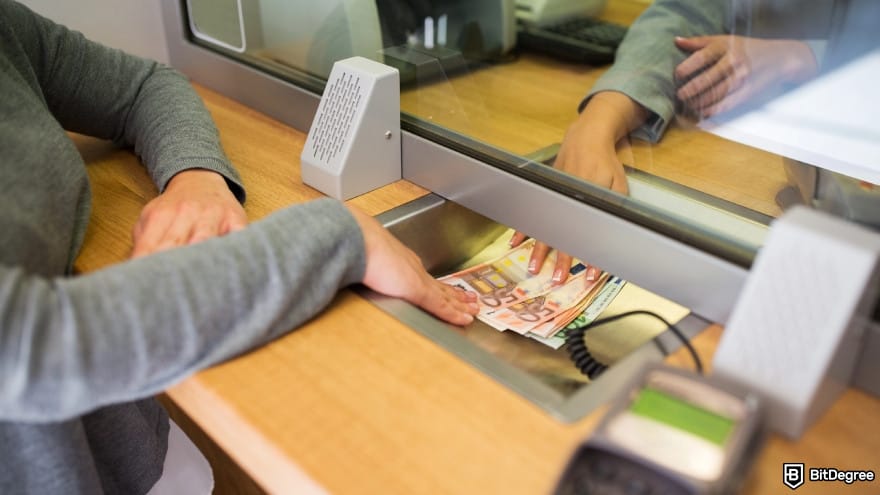
Adding money this way gives you two options to pick from:
1
Regular bank transfers. You share your Revolut account with your bank and initiate the transfer from there. Once it’s sent, you don’t see much happening until the money arrives.
2
Easy bank transfer. This option removes the need to manually enter bank details. You simply approve the transfer through your external bank’s app, which makes the process more guided.
Basically, the easy option simplifies things a lot since you don’t need to manually enter bank details to make the transfer. To use it, though, the banking app you’re sending money from needs to be installed on the same device as Revolut. Then, follow the steps below:

![How to add money to Revolut: click on the [+ Add money] option.](https://assets.bitdegree.org/images/how-to-add-money-to-revolut-add-money-v1.jpg "How to add money to Revolut: click on the [+ Add money] option.")
![How to add money to Revolut: select [Easy bank transfer] from the list.](https://assets.bitdegree.org/images/how-to-add-money-to-revolut-easy-bank-transfer.jpg "How to add money to Revolut: select [Easy bank transfer] from the list.")
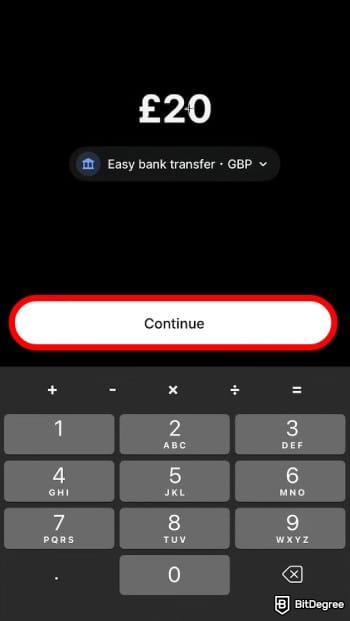

Do note that only selected local banks are supported. If you don’t see yours on the list, you’ll need to enter the details manually using a regular bank transfer.
Once the money leaves your bank, it should arrive in your Revolut account within a few minutes (though it can take up to one business day in some cases).
One thing to be aware of is that easy bank transfers can’t be cancelled after you authorize them. If needed, you can still move the money back to your bank once it reaches your Revolut account, but there may be some extra fees added.
Using a Debit Card
When speed matters, adding money to Revolut with a debit card is usually the best choice. Visa and Mastercard are both supported, which means most debit cards are ready to use right away.

Seeing the section title, a fair question might pop up: “If debit cards are supported, can you also use a credit card? Unfortunately, Revolut doesn’t allow deposits using credit cards. On top of that, certain card types aren’t supported at all, such as:
- American Express, Cirrus, Discovery, Diners Club, Union Pay, JCB;
- Apple cards and gift cards;
- Cards issued in unsupported countries like Belarus and Russia;
- Cards issued in India.
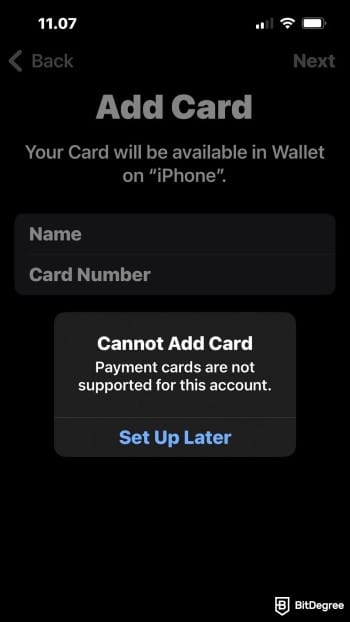
You might notice that while setting up the transfer, some cards can’t be integrated into the app. Most of the time, that’s the platform signaling the card isn’t supported, which means you’ll need to use a different card or switch to another method.
With that covered, here’s how to add money to Revolut account using a debit card:
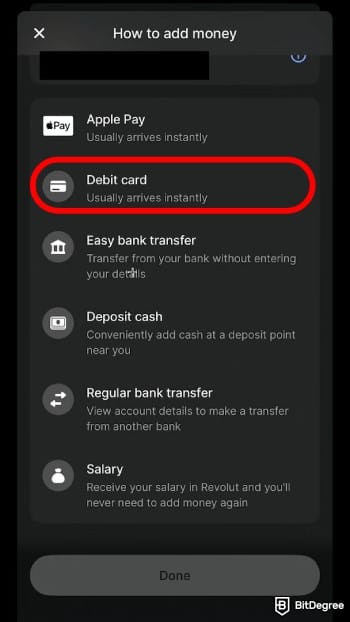
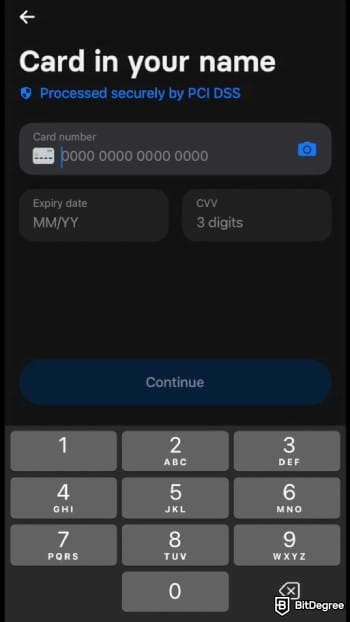
Your funds should arrive instantly, and your balance updates right away. But on some occasions, it may take up to 30 minutes for the funds to be fully credited.
And in some unlucky cases, your card can be blocked after your bank declines a payment or if there are multiple failed attempts. Under Visa and Mastercard processing rules, the block can last up to 30 days.
📚 Check Out: How to Send Money With a Credit Card
Using Apple Pay / Google Pay
For a more convenient option, you can also top up your account using Apple Pay or Google Pay. This works especially well if your card is already verified and stored on your phone, since the top-up is usually just a fingerprint or PIN.

Here’s how to do it:
![How to add money to Revolut: choose [Apple Pay] from the list.](https://assets.bitdegree.org/images/how-to-add-money-to-revolut-apple-pay-1.jpg "How to add money to Revolut: choose [Apple Pay] from the list.")
And that’s all there is to it! If you need the funds in another currency, you can exchange them in-app after topping up.
On less ideal days, adding money with Apple Pay or Google Pay might not work as expected. If that happens, avoid using your Revolut card for the top-up, as it can cause further issues.
Using a Payment Link
Let’s say someone wants to pay you but isn’t on Revolut. Rather than handing out your account details to someone you met literally five minutes ago, you can send a payment link and receive the money. Here’s how it works:
![How to add money to Revolut: navigate to the [Payment] tab.](https://assets.bitdegree.org/images/how-to-add-money-to-revolut-payment.jpg "How to add money to Revolut: navigate to the [Payment] tab.")
![How to add money to Revolut: click on the [+] button.](https://assets.bitdegree.org/images/how-to-add-money-to-revolut-plus-sign.jpg "How to add money to Revolut: click on the [+] button.")
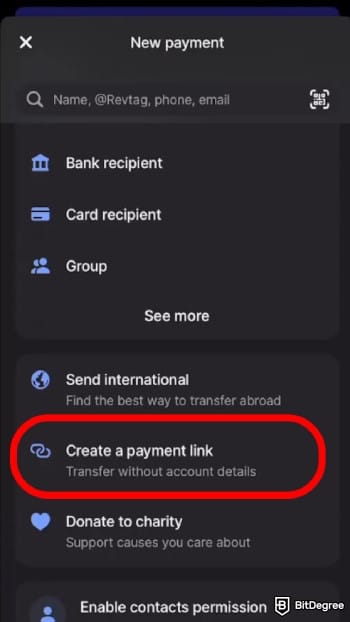
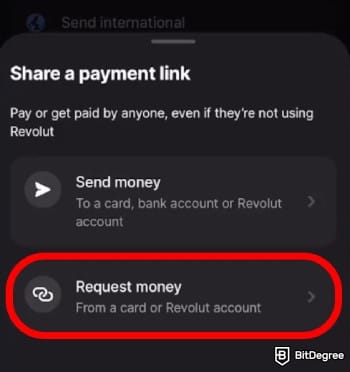
You’ve got 7 days to finish the payment before the money is returned to the sender’s account.
If you change your mind and need to adjust the amount, you’ll have to cancel it and create a new payment link. You can do this by going to the transactions list and selecting [Cancel] on that specific payment.
Revolut Top-Up Fees and Limits
Now that I’ve covered all the available methods, figuring out how to add money to Revolut on your own shouldn’t be a problem no more. That said, like most things in life, it can come with a cost in certain situations. That’s why it’s important to know the fees and limits beforehand to avoid any surprises later.

The good news is that adding money to Revolut works the same across all subscription tiers. Whether you’re on Standard, Plus, Premium, Metal, or Ultra, the deposit fees and limits stay the same.
Here’s a pricing overview for Revolut:
 | |
|---|---|
| Card - up to 1.7% Bank - free | |
| ATM - up to 2% | |
| |
| |
| Visit site Read review |
Table: Revolut's pricing
As you can see, topping up your account via a local bank transfer doesn’t come with any fees. That’s why I’d suggest sending the money in the same local currency as your account to avoid extra charges.
For international bank transfers, Revolut doesn’t charge fees within SEPA and the UK. Step outside those regions, however, and you’ll be charged a small fee. You can see the exact amount in the app before you confirm the transactions.

Apart from the platform’s fees, there are a few external charges you might run into when figuring out how to deposit money in Revolut:
- External bank transfer fees. Some banks apply charges for outgoing transfers based on their policies. If you’re not sure, it’s best to contact them to confirm the details.
- International SWIFT fees. For international SWIFT transfers, external and intermediary banks may apply handling fees (ranging from 15 USD to 50 USD)
- Currency conversion fees. If you send a currency Revolut doesn’t support, your bank may automatically convert it using its own exchange rate, potentially adding extra expenses.
To keep things simple and cost-effective, it’s best to stick with Revolut-supported currencies and the correct local account details whenever possible.

For debit card and wallet top-ups like Google Pay or Apple Pay, Revolut doesn’t clearly specify the fee amount. The cost only shows up when you’re about to complete the transaction. The good news is that your first card top-up is completely free.
It’s the same story with payment links, where fees depend on the selected payment method. There’s no cap on sending money, but receiving card payments is limited to 250 GBP per week (or the equivalent).
If the sender is asked to create a new Revolut account, you’ve likely reached the weekly limit for payment requests from non-Revolut customers.
Ogvio: A More Cost-Effective Alternative
I won’t argue with the app’s popularity for multi-currency use. But when you’re trying to figure out how to add money to Revolut, it can feel pricier than expected. You might also notice that some deposit options and supported currencies are more limited than you’d assume.
And in moments like that, when you start wishing for a simpler alternative, Ogvio is the first name I’d look up.

Built as a global digital money platform, Ogvio works across 160+ countries and supports more than 40 currencies. It’s especially useful if international transfers or frequent travel are part of your routine and you want something easy and affordable to use.
Compared to Revolut, which nudges you toward higher subscription tiers to unlock certain features and perks, Ogvio keeps things simple by being free to use from the start. No monthly plans, no yearly commitments.

You just need to install the app, create your @Tag, and you can start sending and receiving money right away.
You still need to complete identity verification before you can access any bank-related transactions.
There’s also a good amount of flexibility when it comes to depositing money. You can choose between:
- Bank transfer;
- Card transfer;
- Crypto transfer;
- Transfers from other Ogvio users;
- Payment link requests.
If you’re not planning to move your funds for a while, there’s no need to worry about safety. With its non-custodial setup, Ogvio never holds your funds in a centralized account or hands them over to third parties. This keeps you fully in control and eliminates counterparty risks such as frozen funds or sudden access limits.[2]
Here are the steps to get started if Ogvio sounds like your kind of digital money platform:
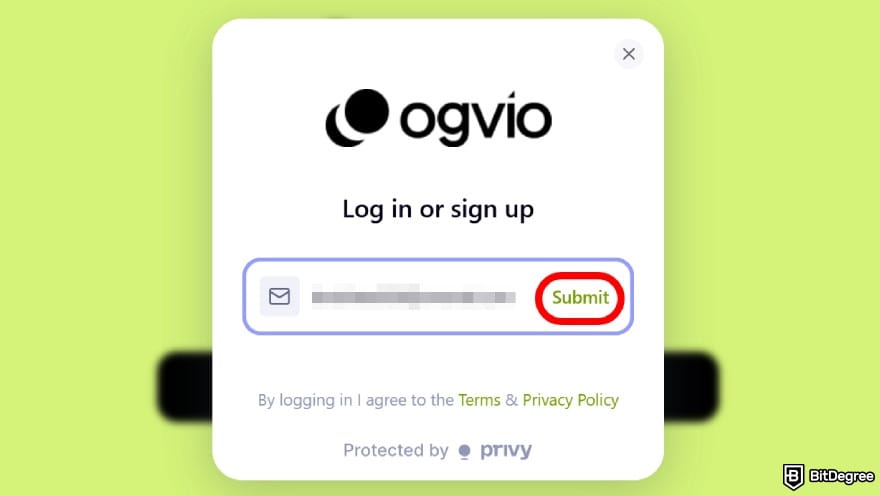

![How to add money to Revolut: select the [+ Add Money] option.](https://assets.bitdegree.org/images/how-to-add-money-to-revolut-add-money.jpg "How to add money to Revolut: select the [+ Add Money] option.")
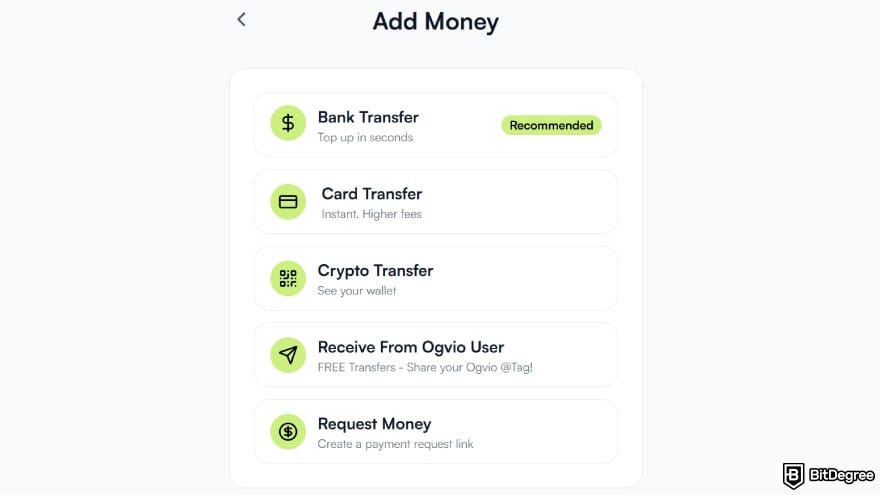
Choose the method that works best for you. In this example, I’ll go with the recommended [Bank transfer] method.
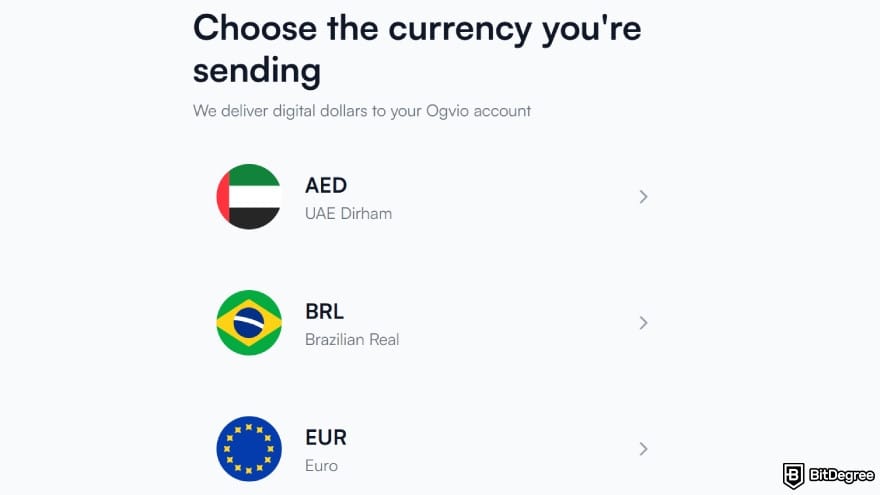
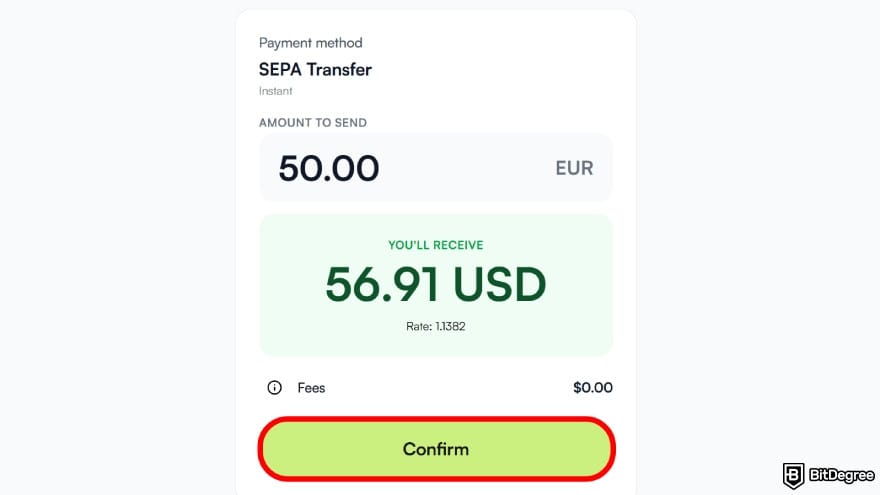
You can also click the small info icon to see the full breakdown. Once you’ve checked everything, select [Confirm].
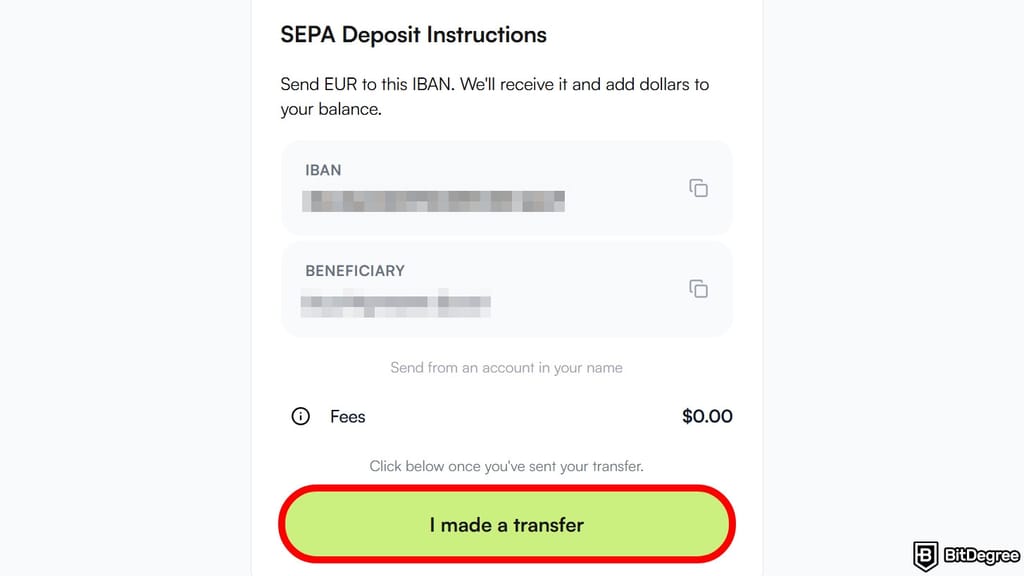
The money should come through soon, with your updated balance showing on the main screen.
Ogvio converts your funds into USD, making it easier to store your money in stable currencies and hedge against local inflation.
![How to add money to Revolut: click on the [Send Money] option.](https://assets.bitdegree.org/images/how-to-add-money-to-revolut-send-money-ogvio.jpg "How to add money to Revolut: click on the [Send Money] option.")
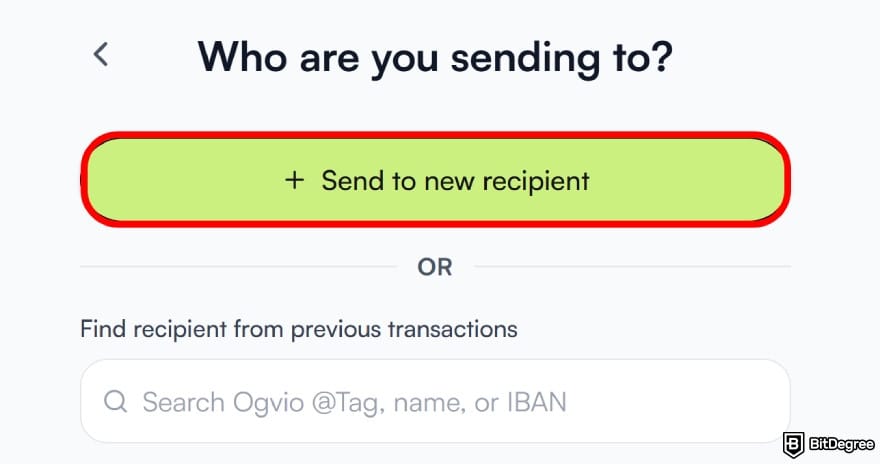
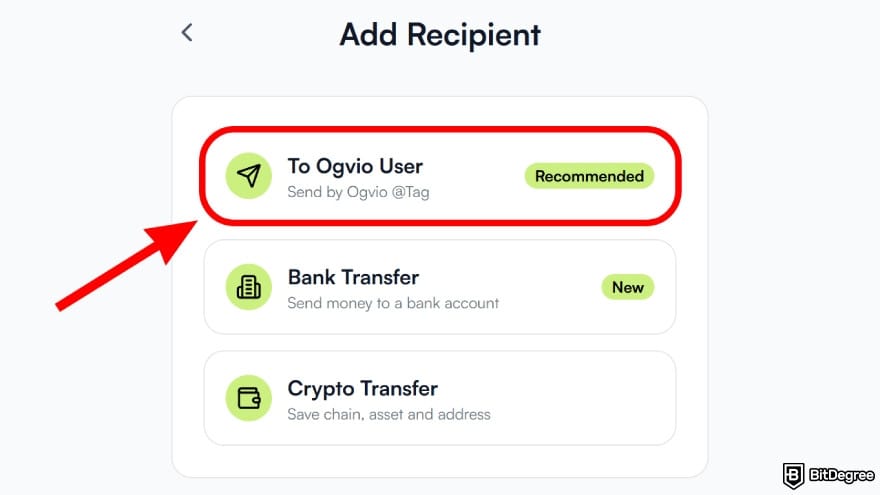

Once a recipient is added, Ogvio automatically saves them to your contacts. That way, you won’t need to re-enter their details next time, making repeat transfers much easier.
You can also earn an extra $10 for every 3 active friends and save on fees together just by sharing your Ogvio link.
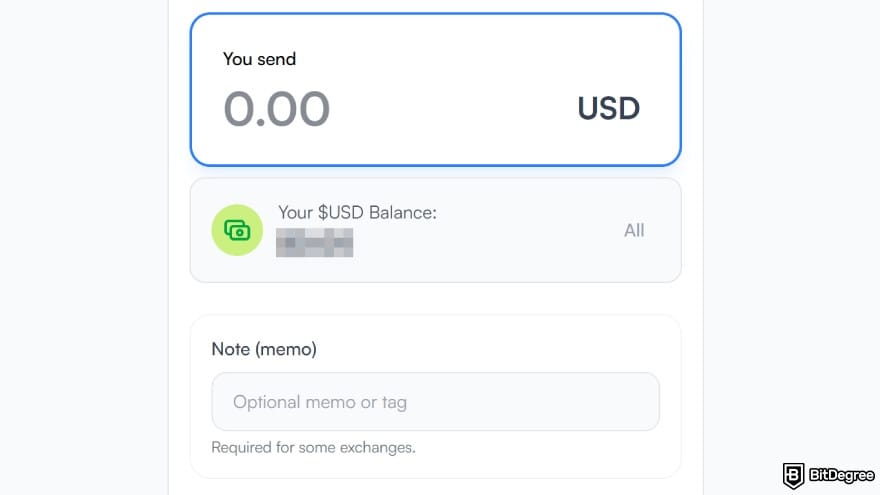
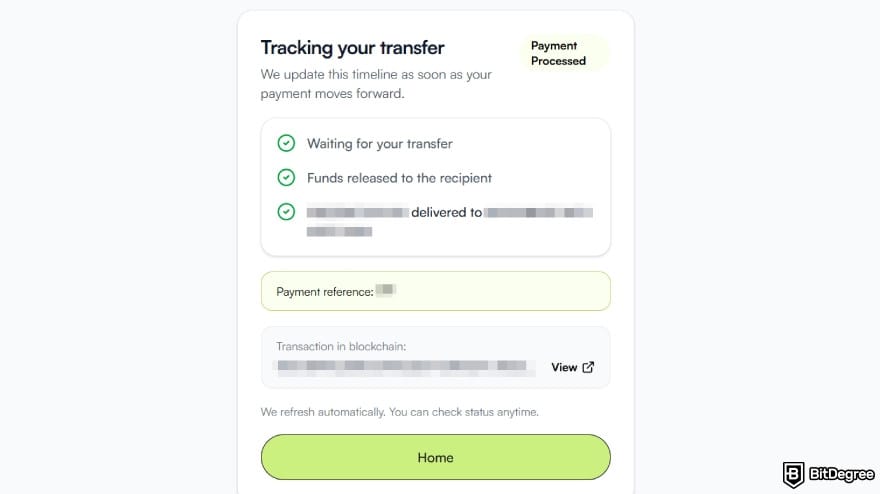
Now you can see how a next-gen neobank like Ogvio can be a good alternative to Revolut when you want something more affordable and flexible. It doesn’t tuck its more advanced perks behind subscription tiers, making it genuinely usable from the start.
📚 Check Out: Ogvio Review
Things to Know Before Adding Money to Revolut
By now, you should be well-equipped with how to add money to Revolut account (and an alternative to check when it doesn’t vibe with you). Before calling it a wrap, there are a few points you should keep in mind:
- Consider one-tap payments. You’ll find this option in the info section during the top-up flow, which can speed up transactions by pre-authorising easy bank transfers.
- Turn on location sharing. Before you make any deposit, I’d suggest that you check that location sharing is on to prevent potential deposit failures.
- Double-check your bank details. Account name mismatches are a common cause of issues, and entering the wrong IBAN can easily lead to failed deposits.

- Be aware of card top-up limits. Revolut sets daily, weekly, and yearly caps that refresh over time, so you might need to wait a bit before making another deposit.
- Watch out for business card fees. Business cards may come with added top-up fees, even in cases where personal debit cards don’t.
- Expect extra checks for large deposits. If you’re moving a considerable amount of money, be prepared as it may trigger verification or source-of-funds checks that can slow down your process.
My last tip is to stay aware and deliberate with every step you take. I get it, topping up a digital wallet is pretty mundane these days, something you could probably do on autopilot (or half-drunk – don’t).
Still, one small mistake is all it takes to turn into a chain of problems that takes far longer to fix than the original top-up ever did. A quick pause to review the details here and there helps keep your transaction safe and secure.
📚 Check Out: Safest Ways to Send Money
Browse our collection of the most thorough Crypto Exchange related articles, guides & tutorials. Always be in the know & make informed decisions!



Conclusions
Getting started with how to add money to Revolut begins with choosing the top-up method that suits you best: bank transfer, debit card, e-wallet, or payment link. Once that’s decided, it’s just a matter of following the steps and seeing the process through from start to finish.
It’s pretty easy to follow. As long as you’ve got reliable internet and some cash sitting in another account (or someone kind enough to cover you), the whole top-up process should run smoothly.
If you reach a point where Revolut’s fees feel higher than they should, I’d suggest giving Ogvio a look. It’s a reliable alternative that offers a more affordable and easier transfer experience.
Scientific References
1. Hutukka P.: ‘Fintech Law in the European Union the United States and China Regulation of Financial Technology in Comparative Context’;
2. Zetzsche D., Nikolakopoulou A.: ‘Crypto Custody An Empirical Assessment’.
Send Money Worldwide
Check out the best ways to send money to other countries quickly, safely, and with minimal fees.



































About Article's Experts & Analysts







