Key Takeaways
- You can transfer money from Venmo to your bank easily, but only once your bank is verified;
- Options like the Venmo Debit Card, PayPal integration, and other workarounds exist, but they may include extra fees, wait times, or eligibility restrictions;
- If you want more flexibility, especially for sending money internationally, Ogvio is a stronger alternative.
Learning how to transfer money from Venmo to a bank can feel confusing at first, especially with fees, instant transfer delays, and verification requirements popping up out of nowhere. Once you know the steps (and what to avoid), the process is actually pretty simple.
Let’s be honest, not everyone has the perfect setup. Maybe your bank account is temporarily frozen, or you just don’t want to deal with slow processing times. In those cases, you’ll need a smarter workaround.
That’s why I recommend exploring Ogvio as an alternative option, especially if you want more flexibility and faster access to your funds. I’ll talk about this innovative tool first, and then walk you through the regular way and other scenarios that may happen.

Did you know?
Subscribe - We publish new crypto explainer videos every week!
Is Decentralized Anonymous Blockchain a Myth? (Explained!)


Table of Contents
- 1. How to Transfer Money From Venmo to Ogvio Neobank
- 2. Basic Requirements for Bank Transfers on Venmo
- 3. How to Transfer Money From Venmo to Bank Accounts
- 3.1. Via the App
- 3.2. Using a Computer
- 4. How to Get Money From Venmo Without a Bank Account
- 5. How to Withdraw Money From Venmo Without Cards
- 6. Venmo Transfer Fees and Limits
- 7. Common Issues and Troubleshooting Tips
- 8. Conclusions
How to Transfer Money From Venmo to Ogvio Neobank
Understanding how to transfer money from Venmo to bank accounts is more important than you might think. Yes, Venmo is helpful with its social features and popularity in the US, with millions of users and billions of payments processed.[1] But once you need to do anything beyond that, especially sending money abroad, you need to rely on your bank.
Latest Changelly Coupon Found:What if I told you there’s a solution that can handle domestic US transfers, international transactions, and even buying crypto, all while offering potentially better rates and minimal fees? Ogvio is a neobank that fills the gaps Venmo leaves behind.
With Ogvio, you can move money globally, convert currencies at rates that are often better than your bank’s, and even manage crypto without juggling multiple apps.
Among the things US users can do is send or receive money in USDC on the Base network, which can actually be a great workaround if you’re curious about how to get money from Venmo without a bank account.
More importantly, most actions on Ogvio don't require KYC – you can move USDC anywhere without the long list of requirements you see on Venmo. Plus, there’s no additional fee if the recipient needs the money ASAP. Ogvio uses the @Tag feature to let you send money instantly for free.
 | |
|---|---|
| |
| Per-transaction | |
| | |
| A global money transfer service with an additional volatile currency rate pegging to USD or EUR. | |
| Visit site Read review |
Table: Ogvio features
Is using USDC for payments safe? Don't worry, the use of cryptocurrency is secure and common now,[2] especially with this digital dollar. Ogvio also encrypts every payment trail, making your activities harder to tamper with compared to traditional systems.
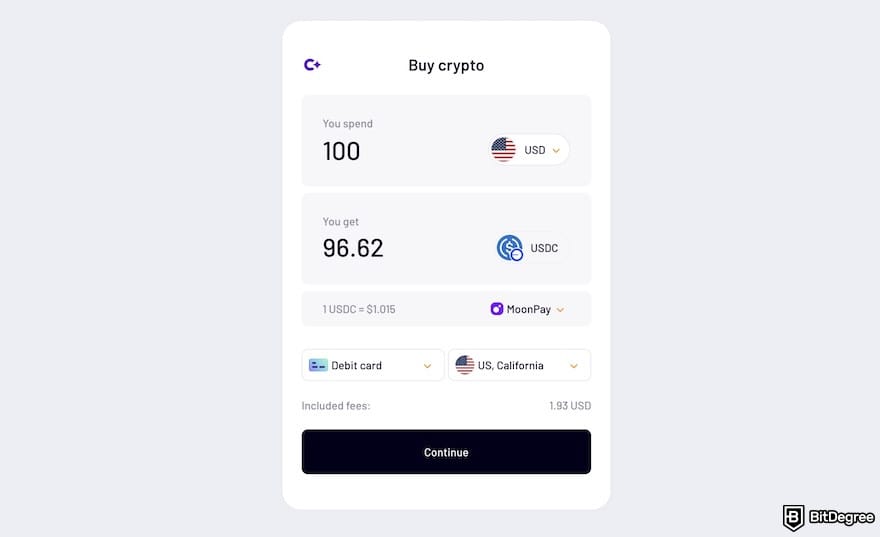
But what if your money is already sitting in Venmo? You can use your Venmo Debit Card (the digital version should also work) to pull out funds and top up your Ogvio balance – no bank account needed. Now, let me walk you through exactly how to set it up and start transferring to your local or international buddies:
![How to transfer money from Venmo to bank: an arrow pointing the [Add Money] button on Ogvio's dashboard.](https://assets.bitdegree.org/images/how-to-transfer-money-from-venmo-ogvio-dashboard-add-money.jpg "How to transfer money from Venmo to bank: an arrow pointing the [Add Money] button on Ogvio's dashboard.")
![How to transfer money from Venmo to bank: the [Card Transfer] menu on Ogvio outlined.](https://assets.bitdegree.org/images/how-to-transfer-money-from-venmo-to-bank-ogvio-card-transfer-outlined.jpg "How to transfer money from Venmo to bank: the [Card Transfer] menu on Ogvio outlined.")
![How to transfer money from Venmo to bank: the [Send Money] menu on Ogvio outlined.](https://assets.bitdegree.org/images/how-to-transfer-money-from-venmo-to-bank-ogvio-send-money-outlined.jpg "How to transfer money from Venmo to bank: the [Send Money] menu on Ogvio outlined.")
![How to transfer money from Venmo to bank: an arrow pointing out the [+ Send to new recipient] button on Ogvio.](https://assets.bitdegree.org/images/how-to-transfer-money-from-venmo-to-bank-ogvio-send-to-new-recipient.jpg "How to transfer money from Venmo to bank: an arrow pointing out the [+ Send to new recipient] button on Ogvio.")
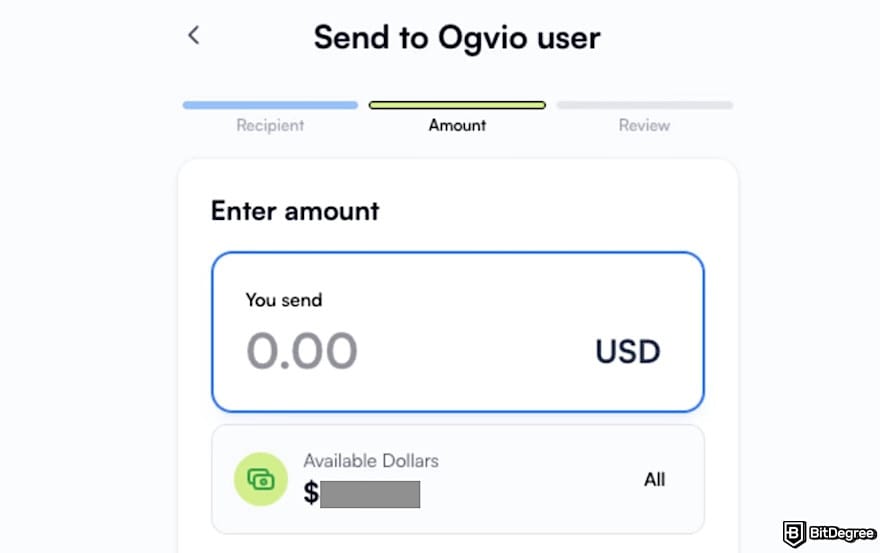
The money should be available in your friend’s Ogvio almost instantly. Once they receive it, they can choose to cash it out locally, convert it to another currency, or use it however they need. Since Ogvio is a neobank, it's a simple workaround on how to transfer money from Venmo to a bank account that lets you move funds globally.
📚 Read More: Ogvio Review
Looking for more in-depth information on related topics? We have gathered similar articles for you to spare your time. Take a look!



Basic Requirements for Bank Transfers on Venmo
While Ogvio lets you send USDC on the platform with no KYC required, Venmo has stricter rules. So, before you practice the steps on how to transfer money from Venmo to bank accounts, make sure you complete these requirements first.
Verify Your Venmo Account
When you want to know how to withdraw money from Venmo, I’d suggest that you get your account verified first to fully access the tool. You can use your Venmo balance for payments and increase the amount of money you’re allowed to send or transfer.
Because federal regulations require Venmo to collect certain details from users who hold a balance, you may be asked to complete identity verification, especially when you try to:
- Send $300 or more within a rolling 7-day period.
- Transfer $1,000 or more to your bank in a week.
- Become a manager on an organization account.
- Accept payments for goods and services through a personal or business profile.
How do you verify the Venmo account? Just open the [Me] tab, then tap the [Settings] gear in the top-right corner. Select [Identity Verification], and follow the steps shown on your screen.
Note that this process can only be completed through the Venmo mobile app, and it isn’t available on the website.
In most cases, identity verification only takes a few minutes. However, if the automatic system can’t confirm your details (e.g., your information isn’t on file, or your name/address has recently changed), Venmo will request additional documents through the app to verify your identity.
Add and Verify Your Bank Account
After passing the KYC for your Venmo account, it’s mandatory to verify your bank account as well. The platform gives you two ways to do this:
1
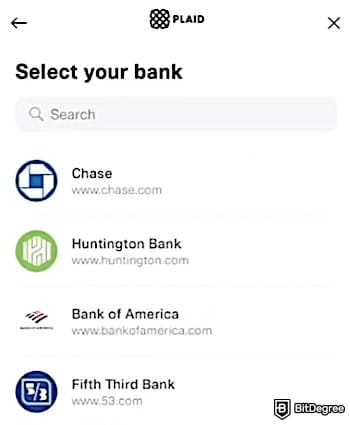
Instant verification. If your bank supports instant verification, Venmo uses Plaid to securely check your account details and, when needed, confirm that you have enough funds for certain transactions. After selecting your bank, you’ll be asked to sign in with your online banking username, password, or another form of identification.
2
Manual Verification (Micro-Transfers). Venmo will send two small deposits and two matching withdrawals (each under $1) to confirm that the account is yours. These micro-transfers cancel each other out, so your balance won’t change overall. Just make sure you have at least $2 in your account to avoid overdraft fees. The micro-transfers typically appear within 1-3 business days.
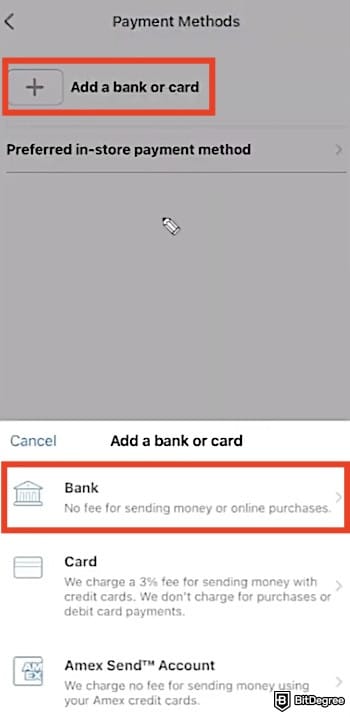
Here's how to add and verify your bank account on Venmo:
![How to transfer money from Venmo to bank: the [Me] icon on the Venmo app highlighted.](https://assets.bitdegree.org/images/how-to-transfer-money-from-venmo-to-bank-me-icon-highlighted.jpg "How to transfer money from Venmo to bank: the [Me] icon on the Venmo app highlighted.")
![How to transfer money from Venmo to bank: the [Payment Methods] menu on Venmo's app highlighted.](https://assets.bitdegree.org/images/how-to-transfer-money-from-venmo-to-bank-payment-methods-menu-highlighted.jpg "How to transfer money from Venmo to bank: the [Payment Methods] menu on Venmo's app highlighted.")

Check Bank Account Eligibility
Venmo can only send money to US bank accounts, and the service is exclusively for use within the United States. Therefore, you must have a US-based bank account and be physically located in the region to use Venmo.
The platform works best with standard US checking accounts, since they support ACH transfers, which Venmo relies on to move money in and out. If your account is a typical checking account from a major US bank or credit union, you should be good to go.
Savings accounts can sometimes work, but they’re not always ideal. If your bank blocks the transfer or Venmo can’t verify ownership, the transfer might get delayed or even fail. That’s why checking accounts are always the safer option.
You may also run into issues with certain prepaid cards, corporate accounts, neobanks, or virtual accounts that don’t support ACH.
These options don’t always fully integrate with Venmo’s verification system, especially if Plaid can’t authenticate them. If your account isn’t accepted, your best move is to switch to a supported checking account or reach out to your bank for confirmation.
Ensure You Have Enough Venmo Balance
Transfers to a bank account come directly from your Venmo balance, and they're not from your linked card or bank. That means if you don’t have enough balance available, the transaction won’t go through.
Many users get confused here, thinking Venmo will simply “pull” the money from their bank, but that only works when you're paying someone, not when you're withdrawing to your bank.
Before you initiate a transfer, check your available balance in the [Wallet] section of the Venmo app. If the amount you want to transfer is higher than your balance, you’ll need to either receive more payments or add funds first (if your account is eligible for adding money).
Reminder: Venmo won’t let you use funds that are still pending. Refunds and payment reviews need to be fully processed first. If you’re planning to withdraw money, give the app a quick check to confirm everything has settled.
How to Transfer Money From Venmo to Bank Accounts
After you’ve verified both your Venmo and bank accounts, you can use the app to begin sending money online.
Via the App
The mobile app is people's favorite route to move funds. Here's how to do it:
![How to transfer money from Venmo to bank: the [Transfer] button on the Venmo app highlighted.](https://assets.bitdegree.org/images/how-to-transfer-money-from-venmo-to-bank-venmo-app-transfer-highlighted-v1.jpg "How to transfer money from Venmo to bank: the [Transfer] button on the Venmo app highlighted.")
![How to transfer money from Venmo to bank: Venmo's payment page, showing the amount field, transfer options, and the [Transfer] button to confirm.](https://assets.bitdegree.org/images/how-to-transfer-money-from-venmo-to-bank-entering-venmo-balance-amount-v1.jpg "How to transfer money from Venmo to bank: Venmo's payment page, showing the amount field, transfer options, and the [Transfer] button to confirm.")
And that's how to withdraw money from Venmo without a card. Once confirmed, Venmo will process your request and send the funds to the bank account you’ve linked and verified.
Using a Computer
If you prefer using a laptop or desktop, Venmo also lets you transfer money through its web version. This is especially useful if you're managing finances on a bigger screen or don’t have access to your phone. Let's see how to get money out of Venmo using a computer:
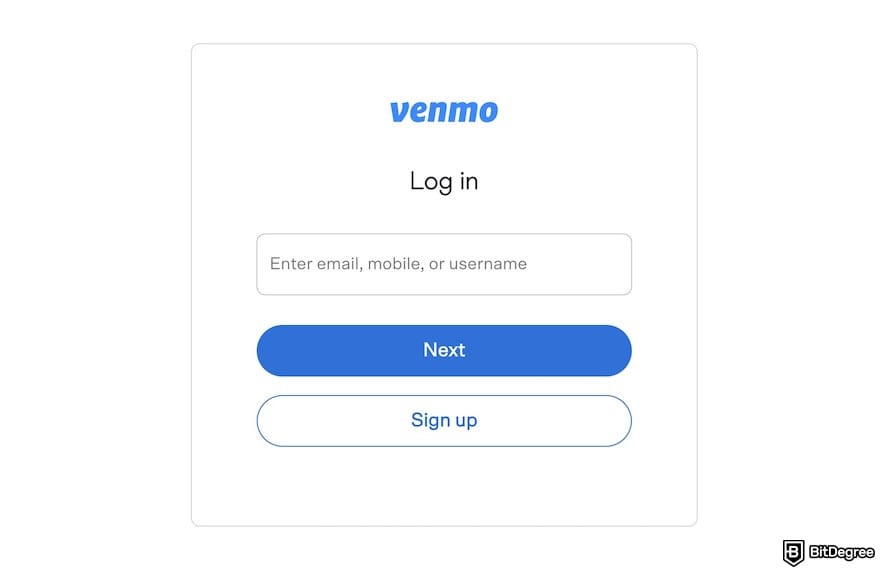
![How to transfer money from Venmo to bank: Venmo's transfer page, with the [Transfer money] link outlined.](https://assets.bitdegree.org/images/how-to-transfer-money-from-venmo-to-bank-entering-amount-venmo-desktop-v2.jpg "How to transfer money from Venmo to bank: Venmo's transfer page, with the [Transfer money] link outlined.")
After you submit the transfer, all that’s left is to wait for the payout to process. Once the money lands in your bank account, you’re free to spend it, save it, or even move it to a platform like Ogvio if you need to send funds internationally.
How to Get Money From Venmo Without a Bank Account
If you don’t have a bank account, you can still access your Venmo balance by applying for a Venmo Debit Card and withdrawing your money via an ATM. Knowing how to get money from Venmo without a bank account is useful when you accidentally leave your phone at home and only have your wallet on hand.
However, there are some requirements to get a Venmo debit card: you must be at least 18 years old, a US resident with a US phone number, and have an active Venmo account.
You may also need to provide personal information like your name, date of birth, and Social Security Number for verification, which Venmo may further review. Here’s how you can check your eligibility for the Venmo Debit Card:
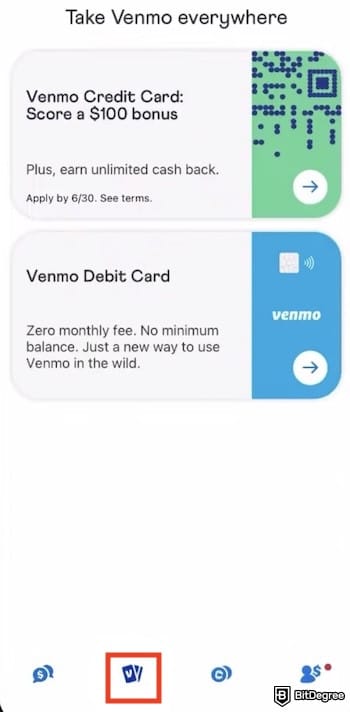
If you see a “Get in Line” message, it means you can't proceed with how to get money out of Venmo using the debit card yet. There’s nothing more you can do, but Venmo will email you automatically once you've become eligible. On the website, Venmo said that contacting customer support can’t speed up this process.
Therefore, wait until your turn comes. By then, Venmo will ask you to verify some personal details before approving your card. After approval, your debit card will be mailed to your home address and should arrive within 10 business days. If it takes longer than that, reach out to Venmo Support for assistance.
With the Venmo Debit Card, you can withdraw cash from ATMs or pay for purchases in stores and online without ever linking a bank account.
Alternatively, you can skip the whole bank transfer route and do what I did in the first section of this guide: connect your Venmo Debit Card and move your money straight into Ogvio. No waiting days for bank transfers, and no dealing with limits or verification stress.
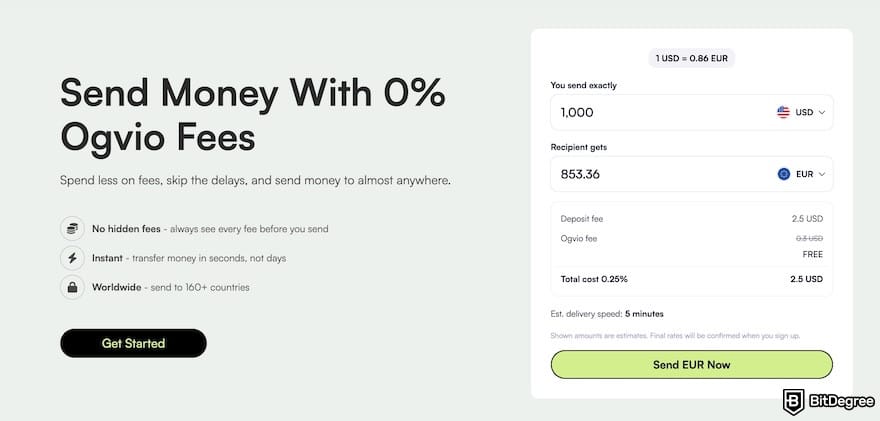
Once the money hits Ogvio, you’re free to do many things with the funds. You can buy crypto, convert currencies, or send money to Brazil and globally, which Venmo can’t do. More importantly, transfers within Ogvio are instant and free when you use the @Tag feature, no matter where your friend or family member lives in the world.
📚 Read More: How to Send Money With a Debit Card
How to Withdraw Money From Venmo Without Cards
Withdrawing money from Venmo using a debit card is usually the most straightforward option. But if you don’t have access to a bank account or a Venmo Debit Card, you’re not out of luck because there’s another workaround: sending your balance to PayPal.
Venmo became part of PayPal’s ecosystem back in 2013, when PayPal acquired Braintree (which had purchased Venmo the year before).
So if you’re unable to use a bank account or debit card, transferring your Venmo funds to PayPal can be a convenient alternative.
This is a step-by-step walkthrough of how the transfer works on the Venmo app. I use the Venmo app on my iPhone, so note that the Android version may look slightly different. Before we get started, make sure you have enough balance to send. Unlike regular Venmo payments, you can’t fund this transfer with a linked bank account or debit card.
If this is your first time using the feature, Venmo will ask you to set up a Visa+ username – just follow the prompts shown.
![How to transfer money from Venmo to bank: the [Copy] button on PayPal's Visa+ page.](https://assets.bitdegree.org/images/how-to-transfer-money-from-venmo-to-bank-paypal-visa.jpg "How to transfer money from Venmo to bank: the [Copy] button on PayPal's Visa+ page.")
![How to transfer money from Venmo to bank: the [Send] button on Venmo's Visa+ page outlined and the PayPal username field on the right side.](https://assets.bitdegree.org/images/how-to-transfer-money-from-venmo-to-bank-send-button-visa-plus.jpg "How to transfer money from Venmo to bank: the [Send] button on Venmo's Visa+ page outlined and the PayPal username field on the right side.")
That’s it; now you know how to withdraw money from Venmo without cards. Transfers typically arrive in 5-15 minutes, though PayPal says that it can take up to 30 minutes.
📚 Read More: PayPal Review
Venmo Transfer Fees and Limits
When you study the flow of how to get money from Venmo, it’s important to know there are fees behind the process. Sending money from Venmo to your bank account via the standard method is free, but the “Instant Transfer” option charges $1.75 with a minimum of $0.25 and a maximum of $25.
Also, your Venmo transfer limit to a bank account depends on your identity verification level and the type of transfer. Unverified users can transfer up to $999.99 per week, while verified users can transfer up to $19,999.99 per week, with a maximum of $5,000 per individual standard transfer. Instant transfers also have an individual limit of $5,000.
Things get a little bit complicated when you get into how to get money from Venmo without bank accounts and use the Venmo Debit Card instead. Here’s the fee and limit breakdown:
Fee/Limit | |
|---|---|
Debit Card - Purchase (Per Transaction) | $2,999.99 limit per purchase |
Debit Card - Daily Purchase Limit | $3,000.00 per day |
Debit Card - Weekly Purchase Limit | $7,000.00 per week |
ATM/Cashback/Over-the-counter Withdrawal | $1,000.00 limit per day |
Debit Card - Number of Transactions | Max 30 transactions per day |
ATM Withdrawal Fee | Free (partner ATMs); $2.50 (out-of-network ATMs) |
Over-the-Counter Withdrawal Fee (e.g. Bank Teller) | $3.00 |
Table: Venmo fees and limits
Well, I might say that following the steps on how to get money off Venmo without cards is still the easiest option. But if you really can’t do that (or prefer using the Venmo Debit Card instead), be aware that you may need to sacrifice a small fee, especially when using out-of-network ATMs or taking out cash over the counter.
If you’re looking for a way to avoid fees altogether when sending money internationally, platforms like Ogvio let you transfer funds across borders for free, making it a helpful alternative when Venmo’s limits or withdrawal fees get in the way.
Common Issues and Troubleshooting Tips
Even when you follow every step correctly, money transfers from Venmo to your bank don’t always go smoothly. Sometimes, the transaction might be pending, delayed, or even reversed. I know it can be frustrating if you need the funds ASAP, so here are the most common issues users face, plus what they mean and how to fix them.
Transfer Pending or Delayed
Transfers can sometimes sit in “Pending” longer than expected. One of the main reasons is the ACH processing delay. Standard transfers run through the ACH banking network, which isn’t instant. If you send money late in the evening, over a weekend, or close to a cutoff time, the processing may pause until the next banking day.

However, before you contact the customer support team, check the US federal holiday schedules. If you tried transferring during a holiday week (like New Year's, July 4th, Thanksgiving), your transfer may take a bit longer. Normally, the transfer takes about 1-3 business days. If it sits in the pending status for more than 5 business days, contact support.
Another common reason for delayed transfers is account verification. If Venmo hasn’t fully confirmed your bank details, or if something looks unusual, like adding a new bank, updating account info, or sending an amount that’s larger than your usual activity, Venmo may put the transfer on hold.
To check whether this is the issue, open your Venmo app, go to [Settings] and tap [Payment Methods], and make sure your bank is labeled as Verified. If it isn’t, complete the verification steps before trying again.
Transfer Failed or Reversed
If your transfer goes through but is later canceled or reversed, don’t panic. This usually happens when something doesn’t match up during the verification process.

One of the most common reasons is mismatched account information. If the legal name on your Venmo account doesn’t match the one on your bank account, your bank may automatically reject the transfer. The solution is simple: update your Venmo name so it matches your bank profile exactly.
Also, Venmo may reverse a transfer if its system detects something suspicious. This could be a larger-than-usual amount, multiple failed attempts, or anything that doesn’t align with your normal transaction pattern. If that’s the case, try sending a smaller amount first. If it still throws an error, you may need to reach out to Venmo Support to clear things up.
Browse our collection of the most thorough Crypto Exchange related articles, guides & tutorials. Always be in the know & make informed decisions!



Conclusions
Understanding how to transfer money from Venmo to bank accounts shouldn’t be stressful. Once you understand how your balance works and verify your bank, you should be able to easily move your money to your checking account.
I know some cases may not be as simple as “tap transfer and wait”. Maybe your bank isn’t supported, or Venmo flags your account. If that happens, you still have backup options, such as withdrawing using the Venmo Debit Card or transferring your balance to PayPal, since it’s now part of the same ecosystem.
If you want something faster, more flexible, and especially useful for international transfers, sign up on Ogvio and use the @Tag feature.
Scientific References
1. Acker A., Murthy D.: 'What Is Venmo? A Descriptive Analysis of Social Features in the Mobile Payment Platform';
2. Koutrouli E., Manousopoulos P.: 'Exploring the Use of Crypto-Assets for Payments'.
Send Money Worldwide
Check out the best ways to send money to other countries quickly, safely, and with minimal fees.



































About Article's Experts & Analysts






