Key Takeaways
- There’s no single best way to add money to PayPal because the option availability depends on your location, timing, and fees;
- Fast options like cards cost more, while slower methods like bank transfers are cheaper;
- If PayPal is limited where you live, tools like Ogvio can give you better access to international transfers.
Learning how to add money to PayPal can be as simple as linking a bank account, although it may not be that straightforward for many people. Depending on where you live, you may have plenty of options or almost none at all.
Some users can top up instantly with a card, and others are stuck waiting days for bank transfers. Then, in certain countries, creating a PayPal account isn’t even possible.
In this guide, I’ll break down seven ways to add money to PayPal, explaining how each method works, what it costs, and who it’s best for. If PayPal’s limitations are slowing you down, I’ll also show where tools like Ogvio come in, especially when you need more flexibility than PayPal can offer.

Did you know?
Subscribe - We publish new crypto explainer videos every week!
Non-custodial Wallet: Why Do You Need It Right NOW

Table of Contents
- 1. Ogvio: Built for Regions PayPal Doesn’t Fully Support
- 2. How to Add Money to PayPal: Seven Possible Methods
- 2.1. Link Your Bank Account or Debit Cards
- 2.2. Add Money to PayPal Using Credit Cards or in Limited Countries
- 2.3. Transfer Crypto to Your PayPal Account
- 2.4. Cash Out Crypto From Coinbase
- 2.5. Hand Over Cash in Stores
- 2.6. Use Direct Deposit
- 2.7. Cash a Check
- 3. Fees and Limits
- 4. Which Method Should I Use to Add Money to PayPal?
- 5. Conclusions
Ogvio: Built for Regions PayPal Doesn’t Fully Support
Before we go any further on how to add money to PayPal, there’s one thing I need to point out. Many PayPal guide writers assume you already have a fully working account, but that’s not always the case. I’ve noticed that in some regions, you can’t even create a PayPal account in the first place.
Latest Changelly Coupon Found:If you don’t have an account, you obviously can’t use common workarounds, like sending money to yourself using PayPal’s request feature, which I mention later in the article. This is where a platform like Ogvio can be especially useful.
Instead of relying on PayPal’s limited regional availability, Ogvio gives you a wider availability. Users in more than 160 countries can receive, store, and move money with their email address.
You can accept payments using a shareable link, receive USDC from a crypto wallet, transfer money from your bank account, or directly from another Ogvio user. The best part is that you don’t have to wait for days for the money to arrive in your Ogvio balance since most top-ups arrive almost instantly or within several minutes.
To give you a better idea, here’s how to add money to Ogvio to help you see how simple it is:
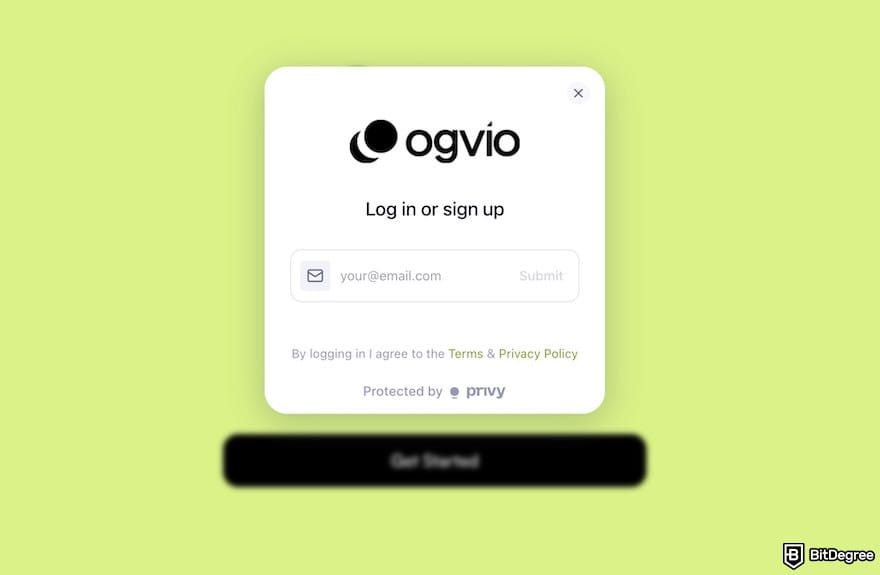
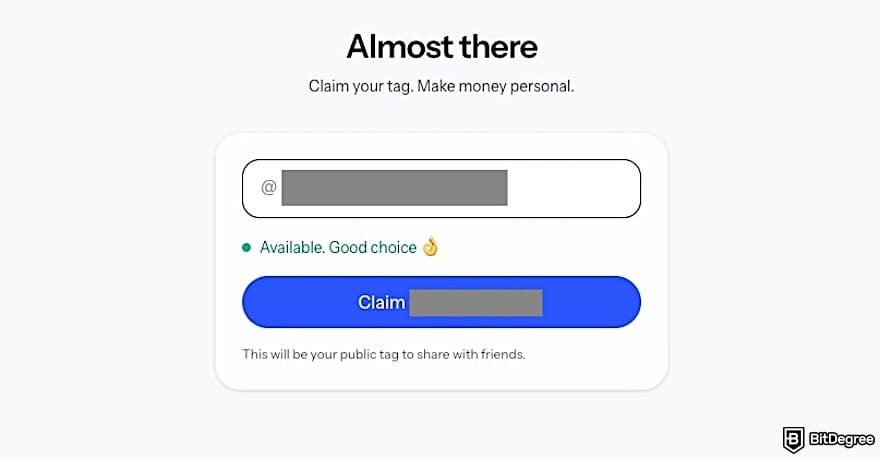
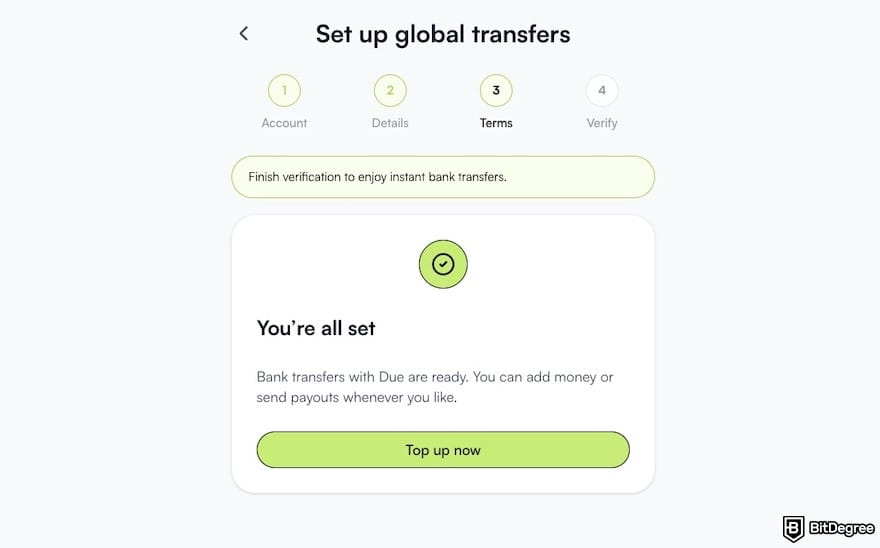
To pass KYC, Ogvio will ask for basic personal details, a valid ID, a selfie, and proof of address. While Ogvio supports users in over 160 countries, some regions (such as the US) can’t complete KYC. Users in those locations can still use Ogvio, but bank transfer features won’t be available.
![How to add money to PayPal: the [Add money] button on Ogvio's dashboard.](https://assets.bitdegree.org/images/how-to-add-money-to-paypal-ogvio-dashboard-add-money.jpg "How to add money to PayPal: the [Add money] button on Ogvio's dashboard.")
![How to add money to PayPal: the [Bank Transfer] method on Ogvio.](https://assets.bitdegree.org/images/how-to-add-money-to-paypal-ogvio-top-up-methods-bank-transfer.jpg "How to add money to PayPal: the [Bank Transfer] method on Ogvio.")
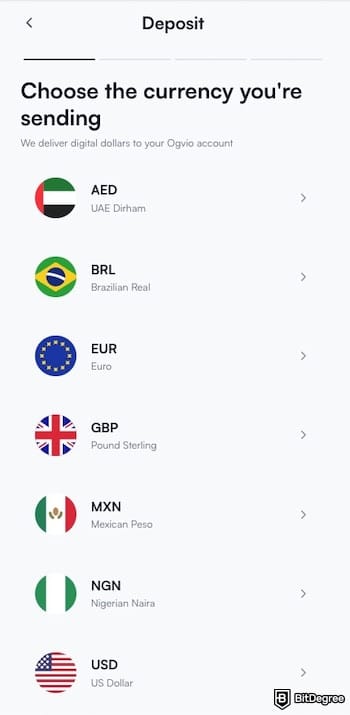
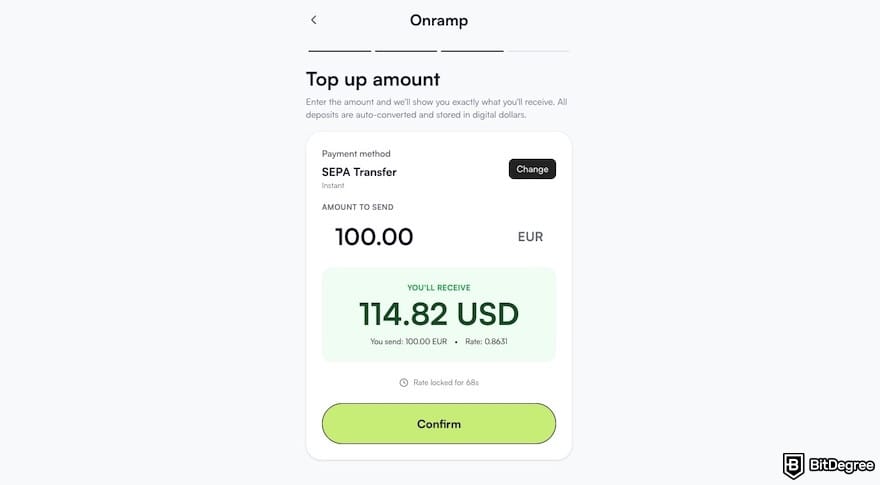
So instead of bending your workflow around PayPal’s limitations, Ogvio lets you build your setup more easily. You get more control over how you receive and move your money, without being limited by regional restrictions, slow processing times, or hidden FX costs.
Looking for more in-depth information on related topics? We have gathered similar articles for you to spare your time. Take a look!

How to Add Money to PayPal: Seven Possible Methods
There’s more than one way to add money to your PayPal account, and the right option depends on where you live, how fast you need the funds, and how much you’re willing to pay in fees. Below are seven common methods you can use to add money to PayPal.
Link Your Bank Account or Debit Cards
You can fund your PayPal balance using either a bank account or a debit card, depending on how fast you want the money and whether you want to avoid fees.
Using a debit or credit card is generally the fastest option, but it does incur fees. If you don’t have a debit card, save budget, and feel okay to wait for the deposit to arrive in several days, the bank option should be your way.
The steps on how to add money to PayPal from debit cards or bank accounts are generally the same: choose the bank or debit/credit card menu, fill in the details, enter the amount, and confirm.
This method is also useful if you’re learning how to add money to PayPal from Cash App, since direct app-to-app transfers aren’t supported. Instead, cash out your Cash App balance to a linked bank account and then transfer the funds to PayPal. As a faster option, you can also use your Cash App Card to add money instantly in the PayPal app.
Below, I’ll show you how to link your bank to PayPal using the mobile app:
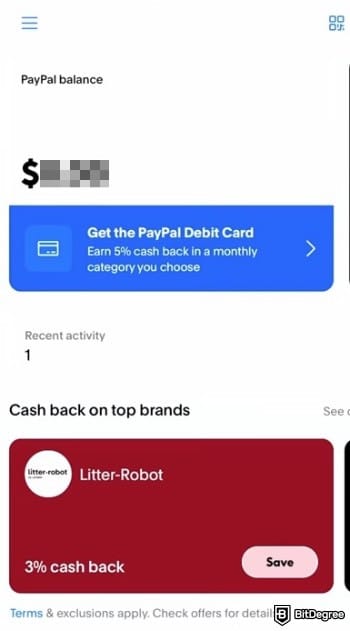
![How to add money to PayPal: the [Add banks and cards] menu on PayPal.](https://assets.bitdegree.org/images/how-to-add-money-to-paypal-add-cards-menu.jpg "How to add money to PayPal: the [Add banks and cards] menu on PayPal.")
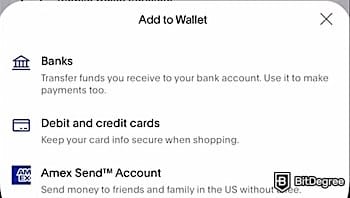
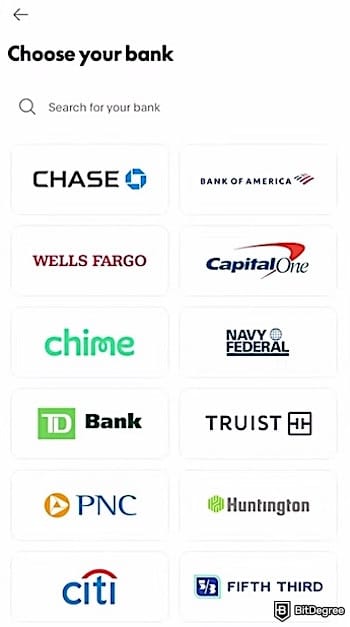
Manual linking usually takes up to three business days to complete because PayPal can’t instantly verify that you actually own that bank account.
![How to add money to PayPal: the [Add money] button inside the [PayPal balance] menu.](https://assets.bitdegree.org/images/how-to-add-money-to-paypal-balance-add-money.jpg "How to add money to PayPal: the [Add money] button inside the [PayPal balance] menu.")
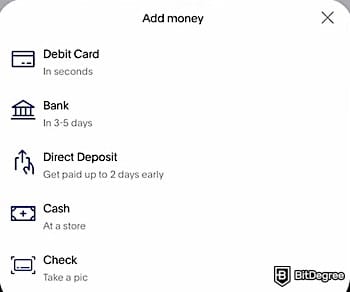
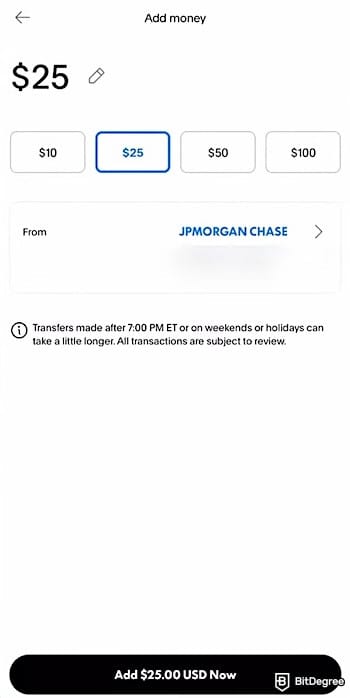
Once the payment is processed, the funds will appear in your PayPal balance. You may also see an option to set up Auto Reload, which automatically adds money when your balance gets low. You can skip this if you don’t need it.
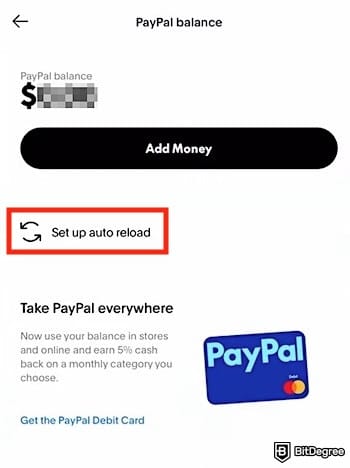
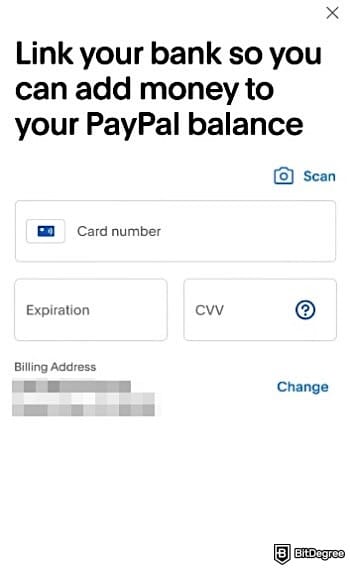
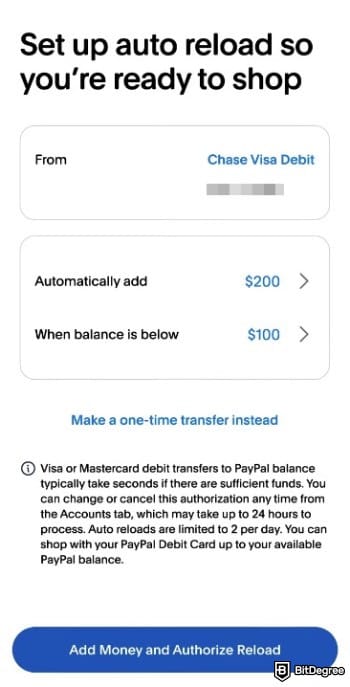
You should see a window showing that the “Auto reload” has been enabled for your account.
Add Money to PayPal Using Credit Cards or in Limited Countries
Have you ever watched a tutorial on how to add money to PayPal, where the [Add Money] button is right there, but it’s completely missing on your screen? This section is for you. This part is also for those who want to know how to add money to PayPal from credit cards because, by default, you can't do the steps in the previous section (simply add your credit card number to the app).
In those cases, there is a simple workaround: requesting money from yourself. So, instead of adding money directly, you create a payment request and pay it yourself using a debit or credit card. This method works because PayPal treats the payment as a standard incoming transaction.
Just a heads-up: this only works if you’re in a country where PayPal still lets you create an account, because you have to be signed in for the process to work.
Here’s how to add money to PayPal if you can’t find the [Add Money] button or want to top up using a credit card:
![How to add money to PayPal: the [Send and Request] button outlined on PayPal.](https://assets.bitdegree.org/images/how-to-add-money-to-paypal-send-request-v1.jpg "How to add money to PayPal: the [Send and Request] button outlined on PayPal.")
Don’t use the email you use to log in to PayPal. The goal is to create a payment request that PayPal treats as coming from another person.
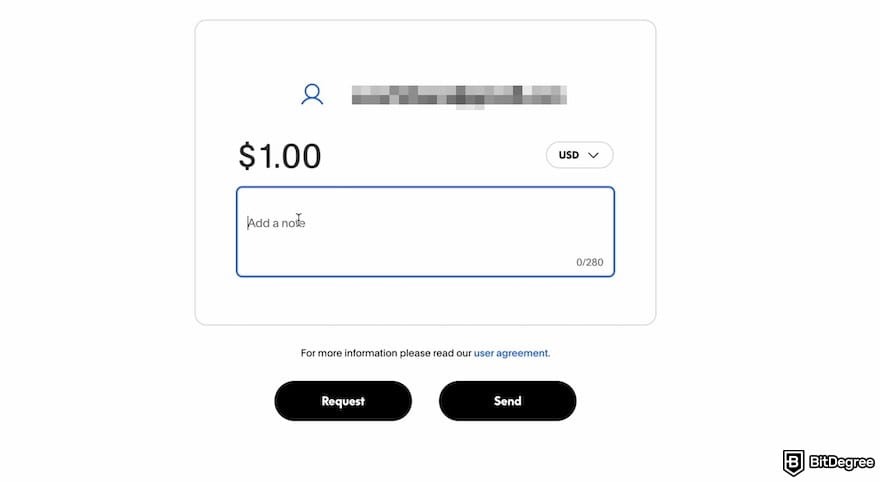
If your card or bank account uses a different currency, PayPal will automatically convert it during the payment process. Keep in mind that PayPal may apply a currency conversion fee.
![How to add money to PayPal: the recipient's sign-in form, with the [Pay as a Guest] button outlined.](https://assets.bitdegree.org/images/how-to-add-money-to-paypal-request-form.jpg "How to add money to PayPal: the recipient's sign-in form, with the [Pay as a Guest] button outlined.")
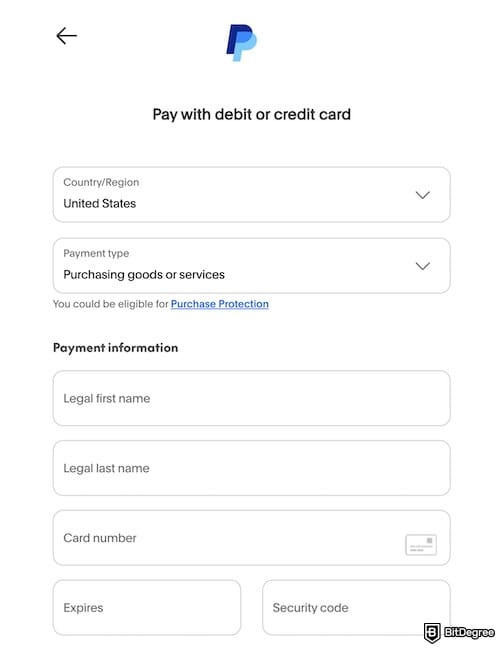
Once the payment is successful, the funds will be credited to your PayPal balance as an incoming payment. If PayPal doesn't allow you to sign up in the first place, consider exploring PayPal alternatives that are actually accessible in your country.
📚 Read More: PayPal Alternatives
Transfer Crypto to Your PayPal Account
PayPal has launched features that let users send and receive cryptocurrencies[1]directly between PayPal and external wallets, although this functionality is not universal and varies by location and account eligibility.
In eligible accounts (especially in the US), you can receive supported crypto by generating a crypto address inside PayPal and sending crypto to it from an outside wallet or exchange. The supported cryptocurrencies for native transfers into PayPal currently include major assets like BTC, ETH, and PayPal-owned stablecoin, PYUSD, on the Ethereum, Solana, and Arbitrum networks.
Here’s how to add money to PayPal without bank accounts by using your crypto wallet or exchange:
![How to add money to PayPal: the [Finances] menu on PayPal's website.](https://assets.bitdegree.org/images/how-to-add-money-to-paypa-finances-tab-v1.jpg "How to add money to PayPal: the [Finances] menu on PayPal's website.")
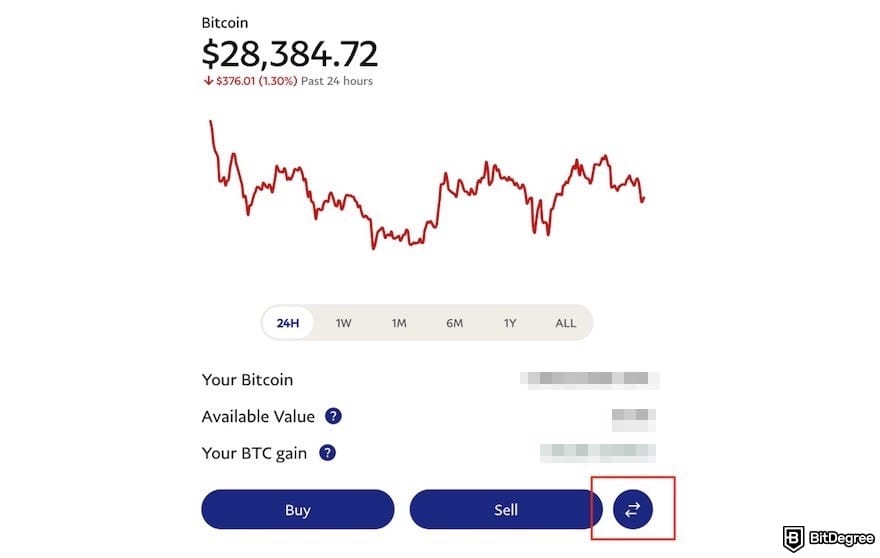
Wait for the confirmation. Blockchain transactions require confirmations, and timing will depend on the network speed and fees you paid on the sending side. Once the network confirms the transaction, the crypto should appear in your PayPal crypto balance.
Cash Out Crypto From Coinbase
If you hold crypto on Coinbase, you can add money to PayPal by selling your crypto and withdrawing the fiat balance directly to your PayPal account. However, note that you first need to sell your crypto into a fiat currency (like GBP or EUR). Check the tutorial below on how to add money to PayPal via Coinbase:
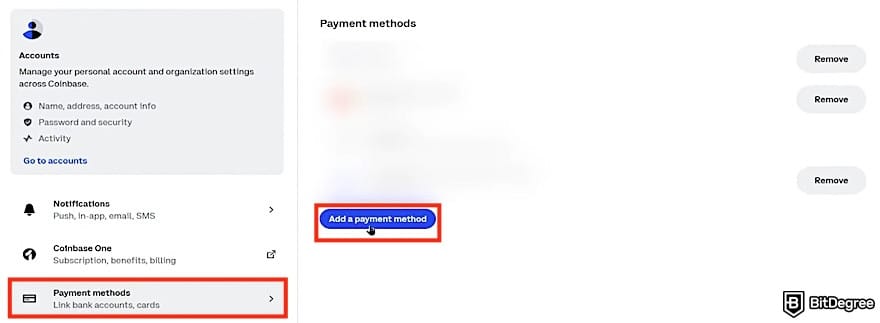
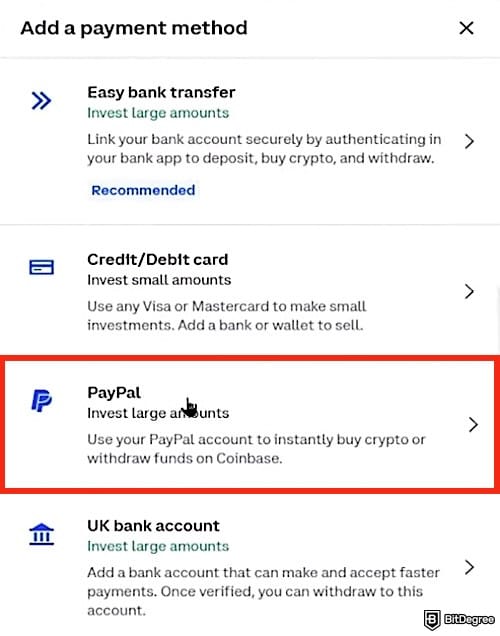
If you don’t see the sell option, it may be because your account isn’t fully verified or you recently bought crypto (especially using a credit card).
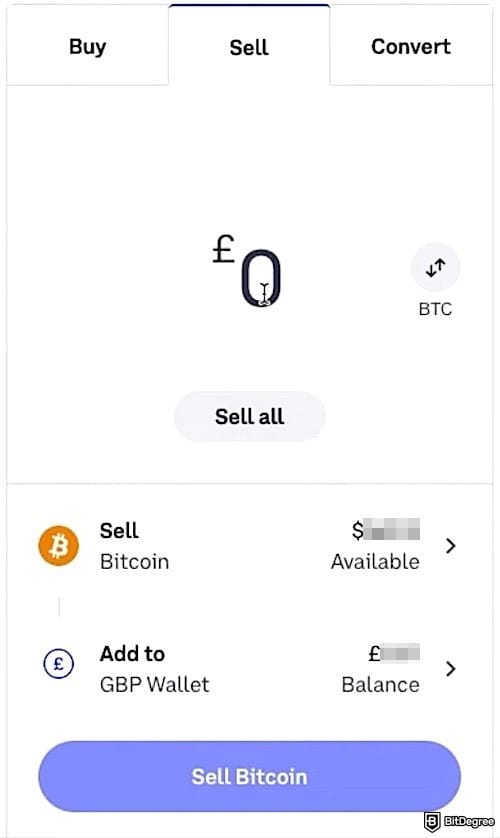
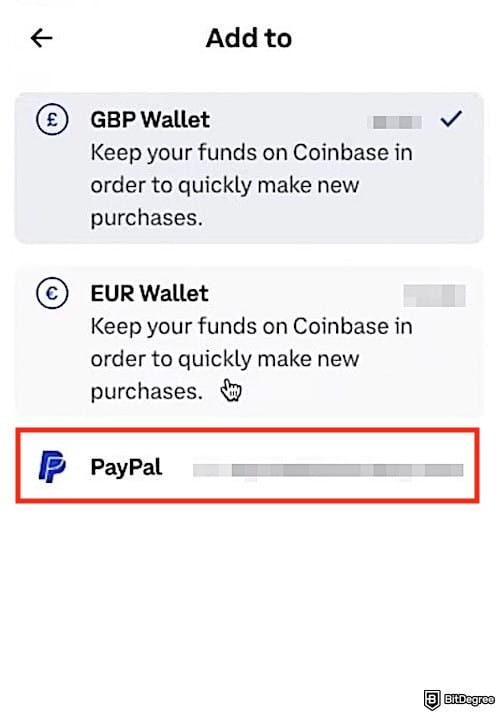
Once completed, the fiat amount is sent to your PayPal balance, usually instantly or within the same day, for free.
Did you know?
Subscribe - We publish new crypto explainer videos every week!
What is DeFi in Crypto? (Explained with Animations)
Hand Over Cash in Stores
How do you add money to PayPal when you don’t have a bank account or crypto? Not everyone wants to deal with bank transfers, cards, or crypto, and that’s fine.
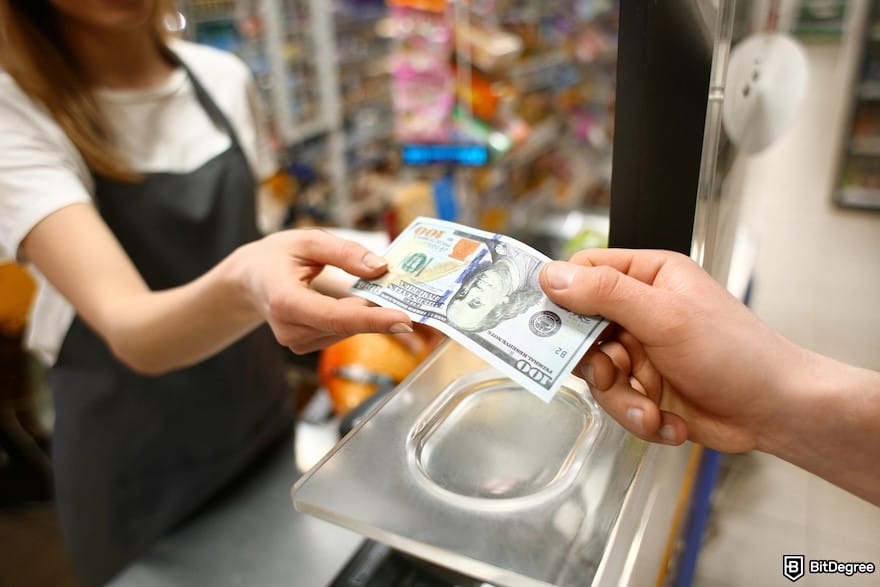
In case you prefer depositing your balance with cash, PayPal enables in-store cash top-ups at 90,000+ store locations in the US, including major chains like Walmart, CVS Pharmacy, 7-Eleven, Dollar General, and Family Dollar.
This is a convenient option, especially if you don’t have a linked bank account or want money in your PayPal balance immediately. To do this, you can use either the PayPal app or the PayPal Debit Card. Follow these steps if you choose the PayPal app:
![How to add money to PayPal: the [Add Money] button on the PayPal app outlined.](https://assets.bitdegree.org/images/how-to-add-money-to-paypal-add-money-store-v1.jpg "How to add money to PayPal: the [Add Money] button on the PayPal app outlined.")
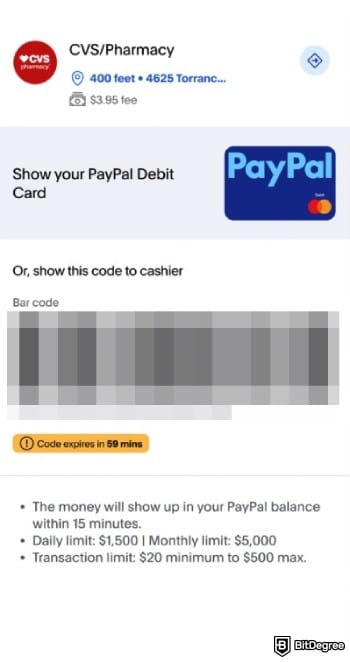
That’s it. You should receive a receipt, and the money typically arrives within 15 minutes. If you have a PayPal debit card, you don’t even need a barcode. Just tell the cashier you want to add cash to your PayPal balance, then swipe your card with the cash you’re depositing; the funds should appear in your PayPal balance right after the transaction is complete.
Use Direct Deposit
You can set up Direct Deposit if you want your paycheck, government benefits, or other recurring payments to land automatically in your PayPal balance. Your payments will be sent electronically by your employer or payer, so you don’t have to learn how to add money from a bank to PayPal manually.
Once it’s set up, the money should arrive in your PayPal balance on payday (often up to two days early). Then, you can immediately send, spend, or use the money via your PayPal app or the PayPal debit card. What if you only want a certain percentage of your paycheck to go into PayPal and the rest somewhere else? Yes, you can do that. Let me show you how to set it up:
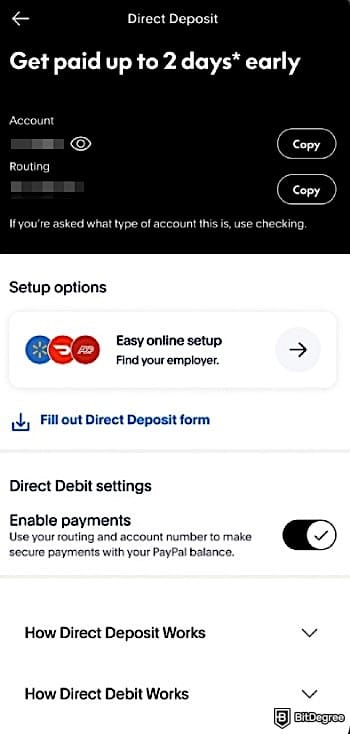
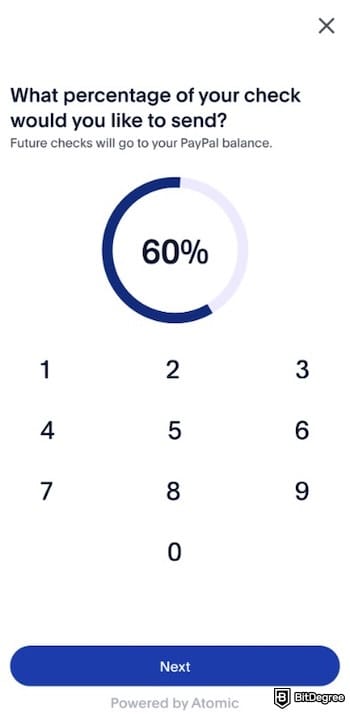
Once everything is set up, Direct Deposit typically starts within two pay cycles, and PayPal will notify you whenever your funds arrive.
Cash a Check
PayPal’s Cash a Check feature enables you to deposit checks straight from your phone without having to visit a bank. Just take photos of the front and back of your signed check in the app, and the money goes directly into your PayPal balance. The feature is available 24/7, so you can cash checks anytime (although the arrival takes time).
So, how do you add money to PayPal by cashing a check? Follow the tutorial below:
![How to add money to PayPal: the [Cash a check] button on PayPal outlined.](https://assets.bitdegree.org/images/how-to-add-money-to-paypal-cash-a-check-button.jpg "How to add money to PayPal: the [Cash a check] button on PayPal outlined.")
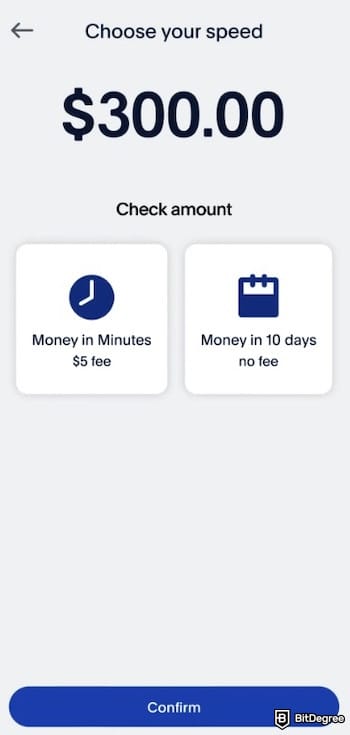
You’re all set. With this feature, you can get your money for free in 10 days without going anywhere, or access it faster by paying a small fee.
Fees and Limits
Fees and limits on PayPal vary depending on what you’re transferring, how you’re transferring it, and your location. PayPal is known for its higher costs[2] compared to some other payment methods, but there are several free options within the platform. If you top up your PayPal balance using a bank transfer, for example, it usually involves no fee for the transfer itself, but it takes several business days.
For readers who think about how to add money to PayPal from debit cards, note that the company applies a percentage fee (often around 2.9% of the transaction amount plus a fixed fee based on currency), which is the same fee structure used for payments funded by credit cards. Moreover, PayPal applies daily, weekly, and monthly limits for debit card top-ups.
Maximum Limit | |
|---|---|
Daily Limit | $5,000 |
Weekly Limit | $10,000 |
Monthly Limit | $20,000 |
Table: Maximum limits for debit card top-ups
For cryptocurrency deposits, PayPal doesn’t charge any fees to receive crypto transfers. However, it applies a weekly transfer limit that applies to both internal transfers within PayPal and external transfers to or from other wallets.
The maximum amount you can transfer in cryptocurrency is $25,000 per week, regardless of the transfer type. For internal transfers, the minimum allowed amount is $0.01 per transaction. These limits reset automatically, with consumer accounts resetting every Thursday.
If you follow the tutorial on how to add money to PayPal via partner stores, there's a fee of up to $3.95 (the exact fee amount varies by store). You can load between $20 and $500 per transaction, and there are a few limits to keep in mind, though.
1
You can add up to $1,500 per day and $5,000 per month,
2
You’re capped at four in-store top-ups a day, seven per week, and twenty per month.
Some stores may set lower limits depending on location, and they’ll let you know at the register. Once you hit any of these limits, you’ll need to wait for them to reset before adding more cash.
For those who plan to complete the steps on how to add money to PayPal without bank accounts via direct deposit, note that there are no fees to set up or maintain Direct Deposit with PayPal. Also, you aren’t charged to receive your funds.
The only requirements are having a PayPal balance account and using a payer that supports Direct Deposit. This is because PayPal's Direct Deposit runs on the ACH system, which uses bank-style routing and account numbers.
If you’re interested in cashing a check and are willing to wait 10 days, you pay no fee. However, those who need the money sooner can pay a fee: 1% for payroll and government checks with pre-printed signatures, and 5% for other eligible checks, including hand-signed payroll or government checks. In both cases, a minimum fee of $5 applies.
📚 Read More: PayPal Review
Which Method Should I Use to Add Money to PayPal?
Having options on how to add money to PayPal is nice, until you actually have to choose one. The truth is, the “best” method is highly personal and depends on several key factors: where you live, how fast you need the money, how often you top up, and how sensitive you are to fees.
What works perfectly for someone in the US with a linked bank account might be completely impractical for a freelancer in a PayPal-restricted region.
To make things easier, here’s a side-by-side comparison of every major method, so you can quickly see which option fits your situation best.
Fee | Processing Time | Limits | Best For | Key Notes | |
|---|---|---|---|---|---|
Bank transfer | Free | Several business days | Varies by country/account | Users who want the lowest cost | Slow, but no fees |
Debit / credit card top-up | ~2.9% + fixed fee (varies by currency) | Instant | $5,000/day $10,000/week $20,000/month | Urgent payments | Convenient, but expensive |
Crypto transfer (receive) | Free | Near-instant | $25,000/week (internal + external) $0.01 min (internal) | Crypto holders | Weekly cap applies |
Add cash at partner stores | Up to $3.95 per transaction | Minutes | $20–$500 per transaction $1,500/day $5,000/month Quantity: 4/day, 7/week, 20/month | People without bank accounts | Store limits may vary |
Cash a check (10-day) | Free | 10 days | Varies by check type | Anyone not in a rush | Slow, but free |
Cash a check (instant) | $5 | Instant | $2,500 per check | Fast cash access | Speed comes at a cost |
Table: Comparison of PayPal deposit methods
If speed is your priority, card top-ups and instant check cashing get the job done, but you’ll pay for the convenience. Meanwhile, those who follow a tutorial on how to add money from a bank to PayPal, use direct deposit, or wait for the full check-clearing period can enjoy the benefits of free top-ups. Just make sure which method is available in your region, and then you can work from there.
📚 Read More: Is PayPal Available in the Philippines?
Browse our collection of the most thorough Crypto Exchange related articles, guides & tutorials. Always be in the know & make informed decisions!

Conclusions
There are many ways on how to add money to PayPal, and what works best really depends on where you’re based, how fast you need the cash, and whether you’re okay paying extra for convenience.
Card top-ups and instant check cashing are fast but pricey, while bank transfers and direct deposit are slower and easier on fees. Then, if PayPal is limited in your region (or not available at all), it’s better for you to have a backup setup.
That’s why consider exploring Ogvio, so you can be more flexible when receiving, holding, and moving your money without being stuck on PayPal’s rules.
Scientific References
1. Koutrouli E., Manousopoulos P.: 'Exploring the Use of Crypto-Assets for Payments';
2. González A. G.: 'PayPal: The Legal Status of C2C Payment Systems'.
Send Money Worldwide
Check out the best ways to send money to other countries quickly, safely, and with minimal fees.



































About Article's Experts & Analysts







