Ledger announced the Ledger Atom on 15 October 2026 at Ledger Op3n 2026 in Paris, and this Ledger Atom review is our first hands-on look at it. Ledger calls it a signer and says it is neither a hardware wallet nor a phone.
While the details on specifications may be awaited, most readers want one answer: Is a $849 device worth the wait? I read Ledger’s whitepaper and shop page and saw it at the launch event to give you that answer.
Ledger invited BitDegree to Op3n 2026 and covered travel; this review is our own. For the announcement itself, see our explainer.
Verdict at a Glance
Ledger Atom puts everyday apps and secure signing on one device, with a hardware switch keeping the two apart. The idea is interesting, but it’s not yet proven. The Atom ships in summer 2027, and independent researchers haven’t tested its isolation claim. At more than double the price of previous models, most people won't need it.
Pros
- One device for everyday apps and signing
- AI Agent approvals on a Secure Screen
- Integrated apps with official partners
- Privacy and tamper protection built-In
Cons
- Ledger Atom price is high at $849
- Not available until Summer 2027
- “Quantum Ready” doesn't mean quantum resistant
Table of Contents
- 1. Ledger Atom: Quick Overview
- 2. What is Ledger Atom?
- 3. First Look at Op3n
- 4. Ledger Atom Review: PROS
- 4.1. One Device for Apps and Signing
- 4.2. AI Agent Approvals on a Secure Screen
- 4.3. Integrated Apps With Official Partners
- 4.4. Privacy & Tamper Protection Built-In
- 5. Ledger Atom Review: CONS
- 5.1. High Price at $849
- 5.2. Ships Only in Summer 2027
- 5.3. “Quantum Ready” Is Not Quantum Resistant
- 6. Ledger Atom Price and Release Date
- 7. How to Reserve Ledger Atom
- 8. Conclusions
Ledger Atom: Quick Overview
If you have limited time to read my full Ledger Atom review, this quick overview covers the essentials: Ledger Atom specs, what it costs, when it ships, and what Ledger has not published yet.
Type | Signer with two modes (Ledger’s wording) |
|---|---|
Launched in | 2026 at the Ledger Op3n conference in Paris |
Availability | Ledger.com only; ships summer 2027, pending certification (such as FCC) |
Price | $849 Founders Edition ($899 after launch) |
Screen, cameras, battery | 6.77-inch AMOLED; 50 MP rear and 32 MP front; 4,000 mAh |
Integrations | Ledger Wallet, Agent Intent, Solana Seeker app and dApp Store |
Key features | Android apps, AI agent approvals, physical camera and microphone switch, Ledger Wallet, Solana Seeker app |
Table: Ledger Atom overview
That is the short version. The rest of my review goes deeper into how the two modes work, what Ledger says you can do with the Atom, and where it falls short.
What is Ledger Atom?
Ledger describes the Atom as a device that combines everyday apps with a separate security system. Is Ledger Atom a phone? It may look like it, but it isn't. Ledger says the Atom is not a smartphone, since Atom is a data-only device.
It has two modes: Standard Mode handles everyday use, and Secure Mode handles sensitive actions, such as signing transactions, storing passkeys, and, soon, encrypting messages. Signing happens on the device itself, so you don’t need a separate phone, a USB cable, or a Bluetooth link.
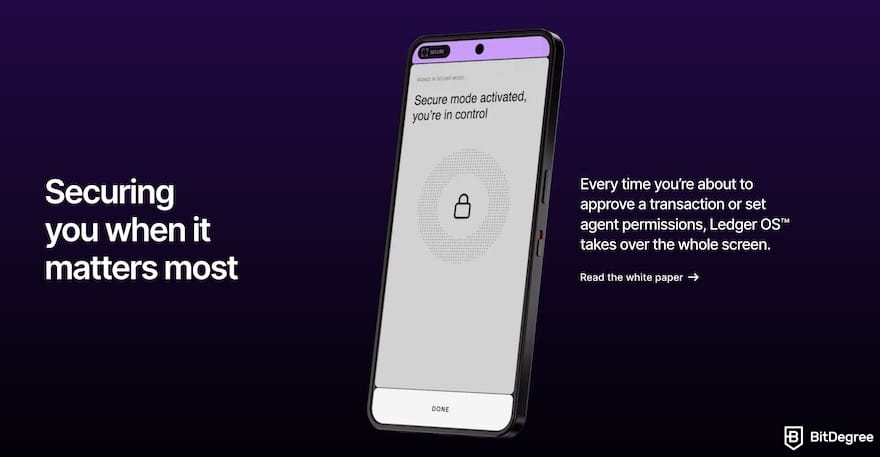
So, why does Ledger Atom have a separate security system? Ledger’s argument is that smartphones have a large attack surface. If a phone is compromised, what it shows on screen, including transaction details, can be altered. Ledger’s usual model treats the phone as untrusted and checks transactions on the signer’s own screen.
The Atom keeps that principle inside one device by separating Standard Mode from the security system at the hardware level.
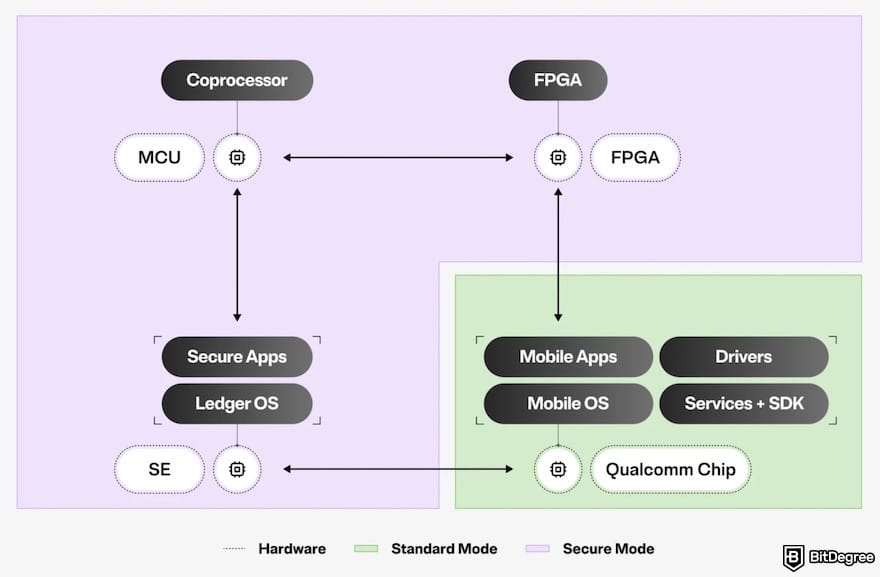
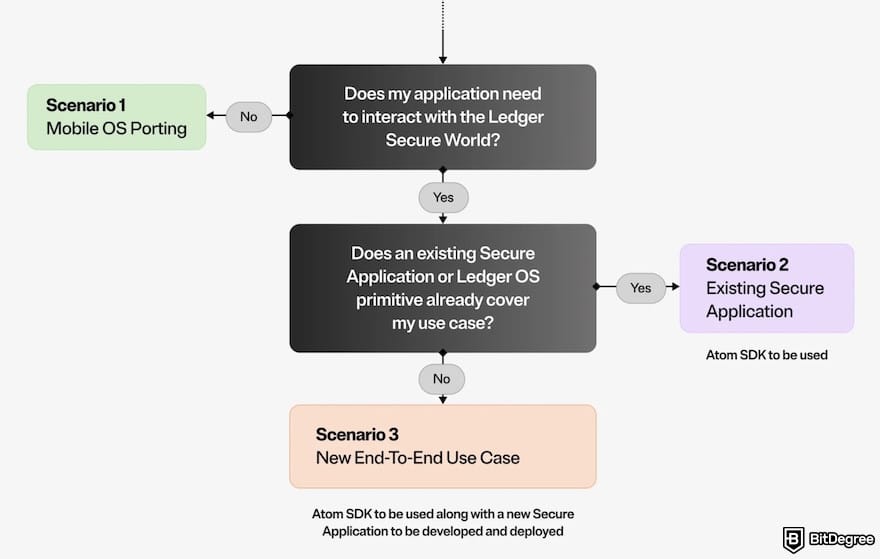
The Atom will have four main components:
- Secure Element. It runs Ledger OS, holds your private keys and PIN, and does all signing. Ledger says the keys are designed to stay inside it.
- Qualcomm chip. This element runs Standard Mode and your apps, and handles cellular data, Wi-Fi, and Bluetooth.
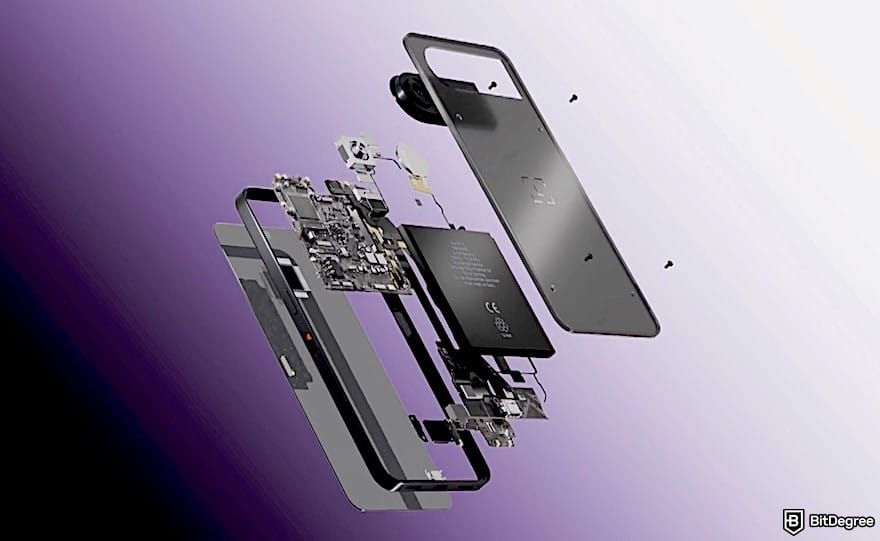
- Microcontroller (MCU). This component builds the Secure Mode screens and passes touch input to the Secure Element.
- Secure switch (FPGA). It decides which system can use the display and touch input at any moment.
The components talk over encrypted links with tamper detection, and each one must prove it is genuine before the Secure Element will communicate with it.

Did you know?
All Crypto wallets may look similar to you but they're NOT all the same!
First Look at Op3n
BitDegree was at Ledger Op3n 2026 in Paris, where Ledger introduced the Atom. This section covers how the device looks and feels, how it switches between its two modes, and how an approval works.
Size and Build
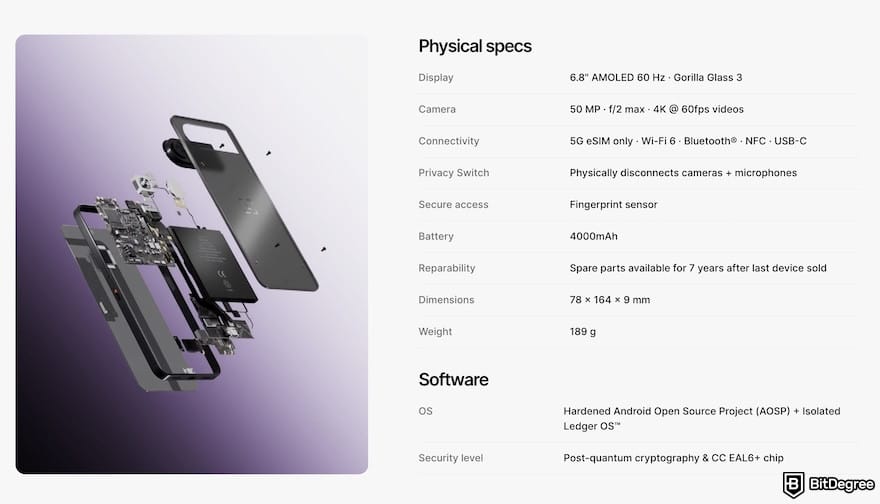
On paper, the Atom is a substantial device. Ledger Atom specs are 164 x 78 x 9 mm and 189 g, with a roughly 6.8-inch AMOLED screen (60 Hz, Gorilla Glass 3). For comparison, the iPhone 17 weighs 177 g and is just under 8 mm thick. The Atom is slightly heavier and thicker, but its larger screen also means a bigger overall footprint.
The screen is the face of both modes, so it matters. A fingerprint sensor sits in the power button, and a physical switch disconnects the cameras and microphones. Atom connects through a 5G eSIM, Wi-Fi 6, Bluetooth, NFC, and USB-C, but it can't receive or make calls.
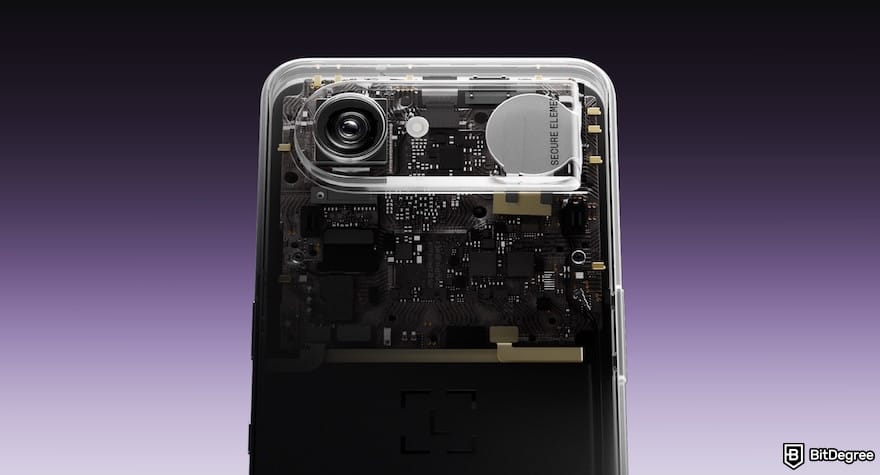
Ledger lists a 4,000 mAh battery and says it should last more than a day. In terms of photography, the 50 MP rear camera records 4K video at 60 fps. Ledger also promises spare parts for seven years after the last device is sold, so repairs should stay possible.
Switching Modes
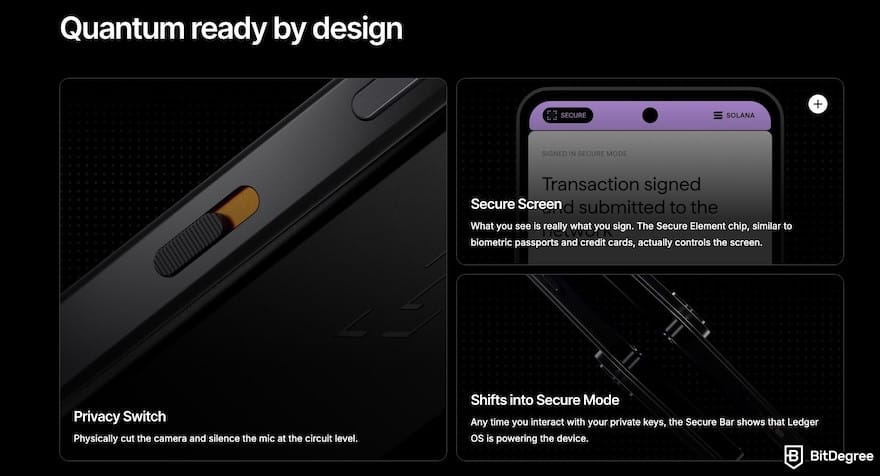
The Atom moves between its two modes in hardware. Ledger says its secure switch (the FPGA) decides which system can use the screen and touch input at any moment. When a sensitive action starts, Ledger OS takes over the whole screen, and Standard Mode is cut off from it.
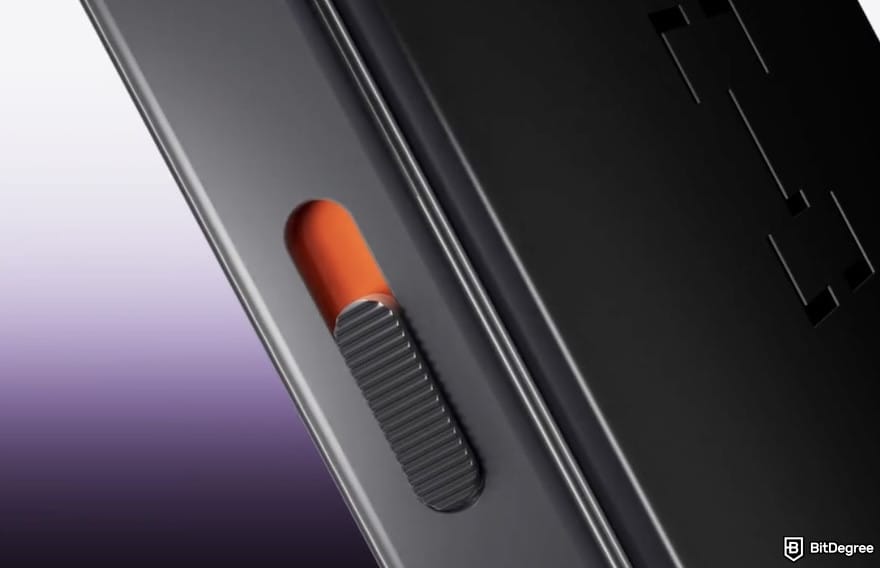
Privacy gets a hardware control as well. One physical switch cuts the camera, microphone, and any other sensors Ledger considers sensitive, such as the accelerometer. Pascal Gauthier, Chairman & CEO of Ledger, emphasizes this feature:
Software cannot secure this world. It is a battle of code against code, and the attacker only needs to be right once. The answer to this threat is hardware. A secure chip, isolated, that does exactly what it was built to do, every time. You cannot patch physics. You cannot social-engineer a chip. The atoms are fighting back, and in this fight, physics always wins.
A bar called the Secure Bar shows which mode is active. Ledger also says the camera and microphone are always cut off while Secure Mode is active, whatever position the switch is in.
The Approval Flow
Ledger Atom VS Ledger Flex comes down to how each device treats the phone or computer you use every day. Hardware wallets such as the Flex and the Nano series are physical devices built to keep your private keys on a separate device, away from your phone and computer.
They’re widely seen as the safest way to self-custody crypto, because they resist common threats[1] such as phishing and malware. In that model, the phone or computer is treated as untrusted. You start a transaction there, but you check the details and approve them on the signer’s own screen.
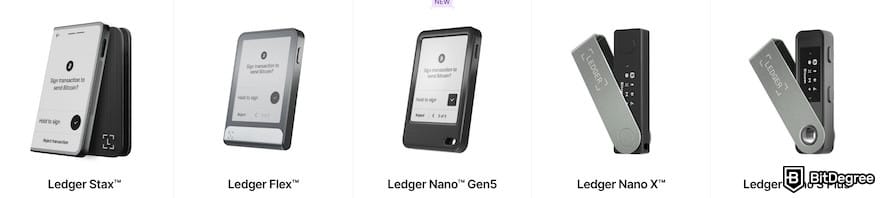
The Atom keeps that principle but moves it into one device. Standard Mode runs your everyday apps, and Secure Mode handles keys, signing, and approvals on a Secure Element.
Because the Atom is connected by 5G, Wi-Fi, and Bluetooth, the “offline” idea behind cold storage doesn't apply in the same way. Ledger’s answer is isolation inside the device, so keys stay in the Secure Element and Standard Mode can’t reach them.
Ledger describes the Atom flow like this:
1
Start a transaction in Ledger Wallet or a supported third-party app.
2
The app sends the request to the Secure Element.
3
The Atom switches to Secure Mode, and the Secure Element decides what to show on screen.
4
Review the details and confirm by swiping.
5
The Secure Element signs the transaction.
App availability depends on certifications and licences, and Ledger will confirm it before shipping.
📚 Read More: Ledger Flex VS Nano Gen5
Ledger Atom Review: PROS
The Atom’s strengths come from its design. Four stand out: one device for apps and signing, agent approvals on a Secure Screen, built-in apps from official partners, and privacy and tamper protection. Most of these are still Ledger’s claims, though.
One Device for Apps and Signing
The Atom runs two independent systems on one device: Standard and Secure Modes. They share the same display and touch panel, and Ledger says a patented hardware-level isolation keeps Standard Mode from bypassing the separation.
Why is a separate mode necessary? On an ordinary smartphone, the main chip controls every pixel and every touch. If the OS is compromised, the screen can lie. An app could show one transaction and sign another. Ledger’s answer is a Secure Screen that Ledger OS controls during sensitive actions.
Standard Mode | Secure Mode | |
|---|---|---|
Job | Everyday use: apps, camera, connectivity, display, power | Sensitive actions: holding keys, signing, approvals |
Main chip | Qualcomm chip (ARMv9.2-A) | Secure Element (ST54M) plus a microcontroller (STM32U5) |
Software | Mobile OS, Ledger Wallet and third-party apps | Ledger OS, the same OS as Ledger’s other signers |
Unlock | Pattern, password or fingerprint | A separate Ledger OS PIN |
Secrets | Credential-encrypted storage, managed by its own Secure Element | Seed, private keys and PIN, designed never to leave this hardware stack |
Ledger's view | Hardened, but a general-purpose OS, not one built for security | A standalone hardware stack |
Table: The comparison of Standard VS Secure Modes
The two modes share one screen, so the switching has to happen in hardware. Ledger uses an FPGA, a chip with configurable logic, as a physical switch that connects the display and touch input to one system at a time. When Secure Mode is active, a separate microcontroller draws the Secure Mode screens and passes your touches to the Secure Element.
The two sides talk over a narrow channel. A dedicated physical link between the Qualcomm chip and the Secure Element carries a Ledger protocol inside a secure channel, and Standard Mode can only send requests through it.
Ledger says Standard Mode can’t force a switch back without Ledger OS accepting it; observe what happens inside Secure Mode, forge what Secure Mode shows, or inject an approval.
Each mode also has its own Secure Element. One holds the credentials and storage protection for Standard Mode. The other, running Ledger OS, holds the seed and does all the signing. They’re linked, so a faulty or replaced chip counts as a security event.
Ledger ties these features together under a concept it calls “Proof of You”. The idea is that sensitive actions, such as a transaction, an agent approval, or, later, an identity check, need your physical confirmation on a screen that Ledger says no software can reach.
This lets you approve actions without handing over personal information or relying on passwords. It describes this as what its hardware and software are designed to enforce.
Independent researchers haven't verified that, and identity attestations are described as a future capability.
AI Agent Approvals on a Secure Screen
AI agents can now act on your behalf[2]: booking, trading, and transacting. Ledger’s concern is that in many agents today, actions run on software-controlled infrastructure. That means the approval screen you see before you confirm can be faked.
That’s why the Atom handles this in hardware. Through the Ledger Agent Stack, any agent action that needs your authorization is routed to Secure Mode. Ledger OS draws the details of the intended action on the Secure Screen, and you approve by touch on hardware-isolated input.
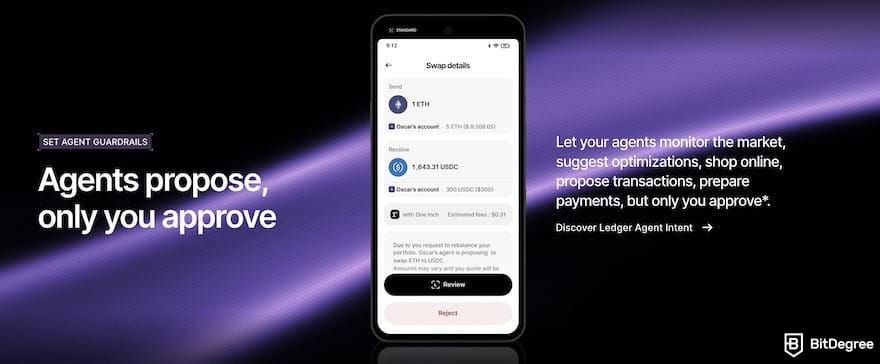
In practice, you connect your agent, it queues proposals, and you approve or reject each one. The agent cannot continue without your confirmation, and Ledger says Secure Mode is designed so that no software on the Standard Mode side can forge it.
To be honest, you don’t need an Atom for this. Agent Intent is already live and free on the Nano Gen5, Flex, and Stax, although Ledger describes the Atom as the best experience.
The Agent Stack is an open toolkit for developers, live since July 2026. Crypto transaction services used through Agent Intent come from third-party providers. Independent researchers have not tested Atom’s approval claim.
Integrated Apps With Official Partners
Atom runs everyday apps next to Ledger OS. Ledger says its hardware security covers select built-in apps and partner apps. App availability depends on certifications and licences, and Ledger will confirm it before shipping.
Ledger Wallet is the built-in way to manage crypto. The team says you can buy, swap, stake, send, and receive across 100+ chains, with each transaction verified on the Secure Screen.
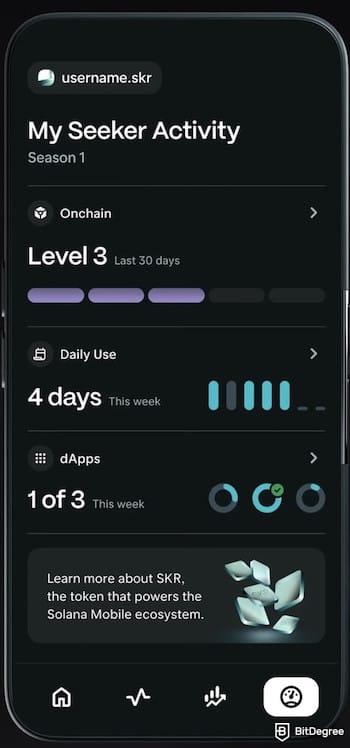
Third-party providers run these services. Solana Mobile’s Seeker app comes preinstalled. According to the Solana Mobile and Ledger announcement, it combines a wallet with the Solana dApp Store, which lists more than 1,500 dApps. Ledger also says encrypted private messaging is coming soon, so it is not available yet.
Privacy & Tamper Protection Built-In
Ledger promises that protection has to start before the device reaches you. Every Ledger device carries a unique cryptographic attestation that shows the code in its Secure Element is genuine. An attestation can’t catch an implant that watches the screen, so Ledger says it built an active shield around the Atom’s secure zone.
The shield is designed to detect attempts to touch, open, probe, or modify that zone. If it’s triggered, the Secure Element knows and reacts.
A Ledger spokesperson said the Secure Element, MCU, and FPGA sit in a protected area that’s monitored for drilling and opening attempts. The Atom is also designed to detect removal of its screen or enclosure. The back cover is paired with the device, so it can’t be swapped for one from another Atom.
📚 Read More: Ledger Security Features
Ledger Atom Review: CONS
The Atom’s drawbacks come down to cost, timing, and wording. None of these says the design is flawed, but each affects whether it is worth the wait.
High Price at $849
The Founders Edition costs $849, which is more than double the top of Ledger’s Nano and Flex range ($69–$399). Ledger adds a $50 BTC voucher, a protective accessory and screen protector, a Ledger Recovery Key, and an optional three months of Ledger Recover.
Its terms also say the final price may be recalculated from its euro price, so it can move before you pay.
For that price, the Ledger Atom specs sheet is still incomplete. Ledger lists a 60 Hz screen and Gorilla Glass 3, but has not published RAM, storage, or the processor. In my opinion, most people don’t need an $849 device for storing their assets. Moreover, Ledger says Agent Intent already works on the previous models, so the core job of signing and approving is available for far less.
Ships Only in Summer 2027
Atom is expected in summer 2027, pending certification (such as FCC), and there’s no fixed date yet. You can reserve one now with a refundable deposit, and Ledger says you can cancel for a full refund before it ships. Even so, you would be committing to a device that is a long way from your hands.
The wait also affects how far you can trust this Ledger Atom review. The Atom has not shipped, so what I know comes from Ledger’s descriptions and an event demo. Independent researchers can only test it once real units exist.
Launch coverage also ties the Atom to Ledger’s investigation into modified hardware wallets sold through its reseller CryptoBilis in Southeast Asia. According to The Block, Ledger’s security team said an unauthorized implant could capture recovery phrases from the device screen during setup and send them over a mobile network.
Onchain researchers have linked the incident to $86 million to $93 million in suspected losses, which Ledger has not confirmed. The Atom hasn’t shipped and is not part of the incident. Ledger says its tamper protection is designed to block this type of implant, and the Atom is sold only through Ledger.com.
“Quantum Ready” Is Not Quantum Resistant
Ledger calls the Atom “quantum ready” and says its Secure Element is ready for post-quantum cryptography. The device will be prepared when the world moves to post-quantum cryptography. “Ready” describes the ability to adopt it later. Nothing in the Ledger text I read says a post-quantum scheme is active on the device today.
Whether that readiness matters also depends on the networks you use. The signature schemes that Bitcoin and Ethereum use today are not post-quantum, and a signer can’t change that on its own. Therefore, the label is a statement about the future, not extra protection at launch.
Ledger Atom Price and Release Date
The Ledger Atom price is $849 as a Founders Edition, and it will be $899 after launch. Founders buyers also get a $50 BTC voucher, a protective accessory and screen protector, a Ledger Recovery Key, and an optional three months of Ledger Recover.
You reserve the Atom with a refundable deposit ($100), and Ledger says you can cancel for a full refund before it ships. Ledger’s terms add that the final price may be calculated from its euro price, so the amount can move before you pay.
There’s no exact Ledger Atom release date yet, but it’s expected to ship in summer 2027, pending certification (such as FCC). Its terms say the cellular bands may still change before launch, and Ledger lists regional versions, so check the one for your country. Ledger also notes that some mobile operators may not offer data-only plans.
How to Reserve Ledger Atom
Ledger lets you reserve the Atom before it ships. You pay a $100 deposit to reserve a Founders Edition, and Ledger says you can cancel for a full refund before the device ships. Here is how:
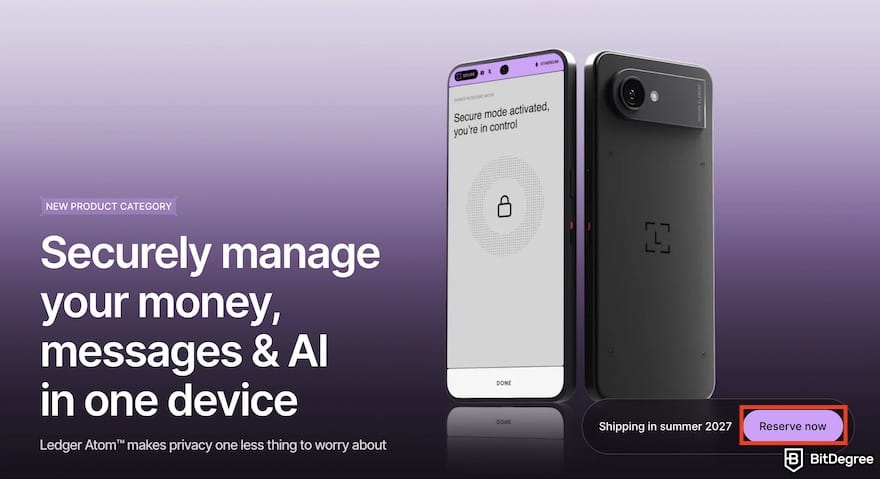
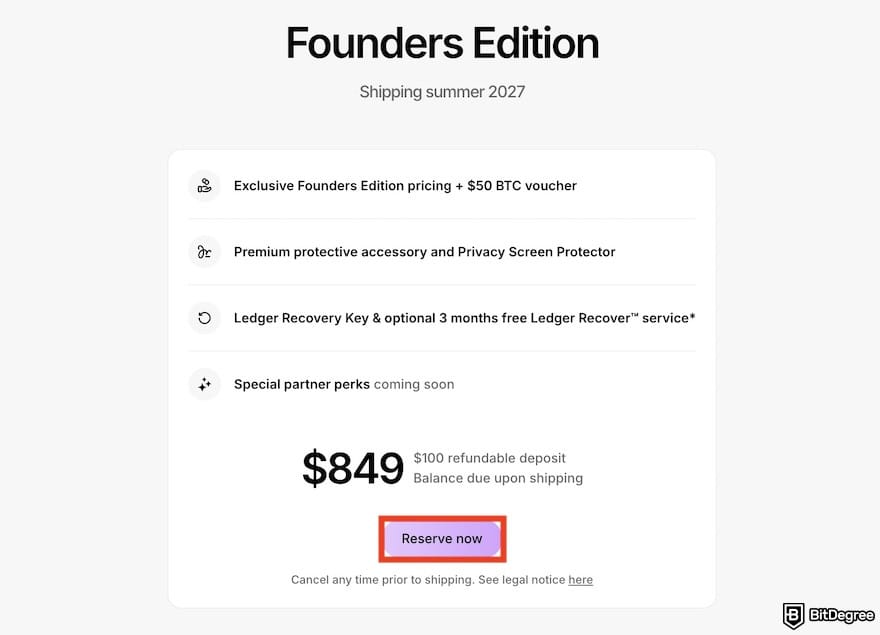
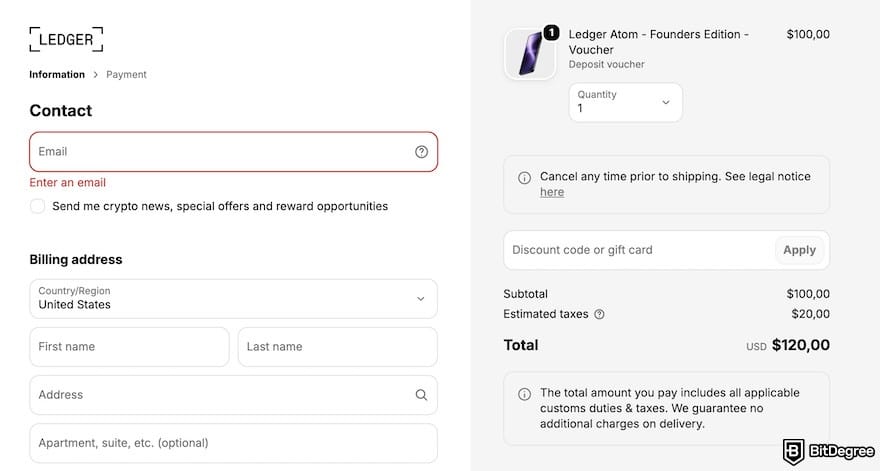
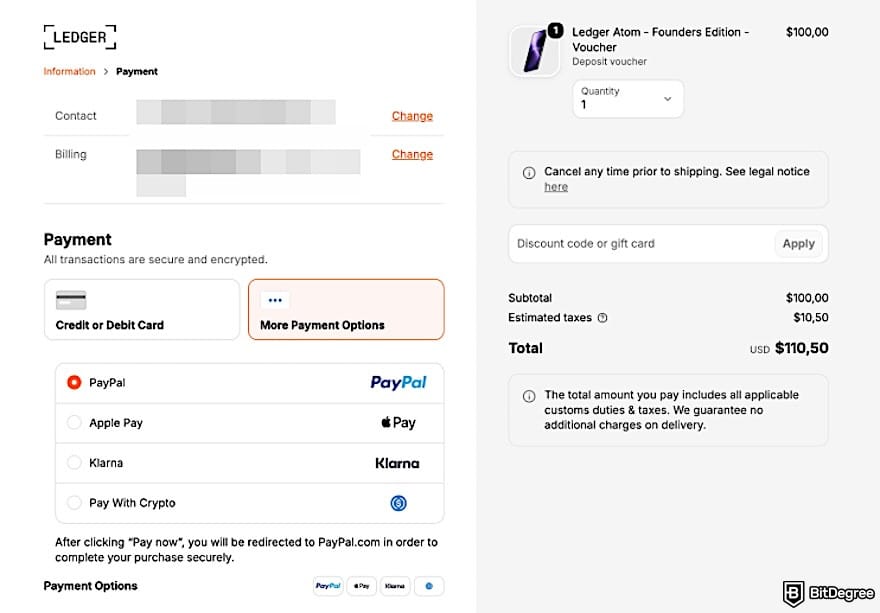
There’ll be a link to its legal notice page in the payment section. Consider checking it in case you want to cancel the reservation in the future.

- User-friendly design
- Robust security
- Long battery life

- Dual auditable Secure Element chips
- Quantum-resistant protection
- Water and dust resistant

- Transaction Check feature
- Direct dApps connection
- Great middle-ground price
Conclusions
This Ledger Atom review treats the device as Ledger’s attempt to put everyday apps and a signer in one device. Ledger’s two-mode design, agent approvals on a Secure Screen, and a physical privacy switch set it apart from previous models, including when we compare Ledger Atom VS Ledger Flex.
But the evidence is still mostly Ledger’s own. The Ledger Atom release date is still unknown, although it’s planned to ship in summer 2027. RAM, storage, and the processor are unpublished, and independent researchers haven't tested the isolation claim. At $849, it costs more than double Ledger’s other devices, which Ledger says already support Agent Intent.
So is it worth the wait? Intriguing, but not yet proven. It suits large holders who want one approval device, AI agent users, and privacy-first users. I might say that most people won’t need it.
If you need a signer today, start with our Ledger Flex or Nano Gen5 instead.
The content published on this website is not aimed to give any kind of financial, investment, trading, or any other form of advice. BitDegree.org does not endorse or suggest you to buy, sell or hold any kind of cryptocurrency. Before making financial investment decisions, do consult your financial advisor.
Scientific References
1. Wilczyński, A., Jasnosz, G.: 'Security Assessment of Smart Contract Integration and Wallet Interaction in Decentralized Applications: A Case Study of BlockScribe';
2. Bandi, A., Kongari, B., Naguru, R., Pasnoor, S., Vilipala, S.V.: 'The Rise of Agentic AI: A Review of Definitions, Frameworks, Architectures, Applications, Evaluation Metrics, and Challenges'.
About Article's Experts & Analysts


- + One device for everyday apps and signing
- + AI Agent approvals on a Secure Screen
- + Integrated apps with official partners
- + Privacy and tamper protection built-In
- - Ledger Atom price is high at $849
- - Not available until Summer 2027
- - “Quantum Ready” doesn't mean quantum resistant
See BETTER-RATED Wallets
An intriguing idea with one device for apps and signing, but not yet proven.
Disclosure: To keep our site running & free of charge, we may sometimes receive a small commission if a reader decides to purchase services via some links on site, at no extra cost.