
If you're serious about keeping your crypto safe, this Trezor Safe 5 review should be on your bookmark list. This new hardware wallet release from Trezor is one of the most talked-about options on the market right now.
It combines a certified Secure Element chip, a new SLIP39 backup standard, and a color touchscreen, all while staying true to Trezor's open-source roots.
But is it actually worth the price tag, or should you consider Trezor Safe 3 VS 5? In this Trezor Safe 5 review, I'll walk you through everything and how it stacks up against alternatives. By the end of this Trezor Safe 5 review, you'll have a clear answer on whether this wallet deserves a spot in your self-custody setup.
Verdict at a Glance
Trezor Safe 5 is a high-quality cold hardware wallet, with an NDA-free EAL6+ certified Secure Element chip, designed to withstand brute-force attacks. In addition, the Trezor Safe 5 has a color touchscreen and tactile feedback. Even though it's relatively expensive, you receive top-notch security and great design for ease of use.
Pros
- Supports 1,000+ crypto assets
- EAL6+ certified chip
- Fully open-source security
- Sleek and modern design
Cons
- Premium pricing
- No seed recovery service
- No wireless connection for mobile devices
Table of Contents
- 1. Trezor Safe 5 Review: Quick Overview
- 2. Who’s Trezor Safe 5 For?
- 3. Trezor Safe 5 Alternatives
- 4. Advantages
- 5. Limitations
- 6. Security
- 7. User Experience
- 8. Integration and Compatibility
- 9. Price
- 10. How to Use Trezor Safe 5
- 10.1. How to Set Up Trezor Safe 5
- 10.2. How to Receive Crypto on Trezor Safe 5
- 10.3. How to Send Crypto From Trezor Safe 5
- 11. Comparison to Other Popular Hardware Wallets
- 11.1. Trezor Safe 5 VS Trezor Safe 7
- 11.2. Trezor Safe 5 VS Ledger Flex
- 11.3. Trezor Safe 5 VS Tangem
- 11.4. Trezor Safe 5 VS KeepKey
- 12. Conclusions: Is Trezor Safe 5 Right for You?
Trezor Safe 5 Review: Quick Overview
Before diving into the full Trezor Safe 5 review, here's a quick snapshot of what the wallet offers, from security features to pricing and supported platforms.
Type | Hardware |
|---|---|
Is Trezor Safe 5 safe? | YES |
Best for | Security-conscious users, multi-coin (or Bitcoin-only) holders |
Established in | 2024 (SatoshiLabs) |
Headquarters | Prague, Czech Republic |
Availability | Windows, macOS, Linux (via Trezor Suite desktop app and web), Android and iOS via a USB cable |
Security | EAL6+ certified Secure Element, PIN protection, optional passphrase, microSD PIN encryption |
Additional features | Color touchscreen, haptic feedback, SLIP39 and BIP39 backup support |
Supported coins | BTC, ETH, XRP, +1000s more and Bitcoin-only |
Integrations | MetaMask, Rabby, Exodus, Backpack, Rainbow, OKX |
Price and fees | $129. No fees from Trezor; only standard network transaction fees apply |
Customer support | Hal chatbot, Knowledge Base, Support ticket system |
Privacy and anatomy | No mandatory KYC; device use doesn't require identity verification |
Table: An overview of Trezor Safe 5
The Trezor Safe 5 checks most of the boxes for anyone serious about self-custody, strong security, broad coin support, and no forced KYC. Just keep in mind it leans more toward desktop use, so if mobile-first management is a priority, it's worth weighing against alternatives.
Latest Trezor Safe 7 Coupon Found:Who’s Trezor Safe 5 For?
The Trezor Safe 5 packs a color touchscreen, haptic feedback, and a certified Secure Element chip into one device, all while keeping its design fully open-source. It's built to be both easy to use and secure.
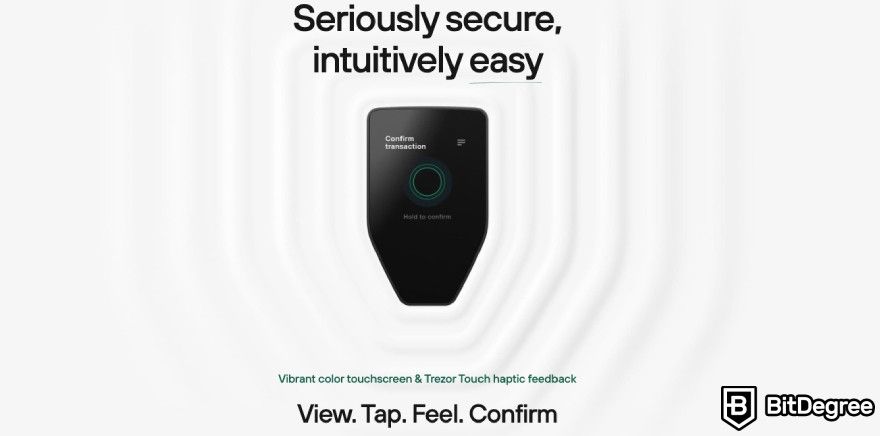
Here's a quick breakdown of who'll get the most out of it.
- Crypto beginners. The color touchscreen, haptic feedback, and the Trezor Suite app make setup and daily use intuitive, so you don't need deep technical knowledge to get started.
- Security-conscious users with larger holdings. Between the EAL6+ Secure Element chip, open-source design, and SLIP39 backup, this device is built for people who want serious protection against both online and physical attacks.
- Multi-coin holders who use several platforms. With support for thousands of coins and tokens, plus compatibility with third-party wallets like MetaMask and Rabby, it fits users who don't want to be locked into one app or ecosystem.
That said, the Safe 5 isn't for everyone. If you only hold a small amount of crypto, or you're looking for the cheapest possible option, the price tag may be hard to justify.
You can choose the Bitcoin-only Trezor Safe 5 if you want to keep just Bitcoin.

Did you know?
All Crypto wallets may look similar to you but they're NOT all the same!
Trezor Safe 5 Alternatives
The Safe 5 isn't the only hardware wallet worth considering. Here are a few popular alternatives, each with a different take on security, price, and usability.
- Ledger Flex. It’s a premium touchscreen wallet with a 2.8" E Ink display and Bluetooth/NFC connectivity, priced at $249. It includes a Ledger Recovery Key for backup, though its chip and OS remain closed-source, unlike Trezor's open design.
- Tangem. This is a card-based wallet that pairs with your phone via NFC instead of using its own screen, starting around $54.90 for a 2-card set. It's highly portable and beginner-friendly, but relies on your phone to display transaction details.
- KeepKey. If you’re looking for a budget-friendly, open-source wallet, you can choose KeepKey. Priced at $59.95, it has an OLED screen for verifying transactions and supports 11 native chains plus EVM tokens.
- Trezor Safe 7. The Trezor Safe 7 is an upgrade from the Safe 5 with a larger, brighter touchscreen, Bluetooth connectivity, wireless charging, and a more durable aluminum body, plus full iPhone support and Trezor's new open-source TROPIC01 secure element
The right choice comes down to what you value most. If open-source security and broad coin support matter more than price or mobile convenience, the Safe 5 is still hard to beat.
📚 Read More: Best Hardware Wallets
Advantages
Based on the user Trezor Safe 5 reviews and my own experience with the device, I can say this wallet can be your best option for these aspects:
- Fully open-source security;
- Certified safety chip;
- Sleek and modern design.
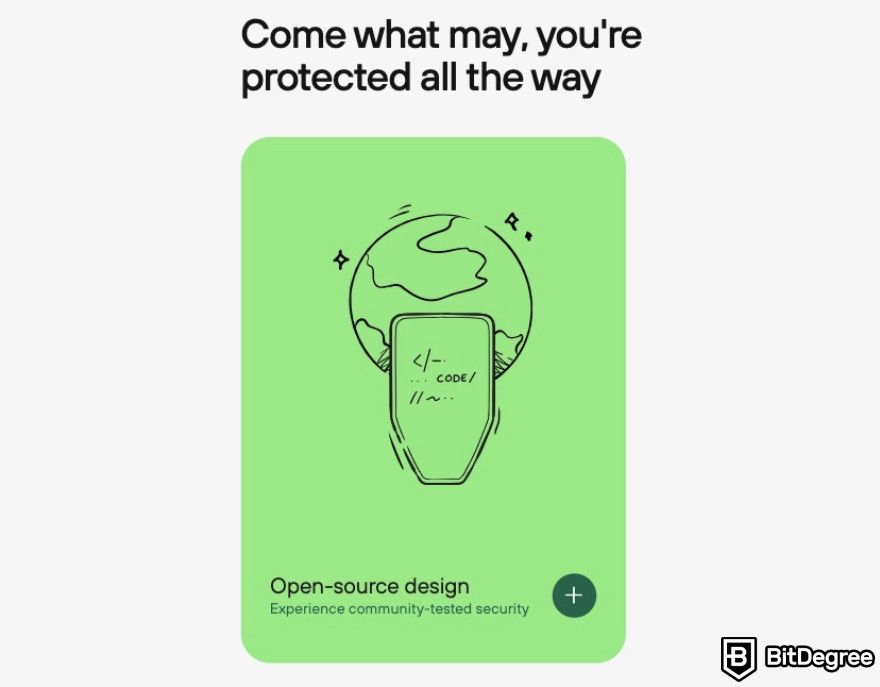
The main benefit is its open-source design, from the BIP39/Shamir Backup protocol to the device's overall design. This lets developers worldwide audit the code, spot vulnerabilities, and suggest improvements.
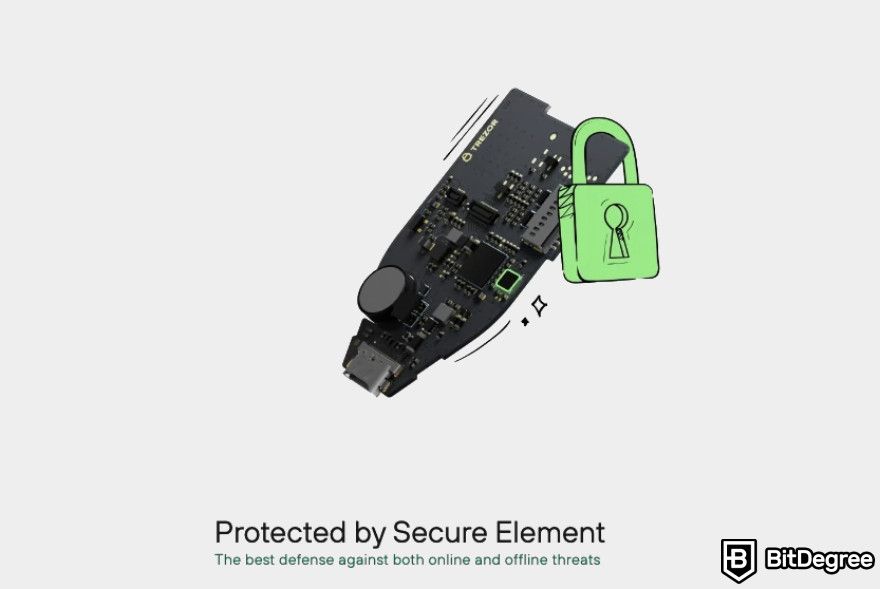
This security feature is also supported by an EAL6+ certified, NDA-free Secure Element chip that protects against brute-force and physical attacks, and SLIP39 backup support, offering a flexible 20-word mnemonic that removes single points of failure.
Besides its strong protection on the inside, Trezor Safe 5 makes sure you feel safe on the outside. The device comes with a scratch-resistant Gorilla Glass display, which is more durable than the Safe 3's screen. Combined with durable PC-ABS plastic and anodized aluminum backplates, available in multiple colors, the overall design feels modern and well-made.
Limitations
Trezor Safe 5 sounds perfect on paper, but it has some drawbacks worth noting before you decide to purchase this wallet:
- Premium pricing;
- No mobile-first experience;
- No built-in recovery service.
At €169 per item, the Trezor Safe 5 price may be hard to justify for users with small crypto holdings. Of course, it may be worthy, considering the safety and physical design it provides. But if you're just starting out or only hold a small amount, a cheaper wallet might make more financial sense.
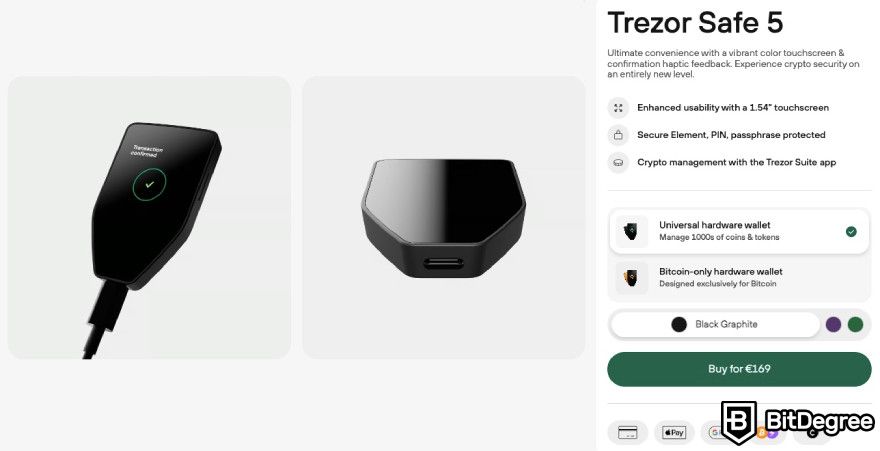
Moreover, Trezor Suite (the app that accompanies Trezor Safe 5) is desktop-centric. Unlike Ledger Flex or Tangem, you don't get the same wireless, on-the-go management directly from your phone.
Lastly, there’s no built-in recovery service, unlike Ledger Recover. This means that if you lose both your PIN and your seed phrase, there's no way to regain access to your wallet.
Security
SatoshiLabs, Trezor’s parent company, developed an open-source protocol, BIP39 or Shamir Backup, to create a human-readable mnemonic sentence[1] that can be used as a backup to recover your wallet. In fact, it was the first open-source protocol for other companies.
As time went by, Trezor has had a respectable resolution to keep everything it produces open-source. This way, developers from around the world can offer improvements to the codebase,[2] identifying potential vulnerabilities and suggesting enhancements, creating a more effective process of improving the code.
This naturally earns the hardware wallet a lot of trust from the crypto community, especially since transparency is an important aspect for everyone who is using their product to store their assets.
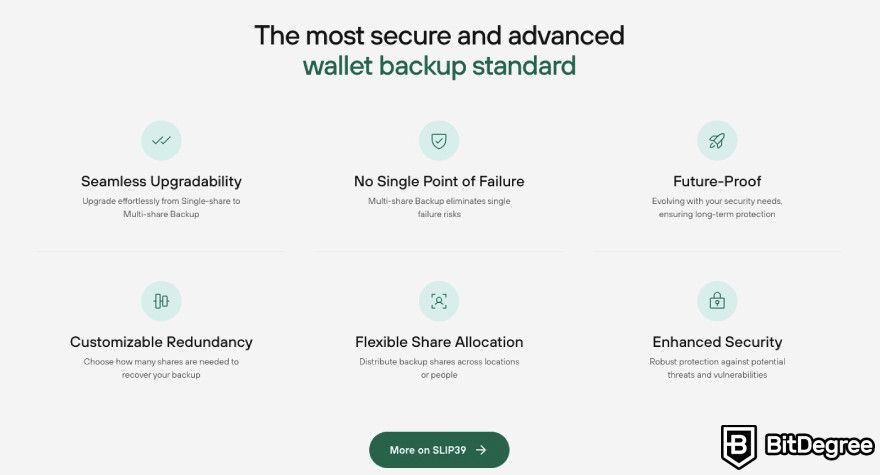
Now, as an upgrade in self-custody security, Trezor has introduced SLIP-39 as the default wallet backup standard. This enhanced 20-word standard offers a smooth upgrade path from single-share to multi-share backup, removing any single point of failure and giving users more flexibility in how they create and recover backups.
Luckily, Trezor Safe 5 is one of the devices that has this upgrade built-in. Nonetheless, if you prefer, the older BIP39 standard is still available too, with a 12- or 24-word seed phrase.
Another feature worth mentioning is the Secure Element chip, called OPTIGA Trust M (V3). It's EAL6+ certified and NDA-free, and it adds an extra layer of protection to the PIN system, making the wallet harder to physically attack.
In simple terms, this chip is designed to stop brute-force attacks. Because Trezor signed an NDA-free deal with the chip maker, they can keep everything open-source.
For even more security, the Safe 5 (like the Model T) lets you encrypt your PIN using a microSD card. When you turn this on, the device generates a random secret and saves it to the card. Without that card, the wallet can't be unlocked.
The issue is that I noticed that some user Trezor Safe 5 reviews expressed concern about sticky residue resembling the word “void” appearing after peeling the tamper-proof holographic sticker. Hence, I want to clarify that this residue is perfectly normal and expected.
Just make sure that you don’t purchase a Trezor hardware wallet from third parties, as they can be tampered with.
Buy it directly from the official website; you definitely get the “legit” one and the possibility to use a Trezor Safe 5 voucher code for a better price.
User Experience
If we were to compare the appearance of Trezor Safe 5 VS Safe 3, there would be one unique difference. The former has a color touchscreen instead of 2 buttons for controlling the device. You could say that the Safe 5 and Safe 3 models are basically upgraded versions of the Model T and One hardware wallets.
Having a touchscreen makes the device more user-friendly, right? Because you don’t have to press buttons each time to enter your PIN or confirm transactions can save a lot of time. But if you don’t trade and only purchase assets once a month, the screen doesn’t make a big difference, to be honest.
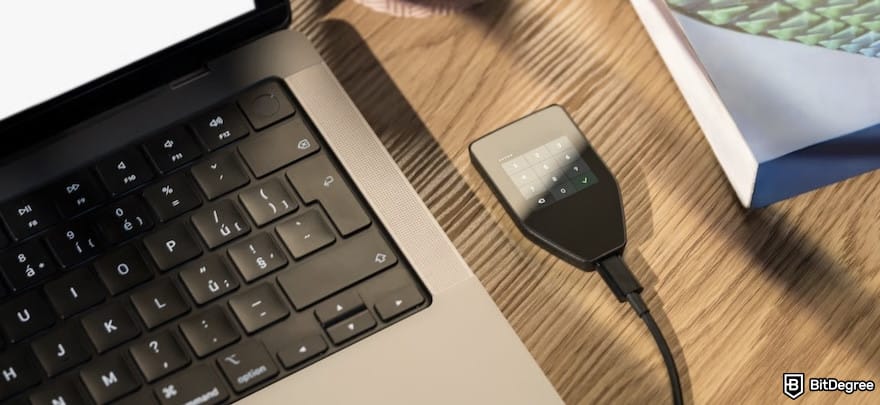
Moreover, Trezor Safe 5 comes with a new feature that provides users with tactile feedback. The hardware wallet uses a haptic engine to make the device more error-free and increase the overall user experience.
In fact, there were a lot of user Trezor Safe 5 reviews that expressed positive feedback regarding the design itself. The new model doesn’t inset the screen, which leaves a lot more space for your fingers.
Additionally, the display is made from scratch-free Gorilla Glass. This makes the screen of high quality and resistant to drops, bumps, and everyday usage. Meanwhile, the Safe 3 display is prone to scratches and overall wear.
The wallet's design is available in three colors: green, purple, and black for the regular model and orange for the Bitcoin-only version.
It’s made with durable PC-ABS plastic and anodized aluminum backplates with intricate laser engravings, so the wallet has a sleek, modern, and expensive look.
Integration and Compatibility
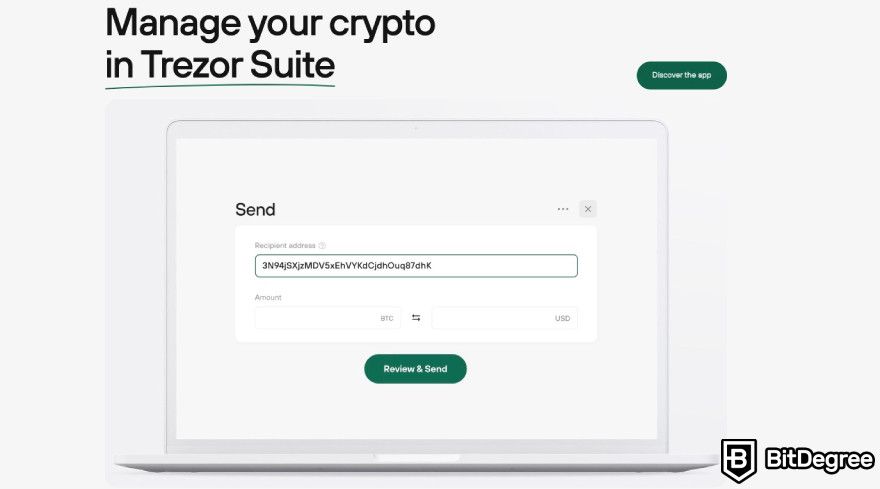
The Trezor Safe 5 works with the Trezor Suite app for everyday tasks like sending, receiving, staking, and buying crypto, plus portfolio tracking.
But you're not locked into it because it also connects to a long list of third-party wallet apps, including MetaMask, Rabby, Exodus, Backpack, Rainbow, and OKX, so you can access features like DeFi, staking, or token swaps that Trezor Suite doesn't offer natively.
The wallet supports 1000s of coins and tokens, including major cryptocurrencies like Bitcoin, Ethereum, Cardano, Dogecoin, and Solana, as well as numerous ERC-20 tokens and other blockchain-specific assets. This broad compatibility ensures that users can store and manage almost any cryptocurrency they own or plan to invest in without needing multiple wallets.
Connecting to exchanges is also straightforward. To move funds from an exchange like Coinbase or Binance, you just connect your Trezor, open Trezor Suite, copy your receive address, then paste it on the exchange to send the transaction.
Your private keys stay on the device the whole time; even when you're using a third-party app, transactions still need to be confirmed on the Trezor itself.
Price
The Trezor Safe 5 costs $129. Besides the hardware wallet itself, you'll get a USB-C to USB-C cable, two wallet backup cards, a start-up guide, and some Trezor stickers.
 | |
|---|---|
| 3 business days | |
| 169 USD | |
| - | |
| Visit site Read review |
Table: Trezor Safe 5 pricing
I get that not everyone wants to pay a premium price for a hardware wallet. But in exchange, you're getting top-tier security, open-source transparency, and a sleek, well-built design. It may be one of the pricier options on the market, but it's also one of the safest.
If you like what the Safe 5 offers but the price feels too steep, look for a Trezor Safe 5 voucher code to bring the cost down.
How to Use Trezor Safe 5
In case you’re interested in having this wallet after reading my Trezor Safe 5 review, let me show you how to set it up, as well as receive and send crypto via the Trezor Suite app.
How to Set Up Trezor Safe 5
After making sure that the security seal on the box itself is untouched, you can go ahead and take out the device. Then, proceed to remove the holographic seal, which should leave a residue that reads “void”, and connect your Trezor to the computer. There, you will need to complete the following steps:
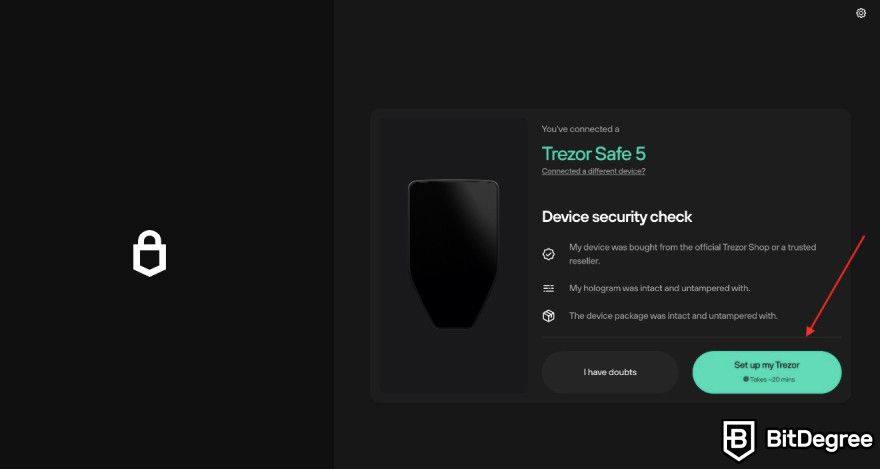
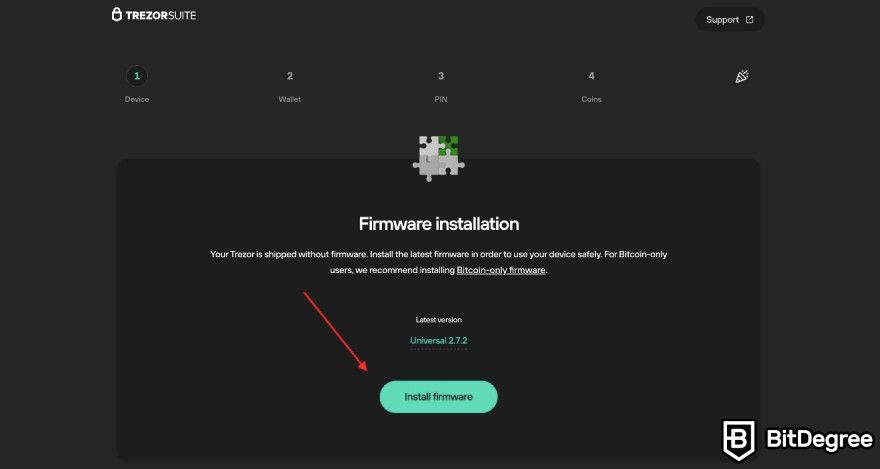
It’s a red flag when you see a status that the firmware has already been installed. Contact Trezor before finishing up the setup process.
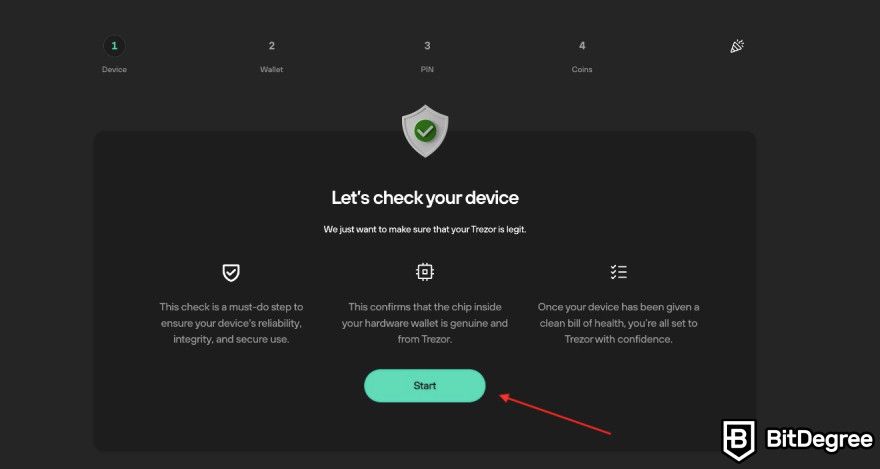
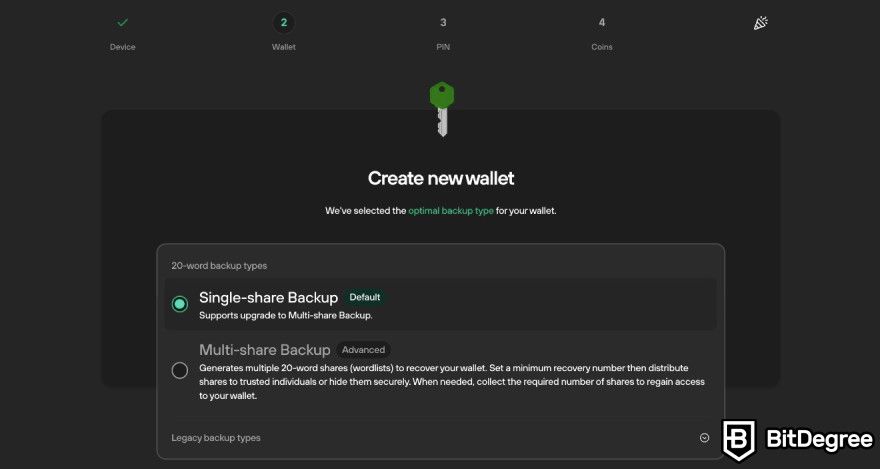
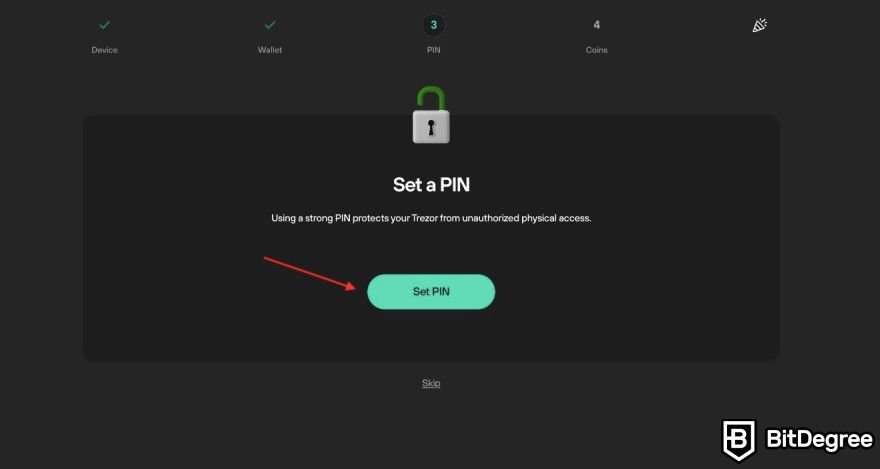
When you complete all of the above steps, your device should be fully functional, and you can proceed to transfer your digital assets into your hardware wallet for safekeeping.
How to Receive Crypto on Trezor Safe 5
No matter which model you use, whether it's the Trezor Safe 5 or the newer Trezor Safe 7, receiving crypto works the same way through the Trezor Suite app.
![Trezor Safe 5 review: the [Receive] button on the Trezor Suite app.](https://assets.bitdegree.org/images/trezor-safe-5-review-receive-button-download.jpg "Trezor Safe 5 review: the [Receive] button on the Trezor Suite app.")
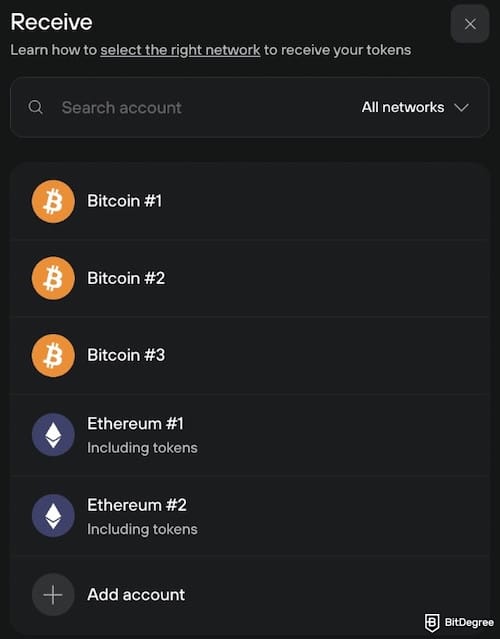
If your network isn't listed, scroll to the bottom and click [Add account] to set it up. Alternatively, you can select an account directly from the left panel and click [Receive] from there.
![Trezor Safe 5 review: the [Receive] screen, along with the [Show full address] button.](https://assets.bitdegree.org/images/trezor-safe-5-review-full-adress-unlock-suite.jpg "Trezor Safe 5 review: the [Receive] screen, along with the [Show full address] button.")
Before confirming anything, double-check that the address you pasted matches the one shown on your Trezor screen; if it matches, you're good to go.
How to Send Crypto From Trezor Safe 5
Just like receiving, sending crypto works the same way across Trezor models, all through the Trezor Suite app. The process takes just a few clicks, but every transaction still needs to be confirmed directly on your Trezor device, so your private keys and final approval never leave the hardware wallet. Here's how it works, step by step.
![Trezor Safe 5 review: the [My Accounts] sidebar on the Trezor Suite app.](https://assets.bitdegree.org/images/trezor-safe-5-review-my-accounts-sidebar.jpg "Trezor Safe 5 review: the [My Accounts] sidebar on the Trezor Suite app.")
![Trezor Safe 5 review: the [Send] screen on the Trezor Suite app.](https://assets.bitdegree.org/images/trezor-safe-5-review-send-screen-trezor-suite.jpg "Trezor Safe 5 review: the [Send] screen on the Trezor Suite app.")
Click [+ Add Recipient] to send to multiple addresses in one transaction, or import addresses from the dropdown menu. This saves on transaction fees compared to sending separately.
This is optional, but you can turn on Labeling in Application Settings to organize transactions. Labels can be stored via Google Drive, Dropbox, or saved locally on your computer.
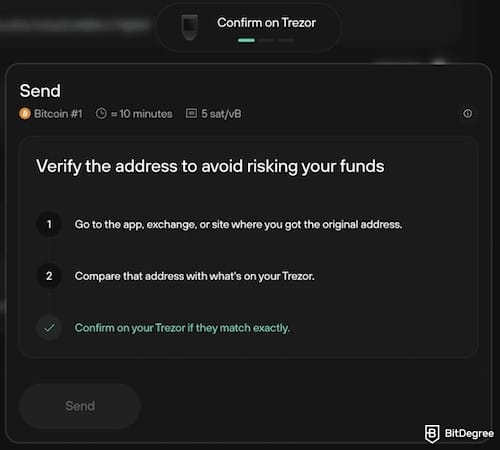
If anything on your Trezor screen doesn't match your computer screen, stop immediately and contact support via the Hal chatbot, as your computer may be compromised.
The speed depends on the network situation. Once done, you can check your transaction history in the Overview tab.
Comparison to Other Popular Hardware Wallets
Are you thinking that this hardware wallet isn't for you after reading this Trezor Safe 5 review? Don't worry; you have plenty of options!
Trezor Safe 5 VS Trezor Safe 7
If you're deciding between Trezor's two current flagship devices, the biggest differences come down to screen, connectivity, and build. The Safe 7 has a much larger 2.5" touchscreen, roughly 62% bigger than the Safe 5's 1.54" display, and it's brighter at 700 nits, making it easier to read outdoors.
 | | |
|---|---|---|
|
| |
|
| |
| | | |
| Visit site Read review | Visit site Read review |
Table: The pros and cons of Trezor Safe 5 VS Safe 7
Build quality is also a step up, since the Safe 7 uses a single-piece aluminum unibody with Gorilla Glass on both front and back.
Connectivity is where the Safe 7 really pulls ahead. It adds Bluetooth and Qi2 wireless charging, and unlike the Safe 5, it's fully usable on iPhone, letting you send, swap, and manage funds directly from your phone rather than just checking balances.
On the chip side, the Safe 7 also introduces TROPIC01, described as the first fully open-source secure element whose hardware design and firmware are published for public review.
All of this comes at a real price difference; the Safe 5 costs around $129 versus the Safe 7's $249. This means the extra $120 goes toward wireless connectivity, the premium build, and the dual-secure-element TROPIC01 architecture.
Trezor Safe 5 VS Ledger Flex
Both are premium touchscreen wallets, but they take different approaches to security and display. The Safe 5 uses a color LCD touchscreen, while the Ledger Flex has a 2.8" E Ink touchscreen with Gorilla Glass and anti-glare coating, and connects via USB-C, Bluetooth, and NFC, so it's more flexible for mobile use.
 | | |
|---|---|---|
|
| |
|
| |
| | | |
| Visit site Read review | Visit site Read review |
Table: The pros and cons of Trezor Safe 5 VS Ledger Flex
On the security side, both use certified Secure Element chips, but Trezor stays true to its open-source roots, while Ledger's chip and OS remain closed. The Flex also ships with a Ledger Recovery Key included, letting users restore access with a tap through the Coincover-backed Ledger Recover service.
Price-wise, the Ledger Flex costs $249, more than the Safe 5's $129. As for mobile use, Ledger has the edge, with the Flex working across desktop, iPhone, and Android through the Ledger Wallet app, with Bluetooth, USB-C, and NFC support, so you can manage crypto straight from your phone.
Trezor Suite, by comparison, is more desktop-centric; you can pair the Safe 5 with a phone, but it doesn't offer the same wireless, on-the-go experience.
If open-source transparency and value matter most to you, the Safe 5 wins. But if you want true mobile flexibility and don't mind paying more, the Flex has the edge.
📚 Read More: Ledger Flex
Trezor Safe 5 VS Tangem
Tangem takes a completely different form factor, as it's a set of NFC-enabled cards (or a ring) that pair with your smartphone.
It's seedless by design, using multiple cards as physical backups instead of a traditional recovery phrase, though generating one is still optional for advanced users. This wallet also has no batteries or cables, since it's powered by your phone's NFC module.
Trezor Safe 5 | KeepKey | |
|---|---|---|
Pros | ✓ Fully open-source security (BIP39/SLIP39, firmware, design) ✓ EAL6+ certified, NDA-free Secure Element chip ✓ SLIP39 multi-share backup with no single point of failure ✓ Color touchscreen with haptic ✓ Supports thousands of coins and tokens | ✓ Budget-friendly at $59.95 ✓ Open-source design ✓ OLED screen for verifying transactions ✓ Mobile companion app (KeepKey Companion) for checking balances ✓ Simple, no-frills setup |
Cons | ✗ Premium price (~$192) ✗ Desktop-centric; no wireless mobile management via Trezor Suite ✗ No built-in recovery service if both PIN and seed phrase are lost | ✗ No certified Secure Element chip ✗ Limited coin support (11 native chains + EVM tokens) ✗ Fewer third-party wallet integrations |
Table: Comparison of Trezor Safe 5 VS KeepKey
Tangem is cheaper, too. A 2-card set starts around $54.90 and a 3-card set around $69.90, well under the Safe 5's $129. It's also mobile-first by design, since the Tangem app is how you manage everything, tapping your card to your phone to sign transactions. There's no desktop-first workflow like Trezor Suite.
This makes Tangem more portable, affordable, and beginner-friendly, but it also means you're relying entirely on your phone to display transaction details, unlike the Safe 5's own trusted screen.
📚 Read More: Tangem Review
Trezor Safe 5 VS KeepKey
KeepKey is the budget, no-frills option in this comparison. It costs $59.95, and stores private keys on a device that never touches the internet, verifying transaction details on its own OLED display. It supports 11 native chains plus EVM tokens, and offers built-in THORChain swaps.
| |  | |
|---|---|---|
|
| |
|
| |
| | | |
| Visit site Read review | See TOP10 Brands Read review |
Table: The pros and cons of Trezor Safe 5 VS KeepKey
KeepKey also offers a mobile app, KeepKey Companion, letting you watch balances and approve transactions from anywhere, though your keys still live on the physical device. Still, this is a lighter mobile experience compared to what Ledger or Tangem offer.
Compared to the Safe 5, KeepKey lacks the certified Secure Element chip and doesn't support anywhere near the same range of coins and tokens. It's a reasonable pick if you're on a tight budget and mainly hold major coins, but for broader coin support, stronger physical security, and a more capable companion app, the Safe 5 is the more well-rounded device.
📚 Read More: KeepKey Review
Conclusions: Is Trezor Safe 5 Right for You?
After going through everything in this Trezor Safe 5 review, from its open-source security to its modern design, I believe that this wallet is built for people who take self-custody seriously.
Moreover, the color touchscreen and haptic feedback make daily use pleasant, and broad compatibility with third-party wallets and thousands of coins means you won't outgrow it anytime soon. If you value transparency, strong physical security, and flexibility over convenience, the Safe 5 delivers on nearly every front.
That said, it's not the right fit for everyone. If you're new to crypto with only a small amount to protect, or you want a wallet you can manage entirely from your phone, the price tag and desktop-centric Trezor Suite experience might feel like overkill. In that case, alternatives like Tangem or Ledger Flex offer a more affordable or mobile-friendly experience.
The Trezor Safe 5 is one of the safest, most transparent hardware wallets on the market today. It’s definitely worth it if you're holding a meaningful amount of crypto long-term.
The content published on this website is not aimed to give any kind of financial, investment, trading, or any other form of advice. BitDegree.org does not endorse or suggest you to buy, sell or hold any kind of cryptocurrency. Before making financial investment decisions, do consult your financial advisor.
Scientific References
1. B. G. Kim., Y. S. Cho., S. H. Kim., et al.: 'A Security Analysis of Blockchain-Based Did Services';
2. S. Weber.: 'The Success of Open Source'.
About Article's Experts & Analysts


- + Supports 1,000+ crypto assets
- + EAL6+ certified chip
- + Fully open-source security
- + Sleek and modern design
- - Premium pricing
- - No seed recovery service
- - No wireless connection for mobile devices
One of the most secure cold hardware wallets on the market.
Disclosure: To keep our site running & free of charge, we may sometimes receive a small commission if a reader decides to purchase services via some links on site, at no extra cost.