


Coinbase vs Uphold - In-Depth Comparison
Coinbase and Uphold will both happily turn your dollars into Bitcoin, but they have set up shop in different corners of the market.
Since launching in 2012, Coinbase has grown into a Nasdaq-listed crypto company known for its accessible interface and more advanced trading tools. Uphold traces its roots to Bitreserve in 2014 and operates more like a multi-asset marketplace, bringing crypto, foreign currencies, and precious metals under one roof.
That’s why asking which platform wins the Coinbase vs Uphold comparison misses the bigger point.
Instead, consider how you want to use your assets after funding the account. Coinbase covers more ground if you want to start simply and move toward advanced trading. Uphold makes more sense if you want several asset classes and easy exchanges between them
Coinbase has separate fee structures for simple and Advanced trading, while Uphold generally charges according to the asset type.
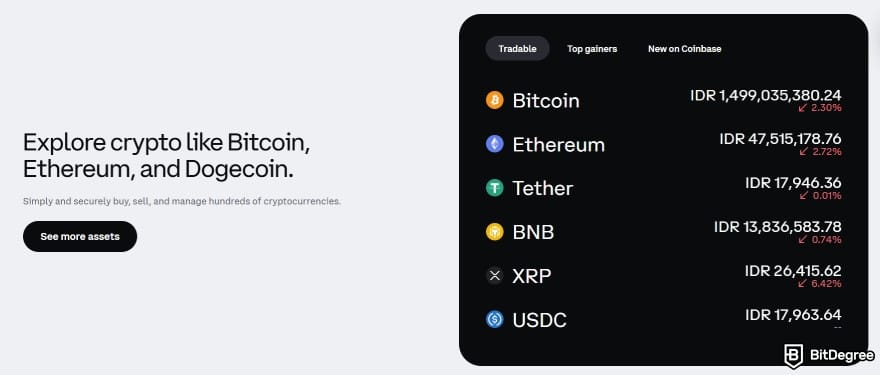
Their scale looks different, too. Uphold reports over 10 million users in more than 150 countries and a catalog of 300+ crypto assets. Coinbase brings over a decade of operating history and the additional transparency expected from a publicly traded company (COIN).
Coinbase | Uphold | |
|---|---|---|
Best for | Users who want an accessible platform that can grow with their trading skills | Multi-asset holders who want crypto, stocks, commodities, and forex in one app |
Main strength | A broad crypto ecosystem that extends beyond buying and selling | A multi-asset account with a simple trading flow |
Spot trading fees | Pricier on simple trades, much lower on Advanced | Low on stablecoins and FX, higher on crypto and metals |
Crypto market access | 550+ spot pairs | 300+ tokens |
Staking | Supported | Supported |
Advanced trading | Advanced tools for spot and eligible derivatives trading | Useful order controls, without derivatives |
Beginner experience | Beginner-friendly with advanced tools available for later | Very accessible, with a simple multi-asset dashboard |
Overall verdict | Better for a focused crypto experience | Better for simple multi-asset access in one account |
Table: a quick Coinbase vs Uphold comparison
Put simply, Coinbase is the more obvious choice if you plan to become an active trader. Uphold is better suited to people who prefer a broader mix of assets, automated features, and lighter trading tools. Neither does everything, and the feature selection depends on where you live.
Coinbase vs Uphold - Market Position
Coinbase started with basic crypto purchases but has since developed into a larger exchange and infrastructure operation. Its status as a public company also means publishing audited filings and scheduled financial reports. By Coinbase’s own measure, it accounted for 10.3% of crypto trading volume in the second quarter of 2026.
Uphold has built its reach differently. It offers hundreds of supported assets, and it searches across more than 30 centralized and decentralized venues when routing orders. You can exchange one supported holding for another without manually finding the necessary trading pair.

Their product ranges have started to overlap in some areas. Coinbase offers some stock products to eligible US users through a distinct securities business, and Uphold has launched access to US equities. Since securities follow different rules from crypto, your country and account eligibility still determine what appears in the app.
Verdict
Coinbase has more visible scale and a fuller trading stack. Uphold’s practical appeal comes from its broad conversion model and access to non-crypto assets in eligible regions.
Coinbase vs Uphold - Trading Features
Both Coinbase and Uphold cover the basics, allowing you to buy, sell, and convert crypto through a browser or mobile app. Their approaches begin to differ once you look beyond those essentials.
Coinbase Trading Features
Coinbase sorts trading into lanes, and the lane you pick has an effect on cost. For everyday trades, Coinbase offers:
- Buy & sell for easy cryptocurrency purchases and sales;
- Convert for swapping one currency for another;
- Recurring buys for automating regular purchases;
- Price alerts help you keep track of market movements without constantly checking the app.
For more experienced traders, it adds:
- Spot trading across more than 550 pairs;
- Market, limit, and stop-limit orders for greater control over how trades are executed;
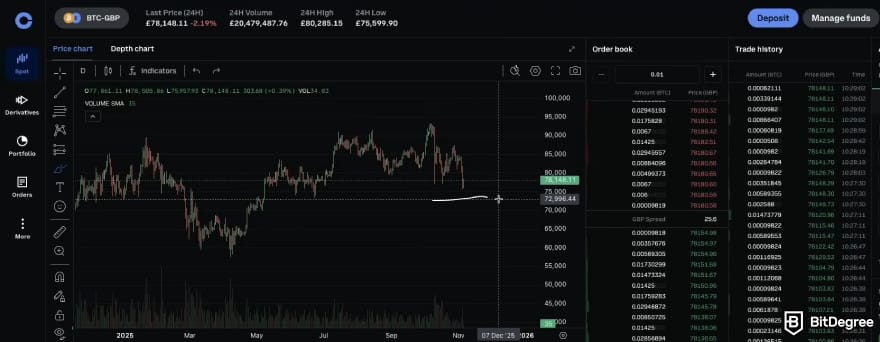
- TradingView charts provide technical indicators and deeper market data for more detailed analysis;

- Order books show the available bids and asks, giving you a clearer view of market depth;
- Derivatives trading is available in eligible regions for users looking beyond regular spot markets;
- API trading supports automated strategies and connections to external trading tools.
The downside is that Advanced takes more time to learn. There are more controls and moving parts than on the simple trading screen, while futures may also incur an extra charge if a position is liquidated.
Uphold Trading Features
Uphold’s pitch is breadth and simplicity. For buying and swapping, Uphold offers:
- Anything-to-anything swaps let you convert directly across 300+ crypto assets, major fiat currencies, and precious metals;
- Crypto Baskets bundle selected assets around themes such as “The Big Three” or AI-related tokens, giving you a simple way to diversify in one click.
For order types and automation, it includes:
- Limit orders that only execute at your chosen price;
- Repeat transactions that run daily, weekly, or monthly, which suits dollar-cost averaging;
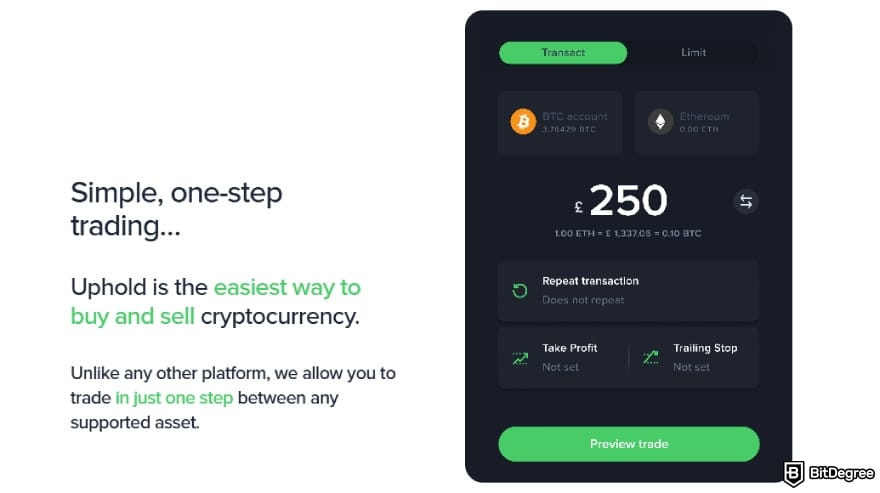
- Take-profit orders that sell automatically at a target price;
- Trailing stops that sell after a set drop from the peak.
Uphold keeps things relatively simple, and that comes with trade-offs. There’s no futures trading, margin trading, advanced order types, or professional charting interface. If you depend on those tools, this probably isn’t the platform you’re looking for.
Verdict
For active crypto trading, Coinbase gives you far more room to work with. Uphold focuses on simple asset conversions and useful automation, but leaves out many of the features more advanced traders may expect.
Coinbase vs Uphold - Fees
Coinbase and Uphold take noticeably different approaches to fees. Coinbase splits its pricing between standard trades and Advanced mode, while Uphold uses one asset-based fee schedule. Standard trades on both platforms can also include a spread, though no worries, you’ll see the final cost before confirming the transaction.
Coinbase's Fee Structure
Coinbase doesn’t apply one universal fee model across the platform. Simple trades generally come with a spread of about 0.5%, along with a flat fee that gets higher as your transaction amount increases.
Order Size | Typical Fee |
|---|---|
Under $10 | $0.99 |
$10–$25 | $1.49 |
$25–$50 | $1.99 |
$50–$200 | $2.99 |
Over $200, funded by bank/ACH | ~1.49% |
Over $200, funded by debit or credit card | ~3.99% |
Table: Estimated Coinbase simple trade fees
Tiny purchases are where Coinbase’s fee model can be a bit harsh. A $0.99 fee on a $5 transaction is roughly a 20% hit, which is hard to ignore if you regularly buy in small amounts. The percentage improves with larger purchases, but Coinbase Simple still carries a high premium.
Coinbase Advanced replaces flat retail-style fees with a tiered maker-taker structure, where increasing your rolling 30-day trading volume can reduce the rate you pay.
30-Day Trading Volume | Taker Fee | Maker Fee |
|---|---|---|
$0–$10K | 0.60% | 0.40% |
$10K–$50K | 0.40% | 0.25% |
$50K–$100K | 0.25% | 0.15% |
$100K–$1M | 0.20% | 0.10% |
$1M–$15M | 0.18% | 0.08% |
$15M–$75M | 0.16% | 0.06% |
$75M–$250M | 0.10% | 0.03% |
$250M–$400M | 0.06% | 0.00% |
$400M+ | 0.04% | 0.00% |
Table: Coinbase Advanced trading fees
At higher volume tiers, Coinbase can bring maker fees all the way down to 0%. Its entry-level 0.40% maker and 0.60% taker rates are still higher than the roughly 0.10% charged by Binance or Bybit, but the balance starts to shift for high-volume makers.
Coinbase One can waive the separate trading fee on eligible simple trades, although each plan comes with its own monthly trading-volume limit.
Coinbase also has a few specialized fee schedules with much lower rates. Eligible stablecoin pairs can come with near-zero pricing, while USDC-to-USD conversion fees only kick in once your rolling 30-day net volume exceeds $2 million.
Just keep in mind that “zero fee” doesn’t mean “zero cost”. Coinbase may still build a spread into the quoted price even when there’s no separate trading fee. Coinbase One can waive that fee too, but the membership itself still costs money.
📚 Read More: Coinbase Fees Explained
Uphold's Fee Structure
Uphold takes a different approach to pricing. There’s no visible trading commission or standard maker-taker model. Instead, the cost of a trade depends on multiple factors, including:
- Location
- Payment method
- Assets
- Trade size
- External costs
- Processing fees
- Network charges
For the US, UK, and Europe, fees usually look like:
Rate | |
|---|---|
Major cryptocurrencies (BTC, ETH) | 2.05% – 2.2% |
USD and supported USD stablecoins | 0% |
Other stablecoins | < 0.25% |
Altcoins | 2.85% – 3.80% |
Major Market FX | 0.30% |
Precious metals | 2.35% – 3.40% |
Table: Uphold fees
If a trade involves two asset categories, the more expensive fee rate wins. Converting an altcoin to a stablecoin, for instance, uses the altcoin fee. Fees may also move higher when markets become volatile, or liquidity dries up, as spreads adjust accordingly. Uphold then gives you an 18-second price lock, with inventory risk built into the final quote.
📚 Read More: Uphold Fees Explained
$1,000 Bitcoin Trade Fee Comparison
Say you buy $1,000 of Bitcoin with a bank transfer. Here’s the trading fee before any spread.
On Coinbase’s simple trade, at the typical rate:
$1,000 x 1.49% = $14.90
On Coinbase Advanced, at the entry taker rate:
$1,000 x 0.60% = $6.00
On Uphold, at either end of its Bitcoin range:
$1,000 x 2.2% = $22.00
In this example, Coinbase Advanced comes out with the lower estimated trading cost. Its standard counterpart is harder to compare without a live preview, though it will generally be more expensive. Uphold already costs more, and that’s without counting additional funding charges such as US card, Apple Pay, or Google Pay deposit fees.
Still, trading fees are only one part of the total cost. Before placing an order, it’s also worth checking:
- The bid-ask spread;
- Slippage on larger orders;
- Your Coinbase trading tier;
- Whether your order adds or removes liquidity;
- Crypto withdrawal and network fees;
- The final execution price.
You can always check the trading fee before confirming an order on either platform. The example above is only illustrative, and the percentage shown on the table doesn’t necessarily tell you the total amount you’ll pay.
Verdict
Coinbase has the more layered pricing model, yet Advanced can cut trading costs considerably for active traders and bigger orders. Uphold is more straightforward, but simpler doesn’t always mean cheaper, as its costs tend to be higher in most situations.
Coinbase vs Uphold - Liquidity & Execution
Published fees only tell you so much. You also need to know what happens to the price when you place a trade.
Coinbase Advanced runs on an order book, with the most activity on major pairs such as BTC/USD and ETH/USD. When plenty of buyers and sellers have orders close to the current price, a typical trade has a better chance of filling quickly without much slippage.
Uphold doesn’t rely on the standard order-book setup you’ll find on many crypto exchanges. It draws pricing from about 30 connected venues, spanning CEXs, DEXs, and Layer-2 networks, before showing you a single rate that includes the full trading cost.
Once the rate is shown, there’s only a short confirmation window before it refreshes. If the spread on a particular asset widens past 4%, Uphold warns you before the trade goes through, a small but useful transparency detail.
Note
For crypto-to-crypto trades, Coinbase is the stronger option for liquidity. Uphold offers less depth but makes execution easier to follow, with all-in quotes and an alert when spreads stretch beyond the usual range.
Coinbase vs Uphold - Security & Trust
Coinbase and Uphold sit on the more regulated side of the crypto market, though the reasons users may trust them aren’t identical. Put simply, both have regulators looking over their shoulders, just not always the same ones.
Coinbase | Uphold | |
|---|---|---|
Two-factor authentication | ✓ | ✓ |
Biometric authentication | ✓ | ✓ |
Cold storage | ✓ | ✓ |
Assets held 1:1 | ✓ | ✓ |
24/7 monitoring | ✓ | ✓ |
Extra withdrawal protection | Vault & withdrawal controls | Vault & account freeze |
Table: Coinbase vs Uphold security features
Coinbase is a US public company listed on Nasdaq under COIN, which means it publishes audited financial statements and regular SEC filings. It also operates through regulated entities across multiple markets, including a MiCA-authorized entity in Luxembourg for the EEA.
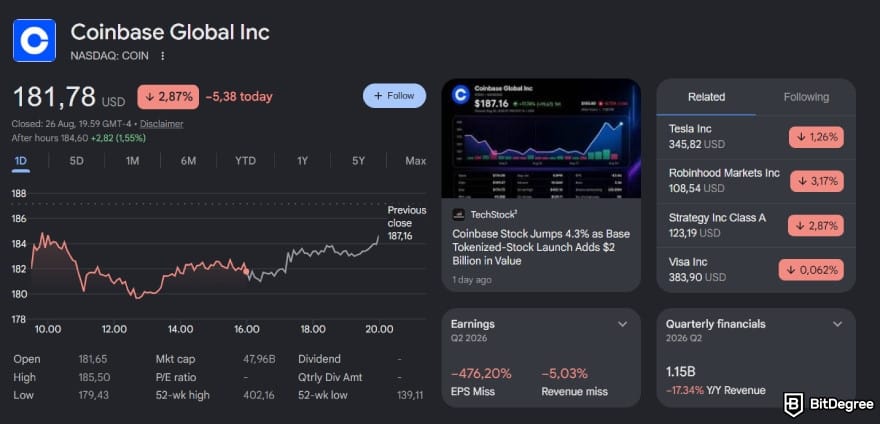
User security features include two-factor authentication, biometrics, address allowlisting, security-key support, and Coinbase Vault. The latter is especially useful if you want to make withdrawals a little harder to rush through on impulse.
One detail needs careful wording, though. Coinbase crypto holdings aren't protected by FDIC insurance simply because they’re kept on the platform. Some US dollar balances may be eligible for pass-through coverage when held at participating banks, subject to the conditions required for that insurance to apply.
📚 Check Out: Is Coinbase Safe?
Transparency is where Uphold stands out more clearly. The platform states that it keeps at least 100% of customer assets in reserve and doesn’t lend them out by default, unless you participate in staking or DeFi lending. Its assets and liabilities are also published in real time, so you can monitor the platform’s reserve position yourself.

Uphold backs its security setup with strong regulatory oversight across multiple jurisdictions. The company says its operating entities are licensed or registered in the US, UK, EU, and the Bahamas, while its US operations are also subject to regular state audits.
📚 Check Out: Is Uphold Safe?
Keep in mind that Uphold’s non-crypto products may fall under a different regulatory framework. Equities and forex, for example, are generally subject to separate rules depending on the jurisdiction. If you use these products, make sure you understand the terms that apply in your country or region.
Note
Security is fairly even between the two. Coinbase provides public financial reporting and additional withdrawal controls, while Uphold stands out by publishing its reserves in real time.
Coinbase vs Uphold - Broader Ecosystem
Beyond trading, each platform plays to a different set of strengths. Coinbase leans into education and membership-based benefits. Uphold, meanwhile, broadens the experience with custody options, cash yield, and products spanning multiple asset types.
Coinbase's Other Features
Coinbase goes far beyond simple buying and selling, while keeping most of its broader ecosystem closely tied to crypto. Some of its notable products include:
1
Earn products
Coinbase Earn gives you several ways to earn from eligible crypto without actively trading it. Depending on your region and the assets in your account, the platform may offer staking, USDC rewards, and crypto lending.
At the time of writing, supported staking assets include ETH, SOL, ADA, AVAX, DOT, ATOM, and XTZ.
You can get started with as little as $1, and eligible assets may also support instant unstaking. Advertised returns can go as high as 13%, though the actual rate varies by asset and market conditions.
2
Payments & spending
Coinbase Card turns part of your crypto experience into something you can use day-to-day. It’s a prepaid debit card accepted anywhere Visa works, with crypto rewards available on purchases. There are no spending fees, and eligible rewards can be earned without a set cap.
3
Membership Program
Coinbase One is the platform’s paid membership program, with benefits that vary by tier. These may include zero fees on eligible trades, higher staking rewards, account protection, priority customer support, trading-fee rebates, and other exclusive perks.
4
Web3 features
Coinbase Wallet gives you a way to step outside the exchange’s custodial setup. As a self-custody wallet, it puts control of your assets in your hands rather than keeping them under the exchange’s custody.

It also goes far beyond simply sending and receiving assets. You can trade a wide range of supported products, from tokenized stocks and commodities to prediction markets and leveraged perpetual futures, alongside dozens of other onchain opportunities.
5
Institutional-grade services
At the wealth-management end of the platform, Coinbase Wealth Services caters to ultra-high-net-worth individuals. Clients gain access to institutional-grade custody, deeper liquidity, and infrastructure, plus tailored solutions such as financing and advisor-ready services.
Uphold's Other Features
Uphold also offers more than basic crypto trading. Its additional products focus less on advanced trading tools and more on making your portfolio easier to manage across different asset types.
1
Earn products
Staking and yield are part of Uphold’s broader offering too, although the selection is more limited than what Coinbase provides. Availability is also highly location-dependent.
For eligible users, though, it can be a convenient way to earn on supported assets without moving them elsewhere. Just remember that staking involves risk, and the exact assets, rates, and terms can change by region.
2
Payments & spending
The Uphold Card gives you a way to spend money from your account wherever the supported card network is accepted. In some regions, that includes both crypto and fiat balances, which makes the platform useful for everyday purchases.
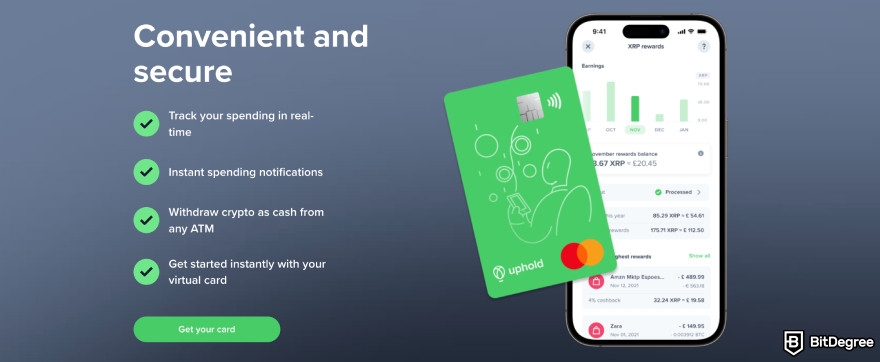
Availability, rewards, and other card features, again, vary by location, so check the regional details before relying on them. Even so, the card adds a practical link between your portfolio and day-to-day spending.
3
Auto-Invest
Uphold’s Auto-Invest feature is built for people who prefer recurring purchases instead of trying to time every market move. You can set a schedule, choose your asset, and let the platform handle the buying automatically.
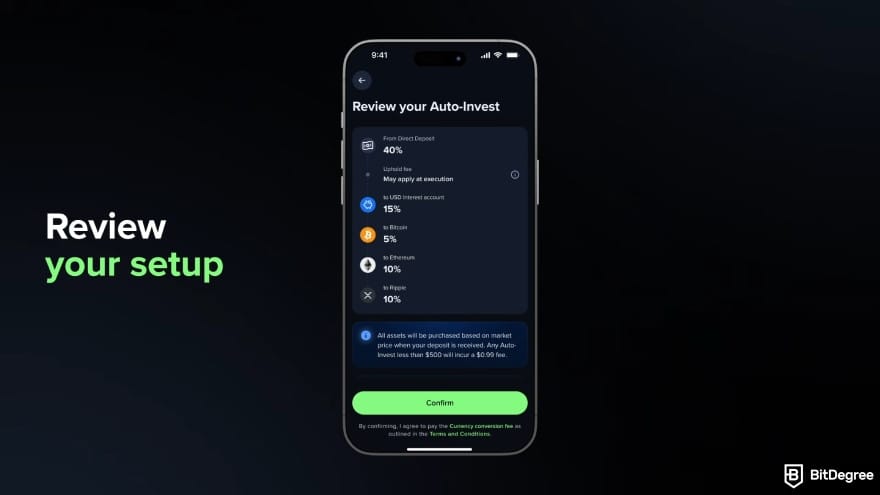
This works well for dollar-cost averaging, especially if you want to accumulate crypto, metals, or other supported assets over time without constantly checking charts. It's simple, low-effort, and aimed at long-term investors.
4
Unified portfolio dashboard
One of Uphold's most useful everyday features is its unified portfolio dashboard. Rather than splitting crypto, fiat, metals, forex, and equities into separate sections, the platform gives you one clean account summary for everything you hold.
5
Institutional-grade services
Uphold for Business gives companies access to crypto financial infrastructure without requiring them to build everything in-house. Businesses can use it to accept crypto payments, pay employees or vendors, and manage treasury holdings across crypto and other supported asset types.

Its offering also includes early access to new tokens and research resources that can help companies assess them before getting involved. On the operational side, Uphold provides deeper liquidity, real-time reserve visibility, and secure custody, with 97% of crypto assets kept in secure storage.
Note
Coinbase offers more ways to explore crypto beyond trading, particularly through Earn, Coinbase One, and its self-custody wallet. Uphold’s extras are more focused on managing and spending from a portfolio that holds different asset types.
Coinbase vs Uphold - Fiat Deposits and Withdrawals
Some of the smaller fees only show up when you move money in or out, which makes deposits and withdrawals worth their own section for Coinbase and Uphold.
| Coinbase | Uphold |
|---|---|---|
Fiat deposits |
|
|
Fiat withdrawal |
|
|
Crypto deposits | No platform fee (network fee may apply) | No platform fee (network fee may apply) |
Crypto withdrawals | Fee based on network conditions (shown before you send) | Network fee plus $0.99 |
Table: Coinbase vs Uphold deposit & withdrawal costs
Bank transfers are generally the cheaper route on both platforms, while faster methods come with higher costs. Uphold offers several convenient options for quicker deposits and withdrawals, but the added fees can start to outweigh that convenience if you move money often.
Crypto deposits work almost similarly on both platforms. Uphold adds a flat fee across most supported networks, while Coinbase bases its charge on estimated network costs and shows it before you confirm. That distinction is easy to ignore on an occasional withdrawal, but regular small transfers can make it more relevant.

The available limits can change, which affects which deposit method works best for you. Coinbase varies them by account, region, and method, whereas Uphold separates daily, weekly, and monthly limits by funding option.
Verdict
For everyday bank transfers, both platforms are straightforward. Uphold stands out for its wider range of faster fiat options, but you’ll generally pay more for the speed. Coinbase can have the edge on smaller, frequent crypto withdrawals where Uphold’s flat network fee starts to add up.
Coinbase Trading Walkthrough
Coinbase makes it easy to start with simple purchases, then step up to Coinbase Advanced when you want more control over the trade. Let’s walk through a BTC purchase as an example:
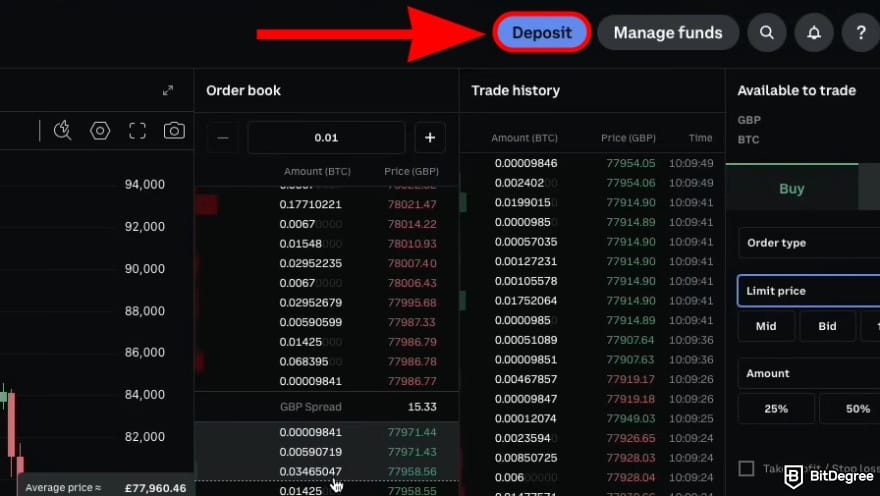
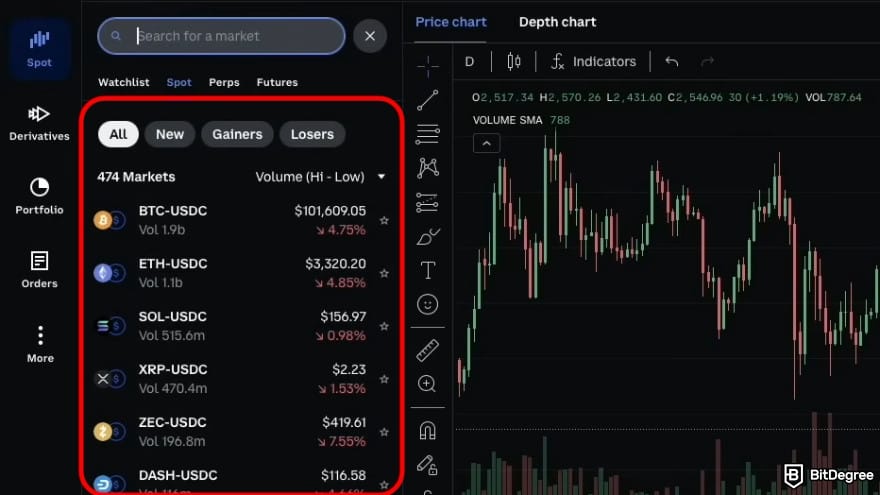
- Market Order. Executes immediately at the current market price with instant order fulfillment.
- Limit Order. Lets you set a specific price, executing only when the market reaches that level.
- Stop Limit Order. Activates a limit order once a predefined trigger price is reached.
- TWAP: Splits a large order into smaller trades and executes them gradually over time.
Once you’ve reviewed the order details, confirm the trade using the [Buy] button.
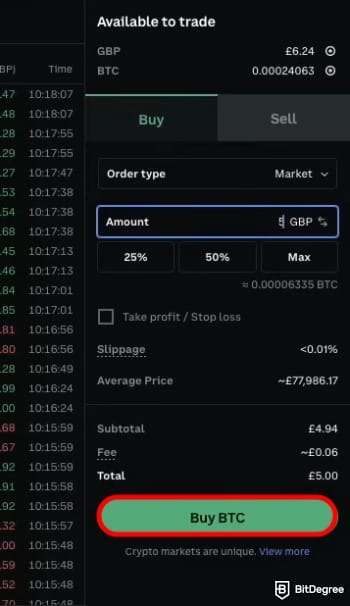
Once the purchase is confirmed, Coinbase sends you a receipt with the transaction details. From there, you can track the position in the Portfolio tab, where you’ll see your holdings, average purchase price, and estimated gain or loss.
Uphold Trading Walkthrough
Uphold may suit you better if you prefer a simpler way to buy crypto. There’s no need to open detailed charts, study an order book, or deal with a crowded trading interface just to buy Bitcoin. Here’s how:
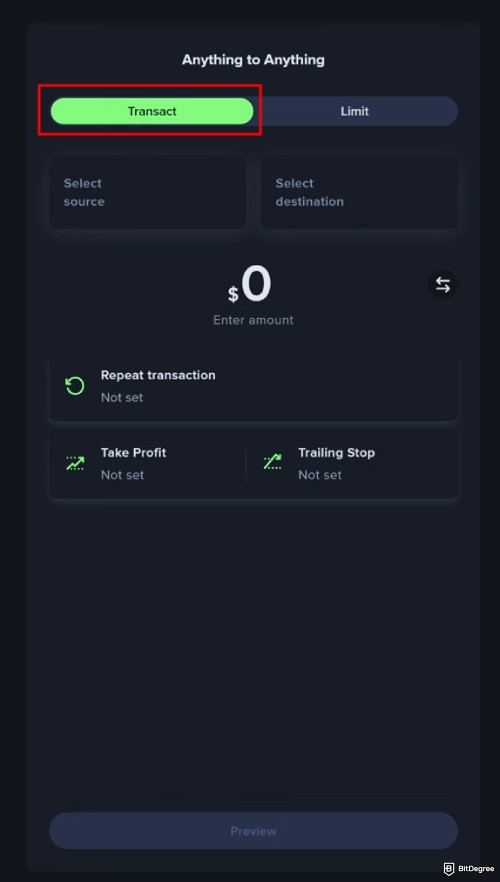
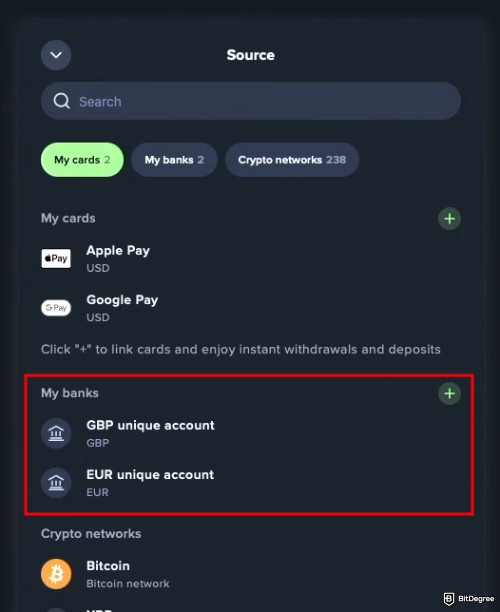
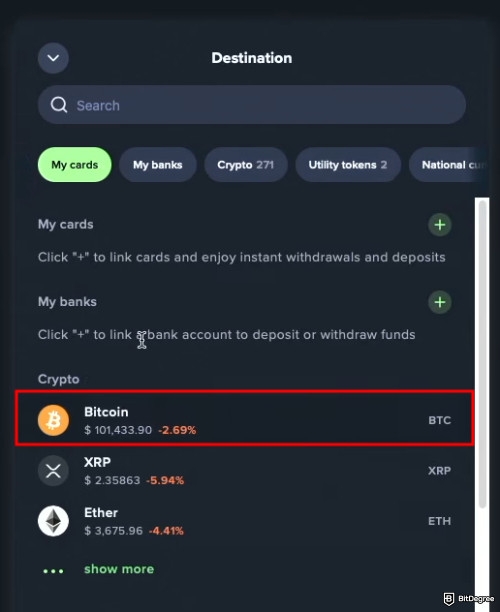
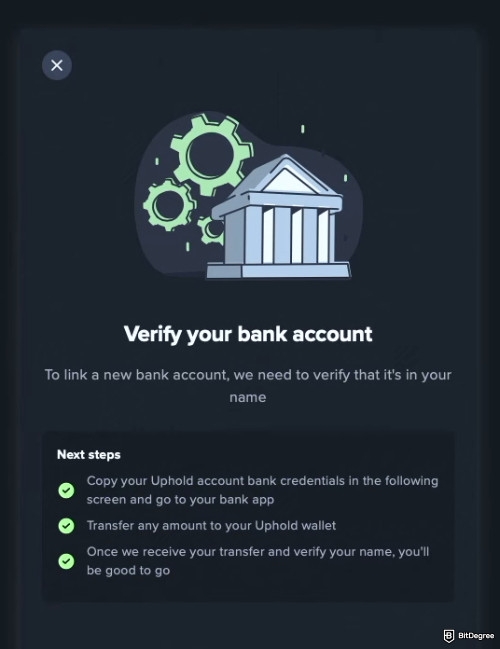
Uphold will then process the transfer once it arrives. Your Bitcoin balance is typically credited within 2–3 business days, though processing times can vary depending on the bank you use.
Coinbase vs Uphold for Beginners
I’d consider both platforms approachable for beginners, although they make the learning process easier in different ways.
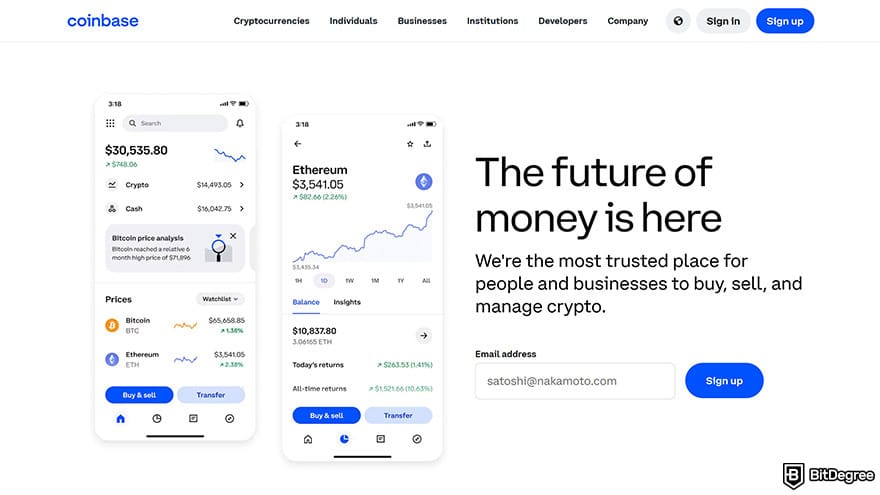
Coinbase puts plenty of information in front of you immediately, including your portfolio value, holdings, and recent price movements. That can be a little nerve-racking if you’re new and only want to make a simple purchase. The good news is that the interface starts to make sense quickly after you’ve used it a few times.
There’s also plenty of educational support through the Learning Center and Coinbase Earn, which is useful if you want to gradually understand more about crypto. The trade-off is that small trades can be relatively expensive because of flat fees. Advanced offers lower-cost trading, but there’s more to learn before it becomes comfortable.
Getting started with Uphold doesn’t take much effort. The sign-up process is fast, while repeat buys and baskets can help you invest regularly or spread your funds across different assets without much extra work.
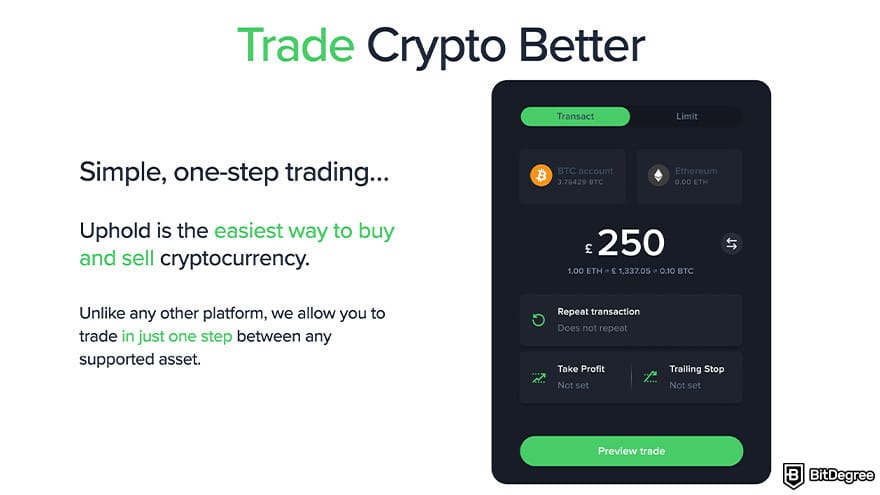
Buying crypto or other supported assets is also kept fairly simple throughout the interface. If mobile banking apps already make sense to you, Uphold shouldn’t be too difficult to navigate.
Verdict
Coinbase is better suited to beginners who want room to grow into more advanced trading over time. Uphold takes the simpler route, with low entry requirements and automated features across several asset classes.
Coinbase vs Uphold for Active Traders
For someone who trades regularly, Coinbase Advanced has most of the tools you’d expect from a serious exchange interface. Its spot platform combines hundreds of trading pairs with detailed charts, advanced order options, API access, and lower fees. Combined, those features give you much more control than the standard buying experience.
That toolkit extends into derivatives as well. Coinbase offers leveraged perpetual futures across hundreds of markets, including crypto and products linked to assets such as gold and leading US stocks. Leverage can go as high as 50x for eligible users, which can increase both potential exposure and risk.
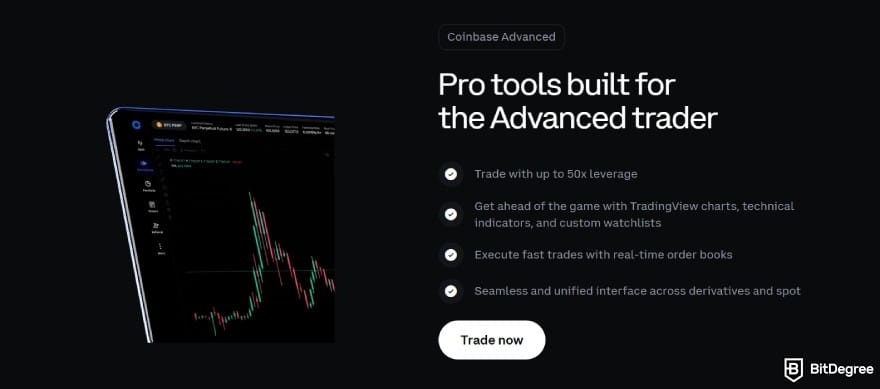
Uphold is lighter on advanced trading tools. You won’t find detailed charting, an order book, derivatives, or leveraged trading. If you trade often and want more precise control over how and when your orders are executed, the platform may feel too limited.
That said, “active” can mean different things. If your focus is actively managing a mixed portfolio of crypto, equities, metals, and forex, Uphold’s Anything to Anything feature makes it easier to move between asset types without relying on multiple platforms.
Note
Coinbase clearly offers more depth for frequent traders who want advanced tools and tighter control. Uphold fits better with a slower approach centered on managing assets across different markets.
Coinbase vs Uphold for Passive Users
If you’d rather build a position over time than trade every price move, either platform can fit your routine. The difference is what you can do with your holdings between purchases.
Coinbase makes gradual investing easy with recurring buys, then offers staking and, in eligible regions, USDC rewards. Its staking APY is shown after commission, so you can use that figure to assess the offer, while remembering that future rewards aren’t guaranteed.
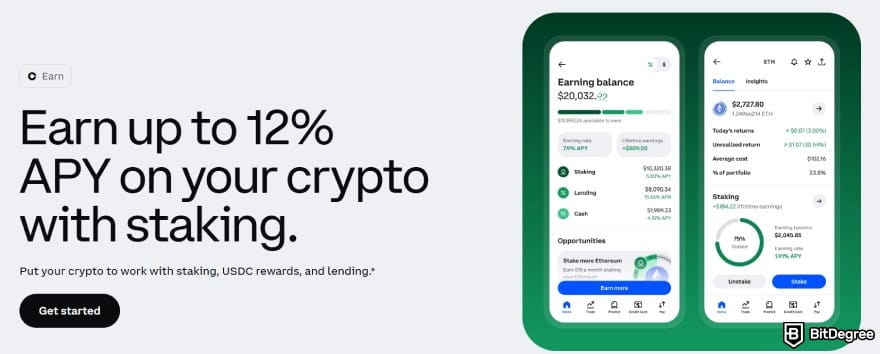
Uphold offers two staking approaches where available. Flexible lets you keep access to eligible assets, while Boosted locks them for a period in exchange for potentially higher rewards.
Uphold may not give passive investors as many ways to put their assets to work, but it does offer stronger visibility into how those assets are backed. If your main concern is knowing that your holdings are there and properly reserved, the platform makes that easier to check.
Verdict
Coinbase gives passive users more ways to build a position and earn after buying. Uphold offers a simpler choice, plus a live view of its reserves for those who plan to keep assets on the platform.
Final Verdict: Is Coinbase or Uphold Better?
Coinbase gives beginners an approachable place to start, backed by the reporting obligations of a listed company. As you gain experience, you can move into Advanced and derivatives, where active trading may cost less than relying on simple trades and small purchases.
📚 Check Out: Coinbase Review
Uphold suits users who want to manage crypto, currencies, and metals from one account. Anything-to-anything swaps, recurring buys, baskets, Vault, and the reserve dashboard give holders plenty to use, but its crypto fees, limited charting, and lack of derivatives may frustrate frequent traders.
📚 Read More: Uphold Review
Coinbase gives you a staircase to climb, from your first crypto purchase to Advanced trading and futures. Uphold gives you aisles to browse, with crypto, currencies, and metals in one account and a straightforward way to move between them. Which setup suits you depends on your location, your portfolio, and your trading habits.
Choose Coinbase if you’re starting with simple trades but want room to grow. Choose Uphold if you’d rather manage crypto, currencies, and metals in one place seamlessly.