



Coinbase vs Revolut - In-Depth Comparison
To be honest, Coinbase VS Revolut is a slightly odd matchup because they’re not exactly fighting over the same lunch table.
Coinbase was built around crypto and has spent more than a decade expanding into trading, custody, staking, institutional services, and other onchain products.
Revolut, meanwhile, started from the other end. It was built as a broader financial app for payments, cards, currency exchange, savings, and investing, before adding crypto as another item on an already crowded menu.

That distinction probably matters more than whichever platform wins a fee comparison by a few decimal places.
If crypto is the whole point of opening the account, Coinbase gives you a much deeper crypto-focused environment. But if Revolut already handles your salary, travel money, transfers, and daily spending, buying Bitcoin from the same app saves you from yet another round of moving money between platforms.

The comparison got a lot more interesting once Revolut launched Revolut X, its dedicated crypto trading platform. It now has a credible route for more advanced trading, with an order book, market and limit orders, API access, and notably low maker-taker fees.
Coinbase still has the broader crypto infrastructure and the more mature trading ecosystem, but Revolut has moved beyond the “banking app with a Buy Bitcoin button” phase.

That makes “Which one is better?” a little too simplistic. The more useful question is which platform fits the place you want crypto to occupy in your finances.
Here’s a quick comparison table to sum up the difference before we get into the finer details:
Coinbase | Revolut | |
|---|---|---|
Best for | Users who want crypto to be the main focus of the platform | Users who want crypto alongside a traditional finance app |
Core identity | Crypto exchange and onchain financial platform | Financial super app with crypto services |
Retail crypto trading fees | Varies by order | Varies by plan |
Advanced trading fees | 0%–0.40% maker / 0.04%–0.60% taker | 0% maker / 0.09% taker |
Crypto market access | 550+ spot pairs | 300+ tokens |
Advanced trading features | Coinbase Advanced, APIs, derivatives | Revolut X, APIs, advanced orders |
Staking | Supported | Supported |
Onchain tools | Strong | Limited |
Fiat, cards, and everyday spending | Crypto-focused, with basic fiat and card features | Finance-focused, with broader everyday money tools |
Beginner experience | Beginner-friendly with advanced tools available for later | Beginner-friendly, especially for existing finance users |
Overall verdict | Better for a dedicated crypto experience | Better for finance and crypto in one app |
Table: Coinbase vs Revolut quick comparison
In simple terms, if you want an all-encompassing crypto platform, Coinbase should fit the bill. If you’d rather have an all-in-one traditional finance app that also gives crypto a proper place at the table, Revolut could be the better match.
Coinbase vs Revolut - Market Position
If we’re judging by crypto pedigree, Coinbase has been around the block a few more times. Launched in 2012, it started as a simple Bitcoin on-ramp before expanding into retail trading, advanced markets, staking, institutional services, stablecoin infrastructure, and onchain products.
As of 2026, Coinbase reported $246 billion in assets on the platform and a 10.3% share of crypto trading volume.
Revolut arrived later, launching in 2015, but it plays a much broader consumer-finance game. Its customer base has passed 80 million globally, with the app covering everything from everyday spending to payments, transfers, and investing.
Of course, comparing that number directly with Coinbase’s crypto metrics would be a bit apples-to-blockchains. Most Revolut customers aren’t necessarily active crypto traders.

Even so, that huge existing customer base gives Revolut an interesting shortcut into crypto. If you’re already using the app for cards, transfers, or everyday spending, buying crypto doesn’t require packing your money up and sending it off to a separate exchange.
The two platforms are also gradually meeting somewhere in the middle.
Coinbase now pitches itself more as an “everything exchange” than a crypto-only platform, while Revolut has gone deeper into digital assets with Revolut X and a MiCA-authorized entity in Europe. Their product lines are starting to overlap more, even if their original job descriptions still look nothing alike.
Verdict
Coinbase has the stronger crypto ecosystem, while Revolut has the broader financial one. It really comes down to whether crypto is the main event or just another tab in your money app.
Coinbase vs Revolut - Trading Features
Both platforms make buying and selling crypto easy enough that you don’t need to decode an order book just to get started. Things become more interesting once you move past the basic buy-and-sell stage, though.
Coinbase offers a broader progression into advanced spot trading, derivatives, APIs, and onchain activity. Revolut takes a cleaner two-step approach: start simple in the main app, then graduate to Revolut X when basic crypto trading starts looking a little too basic.
Coinbase Trading Features
Coinbase divides its trading experience quite neatly between its standard interface and Coinbase Advanced. The first keeps things simple, while the second gives traders much more control over pricing and execution.
For basic trading, Coinbase offers:
- Buy & sell for straightforward cryptocurrency purchases and sales;
- Convert for swapping one supported cryptocurrency for another;
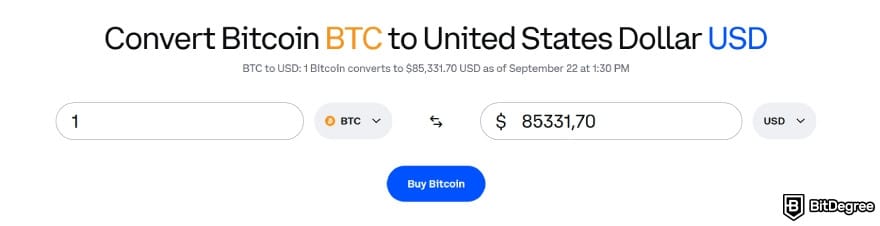
- Recurring buys for automating regular cryptocurrency purchases;
- Price alerts for following market movements without keeping the app open all day.
For more experienced users, Coinbase Advanced is the important part. It includes:
- Spot trading across more than 550 advertised pairs;
- TradingView charts with technical indicators and more detailed market data;
- Market, limit, and stop-limit orders for greater control over how trades are executed;

- Order books for viewing available bids, asks, and current market depth;
- Derivatives trading in eligible regions for users who want exposure beyond standard spot markets;
- API trading for users who want to automate orders or connect their own trading tools.
Coinbase’s setup gives beginners somewhere simple to start without boxing them in. You can make a basic purchase first, then move into Advanced once order books, charts, and execution prices start becoming more relevant.
Revolut Trading Features
Revolut starts from everyday finance and works its way toward crypto. The main app keeps digital assets alongside its broader money-management features, while Revolut X is there for users who decide they want fewer banking buttons and a lot more charts.
For straightforward crypto access, Revolut lets users:
- Buy & sell crypto directly from the broader Revolut ecosystem;
- Manage crypto alongside fiat, stocks, and other investments in the same account;
- Move between fiat and crypto without needing a separate external exchange.
Revolut X then adds a considerably broader trading toolkit:
- Spot trading across 300+ tokens;
- Market & limit orders for controlling how trades are executed;
- API trading with access to real-time market data;

- Real-time order-book trading with maker and taker execution;
- TradingView charts with technical indicators and drawing tools;
- Price alerts & AI integrations for monitoring markets and interacting with supported third-party AI tools.
That makes Revolut X more capable than the standard app might initially let on. It’s still primarily a spot-focused exchange, but there’s considerably more going on than basic buying and selling, with TradingView tools, API access, recurring purchases, and automation features giving active traders plenty to keep their hands busy.
Verdict
For casual buying, it’s really close. Coinbase gives you more room to level up, while Revolut X keeps spot trading clean, simple, and easy to get done.
Coinbase vs Revolut - Fees
Fees are probably the easiest part of this comparison to skew without meaning to, mainly because neither platform runs on a single pricing model. Coinbase separates simple trading from Coinbase Advanced, while Revolut splits its pricing between the main app and Revolut X.
Coinbase's Fee Structure
As I've mentioned earlier, Coinbase doesn’t use the same fee setup across the whole platform. The standard simple interface usually includes a spread of around 0.5% plus a flat fee that rises with the amount you’re spending.
Order Size | Typical Fee |
|---|---|
Under $10 | $0.99 |
$10–$25 | $1.49 |
$25–$50 | $1.99 |
$50–$200 | $2.99 |
Over $200, funded by bank/ACH | ~1.49% |
Over $200, funded by debit or credit card | ~3.99% |
Table: Estimated Coinbase simple trade fees
Coinbase fee model is particularly unfriendly to tiny purchases. A $0.99 fee on a $5 buy works out to roughly 20%, which is a pretty painful cut if you’re making small, frequent purchases. Bigger purchases improve the math, although Coinbase’s simple trading route still carries a noticeable premium.
Coinbase Advanced Trade changes the equation quite a bit. Instead of flat retail fees, it uses a tiered maker-taker structure, with higher rolling 30-day trading volume gradually unlocking lower rates.
30-Day Trading Volume | Taker Fee | Maker Fee |
|---|---|---|
$0–$10K | 0.60% | 0.40% |
$10K–$50K | 0.40% | 0.25% |
$50K–$100K | 0.25% | 0.15% |
$100K–$1M | 0.20% | 0.10% |
$1M–$15M | 0.18% | 0.08% |
$15M–$75M | 0.16% | 0.06% |
$75M–$250M | 0.10% | 0.03% |
$250M–$400M | 0.06% | 0.00% |
$400M+ | 0.04% | 0.00% |
Table: Coinbase Advanced trading fees
At the top end, Coinbase cuts its maker fee to 0%, which is where the pricing starts looking much more competitive. The entry-level 0.40% maker and 0.60% taker rates still trail exchanges like Binance or Bybit at around 0.10%, but high-volume makers can eventually get the better deal on Coinbase.
Coinbase One members can get separate trading fees waived on simple trades, up to a monthly trading-volume cap based on their plan.
Coinbase also has a few specialized fee schedules with much lower rates. Eligible stablecoin pairs can come with near-zero pricing, while USDC-to-USD conversion fees only kick in once your rolling 30-day net volume exceeds $2 million.
Just keep in mind that “zero fee” doesn’t mean “zero cost”. Coinbase may still build a spread into the quoted price even when there’s no separate trading fee. Coinbase One can waive that fee too, but the membership itself still costs money.
📚 Read More: Coinbase Fees Explained
Revolut's Fee Structure
If you’re trading crypto, Revolut X is likely where you’ll spend most of your time. The good news is that its fee structure is fairly easy to follow, using the same familiar maker-taker model.
Maker fee | 0.00% |
|---|---|
Taker fee | 0.09% |
Crypto deposits | Free |
Crypto withdrawals | £1 or £3 service fee + network fee |
Table: Revolut X fee overview
Crypto withdrawals come with two separate costs: a Revolut service fee and a blockchain network fee. The service fee is fixed at:
1
£1 for XRP, XLM, DOT, SOL, AVAX, XTZ, ALGO, & ADA;
2
£3 for all other supported cryptocurrencies.
On top of that, you’ll have to cover the blockchain network fee. This goes to the miners or validators processing the transaction and can move up or down depending on network conditions and transaction speed.
Revolut also runs a market maker program for eligible business clients.
Revolut calculates the estimated network cost and adds the service fee before showing you the total withdrawal cost. Congested networks can make that total higher, but the platform says the final amount shown at confirmation is the most you’ll be charged.
$1,000 Advanced Spot Trade Example
To put those percentages into perspective, imagine placing a $1,000 market order on Coinbase Advanced and Revolut X.
On Coinbase Advanced, a trader in the base fee tier would pay the 0.60% taker rate:
$1,000 x 0.60% = $6.00
On Revolut X, the same $1,000 taker order carries a 0.09% fee:
$1,000 x 0.09% = $0.90
The difference is just as noticeable for maker orders. If a $1,000 order rests on the order book and qualifies for the maker rate, Coinbase's base-tier fee would be:
$1,000 × 0.40% = $4.00
On Revolut X, the maker fee is 0%, so the trading fee would be $0.
Platform | $1,000 Taker Order | $1,000 Maker Order |
|---|---|---|
Coinbase Advanced | $6.00 | $4.00 |
Revolut X | $0.90 | $0.00 |
Table: Coinbase vs Revolut spot trade example
There is one important difference. Revolut X keeps its 0% maker and 0.09% taker fees flat regardless of trading volume. Coinbase Advanced uses a tiered structure instead, so its rates fall as your trailing 30-day trading volume increases.
That said, trading fees also aren't the only cost worth checking. Before placing an order, also consider:
- The bid-ask spread;
- Slippage on larger orders;
- Your Coinbase trading tier;
- Whether your order adds or removes liquidity;
- Crypto withdrawal and network fees;
- The final execution price.
You’ll see the applicable trading fee before confirming an order on either platform. Just don’t assume that percentage represents everything you’ll pay once the trade goes through.
Verdict
Revolut X is cheaper on paper for many spot traders, while Coinbase Advanced offers more depth and improves with higher volume.
Coinbase vs Revolut - Liquidity & Execution
Trading fees get most of the attention, but liquidity is what determines whether the price you see is anywhere near the price you actually get.
Coinbase enters this comparison with considerably more visible scale. It lists more than 550 spot pairs, and the company reported holding 10.3% of crypto trading volume (as of June 2026).

Revolut X is relatively newer and doesn’t publish a comparable public liquidity metric. Its zero maker fee is designed to encourage traders to add orders to the book, while the 0.09% taker fee keeps immediate execution relatively inexpensive.
For ordinary retail-sized BTC or ETH trades, that may be adequate. With very large orders or less-liquid tokens, however, the actual spread and order-book depth matter more than the attractive fee printed on the pricing page.
I’d therefore check the live order book before declaring either exchange the automatic winner. Coinbase has the more established liquidity profile, but Revolut X remains a serious price competitor, particularly when its available depth matches the size of your trade.
Verdict
Coinbase is stronger for liquidity and large trades. Revolut X keeps fees low, but execution costs still depend on the live order book.
Coinbase vs Revolut - Security & Trust
Coinbase and Revolut sit on the more regulated side of the crypto market, though the reasons users may trust them aren’t identical. Put simply, both have regulators looking over their shoulders, just not always the same ones.
Coinbase | Revolut | |
|---|---|---|
Two-factor authentication | ✓ | ✓ |
Biometric authentication | ✓ | ✓ |
Cold storage | ✓ | ✓ |
Assets held 1:1 | ✓ | ✓ |
24/7 monitoring | ✓ | ✓ |
Extra withdrawal protection | Vault & withdrawal controls | Wealth Protection |
Table: Coinbase vs Revolut security features
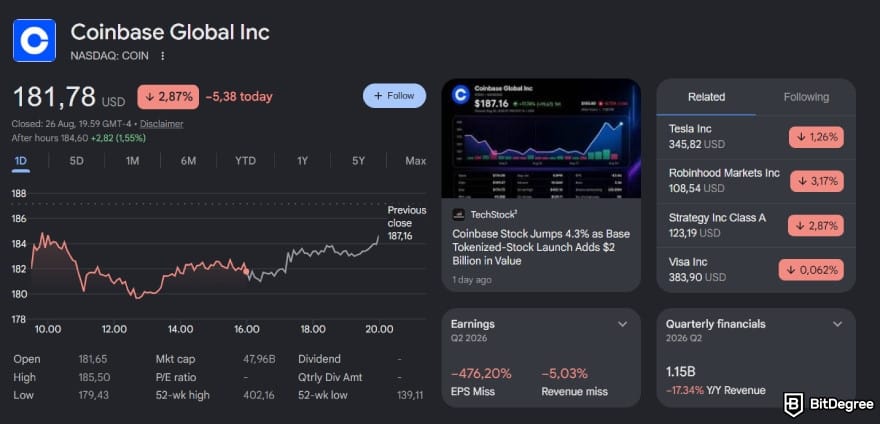
Coinbase is a US public company listed on Nasdaq under COIN, which means it publishes audited financial statements and regular SEC filings. It also operates through regulated entities across multiple markets, including a MiCA-authorized entity in Luxembourg for the EEA.
User security features include two-factor authentication, biometrics, address allowlisting, security-key support, and Coinbase Vault. The latter is especially useful if you want to make withdrawals a little harder to rush through on impulse.
One detail needs careful wording, though. Coinbase crypto holdings aren't protected by FDIC insurance simply because they’re kept on the platform. Some US dollar balances may be eligible for pass-through coverage when held at participating banks, subject to the conditions required for that insurance to apply.

Revolut’s security model builds on the same banking and payments infrastructure that powers the rest of the app. That includes identity verification, device controls, biometrics, real-time transaction monitoring, card freezing, and granular spending controls, so security isn’t exactly treated as an optional extra.
Revolut reports that its business customers worldwide have been protected from more than €746 million worth of potentially fraudulent transactions.
Its crypto business is also moving into clearer regulatory territory. Revolut Digital Assets Europe Ltd holds MiCA authorization from CySEC, while the broader Revolut group operates through different banking and financial entities depending on where you live.
Crypto custody is another area where neither platform should be mistaken for self-custody. Revolut’s European safeguarding policy describes an omnibus-wallet model involving third-party exchanges and custodians, which means your crypto isn’t sitting in a little wallet with your name taped to it.

Coinbase also uses custodial storage for assets left on the exchange. For full control of your private keys, you’ll need a self-custody wallet, with the Base app now taking over many functions from Coinbase Wallet.
The biggest security risk on either platform is still account compromise, and yes, some of the responsibility lands on you. Strong passwords, passkeys, withdrawal allowlists, and a healthy suspicion of phishing attempts will protect you better than relying 100% on the brand.
Verdict
Both platforms have solid security and regulatory foundations. Coinbase brings deeper crypto-specific experience and transparency, while Revolut brings a broader financial-services security stack.
Coinbase vs Revolut - Broader Ecosystem
At this point, the comparison becomes less about the trading interface and more about what happens after you finish it. Coinbase encourages you to keep your assets within its wider crypto ecosystem. Revolut instead connects crypto trading to a broader range of traditional payment and money-management services.
Coinbase's Other Features
Coinbase extends well beyond basic trading, with much of its ecosystem remaining firmly focused on crypto. Its notable products include:
1
Earn products
Coinbase Earn lets you earn a return on eligible crypto without spending your day watching price charts. Depending on your location and the assets you hold, you can access staking, USDC rewards, and crypto lending directly through the platform.
At the time of writing, staking is available for ETH, SOL, ADA, AVAX, DOT, ATOM, and XTZ.
You can start with as little as $1, and Coinbase offers instant unstaking for eligible assets. Returns can reach 13%, but that’s the ceiling. The yield you receive could be much lower depending on the asset and market conditions.
2
Payments & spending
Coinbase Card brings crypto into your everyday spending. It’s a prepaid debit card that lets you earn crypto rewards on your purchases. You can use it anywhere Visa is accepted, with no spending fees and unlimited rewards on every purchase.
3
Membership Program
Coinbase One adds a paid membership layer to the platform, with different tiers offering different benefits. These can include zero fees on eligible Simple trades, boosted staking rewards, account protection, priority support, trading-fee rebates, and other perks reserved for members.
4
Web3 features
Coinbase Wallet gives you a way to step outside the exchange’s custodial setup. As a self-custody wallet, it puts control of your assets in your hands rather than keeping them under the exchange’s custody.

And it goes well beyond basic transfers. You can trade various supported assets, including tokenized stocks and commodities, access prediction markets, trade leveraged perpetual futures, and explore dozens of other onchain opportunities.
5
Institutional-grade services
For ultra-high-net-worth individuals, Coinbase Wealth Services provides access to its prime institutional platform. You get secure custody, deep liquidity, and institutional-grade infrastructure, plus specialized solutions such as advisor-ready services and financing.
Revolut's Other Features
Revolut's ecosystem is broader in the opposite direction. Crypto is connected to ordinary money rather than surrounded by more crypto products.
1
Earn products
Revolut also offers crypto staking, giving you the flexibility to earn rewards on a daily or weekly basis. Supported assets include SOL, ETH, DOT, and several other coins, with APYs reaching up to 22% for some assets. Revolut doesn’t charge a fee on your staking rewards, although third-party fees can still apply.
2
Payments & spending
Revolut Card gives your crypto a life beyond charts and price alerts. Available as either a physical or virtual card, it converts supported cryptocurrencies when you pay and can be used anywhere Visa or Mastercard is accepted.

You can also personalize your card with a custom design, whether that means proudly displaying your crypto enthusiasm or choosing something that simply looks more like you.
3
Money management
Revolut’s budgeting tools are a natural extension of what the platform does best: helping you manage your everyday finances. You can use them to plan daily spending, set monthly budgets, manage your wealth, and even work toward future financial goals, all from one place.
4
Investments
Revolut also goes beyond crypto with stock and ETF trading, commodities, and other investing tools in supported markets. The selection is pretty extensive, with more than 4,000 stocks available in the app, including familiar names like Apple, Tesla, Amazon, and Nvidia.
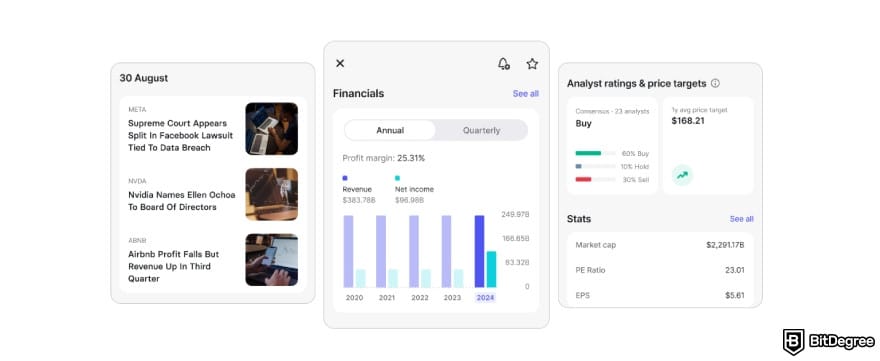
The investing tools don’t stop at buying and selling. You get straightforward portfolio management, while Revolut can keep you updated on market news and major upcoming IPOs. Once an IPO is confirmed, you can register your interest before the listing.
5
International transfers
Sending money overseas is another area where Revolut comes in handy. You can transfer money to bank accounts in different currencies through the app, with coverage spanning 160+ countries and territories and over 70 currencies. Its transfer fees are also relatively competitive compared with other options.
Verdict
Coinbase has the stronger crypto ecosystem. Revolut, on the other hand, has the stronger all-purpose finance ecosystem.
Coinbase vs Revolut - Fiat Deposits & Withdrawals
Fiat access can play a pretty big role in how useful a platform feels beyond crypto trading. Coinbase largely treats fiat as the on-ramp and off-ramp for crypto, while Revolut takes a broader approach by making fiat a core part of its everyday financial tools.
Coinbase Fiat Deposits & Withdrawals
Coinbase supports several fiat funding methods, with fees depending on the currency and payment rail. For deposits, the listed fees include:
- ACH: Free;
- USD wire: $10;
- SEPA: €0.15;
- USD SWIFT: $25;
- GBP SWIFT: Free.
Fiat withdrawals follow a slightly different schedule. ACH and SEPA withdrawals are listed as free, while USD wire withdrawals cost $25, USD SWIFT withdrawals cost $25, and GBP SWIFT withdrawals cost £1.
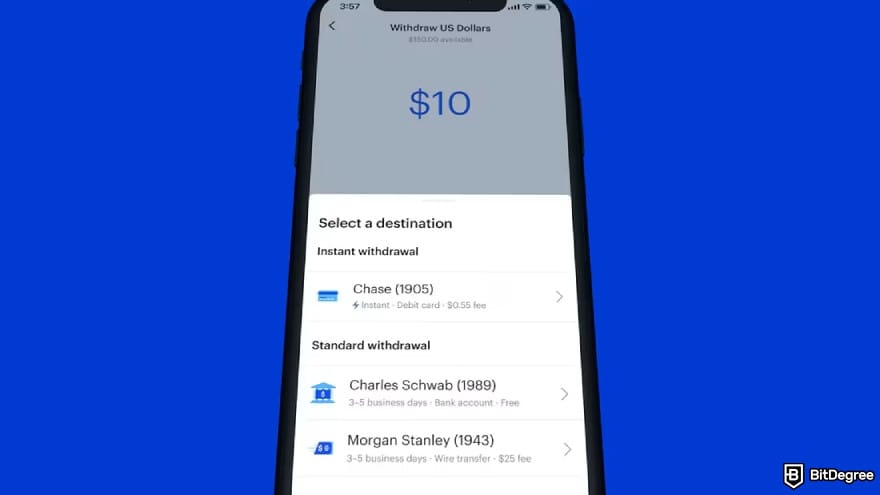
Coinbase also notes that withdrawal limits can vary depending on your verification level and method. A typical starting limit is listed at $100,000 per day, but your actual limit may differ.
Revolut Fiat Deposits & Withdrawals
You can add money through the app and fund your account through supported bank-transfer methods. Once the funds arrive, they sit directly in your Revolut balance and can be used for transfers, card spending, currency exchange, saving, or investing.
Moving money back out is similarly straightforward. From the Payments section, you can select or add a bank recipient, choose the currency, and send the transfer. Bank transfers generally arrive within 1 to 3 business days, depending on the route.

Revolut also has an advantage when you deal with multiple currencies. Its wider finance ecosystem includes multi-currency balances, international transfers, and currency exchange, so fiat isn't simply something you deposit before buying crypto and withdraw afterward. It's part of the main product.
Note
Coinbase covers the essential fiat rails for crypto trading, while Revolut offers a broader experience for everyday money movement and multi-currency use.
Coinbase Trading Walkthrough
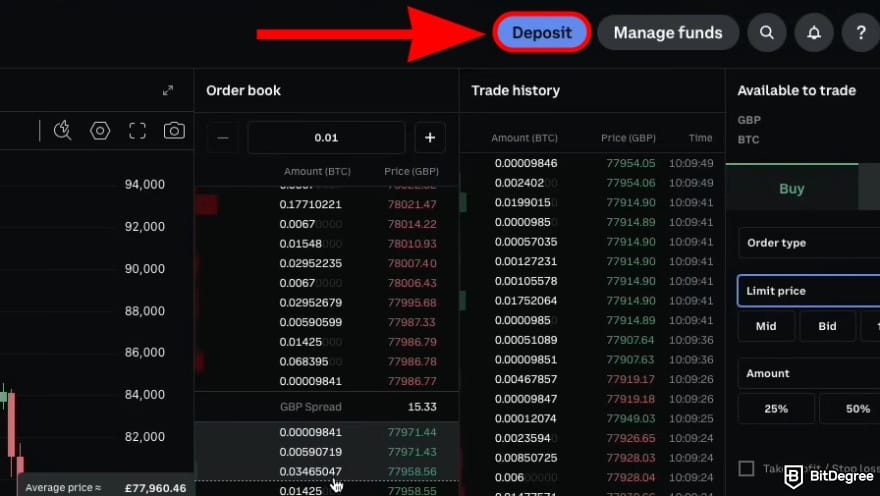
A common Coinbase flow is to begin with simple crypto purchases and later move to Coinbase Advanced for more control. Let’s take buying BTC as an example:
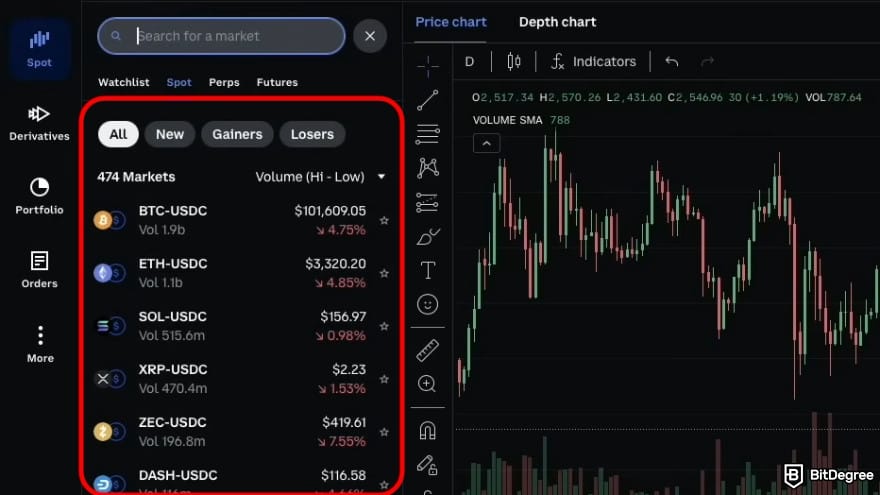
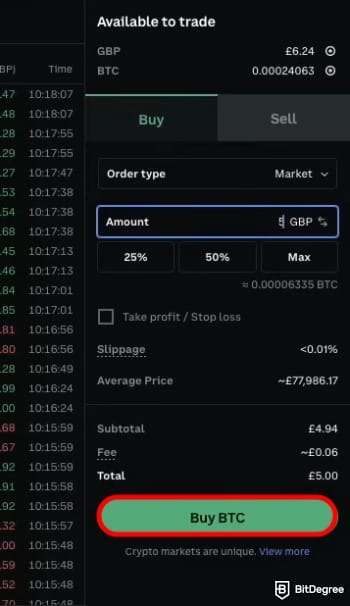
- Market Order. Executes immediately at the current market price with instant order fulfillment.
- Limit Order. Lets you set a specific price, executing only when the market reaches that level.
- Stop Limit Order. Activates a limit order once a predefined trigger price is reached.
- TWAP: Splits a large order into smaller trades and executes them gradually over time.
Once you’ve reviewed the order details, confirm the trade using the [Buy] button.
After confirming, Coinbase will send a receipt for each purchase. You can monitor your position from the portfolio tab, which shows your current holdings, average buy price, and approximate gain or loss.
Revolut Trading Walkthrough
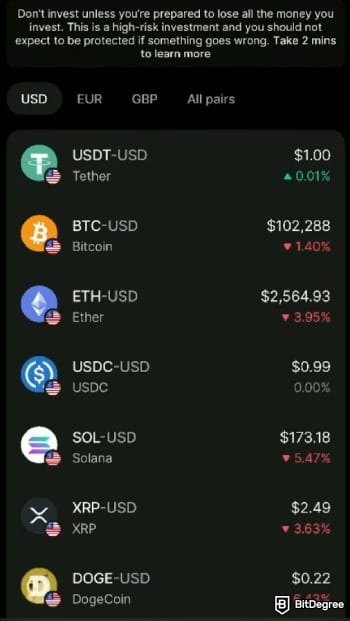
Revolut X is the more trading-focused side of the platform, giving you access to real-time markets, order books, and lower trading fees. You can use it through the dedicated mobile app or desktop platform.
![Coinbase vs Revolut: click [Trade] at the botton.](https://assets.bitdegree.org/images/coinbase-vs-revolut-trade.jpg "Coinbase vs Revolut: click [Trade] at the botton.")
![Coinbase vs Revolut: click [Buy].](https://assets.bitdegree.org/images/coinbase-vs-revolut-buy.jpg "Coinbase vs Revolut: click [Buy].")

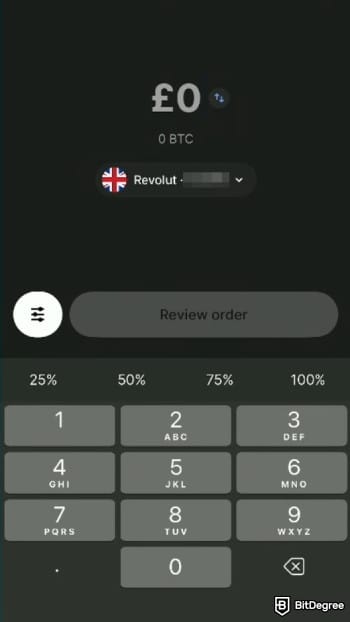
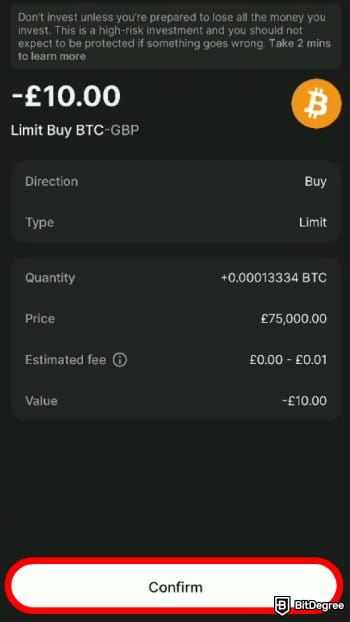
Once the trade is completed, your purchased crypto will appear in your Revolut X portfolio.
Coinbase vs Revolut for Beginners
I’d say both Coinbase and Revolut have done a good job of making crypto approachable for newcomers, but they come at it from different angles. Coinbase is crypto-first and has built a broader ecosystem around it, while Revolut treats crypto as one part of a much wider financial super app.

Coinbase takes the more traditional beginner-friendly exchange approach. Its standard interface makes buying, selling, and converting crypto relatively straightforward. Its desktop and mobile interfaces are also designed to stay clean and approachable, while its educational resources help break down some of the more confusing crypto concepts.
Revolut has a different beginner advantage: familiarity. If you already use the app for transfers or card payments, there’s very little psychological friction in opening the crypto tab and making a purchase. You don’t need to learn a new funding workflow or manage another financial login.
The downside is that convenience can make the risks easier to overlook. Crypto isn’t protected like a standard bank deposit, and a simple one-tap purchase can still involve market, custody, and fee risks. Revolut users should check how their plan affects fees, while Coinbase users should review the order preview carefully.
Verdict
Coinbase offers a more dedicated environment if you expect to become more involved in crypto over time. Revolut, meanwhile, can be an easier introduction if you’re already comfortable with conventional finance apps.
Coinbase vs Revolut for Active Traders
Revolut X gives active traders another option worth considering, particularly with its lower baseline maker and taker fees. It also covers the core tools you’d expect from a spot trading platform, including an order book, market and limit orders, and API access.
Coinbase still offers the more extensive professional trading environment. Advanced gives you hundreds of trading pairs, deeper market infrastructure, more developed API capabilities, and access to derivatives in eligible markets. Its substantial trading volume on the platform also matters if liquidity is high on your list.
For an active spot trader, Revolut X has a straightforward proposition: simple fees, the core trading tools, and regional availability permitting. Coinbase becomes more relevant if your trading needs extend into more markets, derivatives, deeper crypto integrations, or you simply want a specialist exchange with a longer operating history.
Verdict
Revolut can be appealing if your priority is getting started with a lower fee. Coinbase, on the other hand, offers a broader trading ecosystem, with lower fees available to higher-volume traders on certain assets.
Coinbase vs Revolut for Passive Users
Coinbase offers several ways to put your crypto to work, including recurring buys, staking on multiple eligible assets, and USDC rewards in supported regions. Just keep an eye on commission fees, as the net APY you receive can be lower than the advertised reward rate.

Revolut supports recurring crypto purchases and staking for eligible assets. Its advantage is that passive crypto sits beside savings, cards, stock investments, and budgeting tools. While the platform says it doesn’t take a fee from staking rewards, third-party validator fees may still reduce the gross amount.
Verdict
Coinbase gives passive users more crypto-specific options. Revolut is more convenient for people who want a small crypto allocation alongside the rest of their finances.
Final Verdict: Is Coinbase or Revolut Better?
Coinbase is better for users who want crypto to be more than a small part of their financial activity. Alongside its exchange, you get broader trading infrastructure, self-custody options, onchain products, and an ecosystem that gives you more room to explore as your needs grow.
Revolut makes more sense when crypto is one piece of a larger financial routine. Its biggest advantage isn't a particular token or chart. It's that your fiat balances, card, FX, transfers, savings, investments, and crypto can all live in the same interface.
Go with Coinbase if you want a crypto-first platform. Go with Revolut if you value everyday financial integration.