Key Takeaways
- Withdrawing money from Skrill is fairly easy. However, users need to be aware of the nuances like limitations, fees, and the available methods;
- Currently, you can withdraw money from Skrill via bank transfers, debit/credit card, crypto transfers, and digital wallet;
- If you don't think Skrill is compelling enough, Ogvio can be a great alternative, especially if you're looking for better fees overall and easier crypto transfer experience.

Figuring out how to withdraw money from Skrill without getting hit by surprise fees or waiting days for your funds can feel like navigating a maze. Whether you’ve just made a profit from trading or need to cash out a freelance payment, you want that money in your bank account fast and hassle-free.
While Skrill is a giant in the digital wallet space, its withdrawal processing may leave new users scratching their heads.
In this guide, I’ll walk you through the exact steps to get your cash out safely, covering everything from bank transfers to crypto withdrawals. But before you settle for high fees and slow service again, I will also introduce you to Ogvio, which can be a good alternative to Skrill.
Curious? Stick around, and I’ll show you exactly how to clear your Skrill balance and why switching to Ogvio might just be the smartest financial move you make this year.

Did you know?
Subscribe - We publish new crypto explainer videos every week!
How to Withdraw Crypto From Binance in Nigeria? (2026 EXPLAINER)


Table of Contents
- 1. How to Withdraw Money from Skrill to a Bank Account
- 2. How to Withdraw Money from Skrill to a Debit Card
- 3. How to Send Crypto from Skrill to an External Wallet
- 4. Skrill Fee Structure
- 5. How to Withdraw Money from Ogvio
- 5.1. Send Money to Another Ogvio User
- 5.2. Send Money from Ogvio to a Bank Account
- 5.3. How to Transfer Crypto to an External Wallet on Ogvio
- 6. Ogvio VS Skrill: Which One to Choose?
- 7. Conclusions
How to Withdraw Money from Skrill to a Bank Account
Let’s jump straight into how to withdraw money from Skrill. Currently, there are several ways to do this, and I will cover some methods, including their pros and cons.
Latest Changelly Coupon Found:The first one that comes to mind, of course, is to transfer money from Skrill to bank account.
You can withdraw money from Skrill in Pakistan and many other countries by sending your Skrill balance to a linked local bank account, depending on availability, verification status, and local banking support.
Here is how you can do it:
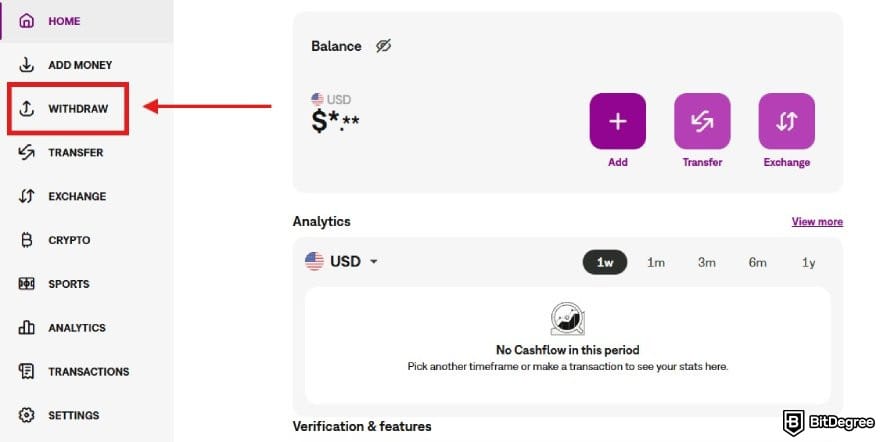
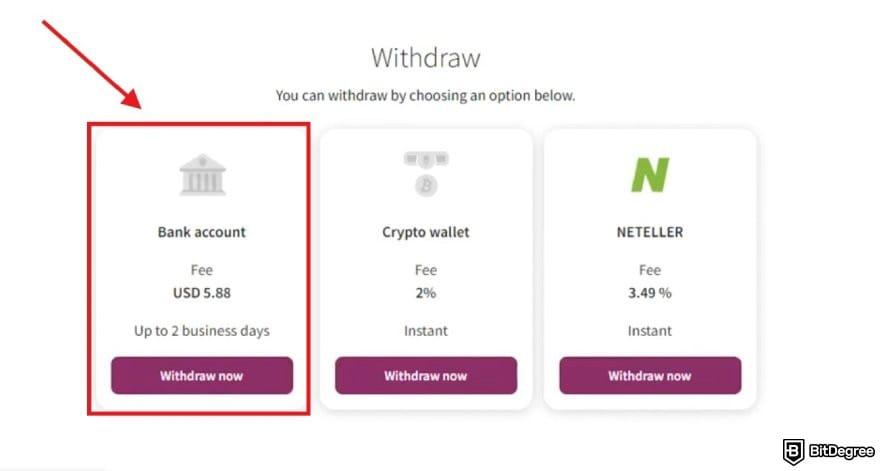
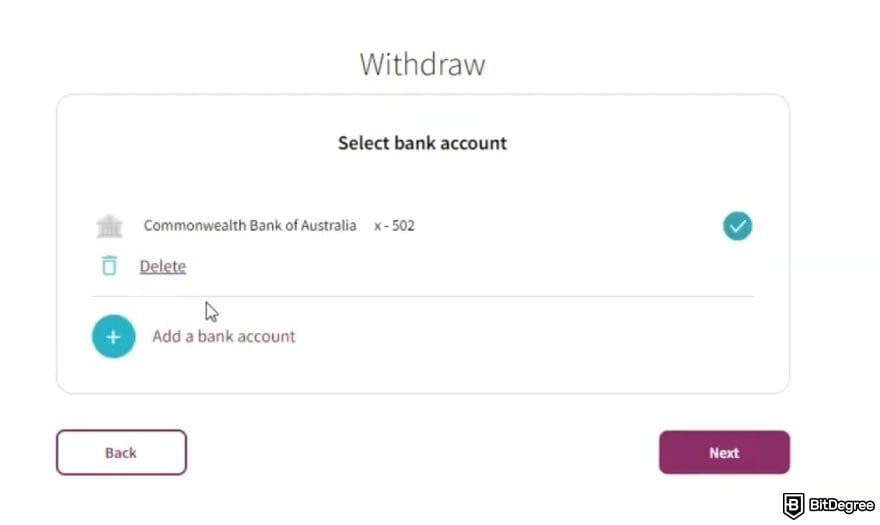
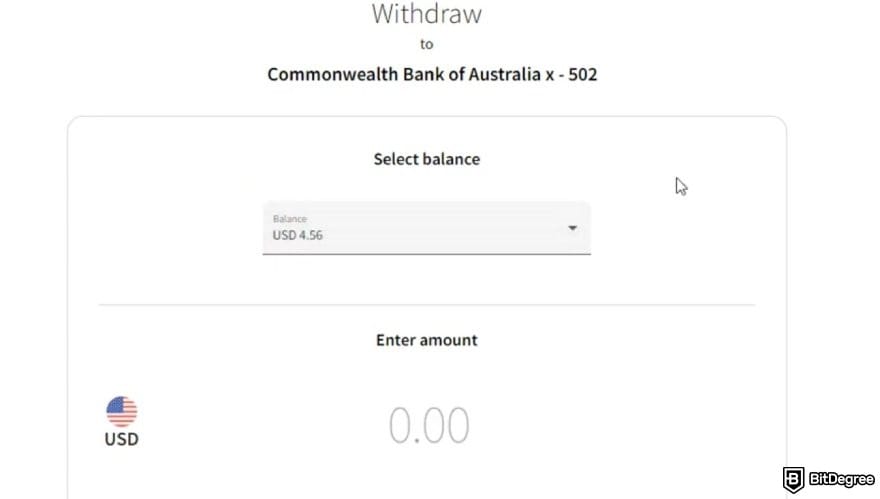
While bank transfer is probably the most common method for cashing out your funds, local bank transfers may not be available in every region. Additionally, the transfer time for this cash-out method will be different depending on where you live.
The fee for bank withdrawals on Skrill is $5.50 in every country.
In general, it may take 1 to 5 business days for the withdrawal to be credited to your bank account. The processing time frame will be displayed to you when you start the withdrawal.
Bank withdrawal is also a viable option if you’re looking for how to get money off a Skrill virtual card, since it can’t be used for direct ATM cash withdrawals. Also, you can get money off Skrill virtual card by transfering them to another Skrill user.
Looking for more in-depth information on related topics? We have gathered similar articles for you to spare your time. Take a look!



How to Withdraw Money from Skrill to a Debit Card
Another available method is to withdraw money from Skrill to debit card or credit card. This can be a good option if you want to use the funds immediately for daily expenses or shopping without having to transfer them to a separate bank account first.
Take a look at this step-by-step guide on how to do it on the Skrill app:
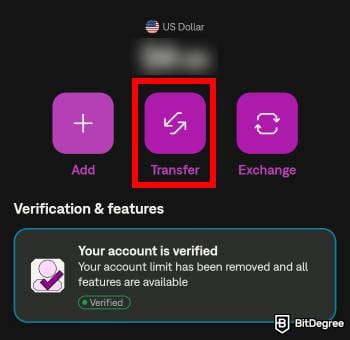
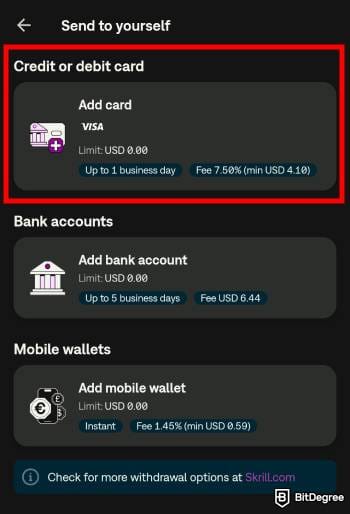
One thing to note is that withdrawal to a debit/credit card on Skrill is significantly more expensive. Currently, the fee rate is at 7.5% of your withdrawal amount, with a minimum amount of $3.50 per transaction.
Furthermore, Skrill only supports either Visa or MasterCard cards for this withdrawal method. These are some pretty major factors, so please consider them as you learn how to withdraw money from Skrill to a debit card.
How to Send Crypto from Skrill to an External Wallet
Since Skrill offers some cryptocurrency services on its platform, it also lets you send coins to an external wallet. However, it is not as straightforward as you might’ve expected since the process involves several loops.
📚 Check Out: How to Send Bitcoin to Another Wallet
You can’t just send your BTC, ETH, or USDC holdings to an external wallet. First, you need to sell it as fiat. Then, you’ll need to convert your fiat balance into a cryptocurrency in the transfer page. If you think this is a bit convoluted, then you’re not the only one.
Regardless, here is how to withdraw money from Skrill in the form of cryptocurrency:

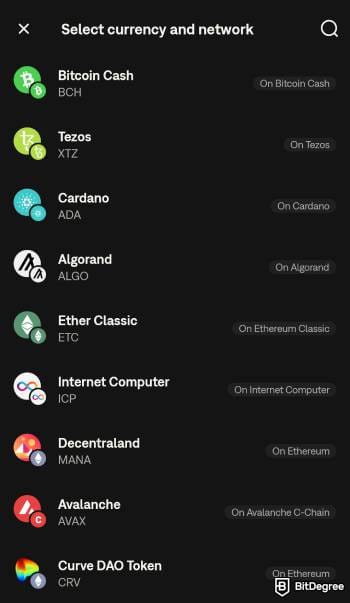
Note that you need to pass the KYC verification process before you can send crypto to an external wallet.
The fee for external crypto transfers on Skrill differs depending on which asset and network you choose. It may also include a network fee.
Skrill Fee Structure
I did mention some fees associated with each withdrawal method I covered. But you might want a more comprehensive look into the platform fee structure. To help you with that, here is a table covering some of the Skrill fees you might want to know:
Bank Withdrawal | $5.50/transaction (or equivalent) |
|---|---|
Debit/Credit Card Withdrawal | Up to 7.50 % per transaction |
Crypto Wallet Transfers | Varies |
Deposit | Varies depending on method and location |
Skrill to Skrill Transfers | 2.99% per transaction (Skriller), 1.45% per transaction (True Skriller) |
International Bank Transfer | Bank transfers: free, credit card: up to 2.99% |
FX Conversion | Up to 4.99% |
Inactivity Fee | $5.00/month (or equivalent) |
Table: Skrill's fee structure
Let’s take a look at the fees a bit closer. Since you’re looking into how to withdraw money from Skrill, it is worth looking at the fee associated with it. The platform applies a flat fee of $5.50/withdrawal for bank transfers, no matter where you are.
This makes the fee easier to understand, and you can always predict how much will be charged for your transfers. But at the same time, this may not be the most compelling fee rate for people who make a lot of smaller transfers.
Now, if you decide to make a withdrawal directly to your debit/credit card, the fee is significantly higher. Skrill will charge you up to 7.50 % per transaction. If you were to withdraw $1,000 from your Skrill account to your credit card, the fee would be $75. Depending on where you live, this can be a significant dent in your overall payout.
Alright, what about money transfer fees? After all, Skrill is a popular remittance app, and you might want to know what it has to offer.
Transferring to another Skrill user will cost you 2.99% per transaction with a minimum fee of €0.50. If you think this is a bit too steep for your liking, then you can increase your account verification level from the regular “Skriller” to a more advanced “True Skriller”.

This way, the fee for sending money to other Skrill accounts will be lower at 1.45% per transaction.
An even better option is to transfer money from Skrill to bank accounts internationally. Skrill won’t charge fees for this transfer method, but remember that there is the FX conversion rate markup that acts as a “hidden fee”.
In fact, research by the World Bank indicates that these exchange rate margins can account for more than half of the total cost[1] of cross-border payments, meaning you could be losing a significant chunk of your money to fees you never even see
At the time of writing, the rate for FX conversion markup on Skrill is up to 4.99%.
How to Withdraw Money from Ogvio
After I showed you how to withdraw your money from Skrill, you might think that you need a better option. You're in luck! I know just the right one – Ogvio. This platform is different from Skrill since it is a self-custodial service.
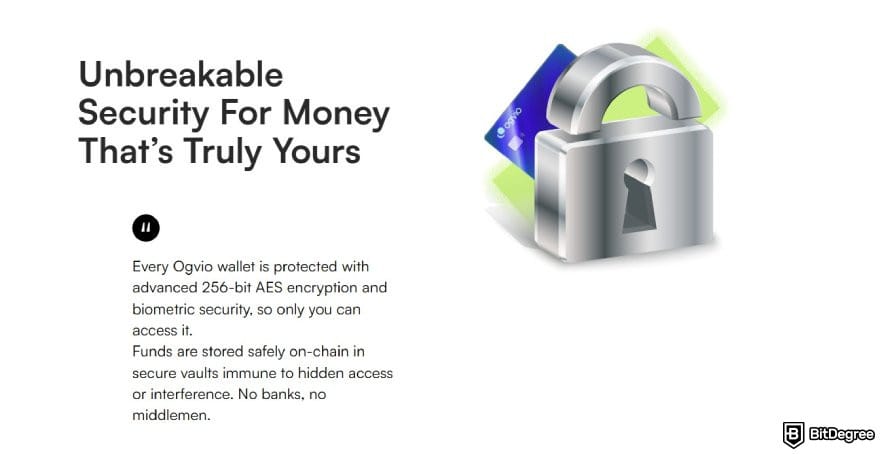
In other words, you are the only one who can touch and have control over your money. No freezing funds, no delay, just you and your money!
Did you know? One in five cryptocurrency owners has faced issues accessing or withdrawing their funds[2] from centralized platforms, proving that when you don't hold the keys, you don't truly hold the money.
Overall, Ogvio offers quick and cost-efficient ways to send money abroad. Currently, you can make remittances to more than 160 countries via transfers to bank accounts, crypto wallets, or other Ogvio users with low-to-no costs.
Send Money to Another Ogvio User
First, let's go over the process of how you can send money instantly to other Ogvio users. There is no need to type in a long and complex bank account number or wallet address. It is also completely free, unlike on Skrill, which charges 2.99% for transfers between users.
Additionally, once you send money to a recipient, they will appear in your contact list. So, there is no need to type in the info again if you made recurring transfers to a recipient.
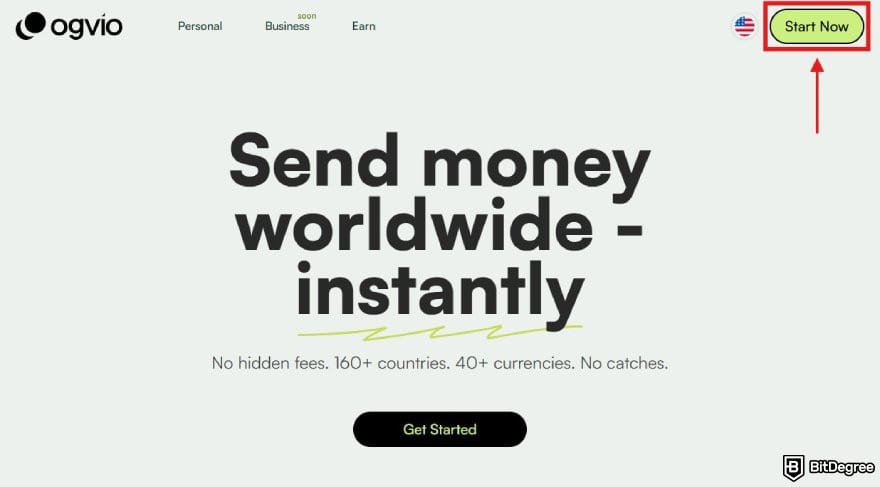
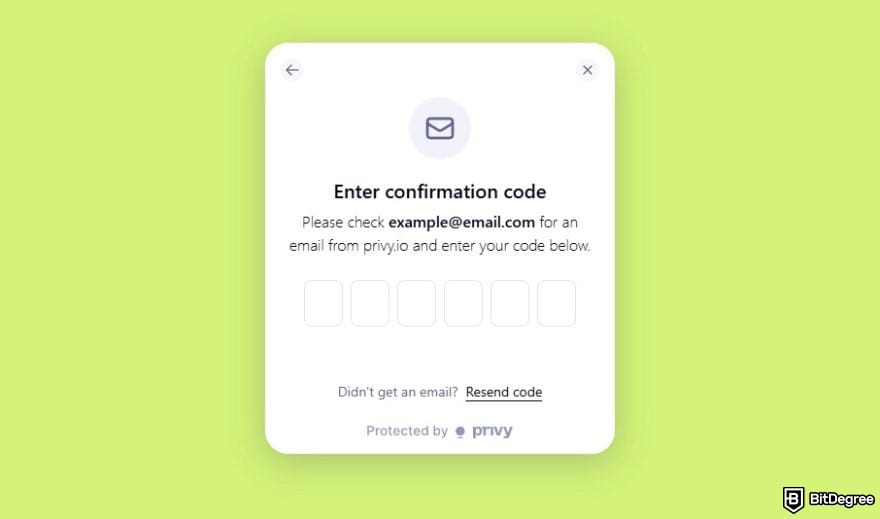
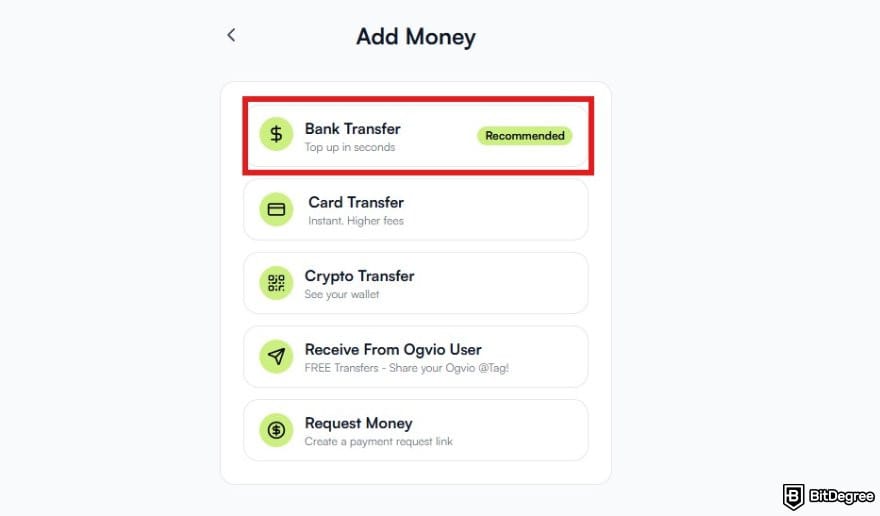
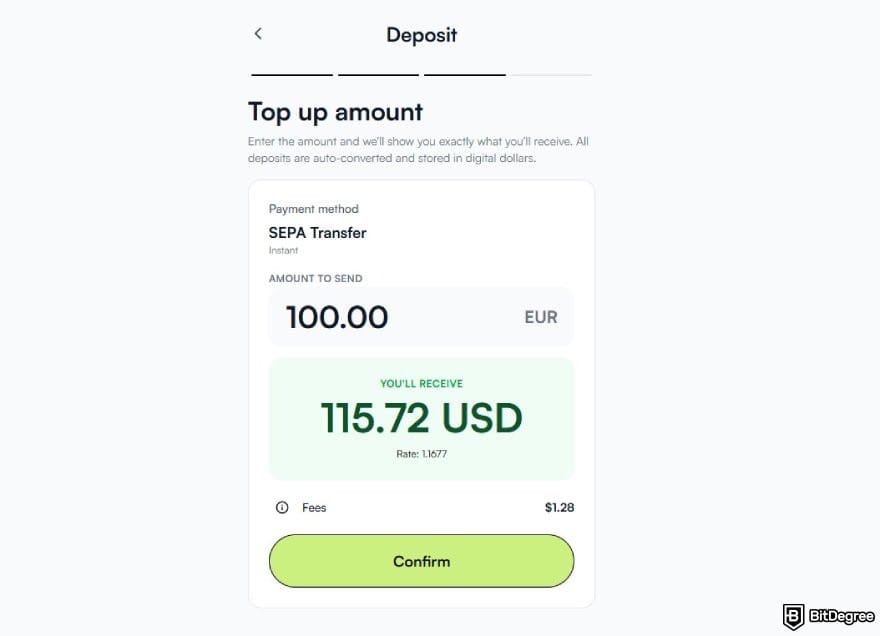
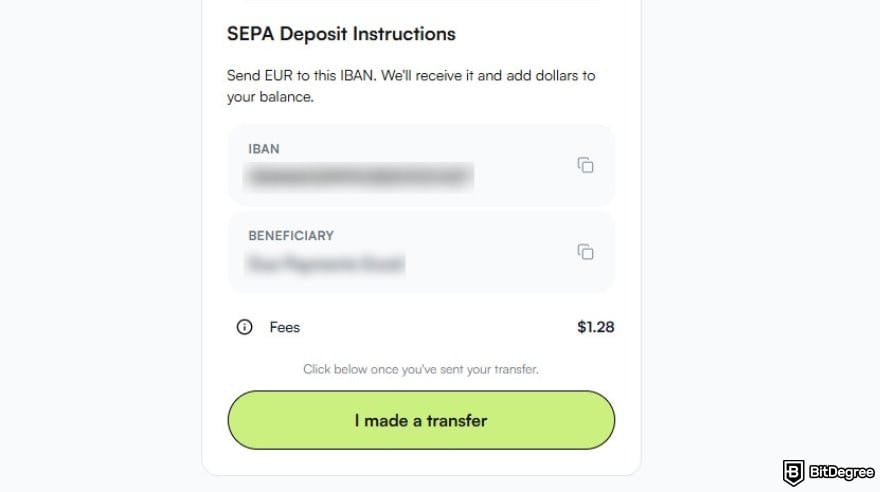
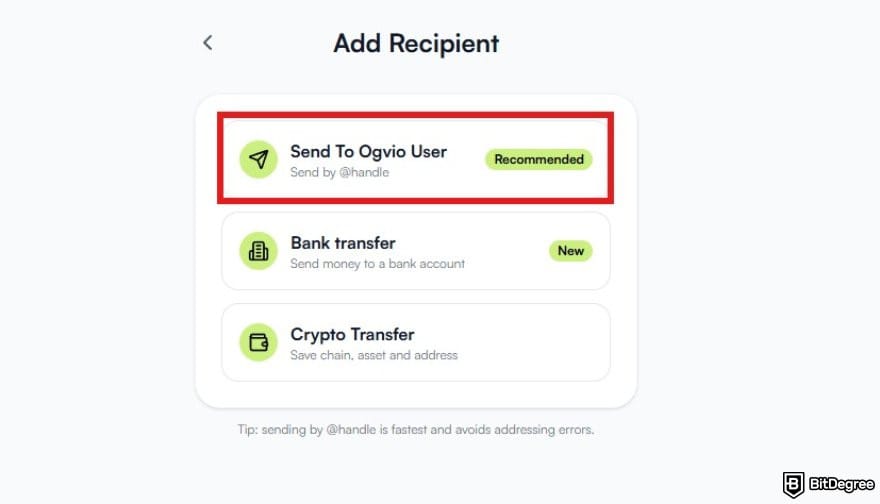
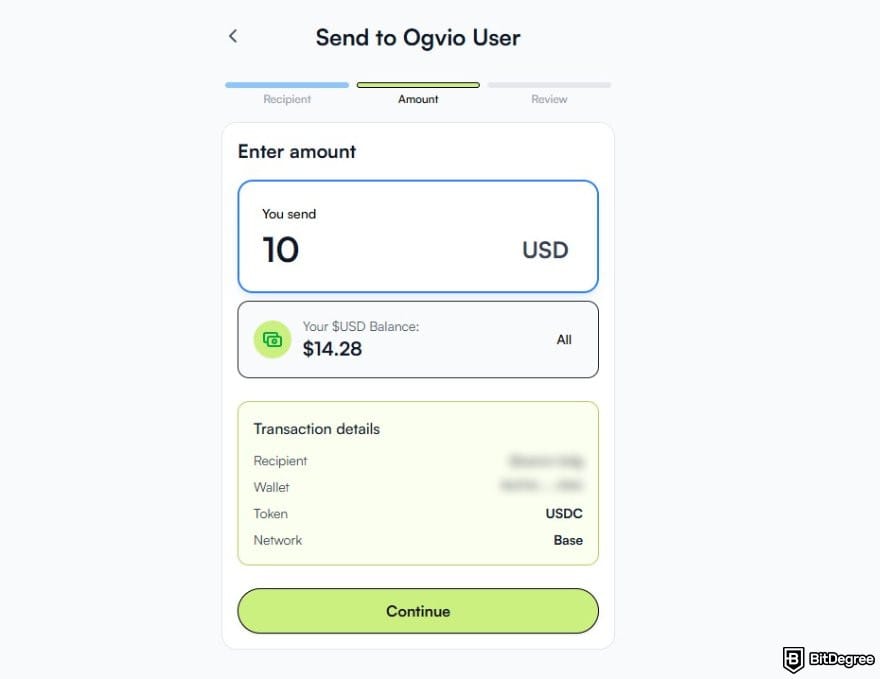
This transfer method is arguably the easiest and safest way to send money on Ogvio.
Send Money from Ogvio to a Bank Account
You can also send money from your Ogvio balance directly to a bank account:
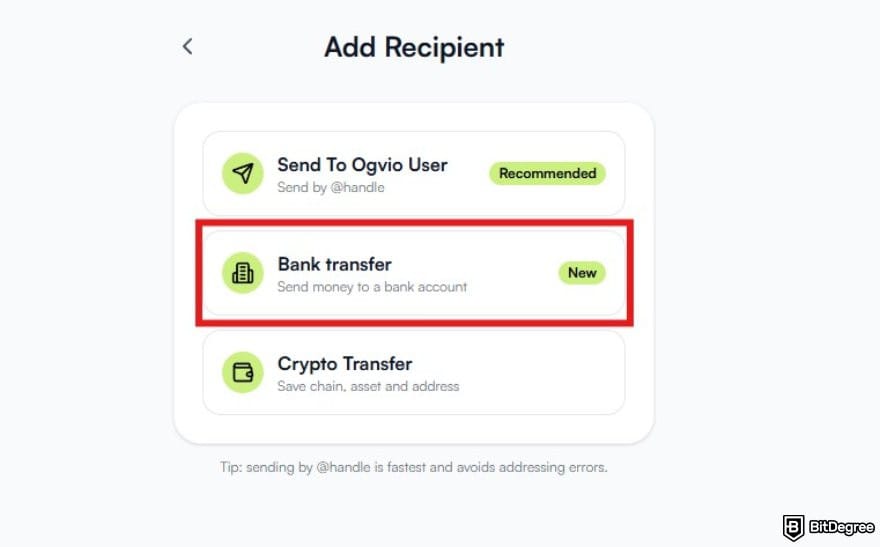
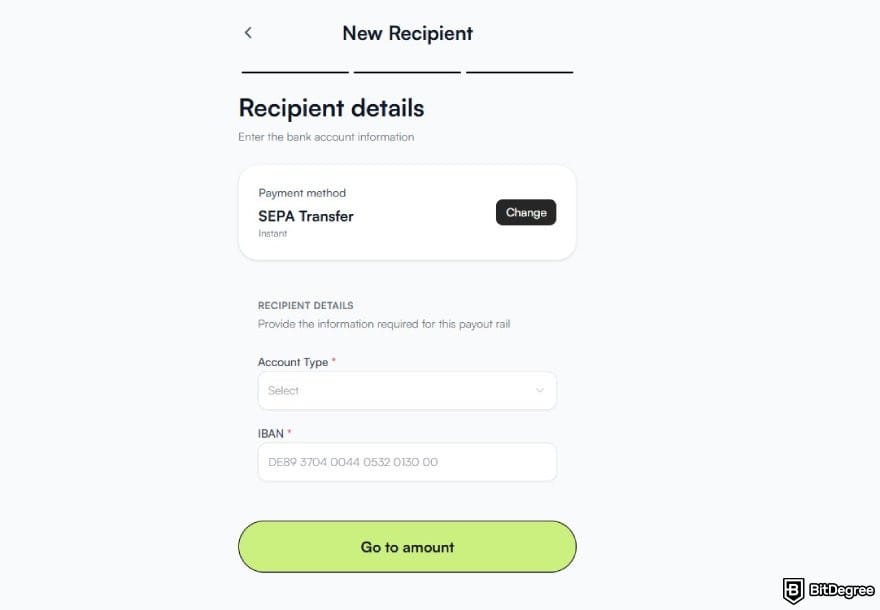
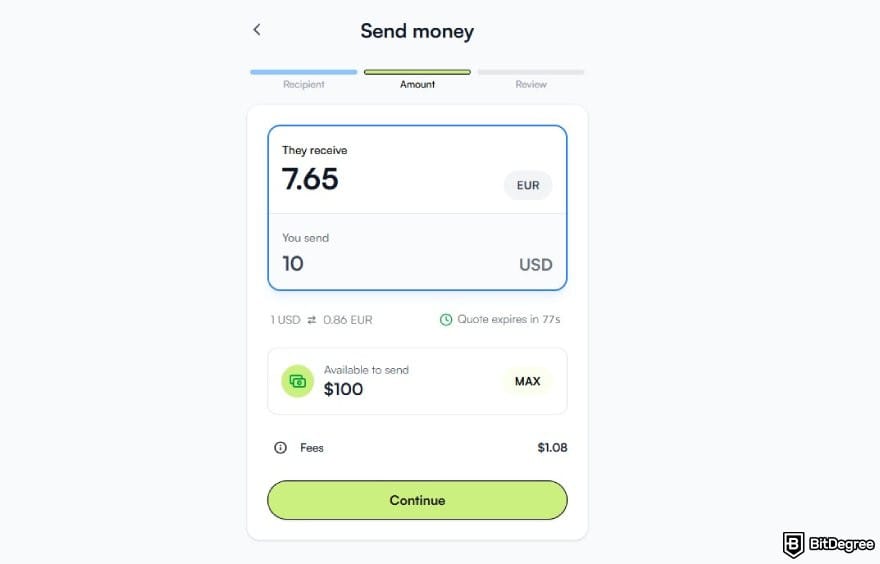
Keep in mind that there might be an additional fee for bank transfers. The exact amount will vary depending on the currency and transfer method, but it is generally low cost because Ogvio uses local payment rails to make bank transfers. Plus, it has a fair exchage rate. You can always check the full costs before you finalize the transfer.
Don't forget you’ll need to pass a KYC verification process to use any bank transfer-related features on Ogvio.
The time it takes for your money to arrive will also differ by country. But in most cases, it will arrive within the same day, if not instantly. Always check the estimated transfer time to make sure.
How to Transfer Crypto to an External Wallet on Ogvio
If you have ever tried sending crypto to an external wallet on Skrill, you’ll know that it doesn’t have the most seamless process. First of all, you need to pass the KYC verification, which may beat the whole purpose of using crypto for some people.
📚 Read More: Is Bitcoin Anonymous?
Additionally, you need to convert your fiat balance into crypto, then send it. Even if you have a crypto balance in your account, you still need to sell it first, then convert it again to crypto, which just adds another unnecessary loop to the process.
On Ogvio, it is much simpler. You can quickly send crypto to other users, external crypto wallet and even to anyone's bank account. Just keep in mind that currently you can only send or receive USDC on Base. Here's how the transfer process looks:
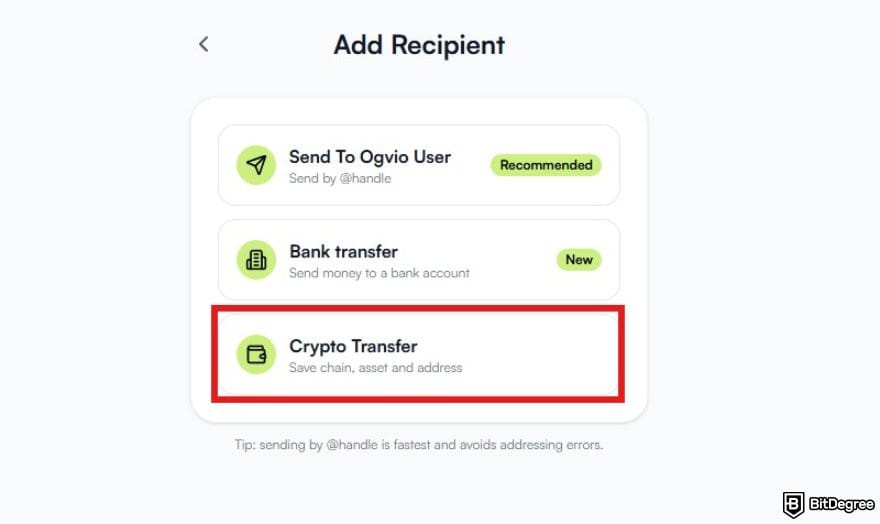
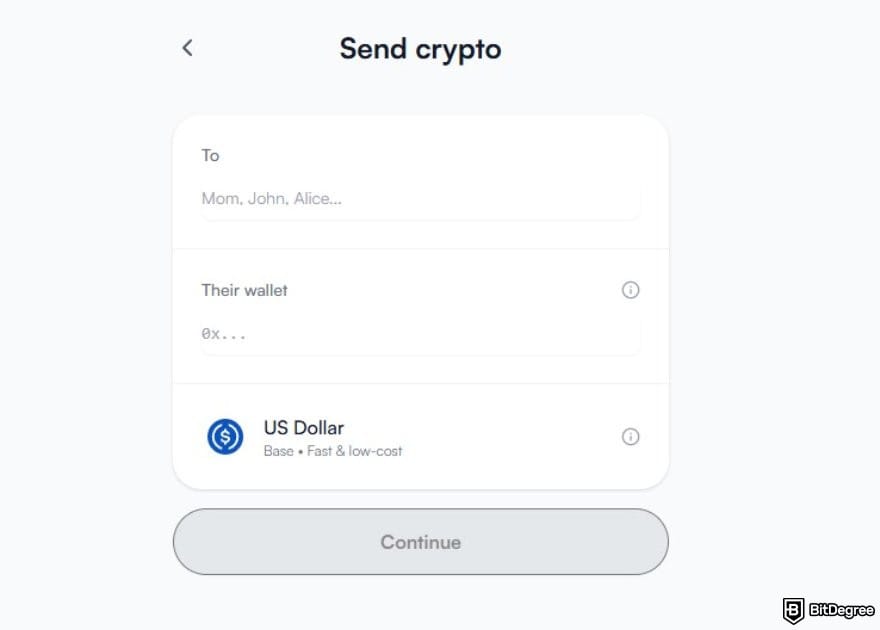
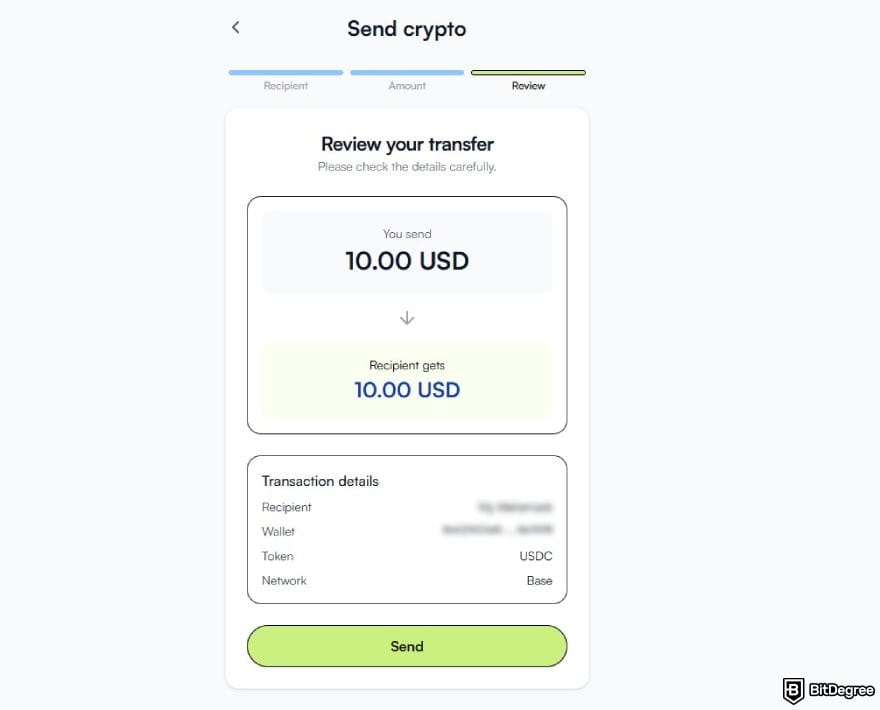
Another thing Ogvio does better than Skrill is that crypto transfers are completely free. You don’t even have to pay for network fees since the platform will cover that for you.
Make sure the recipient’s crypto wallet also supports USDC on Base before you finalize the transfer.
If you have a crypto balance other than USDC in your Ogvio account, you’ll have to swap it to USDC first before you can send it to an external wallet.
Ogvio VS Skrill: Which One to Choose?
Now that I’ve given you two different options to withdraw money, you might wonder which one to choose. No worries! Here is a more comprehensive comparison between Skrill and Ogvio:
 |  | |
|---|---|---|
|
| |
| Per-transaction | Per-transaction | |
| | | |
| A global money transfer service with an additional volatile currency rate pegging to USD or EUR. | A long-running digital wallet for online payments and transfers with clear, published fees. | |
| Visit site Read review | Visit site |
Table: Comparison between Ogvio and Skrill
First, let’s take a closer look at the internal transfer fees for both platforms. Skrill applies a 2.99% fee if you want to send money to another Skrill user. You can reduce fees by upgrading your account to True Skriller, which requires completing KYC and making a deposit.
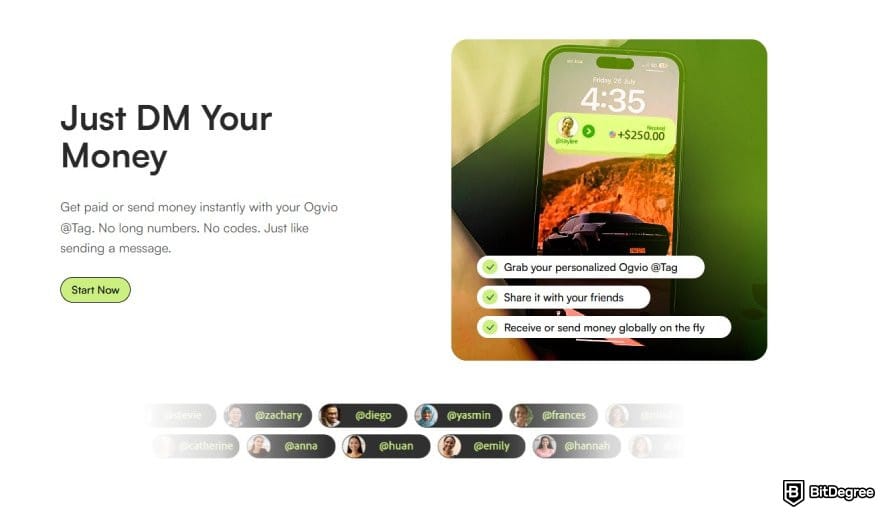
On the other hand, transfers between Ogvio users are completely free. Not only that, but it is also very easy and quick. The platform uses the @Tag feature that works like a social media handle. So, you don’t have to type in a long bank account number. With this method, your money will also arrive in the recipient’s account instantly.
Speaking of fees, Ogvio only charges you per transaction. If you ever decide to store your funds in your account without making any transfers, there will be no fee. In contrast, Skrill will charge you a $5/month fee if you leave your account inactive for at least 6 months.
Thankfully, you can avoid this by simply logging in to your account or making a transfer.
If you are a crypto enthusiast, then you’re in luck! Both platforms give you access to cryptocurrencies. In Ogvio, you can buy crypto coins using card payment or swap your balance into various supported assets on Base within the platform.
You can also easily send funds to an external wallet with no fees at all. Just make sure the recipient's wallet supports USDC on Base.

Skrill also offers a pretty similar access to crypto, except that it also has several trading features like limit orders and recurring buy orders. That said, it is not as comprehensive as on dedicated exchanges like Binance or Kraken.
Additionally, as I mentioned earlier in the article, you can’t send your crypto holdings directly to another wallet. You’ll have to turn it into fiat, then convert it again during the transfer process.
Last but not least, let’s talk about ease of use. Both services offer an intuitive UI that is easy to navigate. You can track your previous transactions on Skrill and Ogvio. Skrill also offers a mobile app so you can always access the features no matter where you are.
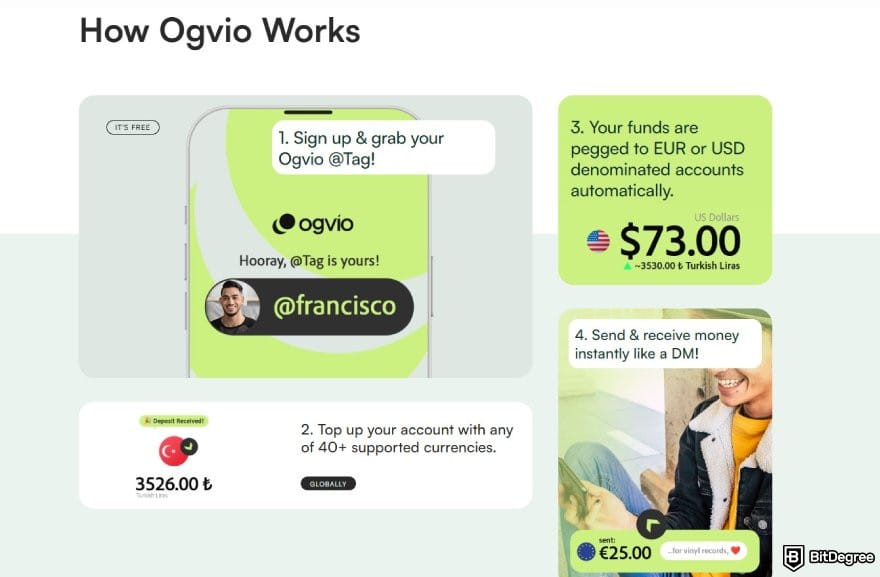
Ogvio also plans to release a dedicated app in the future. But for now, the platform works perfectly on both desktop and mobile without having to install anything. Simply use your web browser and access the platform there. You can even add a shortcut on your smartphone homescreen to access Ogvio just like an app.
Browse our collection of the most thorough Crypto Exchange related articles, guides & tutorials. Always be in the know & make informed decisions!



Conclusions
So, there you have it! The complete roadmap of how to withdraw money from Skrill. While the platform certainly gets the job done, let’s be honest, the process often comes with a side of patience and those nagging fees that eat into your balance. It’s never nice to see how much gets lost in transaction costs and currency conversion markups.
In a world where digital finance moves instantly, you shouldn't have to wait days or pay a premium just to access your own money. If you find yourself constantly frustrated by Skrill’s withdrawal limits, it might be time to rethink your strategy. You deserve a payment partner that prioritizes speed and transparency, ensuring your hard-earned cash stays in your pocket where it belongs.
This is exactly why Ogvio is worth your attention. By offering instant transfers, transparent pricing, and the ability to safeguard your funds in stable currencies like EUR and USD, it solves the biggest headaches associated with traditional remittance services. Why settle for "good enough" when you can have instant and fee-free?
Ready to upgrade how you move money? Try out Ogvio today and see the difference for yourself.
Scientific References
1. World Bank Blogs: 'Ending remittance hidden fees: the international community calls for action';
2. Security.org: '2025 Cryptocurrency Adoption and Consumer Sentiment Report'.
Send Money Worldwide
Check out the best ways to send money to other countries quickly, safely, and with minimal fees.



































About Article's Experts & Analysts






