Key Takeaways
- BTCC mainly supports four deposit methods: Visa/Mastercard, Interac e-Transfer, bank transfer, and crypto transfer. All with zero deposit fees on the platform's end, and both USD and CAD are fully supported;
- Canadian traders have access to Interac e-Transfer for straightforward CAD deposits, with French language support across the platform;
- Before depositing, completing KYC early, double-checking your network selection on crypto deposits, and ensuring your deposit meets the minimum threshold are the three steps most likely to save you a support ticket later.
Knowing how to deposit money into a crypto exchange sounds like it should be the easy part. On many platforms, it isn't. They often include hidden fees, limited payment options, and confusing fund transfer flows, making it harder than it needs to be.
BTCC does it differently. It supports multiple currencies, including USD and CAD, as well as various payment methods, like card payments, Interac, and crypto transfers. The options are there, and the process takes minutes rather than the better part of an afternoon.
I've mapped out every deposit method available on BTCC so you don't have to figure it out on your own. Fiat deposits, crypto transfers, CAD support, and what to do once your funds land, it's all here. By the end of this guide, you'll have your account funded and ready to trade in minutes!

Did you know?
Subscribe - We publish new crypto explainer videos every week!
What is a Crypto Wallet? (Explained With Animation)

Table of Contents
- 1. BTCC Deposit Methods: What's Available
- 2. How to Deposit Fiat on BTCC
- 2.1. Depositing CAD to BTCC
- 3. How to Deposit Crypto on BTCC
- 4. How to Transfer Funds to Your Trading Account
- 5. BTCC Fees Explained
- 6. What to Do If Your Deposit Doesn't Arrive
- 6.1. Crypto Deposits Problems
- 6.2. Fiat Deposits Problems
- 7. Conclusions
BTCC Deposit Methods: What's Available
Before diving into the step-by-step guides, here's a quick look at all the crypto deposit methods explained. There are three ways to fund your account with fiat, plus a crypto deposit option for existing crypto holders.
Latest Changelly Coupon Found:Supported Currency | Speed | Fees | |
|---|---|---|---|
Visa/Mastercard | USD, CAD, EUR, GBP, and others | Fast | 0 |
Interac e-Transfer | CAD | Fast | 0 |
Bank Transfer | USD, CAD, and others | 1–5 business days | 0 |
Crypto Deposit | USDT, BTC, ETH, and others | Near-instant | 0 (network fees may apply) |
Table: Available deposit methods on BTCC
I think these options can give traders the freedom and flexibility to easily fund their accounts using the method they prefer. But, a few things worth knowing upfront:
- All deposit methods carry zero fees on BTCC's side, but the third-party provider may charge you an additional cost.
- Canadian traders have access to Interac e-Transfer, a deposit method not available on most crypto exchanges, making CAD deposits as straightforward as sending an everyday bank payment.
- Fiat deposits are converted to USDT, the margin asset used across BTCC's trading products. This happens automatically during the deposit process.
- Crypto deposits are the fastest option if you already hold crypto in an external wallet.
The right method depends on where you're starting from. But whichever you choose, learning how to fund your crypto trading account on BTCC is relatively easy, and you don't have to spend an entire day figuring it out.
Looking for more in-depth information on related topics? We have gathered similar articles for you to spare your time. Take a look!



How to Deposit Fiat on BTCC
Getting fiat into your BTCC account takes a few clicks, and regardless of which method you use, the starting point is the same. Here is a step-by-step guide on how to deposit USD to the BTCC crypto exchange on a desktop:
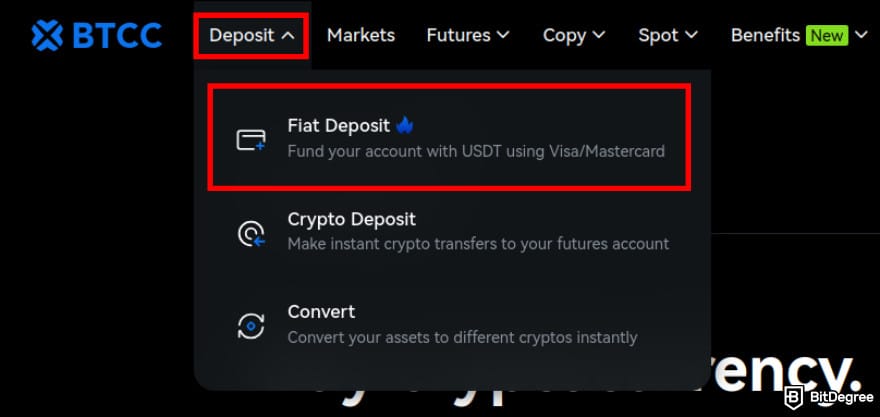
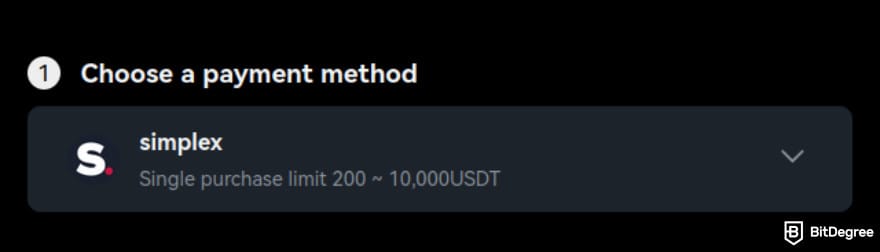
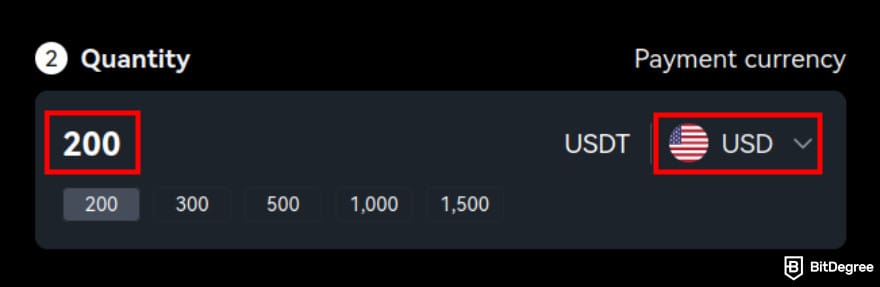
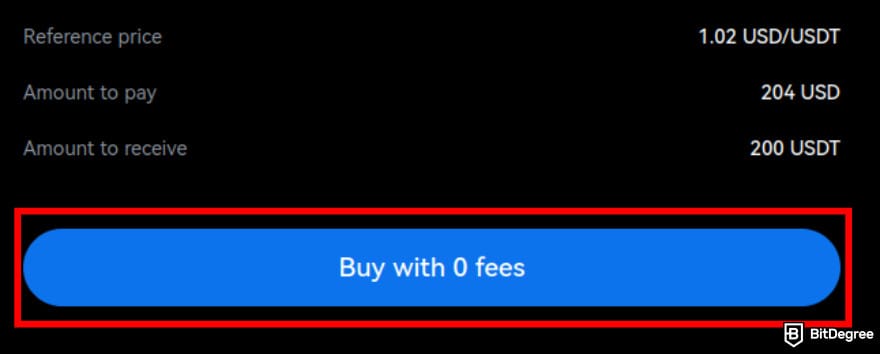
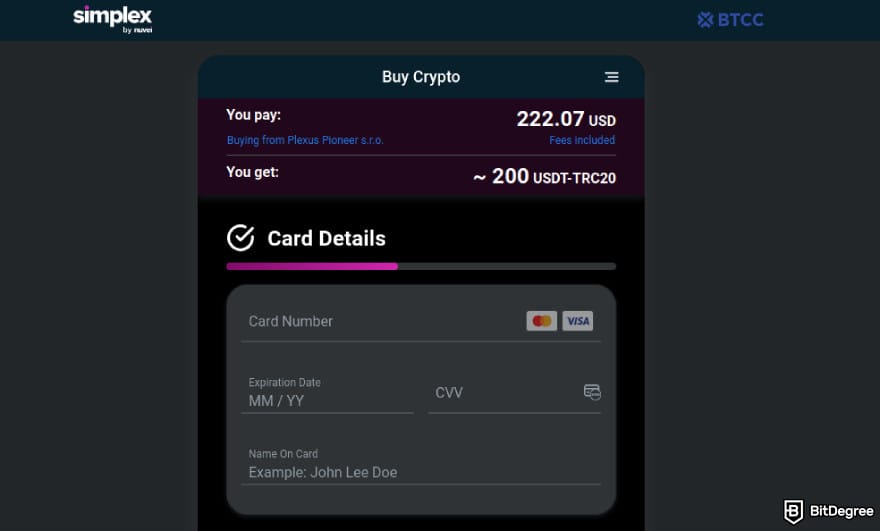
As you can see, the process is easy to do. However, keep in mind that there is a fiat deposit limit that increases depending on your account verification level. So, I recommend doing it as soon as possible to get a higher threshold.
The available payment methods may differ depending on where you live. Additionally, most providers charge additional fees for Mastercard/Visa purchases, so please keep that in mind.
Depositing CAD to BTCC
Now, if you're a Canadian trader who wonders how to deposit CAD to the BTCC crypto exchange, there are multiple ways you can do it. You can follow the same process I showed you above, or you can use Interac transfer crypto deposit to fund your account. Here is how you can do it on mobile:
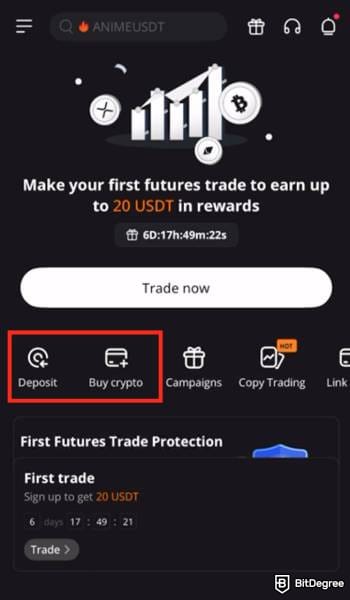
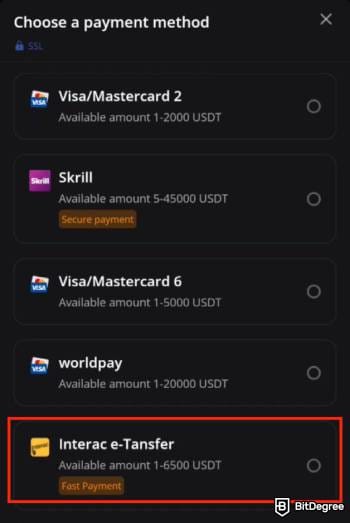
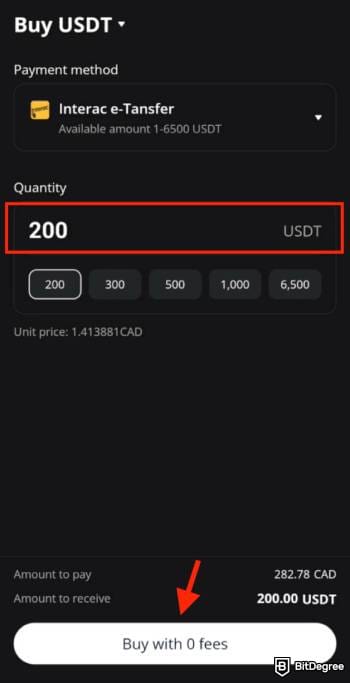
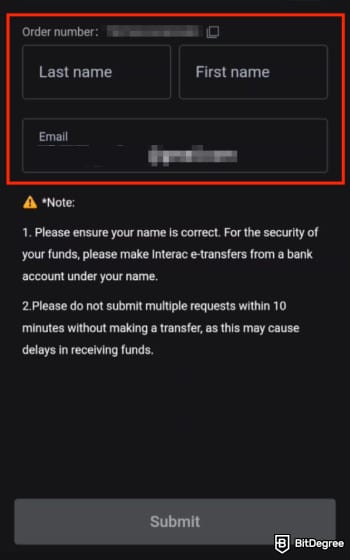
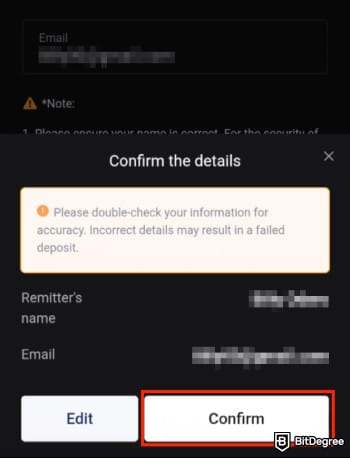
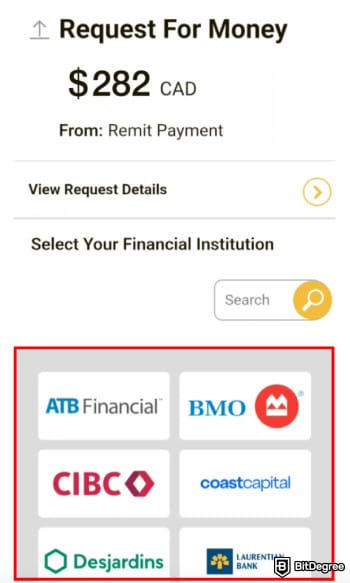
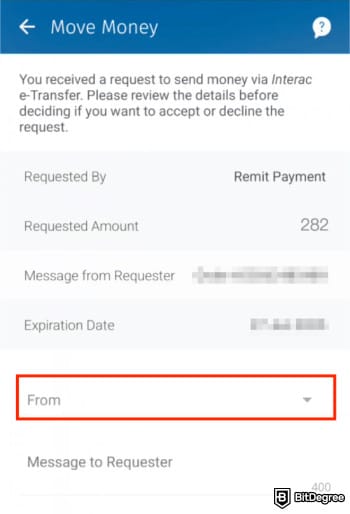
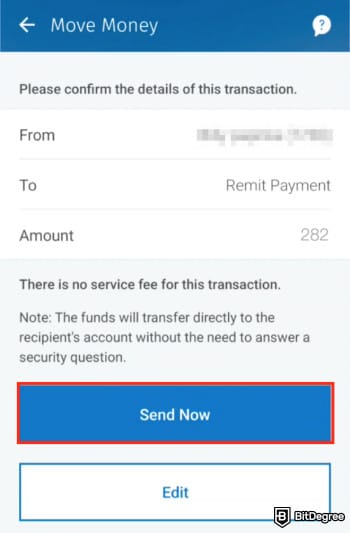
That's it! The process is as easy as the previous method. Keep in mind that there is a minimum purchase amount of 200 USDT for this deposit option.
At the time of writing, Canadian users who make their first deposit using Interac e-transfer will enjoy a 0 deposit fee, available until May 31, 2026.
How to Deposit Crypto on BTCC
If you already hold crypto in an external wallet, knowing how to deposit crypto funds directly into BTCC is the fastest way to get your account funded. Here's how to do it on desktop:
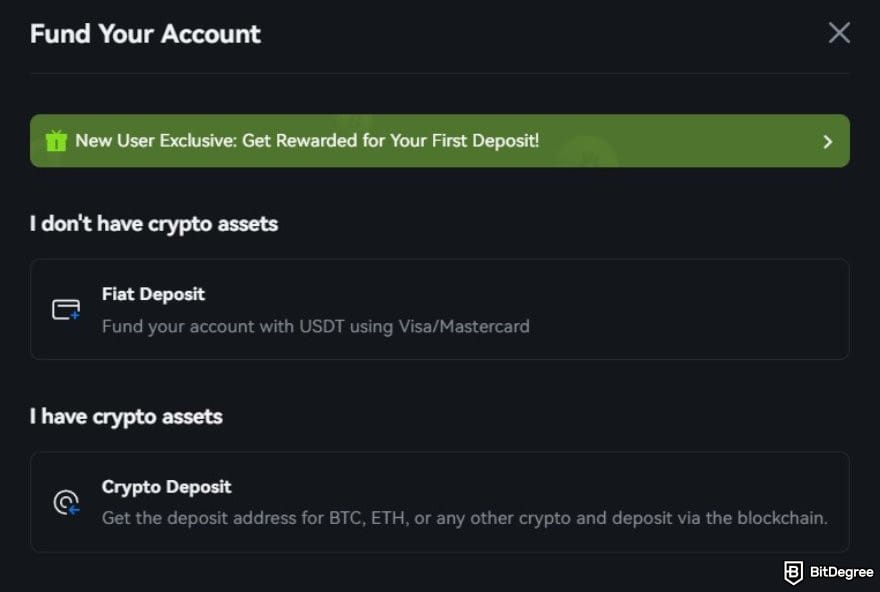
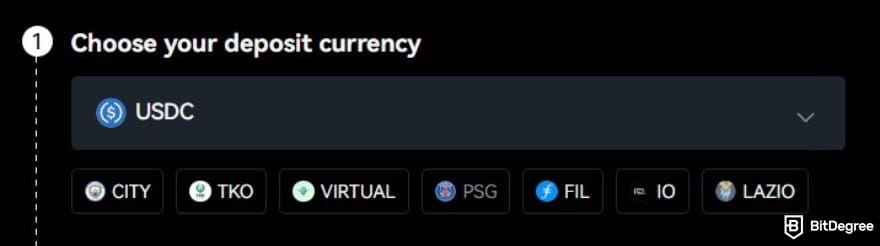
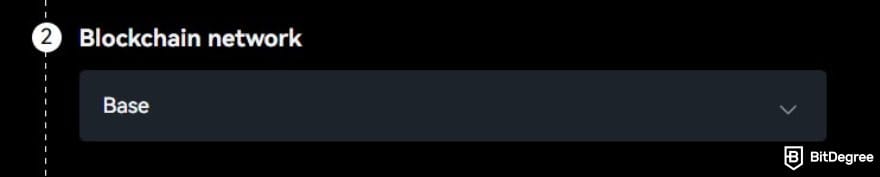
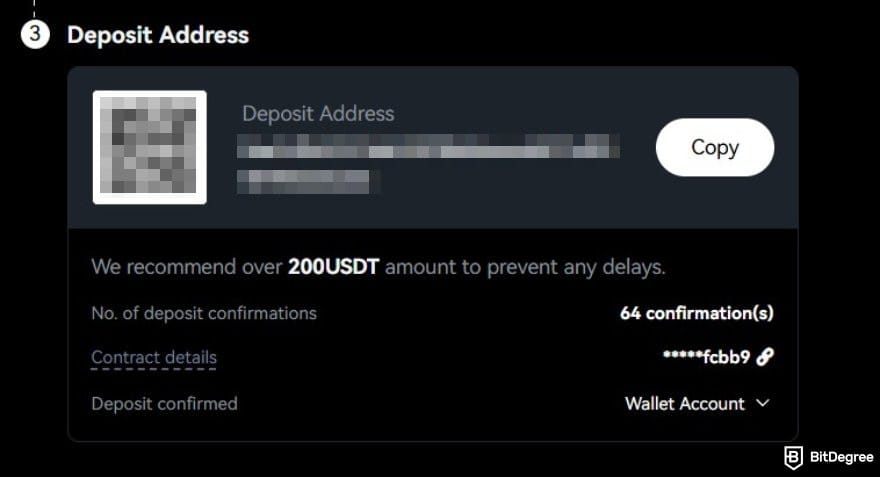
All you have to do now is wait until the crypto turns up in your BTCC account. A question worth addressing here: Is a crypto deposit instant? The short answer is almost. Confirmation times vary depending on the network, but in general, crypto transfers are one of the most efficient ways to deposit money into a crypto exchange.
If you want to check the deposit status of a specific cryptocurrency, you can go to [Assets] > [Deposit] > [Deposit History]. On the detailed page of a specific Crypto Deposit, you will find key information such as the deposit amount, deposit status, and timestamp. A deposit is typically marked as successful once all required blockchain confirmations have been completed.
How to Transfer Funds to Your Trading Account
This is the step that catches a lot of first-time BTCC users off guard, and it's the final piece of knowing how to fund your crypto trading account properly before your first trade. Funds don't land directly in your trading account. They arrive in your Wallet Account first, and you'll need to transfer them manually before you can start trading.
It sounds like an extra step, but it takes about ten seconds. Here's how:
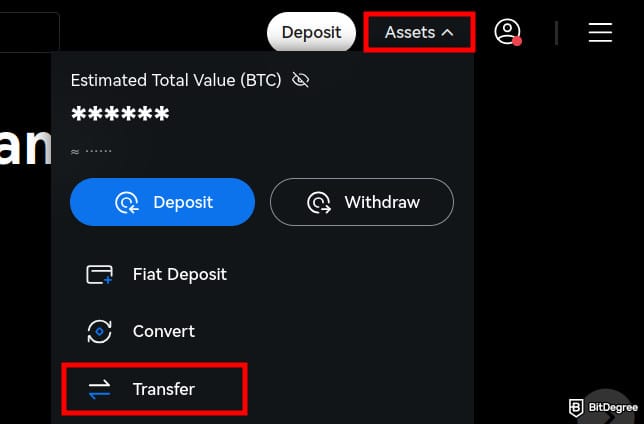
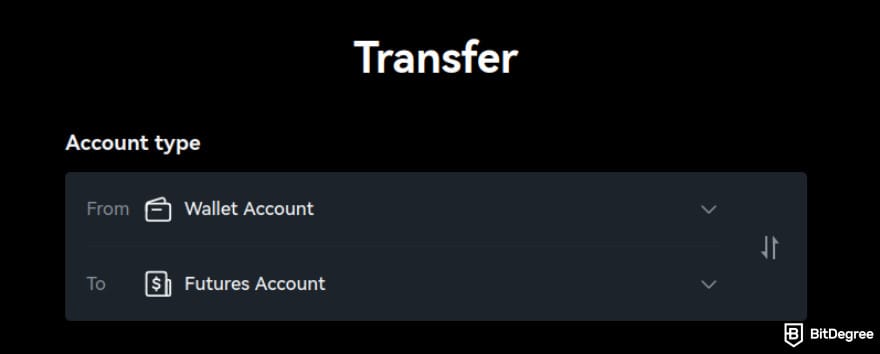

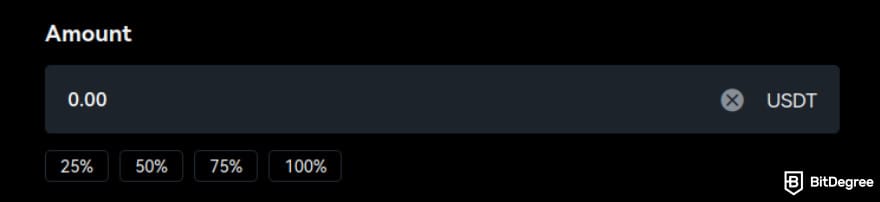
The transfer is instant. Once it lands in your chosen trading account, you're ready to place your first trade. One thing to keep in mind is that if you're planning to trade across multiple product types, say, crypto futures and TradFi stocks, you'll need to split your funds across the relevant accounts. Each trading product draws margin from its own account balance, not your main wallet.
BTCC Fees Explained
One of the more refreshing things about depositing on BTCC is how straightforward the fee structure is. Here's the full picture:
1
Deposit Fees
The deposit fees on BTCC are zero across the board. You can make deposits via Visa, Mastercard, Interac e-Transfer, bank transfer, or a direct crypto transfer, and BTCC won't charge a deposit fee. Every dollar, loonie, or USDT you put in goes directly into your account.

However, keep in mind that third-party providers that facilitate your purchase, such as Moonpay, Simplex, or even your bank, may charge additional fees for the transaction. Gas fees may also apply to your crypto deposits. These are charged by the network itself and are outside of BTCC's control.
2
Trading Fees
While deposit fees are zero, it's worth knowing what comes next once you start trading. BTCC uses a taker/maker fee model. For example, the fees for spot trading on BTCC are 0.2% maker/0.3% taker. The good news is that you can improve your account's VIP level and get discounts on futures trading and withdrawals. Here is a simple table to give you a better picture:
Futures Trading Fees | |
|---|---|
VIP 0 | 0.02% maker/0.06% taker |
VIP 3 | 0.017% maker/0.04% taker |
VIP 7 | 0.01% maker/0.015% taker |
Table: Futures trading fee structure on BTCC
Your VIP level will increase based on the amount of USDT you have (200 USDT for VIP 1), and your trading volume in the last 30 days. In other words, the more active you are on BTCC, the more discounts you can enjoy.
3
Withdrawal Fees
Withdrawals on BTCC are processed in crypto. Fees vary depending on the asset and network used. For example, withdrawing USDC on Base will incur a 5 USDC fee for the transaction.

Keep in mind that the withdrawal fee is determined by the respective main net, and the main net may adjust the fee in situations such as network congestion without further notice. Check the real-time rate listed on the withdrawal page for the most accurate estimate.
Fortunately, as mentioned earlier, BTCC offers withdrawal fee discounts for higher VIP tiers. Take a look at this table for reference:
Withdrawal Fee Discount | |
|---|---|
VIP 1 | 10.00% |
VIP 2 | 10.00% |
VIP 3 | 20.00% |
VIP 4 | 30.00% |
Table: Withdrawal discount rates on BTCC
The discount can go as high as 60.00% for VIP 7 accounts. So, if you're planning to trade regularly on BTCC, building toward a higher VIP level pays off well beyond just the trading fee discounts.
What to Do If Your Deposit Doesn't Arrive
Most BTCC deposits go through without a hitch. But if your funds haven't shown up when expected, don't panic. There's almost always a straightforward explanation. Here are the most common reasons broken down by deposit type, and what to do about each one.
Crypto Deposits Problems
If you're depositing via crypto transfer and your funds haven't arrived, one of the following is likely the cause:
1
Blockchain Confirmation Delay
This is the most common cause for crypto deposits running late. Your transaction may already be visible on the blockchain, but BTCC will only credit the deposit once the required number of confirmations is completed and the wallet syncs. In most cases, waiting a few minutes to a few hours resolves it. If the deposit still hasn't arrived after an extended period, contact BTCC's Live Chat for assistance.
2
Wrong Network Selected
Sending funds over a network that doesn't match your BTCC deposit address can result in a delayed or permanently lost deposit. Because of that, always double-check the network selection in both your external wallet and the BTCC deposit page before confirming a transfer. If this happens, contact Live Chat immediately.
3
Missing or Incorrect Destination Tag
Some cryptocurrencies, including XRP and XLM, require a Memo or Destination Tag alongside the deposit address. Leaving it blank or entering it incorrectly can cause the deposit to fail. The correct tag is displayed on the BTCC deposit page and typically consists of 7 to 8 digits. If you've made this mistake, contact Live Chat with the token name, deposit amount, correct and incorrect tag values, and the transaction hash (TxID).
4
Deposited the Wrong Token
Make sure the token you're sending matches what BTCC supports. A mismatch in token name or contract address will result in the deposit not being credited. This may sound like an unlikely mistake, but you won't believe what happens if you don't focus on the small details when you're rushing through a deposit at 2 AM, watching a market move.
5
Deposit Sent to a Contract Address
Always use the deposit address generated by BTCC, not the contract address displayed on blockchain explorers. Sending funds to a contract address will result in an uncredited deposit. If you're ever unsure which address to use, close the blockchain explorer tab entirely. The only address you need is the one BTCC generates for you on the deposit page.
6
Deposit Below the Minimum Limit
BTCC sets a minimum deposit amount for each supported token. If the amount you send falls below that threshold, it won't be credited and cannot be returned. Check the BTCC fees page for the minimum deposit limits before transferring.
If none of the above applies to your situation, contact BTCC's Live Chat with your transaction hash (TxID), and a member of the support team will investigate further.

- Accepts fiat currencies
- Simple to use
- Supports only trusted cryptocurrencies
- A leading cryptocurrency exchange platform
- Best for all type investors
- Accepts fiat currencies

- Industry-leading security
- Accepts fiat currencies
- Advanced trading tools
- Industry-leading security
- Strong regulatory reputation
- Advanced trading tools

- Wide range of tradable assets
- Robust copy trading feature
- Flawless security record
Fiat Deposits Problems
For card and bank transfer deposits, the causes are a little different. Here's what to check first:
1
Card Restrictions
Your bank may be blocking the transaction due to overseas transaction restrictions, monthly spending limits, or 3D Secure authentication issues. If your card deposit fails, contact your card issuer first to check for any restrictions in place. Trying a different card is also worth attempting before reaching out to support.
2
Risk Controls Triggered by Your Bank
Banks sometimes flag crypto-related card transactions as unusual activity, especially if the amount is higher than your typical spending pattern or if it's your first time making this type of transaction. If this happens, contacting your bank directly to authorize the payment usually resolves it quickly.
3
Platform Restrictions
If you see messages such as "Account Restricted", "IP Address Restricted", or "Identity Verification Required" during the deposit process, address those prompts first before retrying. Incomplete KYC is a common trigger for these messages, and so is using a VPN. BTCC's system may flag or restrict access if your IP address doesn't match your registered location.

4
Payment Channel Maintenance
BTCC's card payment channel undergoes occasional maintenance and system upgrades. If your deposit fails during one of these windows, you'll be notified via announcement. You can either wait for the maintenance to complete or use an alternative deposit method in the meantime.
Under normal circumstances, successful card deposits arrive within 30 minutes. If the issue persists after working through the above, take a screenshot of your payment confirmation or error message and bring it to BTCC's Live Chat. The support team can usually resolve fiat deposit issues quickly once they have the transaction details in front of them.
Browse our collection of the most thorough Crypto Exchange related articles, guides & tutorials. Always be in the know & make informed decisions!


Conclusions
Getting funds into your BTCC account is one of those things that sounds more complicated than it actually is. The platform supports multiple deposit methods, charges zero deposit fees, supports USD and CAD, and has a process that takes minutes from start to finish. The friction most platforms build into this step simply isn't there on BTCC.
To recap: choose the deposit method that suits you. Visa or Mastercard for most traders, Interac e-Transfer for Canadian users looking for a familiar and fee-free CAD option, bank transfer for larger amounts, or a direct crypto transfer if you're already holding crypto in an external wallet. Fund your Wallet Account, transfer to your trading account, and you're ready to go.
A few things worth keeping in mind before you deposit: complete your KYC early to unlock higher limits, double-check your network selection on crypto deposits, and make sure your deposit meets the minimum threshold for your chosen asset. Small details that are easy to overlook but worth getting right the first time.
Now that your account is funded, the next step is putting it to work. Check out our guide on how to trade futures on BTCC to get started.
The content published on this website is not aimed to give any kind of financial, investment, trading, or any other form of advice. BitDegree.org does not endorse or suggest you to buy, sell or hold any kind of cryptocurrency. Before making financial investment decisions, do consult your financial advisor.
About Article's Experts & Analysts