Key Takeaways
- KuCoin's NGN withdrawal to a Nigerian bank isn’t direct anymore;
- Users need to move their crypto off KuCoin first and then use P2P platforms or money transfer services to withdraw crypto as NGN;
- Ogvio works well if you want a quicker, lower-cost way to cash out crypto to NGN.
If you find a guide on how to withdraw from KuCoin to Nigeria banks by clicking “Withdraw” and calling it a day, it's definitely outdated. Cashing out from KuCoin, as of now, isn’t that simple for Nigerian users due to paused NGN services and limited fiat withdrawal options.
But don’t panic, KuCoin’s NGN withdrawal is still possible – you just need a different route using a seamless money transfer service like Ogvio or P2P trading tools on platforms like Bybit.
Follow along to get to learn what actually works to withdraw your funds on KuCoin, as well as how to reverse the process and convert NGN to USDT on KuCoin if you want to trade, stake, or use crypto in other ways.

Did you know?
Subscribe - We publish new crypto explainer videos every week!
What Is a Neobank (And Should You Use It)?


Table of Contents
- 1. Can You Withdraw From KuCoin to a Nigerian Bank?
- 2. How to Withdraw From KuCoin to a Nigerian Bank With Ogvio
- 2.1. Log in to Your KuCoin Account
- 2.2. Create an Ogvio Account
- 2.3. Turn Your Crypto Into USDC
- 2.4. Set Up Google Authenticator (If Not Already Enabled)
- 2.5. Withdraw Crypto From KuCoin to Ogvio
- 2.6. Send the Funds to Your Nigerian Bank Account Using Ogvio
- 3. How to Convert NGN to USDT on KuCoin
- 4. How to Withdraw From KuCoin to a Nigerian Bank Using Bybit P2P
- 4.1. Create and Verify a Bybit Account
- 4.2. Transfer Supported Crypto From KuCoin to Bybit
- 4.3. Sell Your Crypto on Bybit P2P
- 5. Which Is the Best Way to Withdraw From KuCoin to a Nigerian Bank Account?
- 6. Conclusions
Can You Withdraw From KuCoin to a Nigerian Bank?
Short answer: yes, it's possible to withdraw from KuCoin to Nigeria banks in naira (NGN), but not directly. As of writing, KuCoin doesn’t let you withdraw straight to a Nigerian bank account.
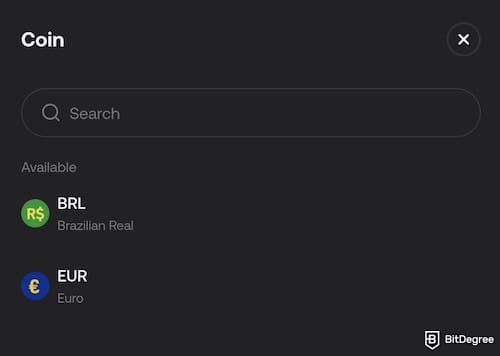
Latest Changelly Coupon Found:KuCoin’s direct fiat withdrawals are limited by currency. Currently, fiat cash-outs are only available in EUR (via SEPA / SEPA Instant, where available) and BRL (via Pix). If you’re trying to withdraw NGN, USD, or any other currency, KuCoin won’t handle that part for you.
Then, what about the KuCoin NGN withdrawal from its P2P trading feature? Unfortunately, in 2024, KuCoin paused its P2P NGN services and naira card payments, which removed one of the main ways Nigerian users used to sell USDT from KuCoin to naira (or other crypto).
The team did this as part of a push for compliance and a safer trading environment. Around that time, Nigerian regulators were tightening crypto rules and cracking down on P2P naira trading. They said it was contributing to naira volatility and didn’t fit cleanly into the country’s foreign exchange regulations.
Therefore, exchanges like Binance and KuCoin pulled back under that pressure to avoid running into legal trouble or compliance issues, although some exchanges like Bybit still keep NGN on the list.
So, if you’re expecting a simple “Withdraw” button to a Nigerian bank account, it’s just not there anymore.
A big part of this also comes down to the use of cryptocurrencies for remittances in Nigeria. Many freelancers and remote employees bypass inefficiencies of conventional banking methods,[1] receive their salary in crypto, and then rely on naira P2P trading to convert it into local currency for daily use.
The approach is also applicable for people wanting to transfer money online, so turning NGN to USDT on KuCoin has become a common thing in the country. That’s why KuCoin’s NGN P2P feature mattered so much. It was a key cash-out route for people holding digital assets, especially remote workers who needed a fast way to turn crypto into naira.

When KuCoin paused its NGN P2P services, it disrupted a workflow many Nigerians were already using: to sell crypto from KuCoin to naira. With that route gone, and direct bank withdrawals not an option, users had to seek alternative ways to transfer their assets off KuCoin and convert them elsewhere.
So, can I withdraw from KuCoin in Nigeria? Yes, you still can do it, but with a different route. You can withdraw crypto from KuCoin to another platform or wallet and convert that crypto into fiat. Then, send the funds to a Nigerian bank account.
Some people use local exchanges or OTC methods. Meanwhile, others look at third-party payout platforms that focus on cross-border transfers, such as Ogvio.
Ogvio isn’t a crypto exchange like KuCoin, it’s a money transfer service. Instead of trying to cash out directly on KuCoin (which you can’t do in NGN), you can move your crypto off KuCoin to Ogvio first, then use it to handle the local bank payout in Nigeria. It's easy, quick, and low-cost.
📚 Read More: Ogvio Review
Looking for more in-depth information on related topics? We have gathered similar articles for you to spare your time. Take a look!


How to Withdraw From KuCoin to a Nigerian Bank With Ogvio
If you’ve ever tried withdrawing crypto using KuCoin P2P, you may understand the struggle of juggling P2P chats and rate negotiations. Here, Ogvio offers a smoother route by letting you move your crypto in a more structured way, rather than dealing directly with buyers.
At the time of writing, you can only transfer USDC on the Base network to Ogvio. So, the flow on how to withdraw from KuCoin to Nigeria banks looks something like this:
1
Make sure you have the USDC amount you want to transfer to your bank account available on Ogvio.
2
Send the funds to Ogvio.
3
Withdraw the funds to your Nigerian bank account.
Once the transfer is complete, the funds will be credited to your Nigerian bank account, wrapping up the withdrawal process. Now, let's go step by step.
1. Log in to Your KuCoin Account
Before you can move any crypto, you need to log in to KuCoin. Make sure you’re logging in from a secure device, ideally your own laptop or phone, to avoid any security risks. Feel free to use your KuCoin app or access the website, but I’ll show you how to do it using the latter option:
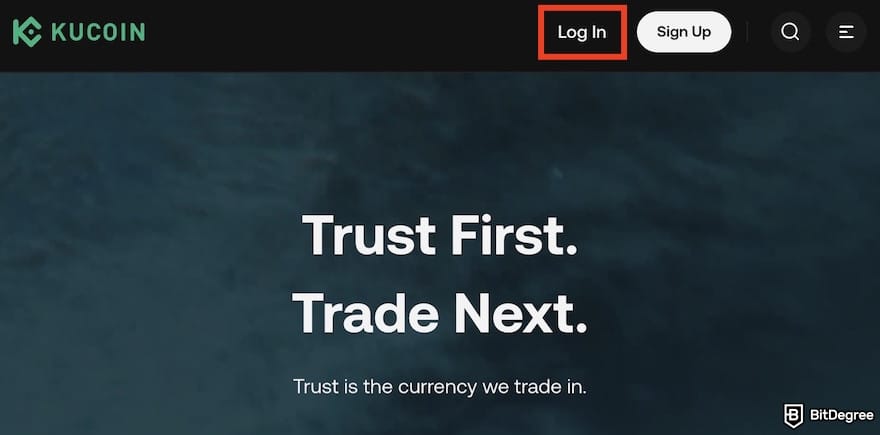
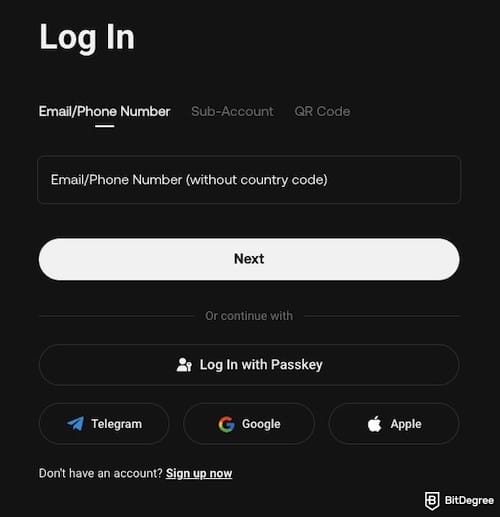
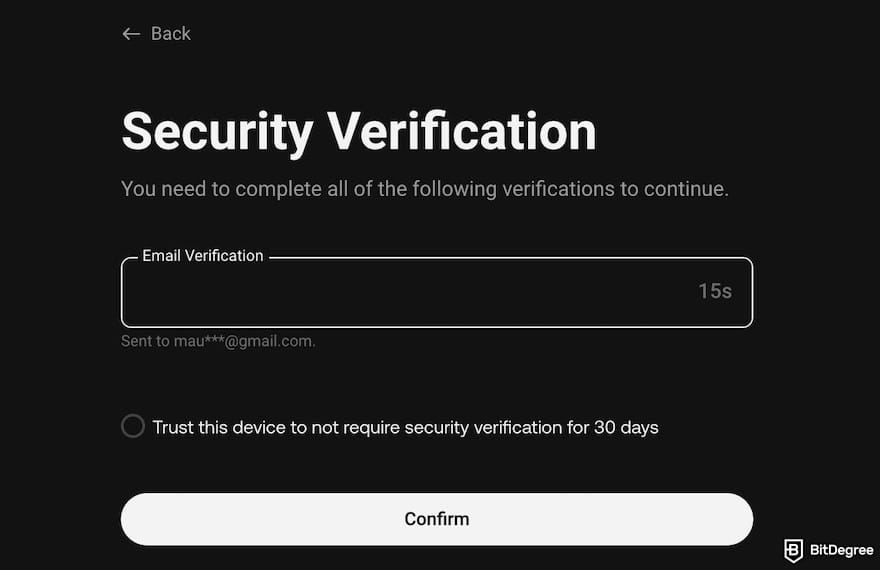
Depending on the crypto you hold and the security settings on your account, you may need to convert your funds to USDC, set up Google Authenticator, or proceed directly to the withdrawal process.
📚 Read More: How to Withdraw Money From KuCoin
2. Create an Ogvio Account
In case you haven’t created an Ogvio account, do it now. This step is important because KuCoin requires a destination address when you initiate a withdrawal, and that address comes from your Ogvio account.
Getting started with Ogvio is pretty straightforward:
![How to withdraw from KuCoin to Nigeria bank: the [Get Started] button on Ogvio's homepage.](https://assets.bitdegree.org/images/how-to-withdraw-from-kucoin-to-nigeria-bank-ogvio-get-started-homepage.jpg "How to withdraw from KuCoin to Nigeria bank: the [Get Started] button on Ogvio's homepage.")
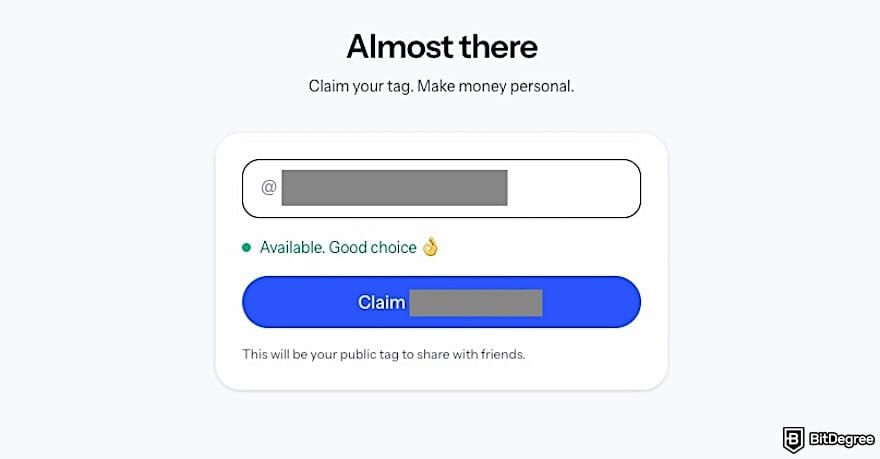
Once you’ve claimed your @Tag, your Ogvio account is ready to go. Just note that you will need to complete KYC to unlock bank transfers, so you can do it now or before making the transfer.
3. Turn Your Crypto Into USDC
Before you can withdraw your funds to Ogvio, make sure your crypto is in USDC. Ogvio processes payouts using USDC. In case your funds are already in USDC, you can skip this step. If not, you can use the Convert tool on KuCoin to turn your asset into USDC or follow the steps below to do it via the "traditional" trading page:
![How to withdraw from KuCoin to Nigeria bank: the [Spot Trading] menu on KuCoin.](https://assets.bitdegree.org/images/how-to-withdraw-from-kucoin-to-nigeria-bank-kucoin-trade-menu.jpg "How to withdraw from KuCoin to Nigeria bank: the [Spot Trading] menu on KuCoin.")
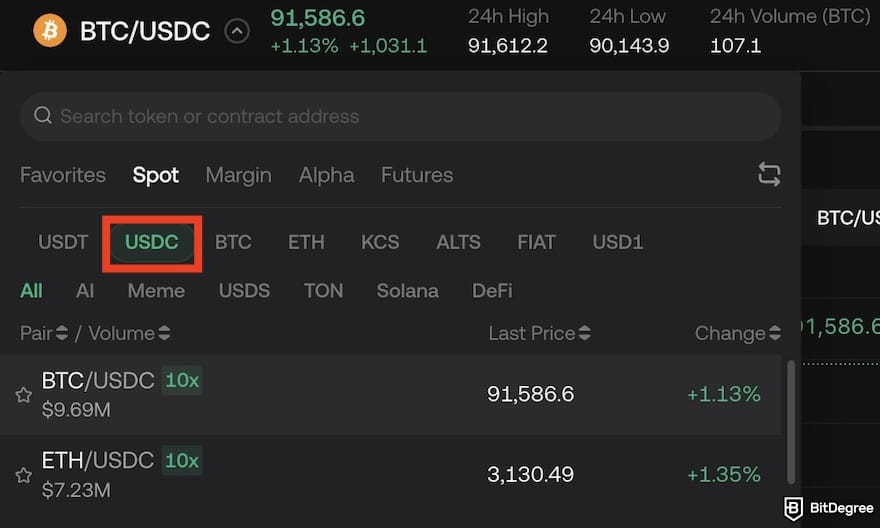
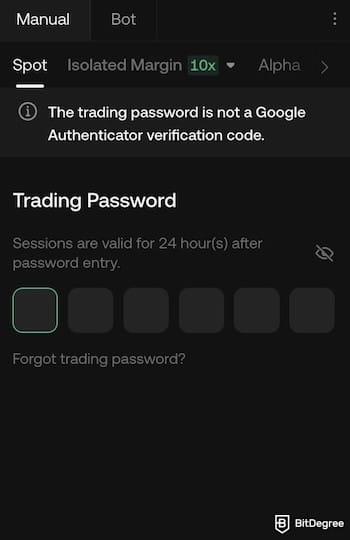
Once the trade is successful, your balance will now be in USDC, meaning your funds are ready for withdrawal.
4. Set Up Google Authenticator (If Not Already Enabled)
KuCoin is serious about security, which is why multi-factor authentication (MFA) is mandatory for withdrawals. This kind of method adds continuous protection[2] for your device to block unauthorized access. If you haven’t set it up yet, here’s what to do:
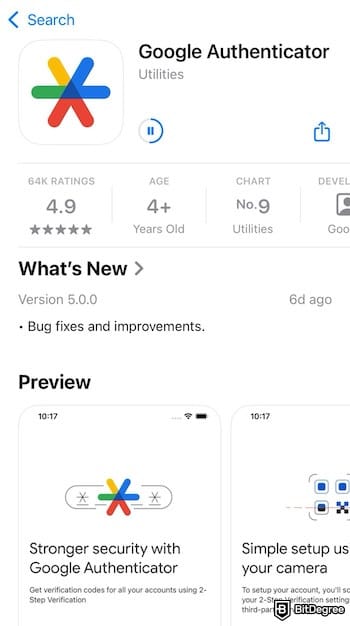
![How to withdraw from KuCoin to Nigeria bank: the expanded [+] menus on Google Authenticator.](https://assets.bitdegree.org/images/how-to-withdraw-from-kucoin-to-nigeria-bank-scan-code.jpeg "How to withdraw from KuCoin to Nigeria bank: the expanded [+] menus on Google Authenticator.")
![How to withdraw from KuCoin to Nigeria bank: the [Google 2FA or Phone Number] on KuCoin outlined.](https://assets.bitdegree.org/images/how-to-withdraw-from-kucoin-to-nigeria-bank-google-authenticator-kucoin.jpg "How to withdraw from KuCoin to Nigeria bank: the [Google 2FA or Phone Number] on KuCoin outlined.")
That’s it! Your account is now much more secure, and you’re ready to transfer your crypto to Ogvio.
Did you know?
Subscribe - We publish new crypto explainer videos every week!
Best Crypto Analysis Indicators Explained (Beginner-Friendly Animation)

5. Withdraw Crypto From KuCoin to Ogvio
Now comes the fun part on how to withdraw from KuCoin to Nigeria banks – although technically you move it to Ogvio first. Just follow these steps:
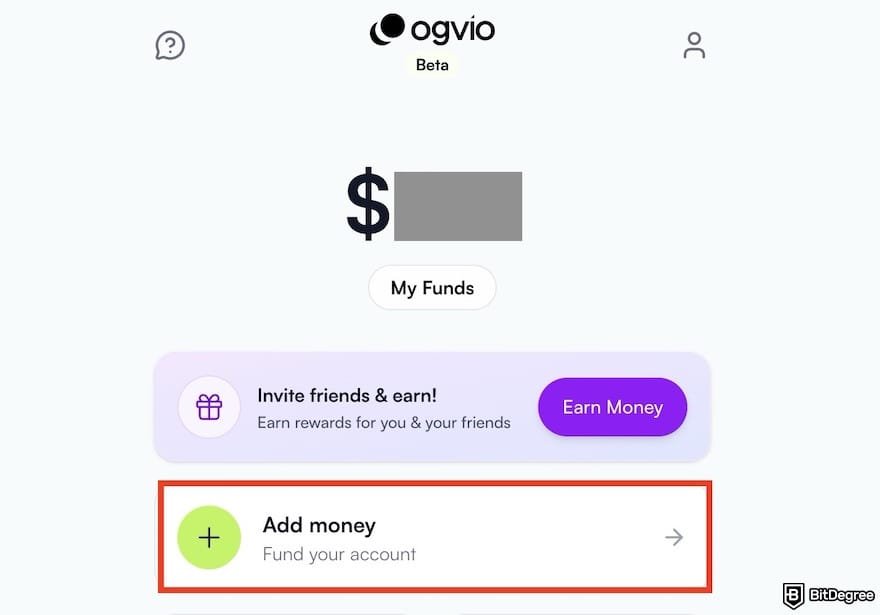
![How to withdraw from KuCoin to Nigeria bank: the [Crypto Transfer] menu on KuCoin outlined.](https://assets.bitdegree.org/images/how-to-withdraw-from-kucoin-to-nigeria-bank-ogvio-top-up-methods-crypto-transfer.jpg "How to withdraw from KuCoin to Nigeria bank: the [Crypto Transfer] menu on KuCoin outlined.")
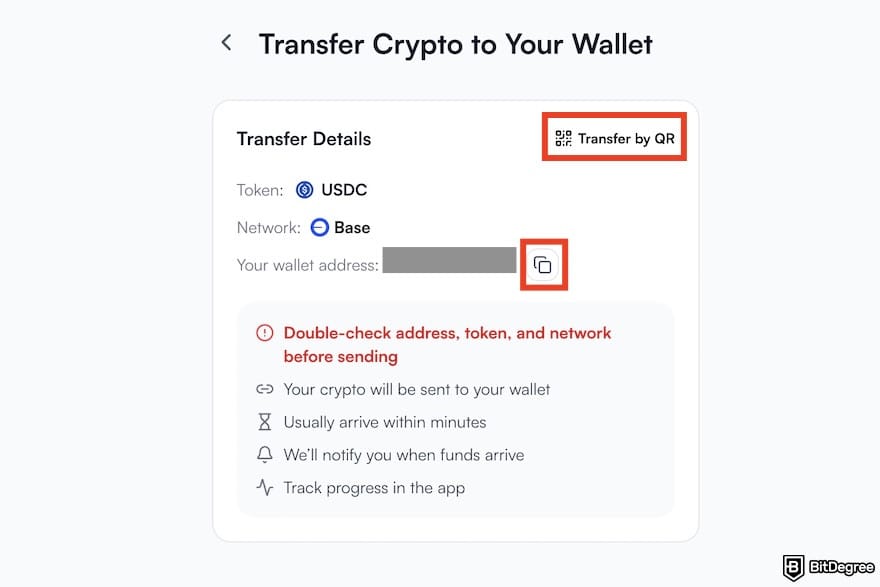
![How to withdraw from KuCoin to Nigeria bank: the [Withdraw] button on KuCoin.](https://assets.bitdegree.org/images/how-to-withdraw-from-kucoin-to-nigeria-bank-withdraw-button.jpg "How to withdraw from KuCoin to Nigeria bank: the [Withdraw] button on KuCoin.")
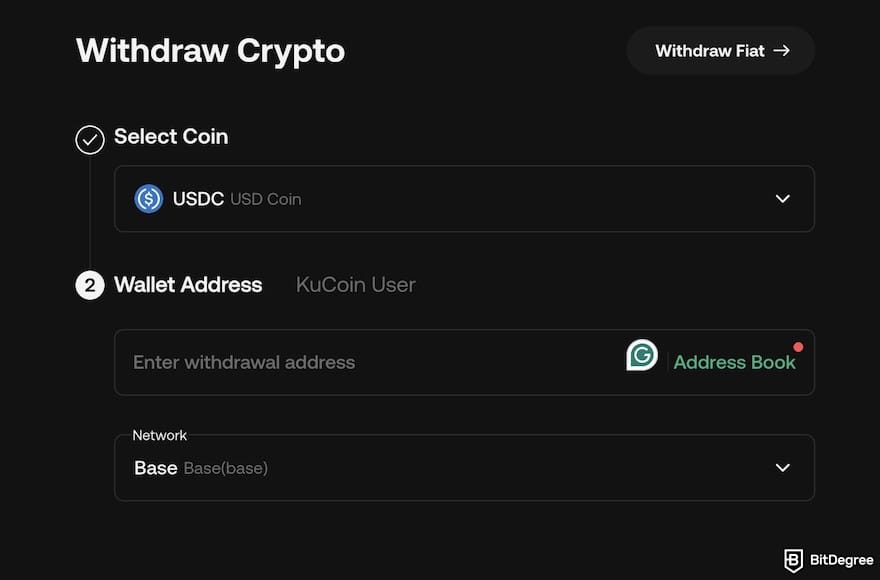
At this point, the crypto will be on its way to Ogvio. Depending on network traffic, it might take a few minutes, but usually, it’s pretty quick. Take a sip of water, grab a snack, or maybe check your favorite TikToks while you wait.
6. Send the Funds to Your Nigerian Bank Account Using Ogvio
Once your crypto hits Ogvio, it’s time to actually get your naira. Here’s how:
![How to withdraw from KuCoin to Nigeria bank: the [Send Money] button on the Ogvio dashboard.](https://assets.bitdegree.org/images/how-to-withdraw-from-kucoin-to-nigeria-bank-bank-ogvio-dashboard-send-money.jpg "How to withdraw from KuCoin to Nigeria bank: the [Send Money] button on the Ogvio dashboard.")
![How to withdraw from KuCoin to Nigeria bank: the [Add new recipient] button on Ogvio.](https://assets.bitdegree.org/images/how-to-withdraw-from-kucoin-to-nigeria-bank-ogvio-add-new-recipient.jpg "How to withdraw from KuCoin to Nigeria bank: the [Add new recipient] button on Ogvio.")
![How to withdraw from KuCoin to Nigeria bank: the [Bank Transfer] menu on Ogvio outlined.](https://assets.bitdegree.org/images/how-to-withdraw-from-kucoin-to-nigeria-bank-ogvio-transfer-methods.jpg "How to withdraw from KuCoin to Nigeria bank: the [Bank Transfer] menu on Ogvio outlined.")
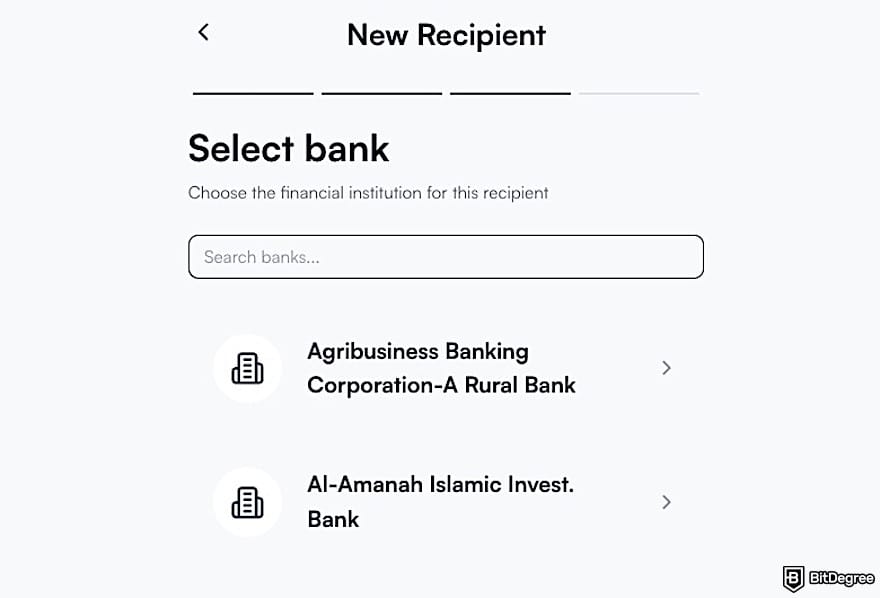
Ogvio uses local payment routes to make bank transfers around the world. When sending to Nigeria, it supports instant bank transfers with a limit of ₦50,000,000 per transfer.
How to Convert NGN to USDT on KuCoin
I know you might just want to know how to withdraw NGN from KuCoin. However, if you're looking for how to convert NGN to USDT on KuCoin (or other crypto) for trading, savings, or cross-border payments, using Ogvio can be a strategic move.
In short, you need to deposit NGN to Ogvio using your bank account or card, send it to KuCoin as USDC, and convert it to USDT or another crypto you like.
1. Deposit NGN and Send USDC to KuCoin
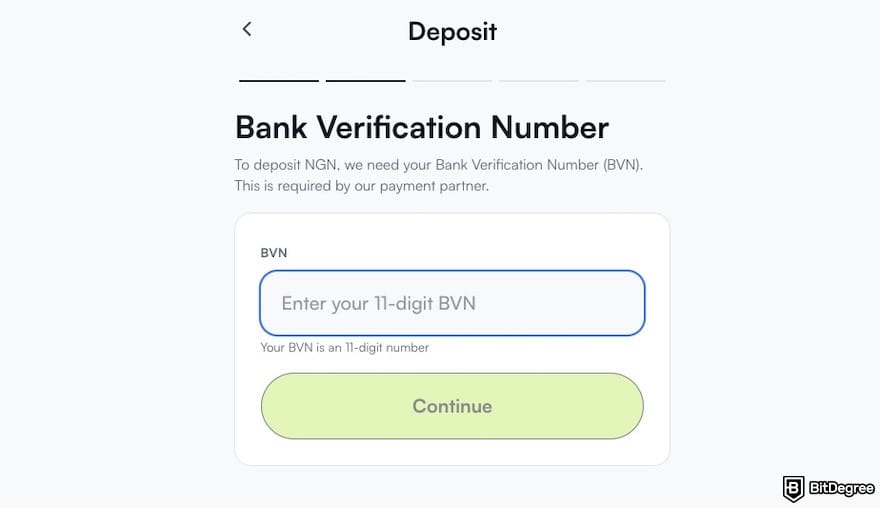
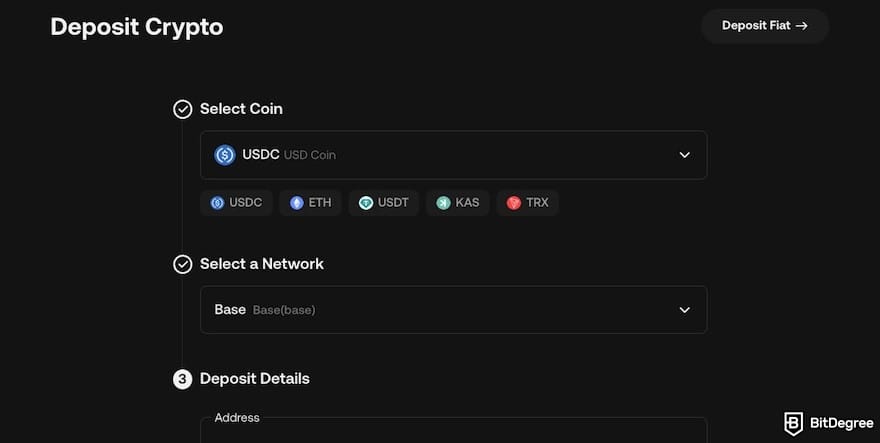
Let’s say you already have an Ogvio account. Here’s how to deposit NGN to the platform and send the funds to KuCoin:
![How to withdraw from KuCoin to Nigeria bank: the [Bank Transfer] menu on Ogvio outlined.](https://assets.bitdegree.org/images/how-to-withdraw-from-kucoin-to-nigeria-bank-ogvio-top-up-methods-bank-transfer.jpg "How to withdraw from KuCoin to Nigeria bank: the [Bank Transfer] menu on Ogvio outlined.")
![How to withdraw from KuCoin to Nigeria bank: the [Deposit Crypto] on KuCoin outlined.](https://assets.bitdegree.org/images/how-to-withdraw-from-kucoin-to-nigeria-bank-deposit-crypto.jpg "How to withdraw from KuCoin to Nigeria bank: the [Deposit Crypto] on KuCoin outlined.")
![How to withdraw from KuCoin to Nigeria bank: the [Crypto Transfer] button on Ogvio outlined.](https://assets.bitdegree.org/images/how-to-withdraw-from-kucoin-to-nigeria-bank-ogvio-crypto-transfer.jpg "How to withdraw from KuCoin to Nigeria bank: the [Crypto Transfer] button on Ogvio outlined.")

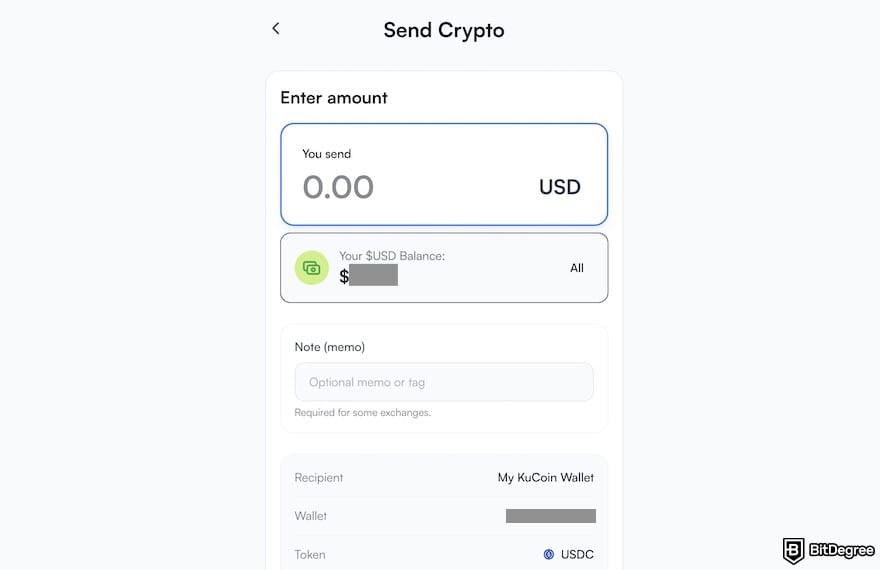
Congrats! You already turned your NGN into USDC and sent it to KuCoin. Now, the funds are ready to be converted to USDT on KuCoin.
2. Convert USDC to USDT on KuCoin
To continue the steps on how to convert NGN to USDT on KuCoin, go to the usual KuCoin trading page or explore KuCoin’s Convert tool. The latter is actually the easiest method if you don't want to deal with charts or "limit orders". It usually has zero trading fees, though the exchange rate might have a tiny "spread".
Check how to use it to convert USDC to USDT or another asset:
![How to withdraw from KuCoin to Nigeria bank: the [Convert] menu on KuCoin outlined.](https://assets.bitdegree.org/images/how-to-withdraw-from-kucoin-to-nigeria-bank-kucoin-convert.jpg "How to withdraw from KuCoin to Nigeria bank: the [Convert] menu on KuCoin outlined.")
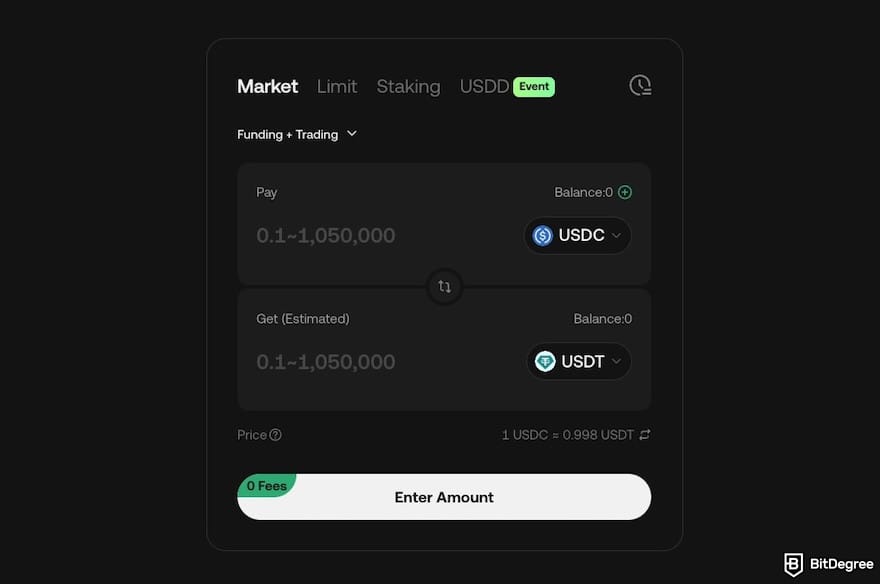
That’s it! The USDT will appear in your "Funding" account immediately, and you can use it however you want.
How to Withdraw From KuCoin to a Nigerian Bank Using Bybit P2P
Can I withdraw from KuCoin in Nigeria using a P2P platform? Well, if you don’t want to use a third-party payout platform, another popular workaround is routing your funds through Bybit’s P2P marketplace.
Since KuCoin and Binance’s P2P functionality is now limited, this method is especially common among Nigerian users who want to sell crypto directly for naira via bank transfer. That said, P2P trading comes with more moving parts, so it’s important to follow each step carefully.
1. Create and Verify a Bybit Account
Before anything else, you’ll need an active Bybit account. Here’s how to create one:
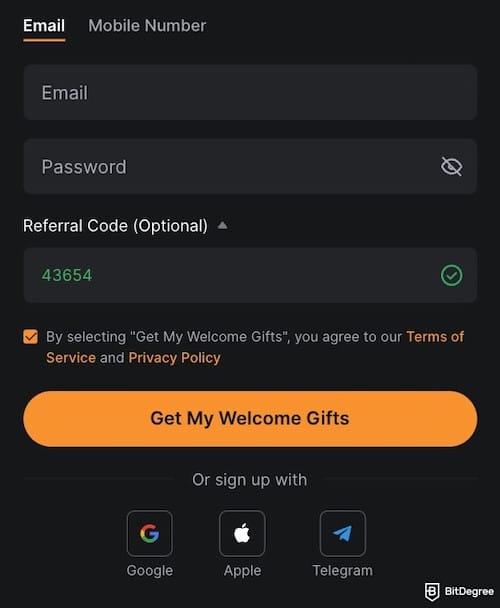
Once these steps are completed, your Bybit account is fully set up and ready for P2P trading.
2. Transfer Supported Crypto From KuCoin to Bybit
The next step on how to withdraw NGN from KuCoin via Bybit is that you move your funds from one platform to another using any cryptocurrency supported by Bybit’s NGN P2P marketplace. Depending on what’s available at the time, this can include USDT, USDC, or even Bitcoin (BTC).
![How to withdraw from KuCoin to Nigeria bank: the [Deposit Crypto] menu on Bybit outlined.](https://assets.bitdegree.org/images/how-to-withdraw-from-kucoin-to-nigeria-bank-bybit-deposit-crypto-v2.jpg "How to withdraw from KuCoin to Nigeria bank: the [Deposit Crypto] menu on Bybit outlined.")
![How to withdraw from KuCoin to Nigeria bank: the [Deposit] page on Bybit.](https://assets.bitdegree.org/images/how-to-withdraw-from-kucoin-to-nigeria-bank-deposit-crypto-bybit.jpg "How to withdraw from KuCoin to Nigeria bank: the [Deposit] page on Bybit.")
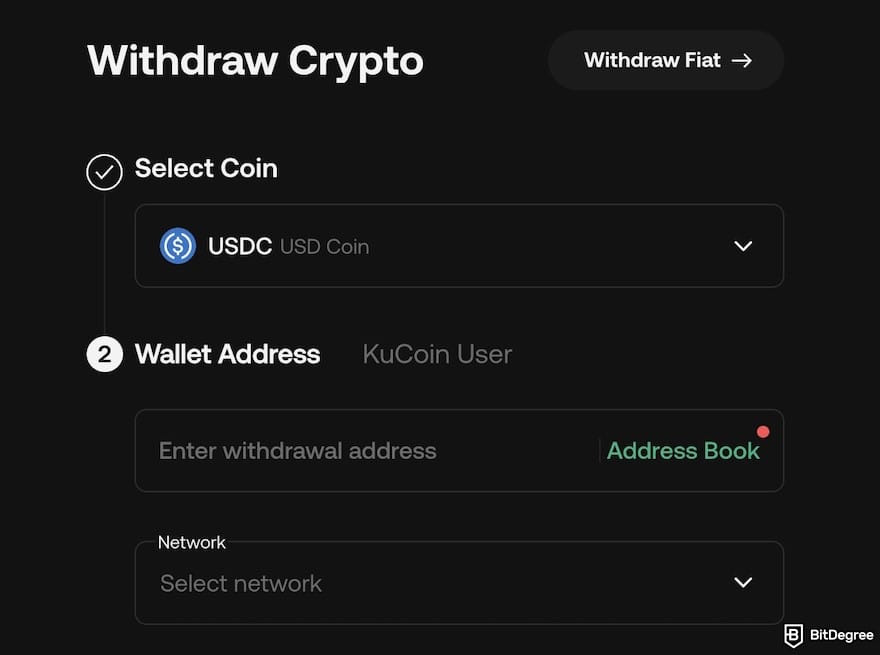
Once the transaction is confirmed on the blockchain, the funds will appear in your Bybit wallet. From there, you can move them to your Funding Wallet and proceed with P2P trading.

- Accepts fiat currencies
- Simple to use
- Supports only trusted cryptocurrencies
- A leading cryptocurrency exchange platform
- Best for all type investors
- Accepts fiat currencies

- Industry-leading security
- Accepts fiat currencies
- Advanced trading tools
- Industry-leading security
- Strong regulatory reputation
- Advanced trading tools

- Wide range of tradable assets
- Robust copy trading feature
- Flawless security record
3. Sell Your Crypto on Bybit P2P
Now you’re ready to sell. Follow these steps on how to do it and get your naira cash via bank transfer:
![How to withdraw from KuCoin to Nigeria bank: the [P2P Trading] menu on Bybit.](https://assets.bitdegree.org/images/how-to-withdraw-from-kucoin-to-nigeria-bank-p2p-menu-bybit.jpg "How to withdraw from KuCoin to Nigeria bank: the [P2P Trading] menu on Bybit.")
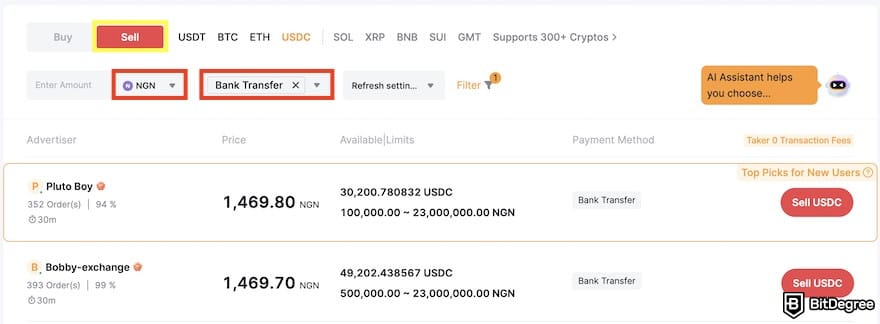
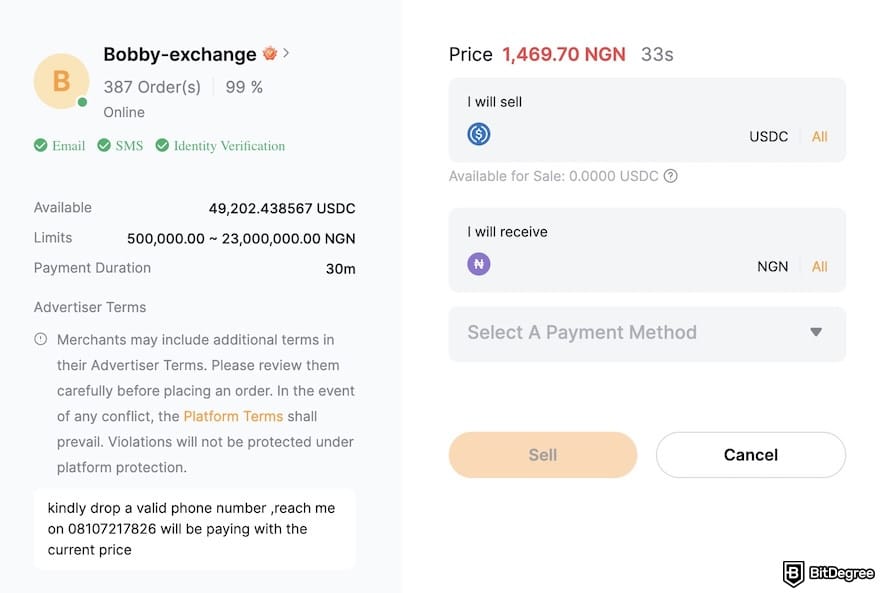
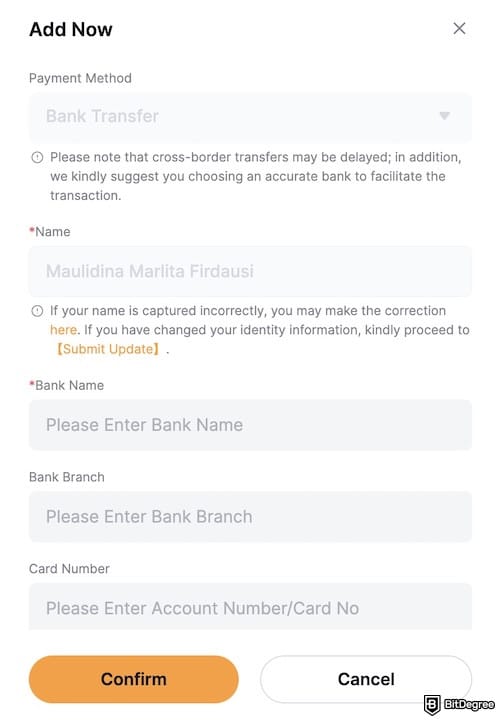
That’s it! You’ve successfully completed the process of KuCoin's NGN withdrawal through Bybit’s P2P marketplace. Take a moment to double-check your balance, and now you’re ready to either repeat the process, save, or spend your funds.
📚 Read More: How to Withdraw Money From Bybit
Which Is the Best Way to Withdraw From KuCoin to a Nigerian Bank Account?
Understanding how to withdraw from KuCoin to Nigeria banks can feel like a maze. Between P2P trading, rate comparisons, payment confirmations, and newer alternatives like Ogvio, it’s not always obvious which option is actually worth it. Some methods give you better control, others save you time, and a few just test your patience.
Ogvio: Simple and Predictable
Ogvio is like the “easy button” to withdraw from KuCoin to Nigeria bank accounts. You just transfer your USDC from KuCoin to Ogvio, hit a few buttons, and then your naira is on the way.
 | |
|---|---|
| |
| |
| |
| Visit site Read review |
Table: Ogvio's asset movement features
One of the biggest advantages here is that you get to see the exchange rate and fees up front before you hit confirm, which makes planning your naira payout a lot less guesswork. You don’t have to negotiate with buyers or wait for someone to pay you manually.
Once the crypto hits Ogvio and you initiate the bank transfer, the process is usually quick and smooth.
Since Ogvio is focused on cross‑border payouts and bank transfers, this method feels almost like using a remittance app because you send your stablecoin and get naira in return without juggling multiple chats or watching deadlines (plus, Ogvio is a remittance-focused service).
This kind of predictability can take a lot of stress off the withdrawal process, especially if you’re new to crypto or just want something that just works without too many steps.
That said, there is a catch. At the time of writing, Ogvio only supports USDC transfers. So, if your funds on KuCoin are in BTC, USDT, or another asset, you’ll need to swap them to USDC first before withdrawing. It’s not a deal-breaker, but it does add one extra step, which can be something to keep in mind if you’re aiming for the fastest possible cash-out.
📚 Read More: Ogvio Review
Bybit: Flexible Deposit and Payout Options
Now let’s talk about P2P trading, such as the kind you’d do on Bybit. Here, the flow is more like teaming up with another person to sell USDT from KuCoin to naira or another digital asset.
You bring the crypto (it could be USDT, USDC, Bitcoin, or whatever else is supported in the NGN marketplace), and a buyer sends naira directly into your bank account once the trade starts. It's not strictly limited like when you use Ogvio.
Using Bybit's P2P is great to withdraw from KuCoin to Nigeria bank accounts if you want more flexibility in your crypto choices and are okay with a little extra interaction.
The platform holds the crypto in escrow until you confirm payment, which gives you protection against people who try to run off with your coins without paying.
Since you’re dealing with another human on the other end of the trade, sometimes you may find better rates than a flat rate payout option offers – although it depends on your negotiation strategy and market demand.
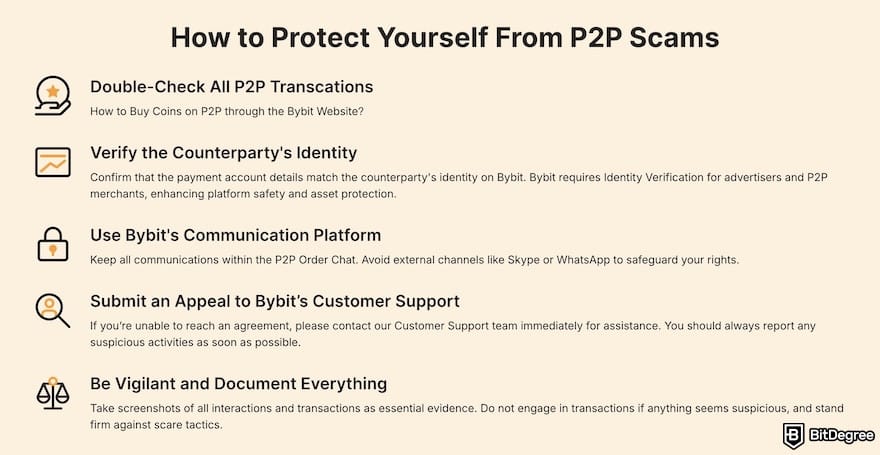
However, be aware that this flexibility comes with a challenge: you have to make sure the buyer is trustworthy, watch for the bank payment, and then release the crypto once everything checks out.
Here’s a comparison table to help you choose which method of withdrawing from KuCoin to Nigeria banks works best for you:
Works best if you want… | Not ideal if you want… | |
|---|---|---|
Ogvio | A simple, low-stress way to move crypto to a Nigerian bank without chatting with buyers or watching price swings | To withdraw assets other than USDC without doing an extra swap first |
P2P Trading | Flexibility to sell USDT, USDC, or BTC directly, and sometimes get better rates if you time it right | A fast, hands-off experience with minimal manual steps |
Table: Comparison of NGN payout methods
If you want fast, simple, and predictable payouts, Ogvio is the way to go. There’s no stress in guessing the fee and arrival time. On the other hand, if you want more crypto flexibility, P2P trading on Bybit might be a better choice.
📚 Read More: Bybit Review
Browse our collection of the most thorough Crypto Exchange related articles, guides & tutorials. Always be in the know & make informed decisions!
Conclusions
Understanding how to withdraw from KuCoin to Nigerian bank accounts starts with realizing that KuCoin no longer offers direct NGN withdrawals or local P2P support. Because of this, cashing out now depends on external routes, and choosing the right one comes down to what you value most: simplicity or flexibility.
If flexibility matters more and you’re comfortable navigating rates, merchants, and confirmations, platforms that offer P2P services like Bybit give you more asset choices.
Those wanting a simpler, more familiar cash-out experience can use Ogvio, since it works more like a regular money app and doesn’t require manual crypto-to-fiat conversion.
The content published on this website is not aimed to give any kind of financial, investment, trading, or any other form of advice. BitDegree.org does not endorse or suggest you to buy, sell or hold any kind of cryptocurrency. Before making financial investment decisions, do consult your financial advisor.
Scientific References
1. Hajj M. E., Farran I.: 'The Cryptocurrencies in Emerging Markets: Enhancing Financial Inclusion and Economic Empowerment';
2. Ometav A., Bezzateev S., ,Mäkitalo N., Andreev S., Mikkonen T., Koucheryavy Y.: 'Multi-Factor Authentication: A Survey'.
About Article's Experts & Analysts