Key Takeaways
- Crypto.com Level Up lets you unlock exclusive perks and rewards that get better as you move up through its tiers;
- You can join or upgrade your Level Up plan by either paying a subscription fee or locking up CRO tokens for a year;
- CRO staking isn’t available in certain regions due to regulatory restrictions.
Crypto.com introduced a revamped rewards system that bundles everything into a simplified subscription structure. And if you’ve heard about perks like zero trading fees or boosted earning rates, no wonder you came here to learn how to use the Crypto.com Level Up Program and be part of it.
Joining the program is as easy as subscribing to YouTube or Netflix. Still, I get that staking or locking up crypto tokens can seem a little daunting if you haven’t done it before. So I’ve broken everything down step by step to make it as simple as possible.
With that said, let’s get started!

Did you know?
Subscribe - We publish new crypto explainer videos every week!
What are Stablecoins, Altcoins & Wrapped Coins Explained!

Table of Contents
- 1. How to Use Crypto.com Level Up Program
- 1.1. How to Get Crypto.com Level Up via Subscription
- 1.2. How to Get Crypto.com Level Up by Locking Up CRO
- 2. How to Upgrade Your Plan
- 2.1. How to Level Up on Crypto.com Plan via Subscription
- 2.2. How to Level Up on Crypto.com Plan by Locking Up CRO
- 2.3. How to Switch from a Subscription to a CRO Lock-Up Plan
- 3. How to Cancel Your Plan
- 3.1. Canceling Subscription Plan
- 3.2. Canceling CRO Lock-Up Plan
- 4. How to Move From Legacy CRO Lock-Up to Level Up Program
- 5. Common Issues With Crypto.com Level Up (and How to Fix Them)
- 6. Tips to Get the Best Value From Level Up
- 7. What Is the Crypto.com Level Up Program?
- 8. Conclusions
How to Use Crypto.com Level Up Program
Figuring out how to use the Crypto.com Level Up Program starts with one thing: picking your way in. To get into a premium plan (Plus, Pro, or Private), you can either pay a subscription fee or lock up Cronos tokens.
Latest Changelly Coupon Found:Before getting into it, though, make sure you already have an active Crypto.com account and that it’s verified. Since the program links to your identity and region, verification is required for compliance with anti-money laundering and fraud regulations.[1]
📚 Read More: Crypto.com Review
How to Get Crypto.com Level Up via Subscription
Subscribing to the Level Up program is probably the more beginner-friendly option between the two. It’s just like paying for a streaming service: you pick a plan, pay the fee, and enjoy the perks (minus the part where you end up watching The Office for the 12th time).
By choosing this method, you’ll know what you’re paying for without needing to convert your money to CRO or lock it up for a year. Once you confirm your payment term (monthly or yearly), your subscription perks start immediately.
At the time of writing, subscription is only available for the Plus and Pro tiers.
If that sounds like your preferred way of doing it, just follow this step below:
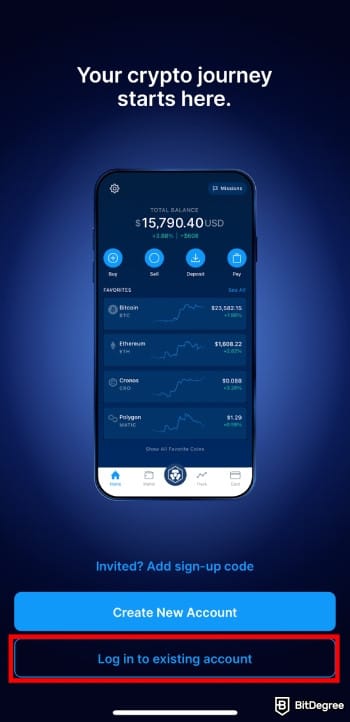
![How to use Crypto.com Level Up program: tap [Level Up] on the home screen.](https://assets.bitdegree.org/images/how-to-use-cryptocom-level-up-program-levelup-2.jpg "How to use Crypto.com Level Up program: tap [Level Up] on the home screen.")
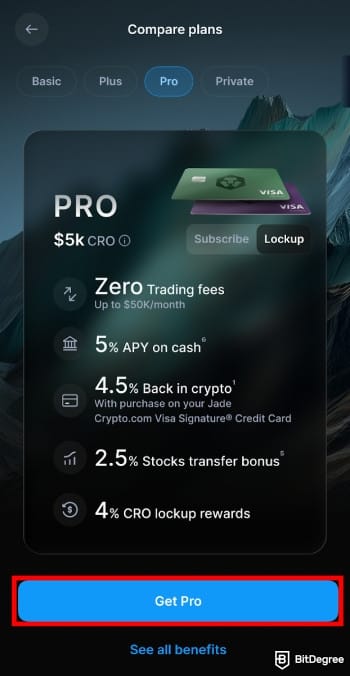
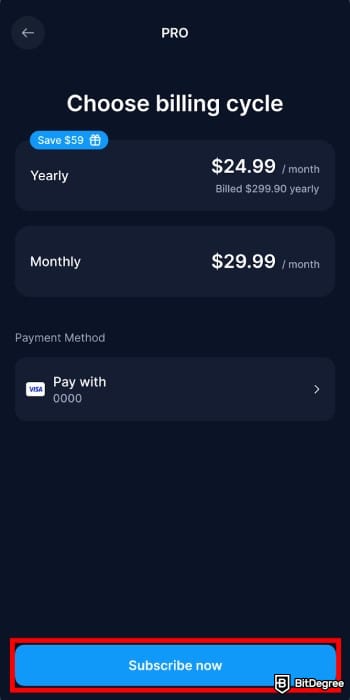
You’ve joined the Level Up program and can start taking advantage of your benefits right away.
How to Get Crypto.com Level Up by Locking Up CRO
Another method on how to use the Crypto.com Level Up program is by locking up or staking CRO tokens. Basically, you’re setting aside a specific amount of CRO for a set period to activate your tier and access its rewards.
Aside from being the only way to unlock the highest tier (Private), this method also gives you an extra financial bonus compared to the subscription option. Based on the CRO you’ve locked or staked, you’ll receive weekly rewards that go directly to your wallet.
Staking is the process of temporarily locking up your crypto on a blockchain to help support the network’s security and operations.[2]
Think of it like depositing money into a fixed-term account at your local bank. You agree not to withdraw your funds for a set period, and in return, the bank pays you interest. Here’s how the process goes:
You can check if your lock-up or staking has been confirmed by going to your account and selecting "Cronos". Then, scroll down a bit to view your transaction history. Here, you’ll find your lock-up status:
Status | Description |
|---|---|
Pending | Your request to stake CRO has been submitted and is waiting to be processed by Crypto.com. |
Activating | Your staking request has been approved, and your CRO will be locked shortly. |
Staked | Your CRO is successfully staked and actively generating rewards in your account. |
Table: CRO lock-up status
Just a quick note from me: the reward rates shown for CRO lock-up are only estimates and can change over time. What you see in the app might not be the exact amount you’ll end up earning.
On top of that, staking comes with certain risks, including something called “slashing”. Basically, it’s a penalty that can apply if a validator behaves maliciously or negligently on the blockchain network.
I’d suggest taking time to read the official terms and understand the full process before committing your digital assets to a 12-month lock-up.
📚 Check Out: Staking Crypto: A Beginner's Guide
Looking for more in-depth information on related topics? We have gathered similar articles for you to spare your time. Take a look!



How to Upgrade Your Plan
You might’ve been on your current plan for a bit and noticed the rewards don’t quite keep up with your trading. If that’s the case, it’s probably worth knowing how to level up on Crypto.com to get more benefits.
There are three ways to do it: upgrade to a higher plan with a subscription, upgrade via a CRO lock-up, or switch from a subscription to a CRO-based plan. Let’s break them down!
How to Level Up on Crypto.com Plan via Subscription
You can easily upgrade your plan (say from Plus to Pro) directly through the app. If you go this route, you’ll only pay the prorated difference for the rest of your billing cycle. Here’s how:
Once completed, your upgraded perks take effect immediately. Your billing cycle resets on the upgrade date, and future payments will be charged based on the new plan.
How to Level Up on Crypto.com Plan by Locking Up CRO
If you already have some CRO locked or staked, you’ll just need to add the difference to match the new plan’s requirement.
For instance, if you’ve locked $2,500 and want to upgrade to Pro, you’ll need to add another $2,500 worth of CRO. You can do it easily by following these steps:
Plus | Pro | Private (Icy/Rose) | Private (Obsidian) | |
|---|---|---|---|---|
12-month CRO staking | $500 | $5,000 | $50,000 | $500,000 |
Table: The required amount of CRO staking based on the Level Up tier
That’s all! Just keep in mind that your 365-day holding period will be restarted.
Did you know?
Subscribe - We publish new crypto explainer videos every week!
What is Crypto Arbitrage? (Risks & Tips Explained With Animation)

How to Switch from a Subscription to a CRO Lock-Up Plan
Let’s say you’ve been subscribed to a lower plan for some time and want to move up to a higher tier through the CRO lock-up or staking. If that’s the case, follow the steps below:

You’ll receive a proportional refund for the unused portion of your subscription.
How to Cancel Your Plan
Sometimes life happens, and you might not be getting as much value out of your Level Up plan as before. Thankfully, canceling your plan is easy, as you don't have to go searching for a "hidden" button to do it.
That said, the steps are slightly different depending on whether you’re subscribed or using CRO lock-up/staking. So let me break them down for you.
Canceling Subscription Plan
If you want to cancel your current subscription, the process is simple and can be done directly in the app. Just follow these steps:
If you want to downgrade (for example, from Pro to Plus), wait until your current billing period ends. After that, resubscribe to the lower-tier plan you want to activate.

- Accepts fiat currencies
- Simple to use
- Supports only trusted cryptocurrencies
- A leading cryptocurrency exchange platform
- Best for all type investors
- Accepts fiat currencies

- Industry-leading security
- Accepts fiat currencies
- Advanced trading tools
- Industry-leading security
- Strong regulatory reputation
- Advanced trading tools

- Wide range of tradable assets
- Robust copy trading feature
- Flawless security record
Canceling CRO Lock-Up Plan
Note that you can only cancel your CRO lock-up or staking plan after the 365-day period has ended. Once it’s over, you can unlock or unstake your CRO by following these steps:
When your CRO is available again, head to the "Level Up" screen and lock or stake the amount needed for your new plan (if you choose to). Once confirmed, your new tier will activate, and your perks will update automatically.
You’ll also find your lock or stake status listed in your account:
Status | Description |
|---|---|
Processing | Your request to unstake CRO has been submitted and is being reviewed by Crypto.com. |
Unbonding | Your CRO is going through the network’s unbonding phase. The duration depends on the blockchain and isn’t controlled by Crypto.com. |
Unstaked | Your CRO has been successfully released and is now available in your wallet. |
Table: CRO unstaking status explanation
The unbonding period usually takes about 36 days, and during this time, your CRO won’t earn any booster or staking rewards. If something seems off or doesn’t update as expected, you can try to contact customer support or refer to the relevant official Crypto.com Level Up tutorial for guidance.
How to Move From Legacy CRO Lock-Up to Level Up Program
Before the launch of the Level Up program, you had to lock or stake your CRO in what was known as the legacy system. This was called Cardholder CRO staking (Legacy) or CRO lock-up (Legacy), which determined your crypto rewards and card perks.
Even though the upgrade has been around for a while, I still often see people asking how to use Crypto.com Level Up program when their CRO remains locked in the legacy system.
Well, you don’t really have to worry about it. All remaining legacy users will be eligible to transition to the Level Up plan that matches their existing CRO Lockup (legacy) tier.
For example, let’s say you staked $5,000 worth of CRO under the staking (legacy) program to qualify for the Crypto.com Card. When the automatic transition happens, that same amount will determine your new Level Up tier.
In this case, your $5,000 CRO stake would automatically place you in the Pro plan under the new structure. Your card perks, such as CRO rewards and bonuses, will also be adjusted to match the new plan’s benefits.
If you’d rather not accept the offer, that’s fine too! You've the option to keep your CRO locked, but rewards will stop once your previous plan ends.
Common Issues With Crypto.com Level Up (and How to Fix Them)
It doesn’t happen too often, but sometimes, things don’t go as planned during the registration process. That’s why I’ve put together this short Crypto.com Level Up tutorial to help you fix the most common issues.
- Payment keeps failing during subscription. Make sure your selected payment method (crypto wallet, cash account, or card) has enough balance. If it still won’t go through, switch to another option or restart the app before retrying.
- Plan not showing as active after payment. Your plan might take a little time to update after the payment goes through. Try refreshing the app or restarting your connection, then check the “Level Up” screen again.
- Perks missing after upgrade. Most rewards update automatically, but not always right away. Give it a little time, refresh your connection, and check your dashboard or reward history again.

- CRO lock-up stuck in pending. CRO lock-ups can take some time to process, especially when the network is busy. Wait a few hours and check your [Accounts > Cronos] section for updates.
- Can’t stake CRO. You might be in a region where staking is restricted due to local regulations. If that’s the case, you should be able to level up by using CRO lock-up.
- Unable to cancel or downgrade a plan. You can only downgrade after your current subscription cycle ends. Once it does, access the "Level Up" section on the app, select your plan, and go to [Manage Subscription] > [Cancel Plan] to proceed.
If you’ve tried everything and it still doesn’t work, I suggest reaching out to the Crypto.com customer support team as soon as possible. They should know what to do.
Tips to Get the Best Value From Level Up
Mastering how to use the Crypto.com Level Up program is great and all, but it’s also worth pausing to see how it fits your personal situation. A few thoughtful decisions can help you maximize its value and turn the program into something that really benefits you:
- Pick the right entry method. Pick a subscription for more flexibility and easy monthly billing, or go with a CRO lock-up if you want better rewards and are fine with a year-long commitment.
- Plan your upgrades around how active you are. Only move up a tier when you know you’ll be using Crypto.com more often in the next cycle. There’s no point in spending $299.90 on a Pro annual subscription plan if you only use it once in a while.
- Pay attention to market trends. The crypto market moves fast and tends to be unpredictable.[3] Try to analyze CRO’s recent performance and potential direction before locking it up for a year.

- Monitor your renewal or lock-up period. Stay on top of your subscription schedule and CRO unlock dates so you don’t miss out on perks or end up auto-renewed by accident.
- Experiment with the base tier. Give the free Basic option a try first to test what the program has to offer. If you think the perks end up outweighing the cost after a month, it might be time to consider upgrading.
I do think the program offers a good opportunity to explore and earn with its perks across the premium tiers. But at the end of the day, it’s all about finding the setup that matches your crypto habits.
My advice is don’t chase the “perfect” plan. Keep things flexible and pick whatever brings the most value to your situation at the time. If that value isn’t there, there's no harm in pausing your plan, withdrawing your assets, and coming back when you’re ready.
📚 Check Out: How to Withdraw Money from Crypto.com
What Is the Crypto.com Level Up Program?
Before wrapping up this Crypto.com Level Up guide, let’s rewind for a bit. Maybe you’ve seen the "Level Up" button on your app for a while and never really knew what it did, or maybe it’s been a while since you last checked. Either way, here’s a quick refresher on what the program is all about.

Crypto.com Level Up is the platform’s way of saying, “Let’s stop confusing everyone and bring all rewards under one simple, tiered system”. With this revamped version, everything that used to be scattered is now organized into one easy-to-follow structure. You pick a plan, activate it, and enjoy all your perks in one place.
It’s a bit like a battle pass in games. Before, you had to grind separate missions just to get different rewards, like talking to one NPC for gold, another for gear, and someone else for XP. Now, everything’s bundled into one unified system where your perks, bonuses, and upgrades live under one dashboard.
You no longer have to switch between multiple promos or keep track of where each reward is coming from.

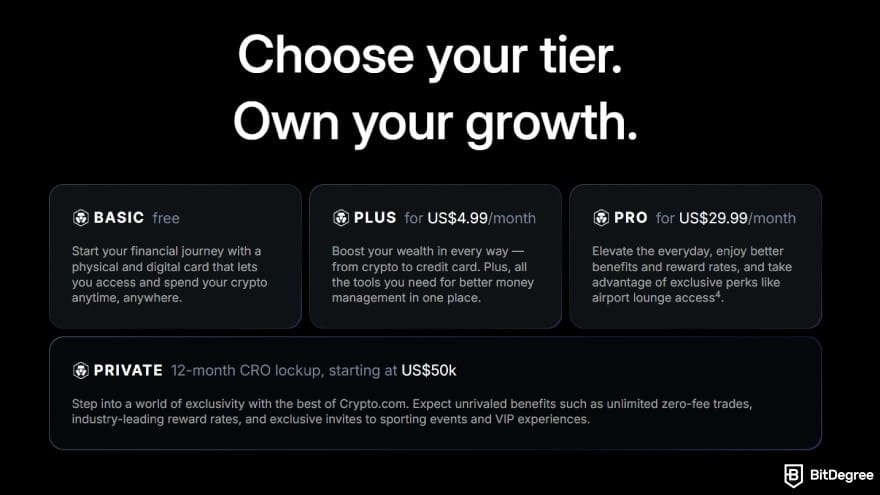
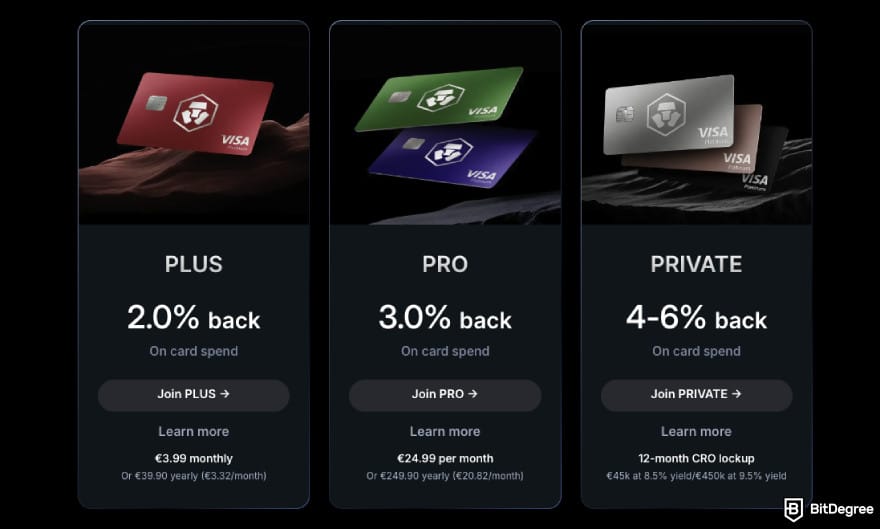
As of writing this Crypto.com Level Up tutorial, there are four plans made to match how you use the platform:
- Basic is a free entry-level tier with its main benefit being zero platform trading fees.
- Plus is the accessible entry point if you want to experience boosted benefits.
- Pro caters to active traders and investors aiming for higher reward rates.
- Private delivers premium privileges for dedicated CRO holders.
Each tier unlocks a new set of perks once activated. And naturally, the higher you go, the better the rewards you get.
Now, to access the tiers, you basically have two options: either pay a subscription fee (monthly or yearly) or lock up CRO for 12 months.
The first option gives you more flexibility since you don’t have to set aside a large amount of CRO for a year. On top of that, you can upgrade, downgrade, or cancel your subscription anytime.
The second option suits those planning to use Crypto.com long-term and already holding (or planning to hold) CRO in their portfolio. It's also the only way to unlock the highest-level Private benefits (as of writing, at least).
Here’s a quick breakdown:
Tier | How to Join |
|---|---|
Basic | Free plan |
Plus | Subscription or CRO lock-up |
Pro | Subscription or CRO lock-up |
Private | CRO lock-up only |
Table: Sign-up options for each tier
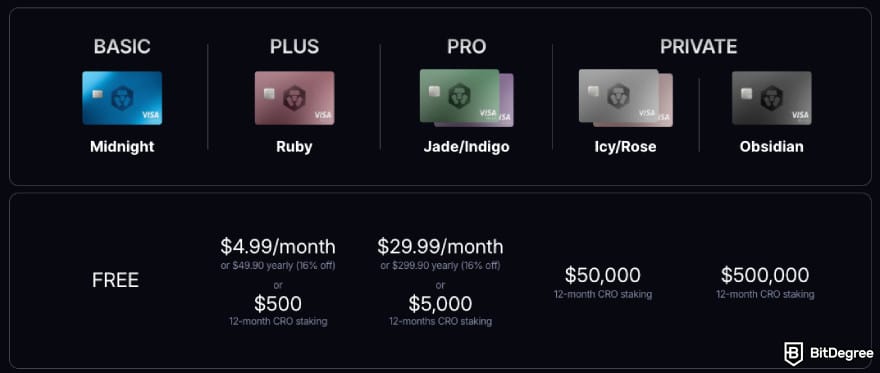
The four tiers also come with what I’d call fairly reasonable budget requirements. They’re not too demanding, but they’re not exactly pocket change either (especially for the subscription plans). Here’s a more detailed look:
Tier | Subscription Fee | Lock-Up Requirement | Lock-Up Duration |
|---|---|---|---|
Basic | Free | - | - |
Plus | $4.99/month or $49.90/year | $500 of CRO | 12-month |
Pro | $29.99/month or $299.90/year | $5,000 of CRO | 12-month |
Private ($50K) | - | $50,000 of CRO | 12-month |
Private ($500K) | - | $500,000 of CRO | 12-month |
Table: Crypto.com Level Up pricing & requirements
In case I wasn’t clear, you only need to choose either to pay the subscription fee or go with the CRO lock-up to activate the Plus and Pro tiers. Unfortunately, that flexibility isn’t available for the Private tiers, which require you to lock up a much larger amount of CRO for a full year.
So take your time and pick the tier that you think gives you the most value.
Browse our collection of the most thorough Crypto Exchange related articles, guides & tutorials. Always be in the know & make informed decisions!


Conclusions
If you’ve made it this far, you’ve pretty much mastered everything about how to use Crypto.com Level Up program. But feel free to bookmark my article just in case you ever need a quick reference.
I’d say it’s not so much about setting up Crypto.com Level Up, but about finding the tier that aligns with your routine. Once you do, though, it may open up opportunities that make your crypto journey even more rewarding.
So what are you waiting for? Take a look at the Level Up program and try it out yourself!
Important Information:
* Other transaction fees and spread may apply. Zero trading fees up to the transaction limit specified per Level Up tier.
This content is sponsored by Crypto.com and should not be considered as investment advice. Trading cryptocurrencies carries risks, such as price volatility and market risks. Before deciding to trade cryptocurrencies, consider your risk appetite.
The Level Up rewards and availability are subject to terms and conditions and jurisdiction. Certain rewards and benefits are available only in eligible markets and may vary by region. All benefits, offers, and rewards conferred by Crypto.com, including but not limited to merchant rebates and CRO Rewards, are subject to change at Crypto.com’s sole discretion. See this page for details.
Credit card offers are subject to credit approval. Crypto.com Visa Signature® Credit Card Accounts are issued by Comenity Capital Bank pursuant to a license from Visa U.S.A. Inc. Visa is a registered trademark of Visa International Service Association and used under license.
The content published on this website is not aimed to give any kind of financial, investment, trading, or any other form of advice. BitDegree.org does not endorse or suggest you to buy, sell or hold any kind of cryptocurrency. Before making financial investment decisions, do consult your financial advisor.
Scientific References
1. Gabbiadini R., Gobbi L., Rubera E.: ‘Money Laundering and Blockchain Technology: Can you Follow the Trail of Cryptocurrency Transactions’;
2. Lehmann M., Krysa F., Prévost E., Schinerl F., Vogelauer R.: ‘Staking Your Crypto: What are the Stakes’;
3. Omrane W. B., Dabbou H., Saadi S., Savaser T., Sebai S.: ‘Exploring Volatility Reactions in Cryptocurrency Markets Using Intraday Macroeconomic News Analysis’.
About Article's Experts & Analysts