Key Takeaways
- You can withdraw either in crypto or fiat from Binance, with each option having its own process;
- Binance doesn’t charge you for withdrawals, but you still need to cover the network fees;
- You can use Ogvio for a seamless experience when cashing out your coins in Indian rupees.
If you’re Googling how to withdraw money from Binance in India, congrats! Chances are the market smiled on you this cycle, and you want to enjoy the fruits of your labour. Maybe not Lambo money yet, but enough for a nice trip, a little splurging, and helping out with groceries at home.
With its deep liquidity and advanced features, it’s no surprise that Binance is one of the most popular exchanges in the country. It gets many things right. But when it comes to withdrawal, the experience can feel… uneven at times. This experience is enough to make you think a user-first platform like Ogvio would’ve been better from the get-go.
Well, no need to overthink it now. Let’s focus on the task at hand: moving your funds from Binance to INR for practical, day-to-day use.

Did you know?
Subscribe - We publish new crypto explainer videos every week!
How to Create an NFT: Easiest Way (Animated Explainer)


Table of Contents
- 1. Methods for Withdrawing Money From Binance in India
- 1.1. Off-Ramp Service
- 1.2. Binance P2P
- 1.3. Crypto Wallet
- 2. How To Withdraw Money From Binance In India
- 2.1. Using Ogvio
- 2.2. Using Binance P2P
- 2.3. Using A Hardware Wallet
- 3. Binance Withdrawal Fees and Limits
- 4. The Best Platforms to Withdraw Money From Binance in India
- 5. Best Practices for Moving Funds off Binance
- 6. Conclusions
Methods for Withdrawing Money From Binance in India
The first thing to keep in mind when learning how to withdraw money from Binance in India is that your available options can change. What works today might change tomorrow, and what’s missing now could show up again later.
Latest Changelly Coupon Found:Part of the reason is that crypto is still treated as a “new” asset class (hard to believe, I know, even after all these years). Because of this, platforms regularly adjust their risk policies, banking partnerships, and regulatory compliance.[1]
So, it’s not unusual to see different withdrawal options depending on timing, location, or account setup. You might hear someone say they can withdraw their crypto to their local bank just fine, while you’re scratching your head wondering how to convert USDT to INR in Binance and having it transferred to your ICICI or SBI account.
As of writing, the most common ways to move funds out of Binance in India are through an off-ramp service like Ogvio, via P2P trades, or by moving them to a crypto wallet.
Off-Ramp Service
Basically, an off-ramp means converting your crypto into fiat currencies, like INR, GBP, or USD. That way, you move your value off the digital trading platform and use it more freely in everyday, real-world scenarios.
There’s no shortage of off-ramp platforms out there (hundreds, if not thousands), but I want to specifically highlight Ogvio, a money transfer platform designed around user-first flows for crypto cash-outs. Besides, Ogvio allows you to cash out crypto to anyone's bank account, not only your own.
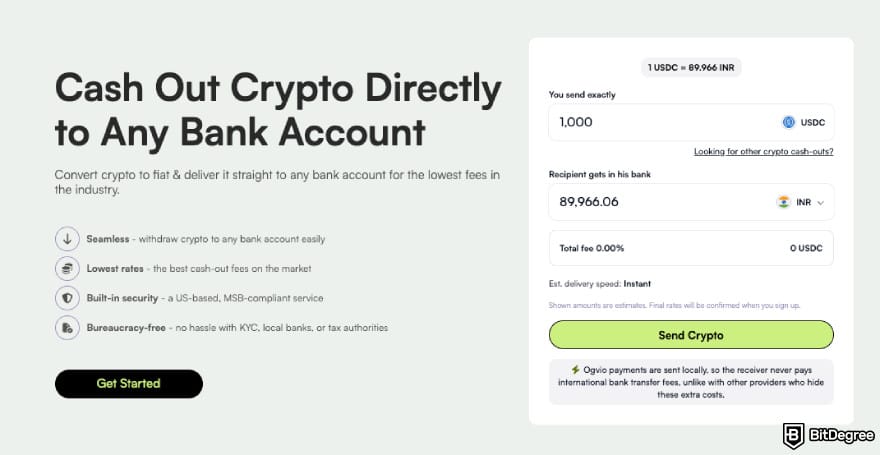
Thanks to its neobank-style approach with built-in crypto functionality, Ogvio makes it easier to convert your tokens into Indian rupees without jumping between services. All you need to do is move your coins from Binance to the platform, and you’ll see multiple cash-out options:
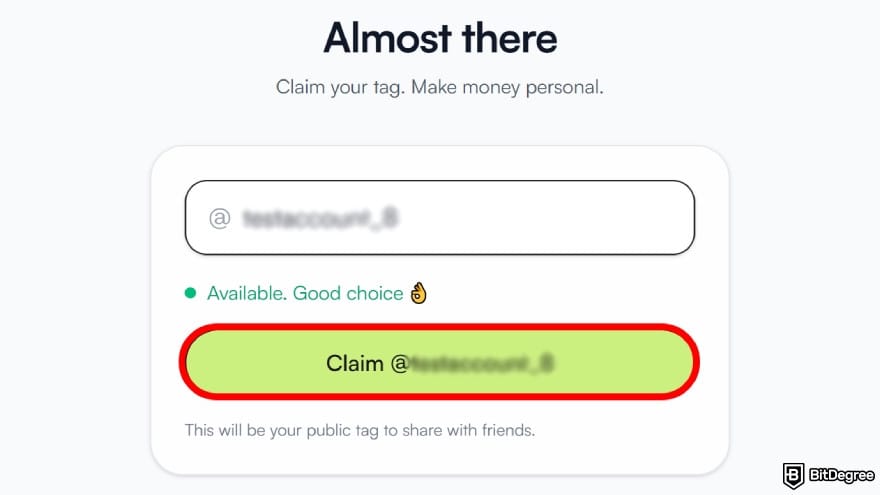
- Send to another Ogvio user. You can move your fund directly to another Ogvio account via @Tag – no bank details or wallet addresses needed, making transfers fast and much less error-prone.
- Withdraw to a local bank account. Ogvio lets you convert your tokens to INR and send them to your bank using local rails, keeping transfers fast and affordable.
- Transfer to a crypto wallet. If you’re not cashing out and just want to move crypto, you can easily send it to any external wallet of your choice.
Personally, I’ve found Ogvio to be most reliable for small to medium withdrawals. Fees and timing are more predictable than P2P routes or other off-ramp services. It’s also easy to use, even if this is your first time cashing out crypto.
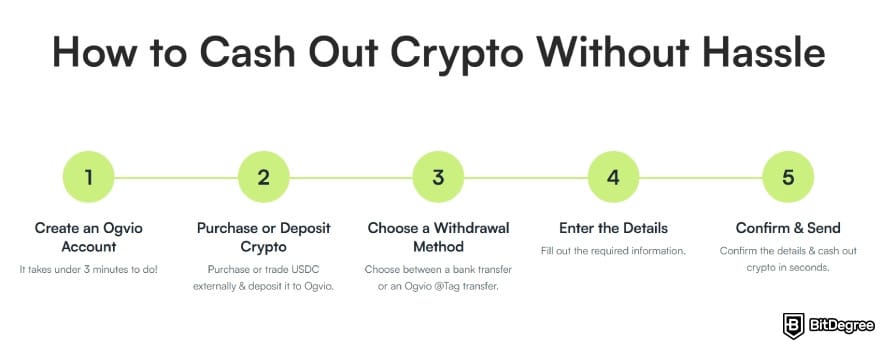
If you’re looking at how to withdraw money from Binance in India with the least friction possible, this is the route I’d point you to first.
Binance P2P
Another method to move money from Binance to INR is through Binance’s P2P marketplace. It works by letting you sell crypto directly to other users for fiat, instead of going through standard exchange trades.
Unlike spot trading, where prices are mostly set by the market, P2P gives you plenty of room to maneuver. You get to choose who you trade with, select a payment method that suits you, and settle on a price both sides are happy with.
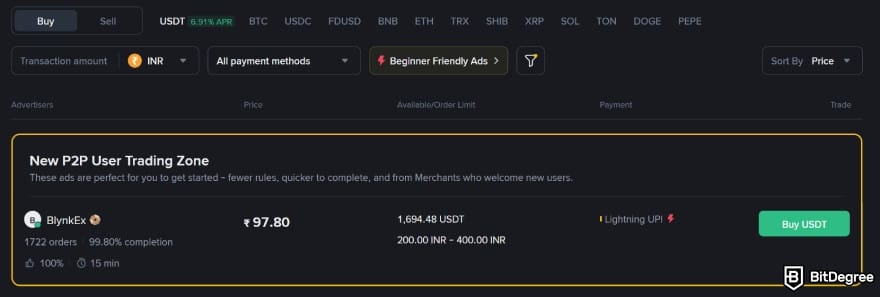
Say you want to convert USDT to INR. Binance P2P lets you pick a buyer you’re comfortable with, enter the amount of USDT you want to sell, choose a payment method, and click the “sell” button. After that, it’s just a matter of waiting for the rupees to land in your account.
Seems easy enough, right? Well, in practice, Binance P2P needs a bit more attention than you might expect. You’ll need to stay online, monitor incoming payments, and reply on time until the trade is completed.

There are a few risks you’ll want to keep in the back of your mind too. Fake payment confirmations during settlement are pretty common occurrences. Local banks can also temporarily freeze incoming transfers for compliance checks,[2] which can ruin your day quickly.
So if you’d rather keep things simple and avoid unnecessary risks, a beginner-friendly service like Ogvio is the route I’d recommend.
📚 Check Out: How to Use Binance P2P
Crypto Wallet
I know this isn’t the route you’d take if you’re looking to cash out, say, Binance USDT to INR straight away. That said, there are times when you’d rather withdraw your assets from the exchange and “park” them somewhere safe for a while.
In situations like this, hardware wallets such as those offered by Ledger or Trezor usually come to mind. These external storage devices keep your assets offline and fully under your control. Once your crypto is there, it’s no longer exposed to exchange-related risks like security breaches, insolvency problems, account freezes, or other counterparty concerns.
You can think of this option more as a "pause" than a full exit. It’s useful if you want to step away for a bit, wait for better timing, or avoid making a rushed decision that you might regret later.
And when the time feels right, you’re free to move your crypto assets again. You can cash out to rupees via a transfer service, or swap into another token if you feel altcoins are making a comeback. Totally up to you!
📚 Check Out: Best Hardware Crypto Wallets
Looking for more in-depth information on related topics? We have gathered similar articles for you to spare your time. Take a look!



How To Withdraw Money From Binance In India
Have you figured out which method works best for you? If so, let’s get into practice and look at how to withdraw money from Binance in India. I’ve broken everything down by the available methods, so you can easily follow along with whichever one you’re using.
Using Ogvio
As I’ve mentioned earlier, using an off-ramp is probably the most straightforward method to withdraw money from Binance in India. And among the available names, Ogvio is the one I’d recommend since it keeps things simple while staying transparent with its competitive pricing.
Ogvio only supports USDC transfers at the time of writing. That means if you want to withdraw another token, you’ll have to swap it to USDC first (using the Base network) before sending it.
Here’s how it works, step by step:
![How to withdraw money from Binance in India: click [Get Started].](https://assets.bitdegree.org/images/how-to-withdraw-money-from-binance-in-india-started.jpg "How to withdraw money from Binance in India: click [Get Started].")
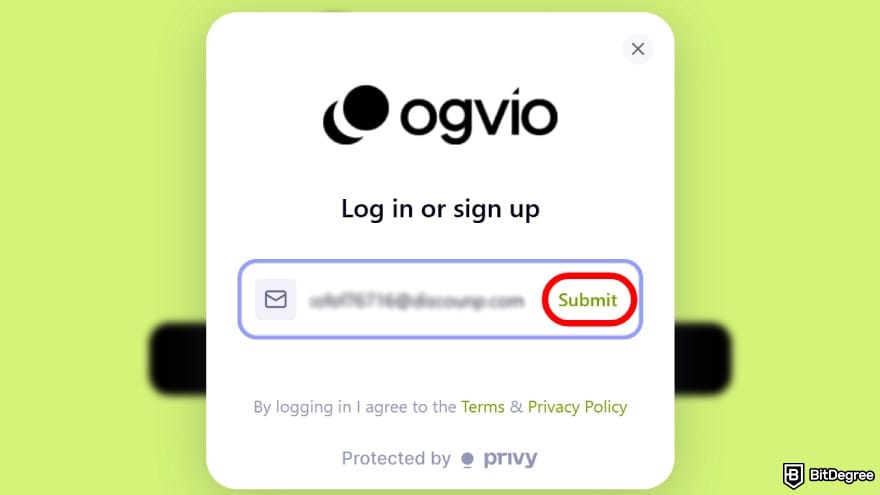
Enter your email address and submit it to create an account. You’ll receive a verification code from Ogvio that you’ll need to enter to continue.
![How to withdraw money from Binance in India: click on the [Add Money] button.](https://assets.bitdegree.org/images/how-to-withdraw-money-from-binance-in-india-add-money.jpg "How to withdraw money from Binance in India: click on the [Add Money] button.")
![How to withdraw money from Binance in India: select [Crypto Transfer].](https://assets.bitdegree.org/images/how-to-withdraw-money-from-binance-in-india-crypto-transfer-1.jpg "How to withdraw money from Binance in India: select [Crypto Transfer].")
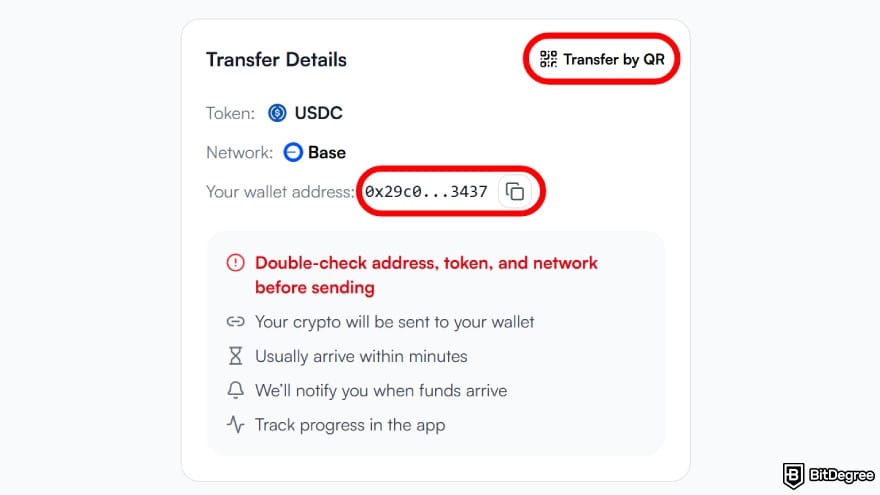
![How to withdraw money from Binance in India: click on the [Withdraw] option.](https://assets.bitdegree.org/images/how-to-withdraw-money-from-binance-in-india-withdraw-binance.jpg "How to withdraw money from Binance in India: click on the [Withdraw] option.")
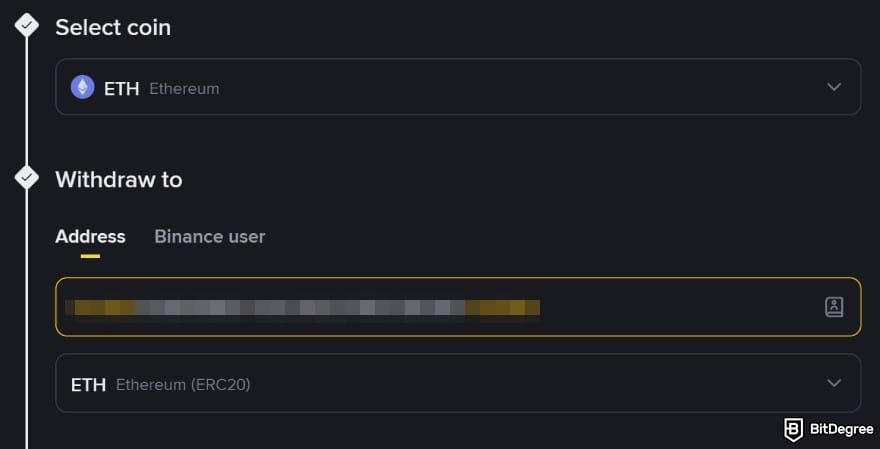
![How to withdraw money from Binance in India: enter the withdrawal amount and select [Withdraw].](https://assets.bitdegree.org/images/how-to-withdraw-money-from-binance-in-india-binance-amount.jpg "How to withdraw money from Binance in India: enter the withdrawal amount and select [Withdraw].")
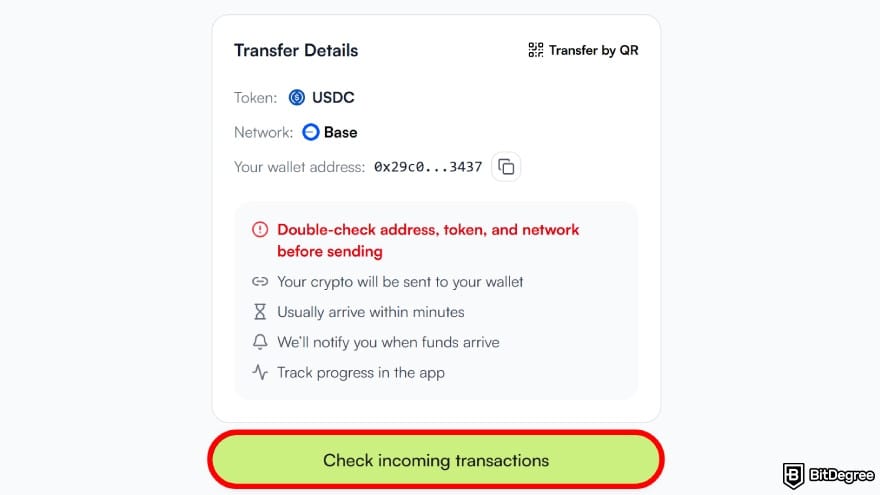
Once the funds arrive, Ogvio will notify you and update your balance automatically.
![How to withdraw money from Binance in India: select [Send Money].](https://assets.bitdegree.org/images/how-to-withdraw-money-from-binance-in-india-send-money.jpg "How to withdraw money from Binance in India: select [Send Money].")
![How to withdraw money from Binance in India: continue by selecting [+ Send to new recipient].](https://assets.bitdegree.org/images/how-to-withdraw-money-from-binance-in-india-add-recipient.jpg "How to withdraw money from Binance in India: continue by selecting [+ Send to new recipient].")
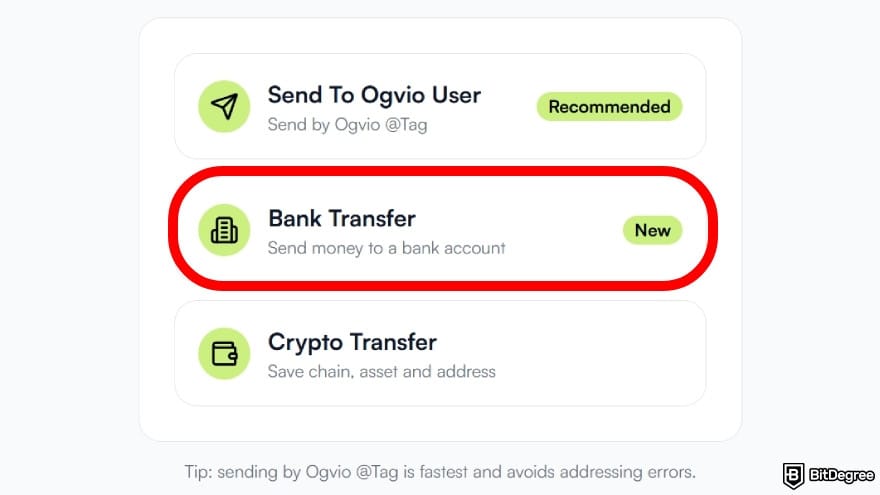
Of course, you can choose another method if that suits you better.
You don’t need to verify your identity to start using Ogvio. That said, if you want access to bank-related transactions, you’ll need to complete KYC first.
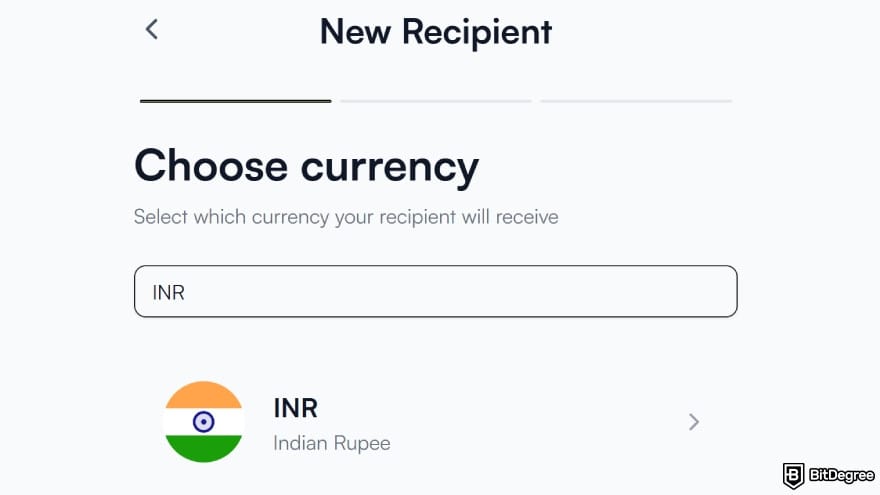
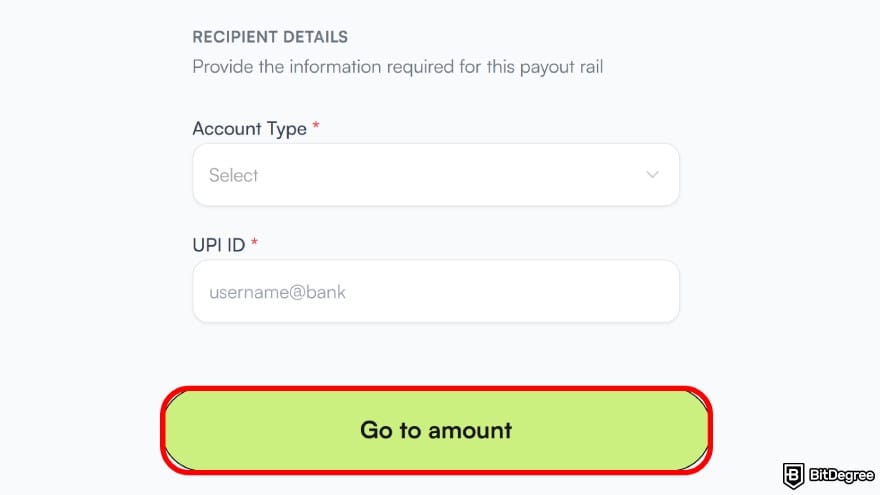
![How to withdraw money from Binance in India: type in the amount to send and choose [Continue].](https://assets.bitdegree.org/images/how-to-withdraw-money-from-binance-in-india-amount-inr.jpg "How to withdraw money from Binance in India: type in the amount to send and choose [Continue].")
And that should do it! You can track the transaction in the “Activity” section, but in my experience, it usually arrives before you think to look.
📚 Check Out: Ogvio Review
Did you know?
Subscribe - We publish new crypto explainer videos every week!
10 Biggest Crypto Scams & How to Avoid Them (ANIMATED)

Using Binance P2P
If you’d rather stay within the ecosystem, the Binance P2P marketplace is probably the option you’ll feel most comfortable with. Most of the process stays on-platform, with crypto held in escrow while you trade with another person.
Binance does a good job keeping things user-friendly, but I’d still suggest getting familiar with a few terms. You’ll come across things like escrow, payment windows, merchants, and advertisements. It’s nothing complex, really, but it can feel a bit overwhelming, especially if you’re looking at how to withdraw money from Binance in India for the first time.
Make sure you have completed identity verification and enabled at least one 2FA, such as passkeys or Google Authenticator.
With that out of the way, here’s how to convert USDT to INR on Binance P2P:
![How to withdraw money from Binance in India: navigate to the [P2P] section.](https://assets.bitdegree.org/images/how-to-withdraw-money-from-binance-in-india-binance-p2p.jpg "How to withdraw money from Binance in India: navigate to the [P2P] section.")
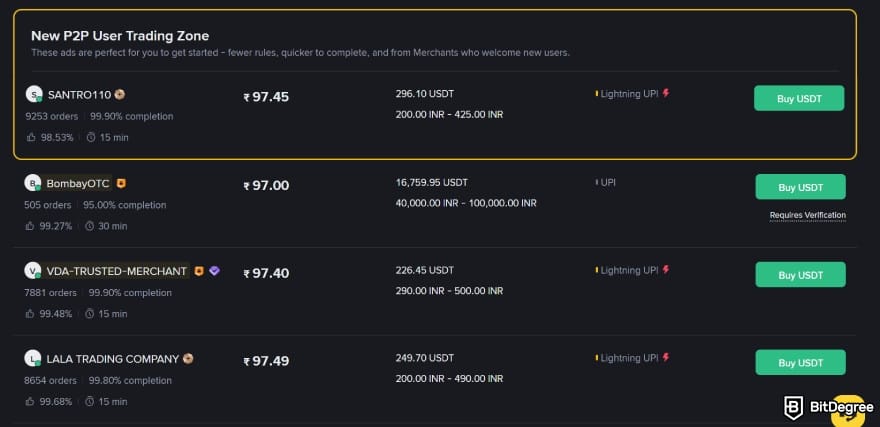
You can browse and choose manually if you want, but to speed things up, let’s switch to the [Express] tab.
![How to withdraw money from Binance in India: go to the [Express] tab.](https://assets.bitdegree.org/images/how-to-withdraw-money-from-binance-in-india-p2p-binance-ui.jpg "How to withdraw money from Binance in India: go to the [Express] tab.")
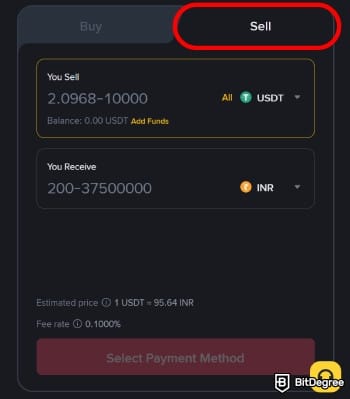
After that, enter the amount you want to convert to INR.
As of writing, the Binance minimum withdrawal INR is 2.10 USDT, or around 200 Indian rupees.
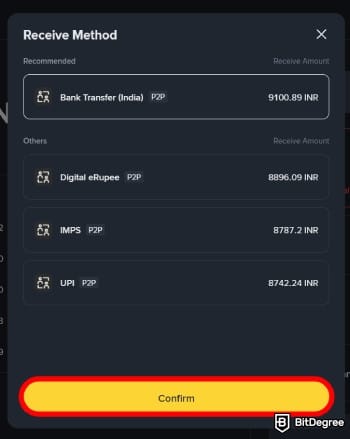
At this point, you’ll have cashed out your USDT to INR using Binance P2P. If you run into any issues, click [Appeal] to get help from Binance Customer Support.
📚 Check Out: Bybit P2P: Everything You Need to Know

- Accepts fiat currencies
- Simple to use
- Supports only trusted cryptocurrencies
- A leading cryptocurrency exchange platform
- Best for all type investors
- Accepts fiat currencies

- Industry-leading security
- Accepts fiat currencies
- Advanced trading tools
- Industry-leading security
- Strong regulatory reputation
- Advanced trading tools

- Wide range of tradable assets
- Robust copy trading feature
- Flawless security record
Using A Hardware Wallet
This is the route to take if you want to withdraw from Binance but aren’t looking to cash out your crypto just yet. Exchanges offer decent security measures, but hardware wallets are specifically designed to keep your private keys safe from both digital and physical threats.[3]
You’ll find several hardware wallet brands on the market, but for this guide, I’m using Ledger. Here’s how to do it:
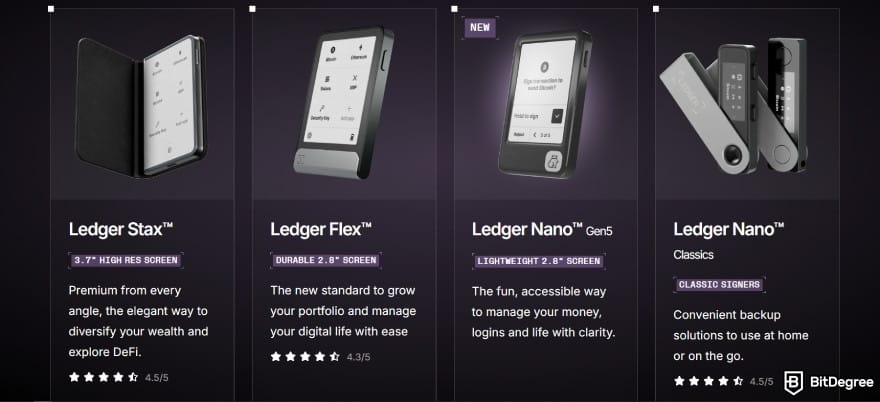
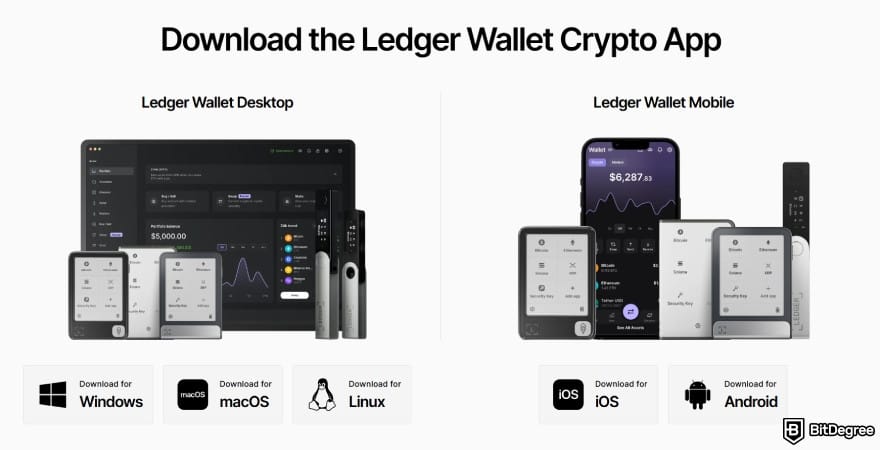
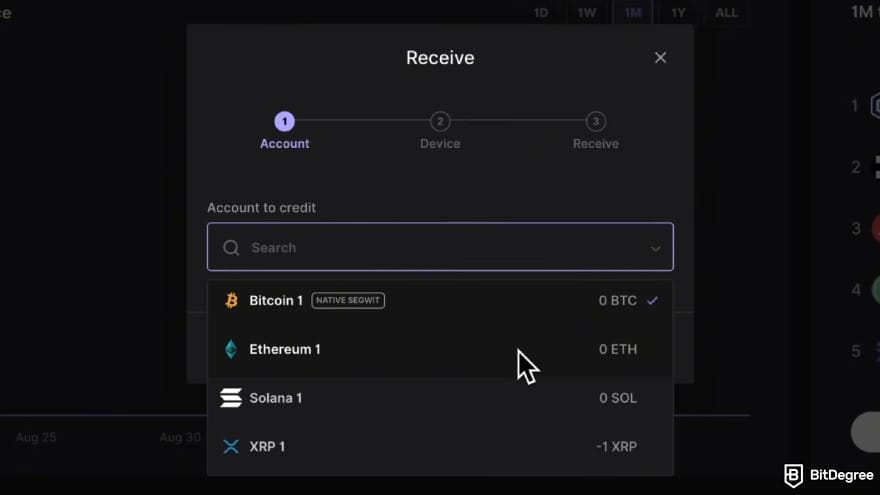
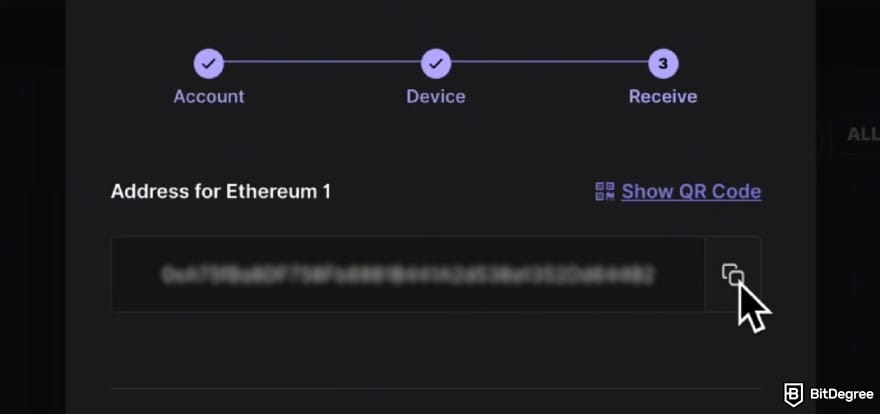
All that’s left is to wait for your tokens to arrive. How long it takes depends on the network you choose.
Once your tokens are safely stored in your hardware wallet, you’re in control of what happens next. Ideally, this route works best if you’re holding for the long haul. But if the moment feels right, you can always send them back to Binance to trade or cash out into fiat through a reliable off-ramp service.
Binance Withdrawal Fees and Limits
When figuring out how to withdraw money from Binance in India, it’s just as important to know the fees and limitations you’ll be dealing with. This makes it easier to pick the route that suits your situation best.
First of all, it’s good to know that Binance doesn’t charge a platform fee just for processing withdrawals. This applies when you’re sending crypto to an external platform or wallet, which means you’re not paying an extra “withdrawal service” cost on top.
That said, you still need to pay a network fee. This cost acts as an incentive for the miners or validators running the blockchain and doesn’t go into Binance’s pocket. The amount you pay also varies based on the network you choose and how busy it is.
Here’s an overview of average network fees for popular coins on Binance:
Coin | Network | Min. Withdrawal | Fees |
|---|---|---|---|
BTC | Lightning Network | 0.00002 | 0.000001 |
Bitcoin | 0.00012 | 0.000015 | |
ETH | BNB Smart Chain | 0.000017 | 0.0000084 |
Ethereum | 0.002 | 0.00003 | |
USDT | Solana | 10 | 0.5 |
Tron | 10 | 1 | |
USDC | Base | 10 | 0.5 |
Sui | 10 | 0.1 |
Table: Binance withdrawal fees and minimums.
Let’s say you withdraw 100 USDT from Binance. If you choose the Solana network, you’ll pay a 0.5 USDT network fee and receive 99.5 USDT. If you use the Tron network, the fee is 1 USDT, so 99 USDT arrives instead.
Binance will show the minimum withdrawal, network fee, and final amount you’ll receive before you complete the transaction.
Now, things work differently if you’re withdrawing USDT to INR on Binance P2P. Instead of sending coins over a blockchain and paying a network fee, you’re selling your USDT directly to another user.
Binance simply provides the marketplace and holds your funds in escrow until both sides complete the trade. Here's the fee structure:
Mode | Fees |
|---|---|
P2P Zone | 0% |
Express P2P | 0.1% (0.06 for Tether) |
Table: Binance P2P trading fees
Binance selling USDT to INR through the regular P2P Zone comes with no platform fees. The trade-off is that you need to be more hands-on, since you’ll be choosing the buyer, checking their rates, and selecting a payment method manually.
Express P2P, on the other hand, streamlines the process into a more straightforward flow. The platform pre-selects the buyer and walks you through fewer steps. In return for that convenience, Binance charges a 0.1% fee.
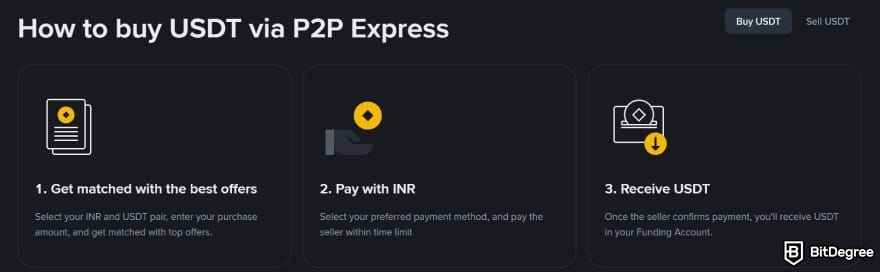
Personally, I think that’s a fair trade-off. Most of the time, I don’t have the patience to compare multiple ads when I just want to convert Binance USDT to INR. In those moments, I’d rather pay a small fee and move on.
📚 Check Out: Binance Fees
The Best Platforms to Withdraw Money From Binance in India
Once you’ve got a handle on how to withdraw money from Binance in India and what it’s going to cost you, the next question is where to route your funds. If you’ve been following along, you might already know which platform I prefer. But let’s lay it out properly:
- Ogvio. If your goal is to turn crypto into usable money as quickly and affordably as possible, I can’t recommend Ogvio enough. It’s designed to make off-ramping far more casual-friendly and easier for anyone to manage.
- Binance P2P Express. For convenience, I’d use P2P Express over the full marketplace. The flow is faster, the steps are fewer, and it works smoothly on mobile too.
- Ledger Flex. For holding assets over the long haul, the Flex is one of my favorite options. It packages industry-grade security with a comfortable 2.84″ touchscreen that makes transactions easy.
When I’m still on the fence, I usually try to simplify it by asking what I want to do. "Am I cashing out to rupees, in-app conversion, or moving funds to safer storage?" Once I answer that, the platform choice becomes obvious.
Best Practices for Moving Funds off Binance
As long as you follow the steps I’ve outlined carefully, figuring out how to withdraw money from Binance in India should be easy. Still, there are a few key points worth paying close attention to:
- Be mindful of INR volatility. The Indian rupee can be volatile at times. If timing your cash-out matters to you, make sure to keep an eye on the rate changes when converting crypto tokens to INR.
- Use UPI for bank transfers. Unified Payments Interface (UPI) has grown into a reliable way to transfer money, but its reliance on stable internet access can be a drawback in regions with poor connectivity.
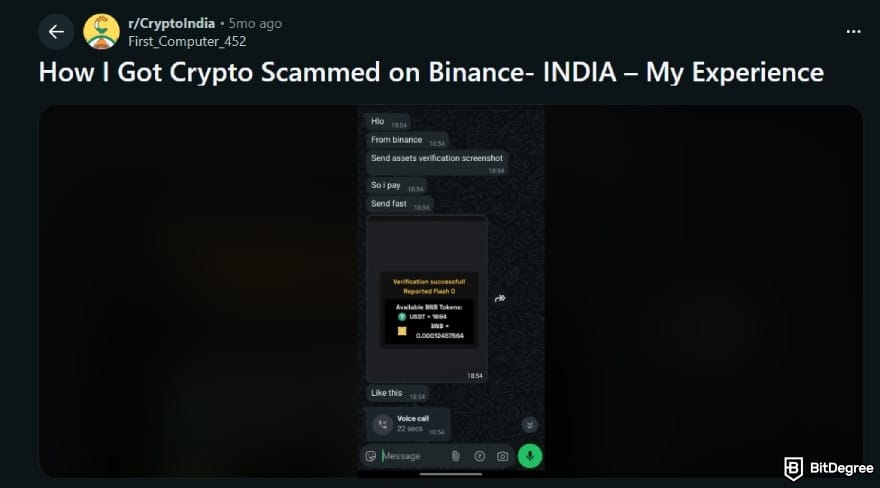
- Choose P2P buyers carefully. When using the P2P marketplace, prioritize buyers with high ratings and a proven trade history. Don’t get easily tempted by unusually high INR rates!
- Keep India’s crypto tax rules in mind. You may face a 30% tax on crypto gains, along with a 1% TDS on certain transactions. It varies by individual situation, so make sure you factor this in before cashing out.
- Double-check addresses and networks. It’s best not to rush when withdrawing to an external exchange, wallet, or off-ramp service. Since blockchain transactions can’t be reversed, even minor errors can be costly.
Personally, I’d say most issues can be avoided by simply being deliberate. Once you understand the available routes and pick the right tools for your situation, the rest tends to fall into place.
And most importantly, slow down a bit! I get that sometimes you’re working with a tight window, either trying to catch a better rate or needing the funds in India ASAP. Even then, pausing to verify the key details can save you from a lot of problems that are much harder to clean up later.
📚 Check Out: Best Money Transfer to India
Browse our collection of the most thorough Crypto Exchange related articles, guides & tutorials. Always be in the know & make informed decisions!


Conclusions
Now that I’ve covered how to withdraw money from Binance in India, including the available routes and the costs involved, you shouldn’t be left hanging when it’s time to move your funds off the platform. I get that the in-app options can feel limited, but that doesn’t mean withdrawing your funds has to be difficult.
Binance P2P works well if you want a controlled cash-out method without leaving the app. But if long-term security is your main goal, I’d suggest moving your assets to a hardware wallet instead.
When it comes to converting your coins in Binance to INR, I’d personally go with Ogvio for its affordability and practicality.
The content published on this website is not aimed to give any kind of financial, investment, trading, or any other form of advice. BitDegree.org does not endorse or suggest you to buy, sell or hold any kind of cryptocurrency. Before making financial investment decisions, do consult your financial advisor.
Scientific References
1. He D. et al.: ‘Capital Flow Management Measures in the Digital Age: Challenges of Crypto Assets’;
2. Tsuchiya T., Cuevas A., Christin N.: ‘Identifying Risky Vendors in Cryptocurrency P2P Marketplaces’;
3. Weichbroth P., Wereszko K., Anacka H., Kowal J.: ‘Security of Cryptocurrencies: A View on the State-of-the-Art Research and Current Developments.
About Article's Experts & Analysts