Key Takeaways
- KuCoin is available in India, but direct INR withdrawals to Indian bank accounts are not supported;
- The process of how to withdraw money from KuCoin in India depends on the method you choose, such as KuCoin P2P, money transfer apps, or local exchanges;
- The best withdrawal method depends on whether you prioritize simplicity, lower fees, or regulated INR bank transfers.
Crypto exchanges can feel like a game of mix-and-match. What works perfectly in one country suddenly doesn’t in another (due to regulations). And that’s exactly why many users end up searching for how to withdraw money from KuCoin in India.
KuCoin still runs as a global crypto exchange, but when it comes to turning crypto into rupees, Indian users now need to rely on alternative routes: selling through P2P, transferring to Indian exchanges that support bank withdrawals or using apps like Ogvio to transfer crypto as fiat around the world.
Each option comes with different steps, fees, and trade-offs. In this guide, I’ll walk you through what works today, what doesn’t, and how KuCoin INR withdrawals work without unnecessary friction.

Did you know?
Subscribe - We publish new crypto explainer videos every week!
Copy Trading Guide for Beginners (ANIMATED EXAMPLES)


Table of Contents
KuCoin in India: Is It Available?
KuCoin is available for users in India, but its presence is a bit nuanced. There are a few regulations that affect how certain features work, including how to withdraw money from KuCoin in India. Users can access the platform, trade crypto, and use supported services, but KuCoin doesn’t offer all the same features as it does in other countries (like direct fiat withdrawals).
Latest Changelly Coupon Found:The reason for this goes back to KuCoin’s regulatory history in India. At one point, several offshore exchanges, including KuCoin, were blocked for non-compliance with local requirements. This is most likely related to how India regulates crypto. Cryptocurrencies have long been debated because their semi-anonymous nature can make money laundering harder to track.[1]
Since then, KuCoin has registered with India’s Financial Intelligence Unit (FIU) as a Virtual Asset Service Provider (VASP), which allows it to legally offer services again. As a result, features like crypto trading and P2P transactions involving INR are available to Indian users. However, it doesn't allow you to withdraw INR to your bank account straight from your wallet.
Despite KuCoin being available in India, you should regularly check their official announcement and updates.
Overall, though, KuCoin does offer quite a wide range of features for users in India. These include spot trading, futures trading, staking, crypto deposits and withdrawals, and access to the KuCoin P2P for India (which is what I’ll cover fully in the next chapter).
Before getting into withdrawals, it’s important to understand how Indian users fund their KuCoin accounts in the first place. KuCoin does not support direct INR deposits through Indian banks, which means users can’t add funds in rupees the traditional way.
Instead, Indian users typically choose one of two options:
- Transfer crypto from an external wallet or exchange (most commonly USDT).
- Use KuCoin P2P, where INR is exchanged directly with other users for USDT.
Once USDT (or other crypto) is credited to the KuCoin account, it can be used to trade other cryptocurrencies on the spot market. In practice, KuCoin P2P serves as the main entry point for Indian users who want to access the platform using INR.
Looking for more in-depth information on related topics? We have gathered similar articles for you to spare your time. Take a look!



How to Withdraw Money From KuCoin in India
In general, withdrawing from KuCoin is straightforward. You log in to your account, go to [Funding] on the left sidebar menu, and select [Withdraw]. KuCoin will then show the available fiat withdrawal options for your account.
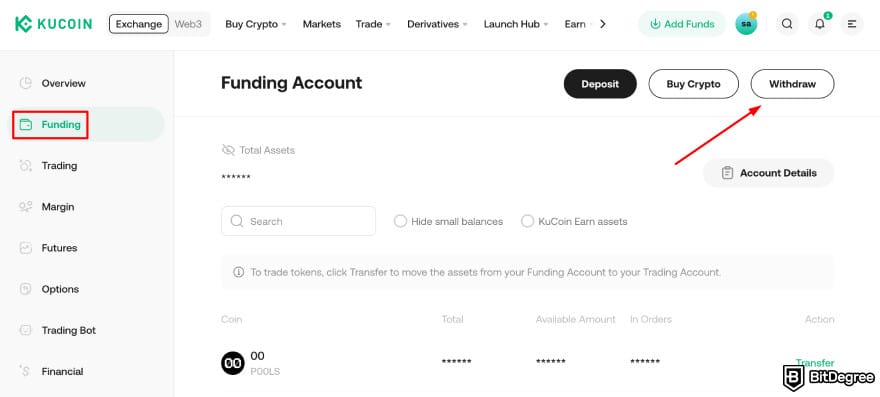
If your local currency is supported, you’ll see it listed there on the page, along with the steps to choose the amount, choose a payout method, and confirm the withdrawal.
But this is where things work differently for Indian users. At the moment, there’s no direct KuCoin INR withdrawal to Indian bank accounts through the standard fiat withdrawal interface. As you already know, KuCoin doesn’t offer a built-in option to send INR directly to your bank.
Because of this, making KuCoin INR withdrawals usually requires an extra step. Before you can cash out in rupees, you typically need to deal with crypto first, most commonly USDT (or USDC) and convert it to INR through another method:
- Using KuCoin P2P to sell USDT directly.
- Sending crypto to a money transfer service like Ogvio.
- Transferring crypto to a local Indian exchange and then withdrawing to INR.
Each alternative depends on what’s available and what you’re comfortable with, but the end result is still the same: you find how to convert USDT to INR using KuCoin or another platform. So, in the next few chapters, I’ll cover each of them one at a time.
Using KuCoin P2P
KuCoin P2P is one of the main ways to withdraw money from KuCoin in India. It’s a peer-to-peer marketplace where you sell your crypto directly to another user. It’s also the closest thing to a KuCoin INR withdrawal you can do inside the platform.
KuCoin P2P in India works by sending INR to your bank. Then, the buyer pays you via local methods such as UPI, IMPS, or bank transfer, while KuCoin holds the USDT in escrow until the payment is confirmed.
So, you'll receive the money straight into your bank account, with escrow helping reduce the risk on both sides.
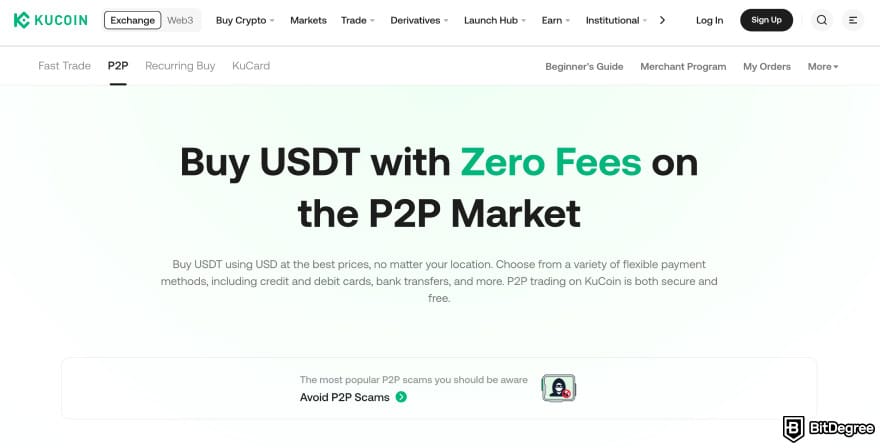
There are two ways to use KuCoin P2P in India. You can use either Fast Trade, where KuCoin automatically matches you with a buyer, or go to the regular P2P marketplace, where you manually choose an advertisement that fits your needs.
Both options are commonly used to withdraw USDT from KuCoin to Indian bank, since the buyer pays you directly via UPI or bank transfer.
In this guide, I’ll stick with the regular P2P option since it gives you more control over pricing, payment methods, and who you trade with. Here’s the full step-by-step process on how to convert USDT to INR in KuCoin P2P (how to filter for USDT to INR, choose a reliable buyer, confirm the INR payment, and safely release the crypto to complete the withdrawal):


At this point, the INR stays in your bank account, and the USDT is transferred to the buyer. While it’s not the same as one-click bank withdrawal, KuCoin P2P is currently the most direct way for Indian users to cash out INR.
Things to Watch Out for When Using KuCoin P2P
KuCoin P2P is straightforward once you get used to it, but a few small details can make a big difference. Paying attention to these points helps you avoid unnecessary delays, disputes, or risky situations when withdrawing INR.

First, consider payment confirmation timing. Even if the buyer says they’ve sent the money, only release the crypto after you can clearly see the INR credited in your bank account. Screenshots or payment confirmations alone aren’t enough. If the money isn’t showing yet, it’s better to wait.
KuCoin also warns about SMS scams, where fake bank-style messages claim a payment has been sent even though no INR has actually arrived. So be aware of these, too.
Secondly, don't forget account name matching. Make sure the name on your KuCoin account matches the name on your bank account. If there’s a mismatch, payments can get delayed or rejected, and some buyers may even cancel the trade.
Finally, it's important to follow risk management basics. Stick to buyers with a strong completion rate and a solid trading history. Avoid taking conversations off the platform, and always keep the trade within KuCoin’s escrow system.
Using a Neobank: Ogvio
Another option for Indian users is withdrawing funds from KuCoin to a new-generation money transfer service that supports crypto. My personal favorite is Ogvio, a neobank that lets you receive, hold, send, and manage both fiat and crypto.
Ogvio is like a combination of a traditional money app and a Web3 platform. You can use Ogvio in a couple of ways:
- As a remittance tool to send money to India or 160+ other countries using local payment rails (e.g., UPI).
- As a crypto-friendly tool that allows you to hold, swap, buy, and send crypto to others.
In that sense, Ogvio works a bit like KuCoin: you can still buy and sell crypto, but with a stronger focus on fiat currency movement and remittances. It’s a good fit if you want to switch to something simpler and more payment-oriented.
This is possible because Ogvio uses blockchain technology for its transactions. In simple terms, this helps track funds, verify transactions, and support wider access to financial services.[2]
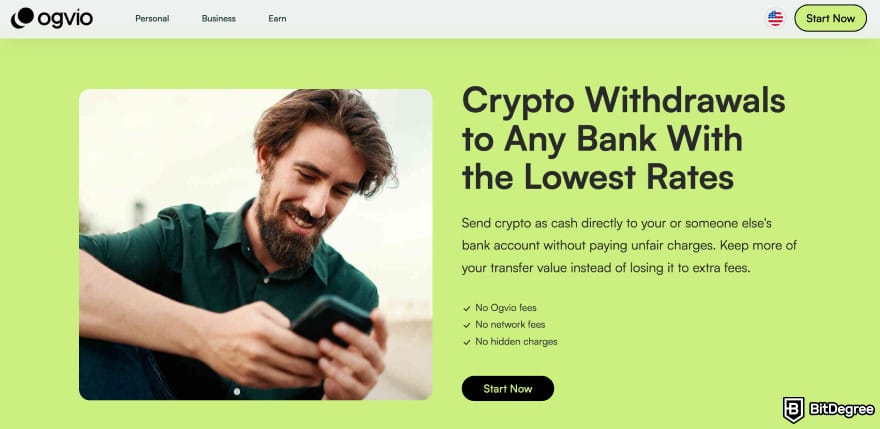
From a security standpoint, this lets you move funds out of KuCoin without relying on a one-off P2P trade and its risks. Ogvio employs non-custodial fund storage, so you stay in control of your funds while managing crypto and payments in one app.
As of writing, Indian citizens cannot make INR bank transfers to Indian bank accounts with Ogvio. However, they can send crypto as fiat to bank accounts in other countries and make internal transfers.
That said, here’s how to withdraw USDT (or other crypto) from KuCoin to Ogvio:
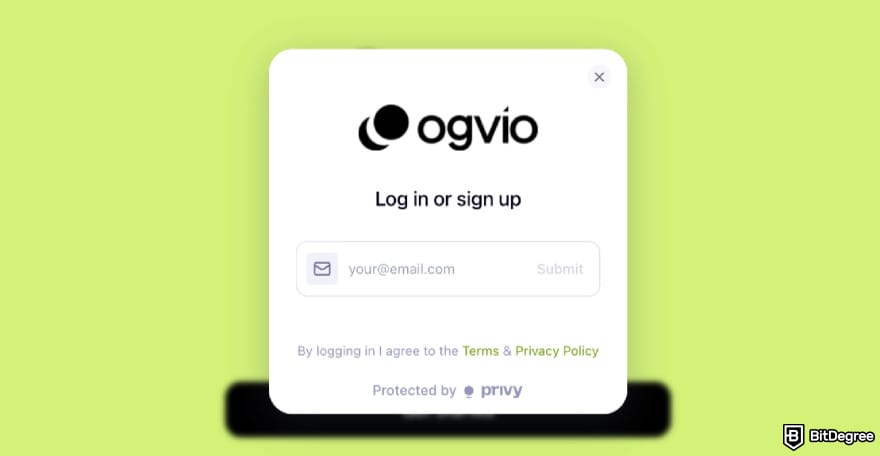
You need to pass KYC on Ogvio to unlock bank transfers.
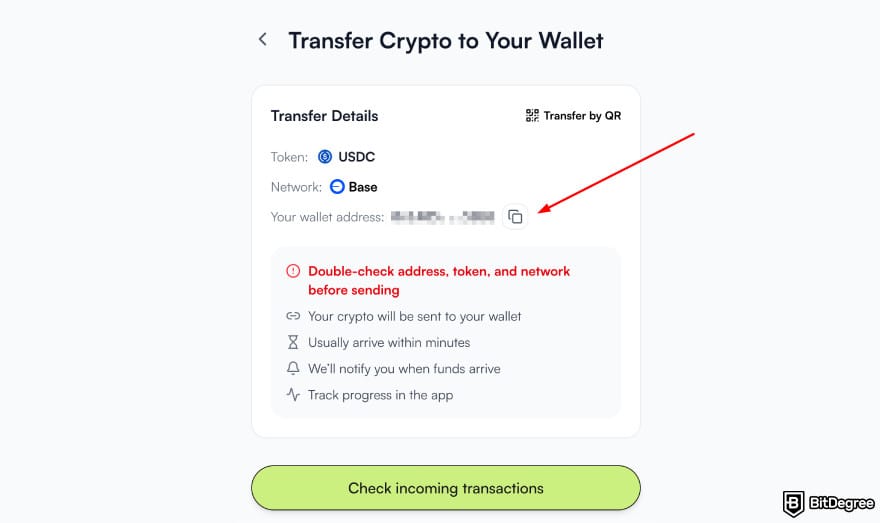
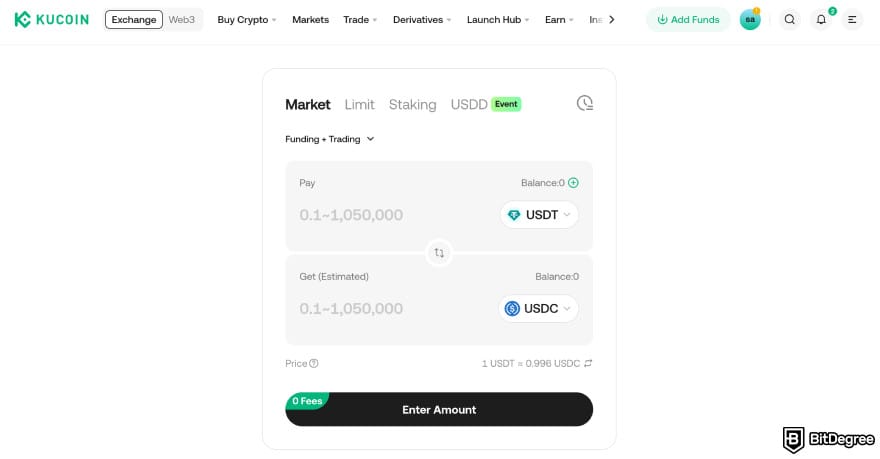
Once the USDC is in your Ogvio wallet, you can hold, swap, or send the funds using the app.
Things to Know Before Using Ogvio
Before using Ogvio as part of your KuCoin withdrawal flow, there are a few practical points worth keeping in mind. Note that some of these depend on how you plan to use the app.
If you plan to use Ogvio as a remittance platform, you’ll need to complete KYC verification. While you don’t need it for crypto transactions, you’ll need it for activities like sending money via fiat rails or withdrawing fiat.
For INR remittance, you cannot send money from Ogvio to an Indian bank account if you're an Indian citizen. You can send other fiat currencies to bank accounts in other countries, though (like AED to a bank account in the UAE, for example).
When it comes to fees, Ogvio is generally low-cost. Transfers between users are free, and for crypto transactions, they are also free, and Ogvio even covers network fees (so you’re not paying extra gas fees).
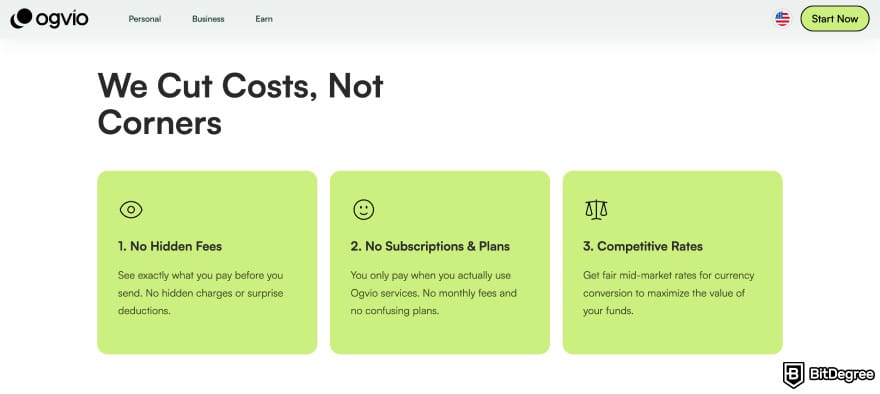
Finally, it’s important to understand how Ogvio wallets work. Ogvio uses non-custodial wallets, which are different from KuCoin’s standard exchange account (even if you’re already familiar with KuCoin’s Web3 wallet).
If you’ve mainly used centralized exchanges before, keep these points in mind and non-custodial storage:
- You control your wallet and funds directly.
- You’re responsible for securely storing recovery details.
- Transactions are final once sent.
- Lost access can’t be recovered by the platform.
Overall, Ogvio can be a flexible option if you want to move funds out of KuCoin and manage both crypto and payments in one app.
Just make sure you understand when KYC is required, how remittance limits may apply, and what it means to use a non-custodial wallet before relying on it as your main setup.
📚 Read More: Ogvio Review

- Accepts fiat currencies
- Simple to use
- Supports only trusted cryptocurrencies
- A leading cryptocurrency exchange platform
- Best for all type investors
- Accepts fiat currencies

- Industry-leading security
- Accepts fiat currencies
- Advanced trading tools
- Industry-leading security
- Strong regulatory reputation
- Advanced trading tools

- Wide range of tradable assets
- Robust copy trading feature
- Flawless security record
Using a Local Indian Exchange: CoinDCX
Another common way to withdraw funds from KuCoin in India is by sending crypto to a local Indian exchange and cashing out from there. In this setup, KuCoin is only used as the starting point. The actual INR withdrawal happens on the Indian exchange after you convert your crypto to rupees.
Several Indian exchanges support this flow, each with slightly different features. Platforms like CoinDCX and ZebPay allow users to deposit USDT, sell it for INR, and withdraw directly to an Indian bank account.
Some focus on simplicity and UPI withdrawals, while others offer deeper trading features and higher limits. So always choose the exchange that fits your needs best.
This route can be the best option for you because local Indian exchanges operate within India’s regulatory and banking frameworks. One example is making INR withdrawals more predictable than relying on offshore platforms.
Since there can be lots of options out there, I’m going with CoinDCX for this article. It’s widely used in India, supports direct INR deposits and withdrawals (with zero fees), and keeps the crypto-to-bank flow relatively straightforward.
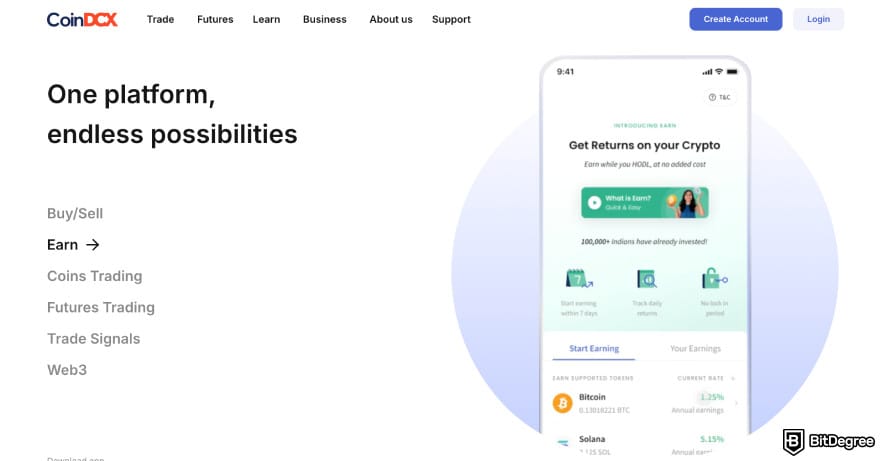
CoinDCX is also secure and has FIU-compliant crypto deposits. This matters because it keeps transfers aligned with Indian rules, which can make deposits and INR withdrawals smoother.
📚 Read More: CoinDCX Review
Before starting, make sure your CoinDCX account is fully set up and verified for INR withdrawals. You can check out BitDegree’s article on how to sign up on CoinDCX. Once that’s done and you’ve signed up, here’s how the process usually works:
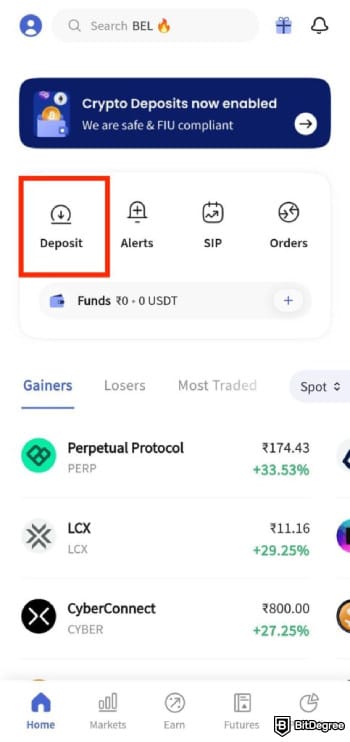
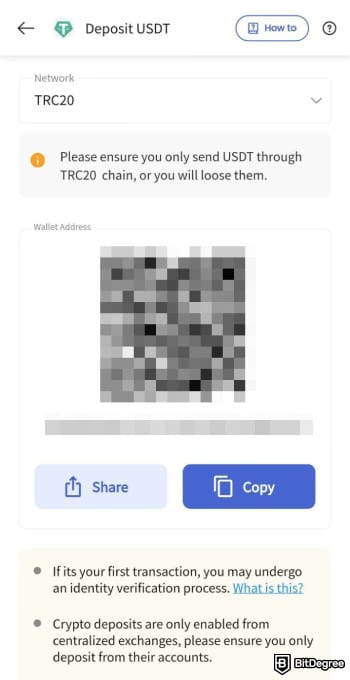
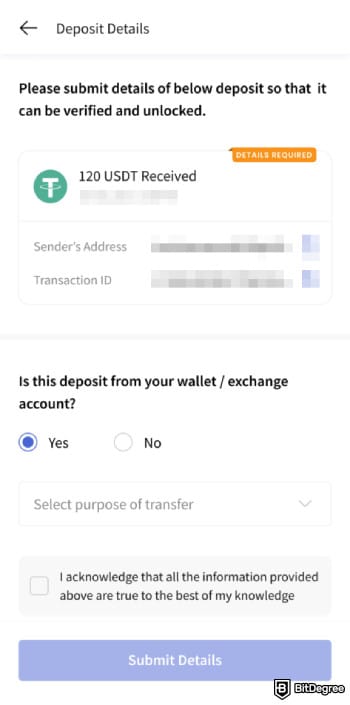
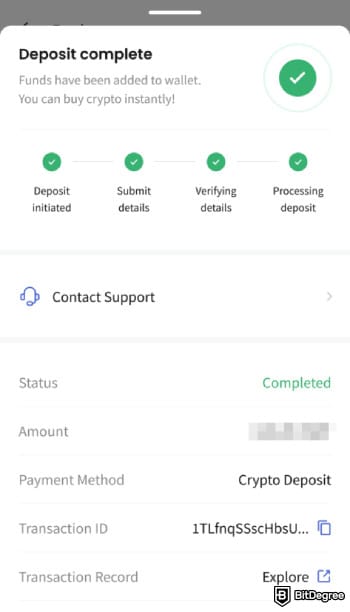
From here on, everything happens within CoinDCX’s INR withdrawal flow.
Using CoinDCX (a local Indian exchange) works well if you just want to cash out to your bank, but it does have some limits. First, INR is the only supported fiat currency. This is fine for local use, but not great if you deal with other currencies or want to send money across borders.
Another thing to keep in mind is that the range of supported crypto coins is more limited compared to global exchanges like KuCoin.
Plus, advanced trading features, like higher leverage, are also usually more limited than on global exchanges. So this method is best if your goal is to turn crypto into INR and withdraw it to your bank account.
KuCoin Withdrawal Limits for Indian Users
When it comes to P2P, there is no publicly stated KuCoin minimum withdrawal (INR) amount that applies universally to all users. Instead, the minimum and maximum values are generally set per individual offer on the P2P marketplace by each buyer/seller, and can vary by payment method and merchant settings.
As for crypto withdrawals, the amounts depend on the specific cryptocurrency and the network you choose. Plus, the exact numbers are shown directly on KuCoin’s withdrawal page at the time of withdrawal.
In practice, most Indian users withdraw USDT (and the minimum also varies by network). Some networks allow smaller withdrawals with lower fees, while others require higher minimums and charge more.
KuCoin also applies general limits, such as a daily fiat withdrawal cap of up to 150,000 USDT. But it depends on your account status and verification level. Here’s also what Indian users should keep in mind:
- Crypto minimums are network-based, not country-based.
- You must meet KuCoin’s minimum before you can withdraw at all.
- The receiving platform may have its own minimum or maximum limits.
Always review KuCoin’s withdrawal page and the limits of the platform you’re withdrawing to before proceeding, to avoid failed transfers or extra fees.
Costs When Withdrawing From KuCoin in India
Now, the fees you have to pay depend on the method you choose. When withdrawing via KuCoin P2P, you’re essentially selling crypto such as USDT directly to another user in exchange for INR. KuCoin itself doesn’t charge a direct withdrawal fee for P2P transactions, but the real cost comes from the price spread set by buyers and sellers.
If you withdraw crypto from KuCoin to Ogvio, you'll only need to cover crypto withdrawal and network fees on KuCoin's end. Ogvio doesn't charge any deposit fees. Then, your further costs depend on what you do with that crypto on Ogvio. If you send it to another Ogvio user, it will be free as well. If you send it as fiat to a bank account, it will depend on the fiat and payment method.
Lastly, if you transfer crypto from KuCoin to CoinDCX, convert it to INR there, and then withdraw to a bank account, you will first pay the network fee to send USDT from KuCoin to CoinDCX, typically around 1–3 USDT. Once the funds arrive, converting USDT to INR on CoinDCX usually incurs a fee of about 0.1%–0.2%. On top of that, Indian regulations require a 1% TDS to be deducted at the time of conversion.
For example, converting 1,000 USDT at roughly ₹83 per USDT would trigger a TDS of about ₹830. CoinDCX itself does not usually charge a fee to withdraw INR to an Indian bank account, so after fees and TDS, you would typically receive around ₹82,000–₹82,100.
These numbers are only estimates. Actual fees can change depending on exchange rates, network activity, and platform updates, but they show a typical withdrawal process used by Indian users.
There’s no single cheapest route for everyone. The best choice depends on how often you withdraw, the amount involved, and whether you prioritize simplicity, cost, or regulatory clarity.
Browse our collection of the most thorough Crypto Exchange related articles, guides & tutorials. Always be in the know & make informed decisions!

.jpg?tr=w-400 "Binance Alternatives by Continent: Pick Your Fit")

Conclusions
If you’ve been trying to figure out how to withdraw money from KuCoin in India, the main takeaway is that it can be done, but the process isn’t as straightforward as it once was. While KuCoin continues to operate globally, Indian users now have to navigate regulatory limits, tax rules, and indirect withdrawal methods such as P2P or transfers through other exchanges.
One common workaround is transferring crypto from KuCoin to an Indian exchange such as CoinDCX, WazirX, or ZebPay. Once the crypto arrives, users can convert it to INR and withdraw it directly to their bank account.
Because of these extra steps, many users look for simpler ways to handle crypto once it’s no longer needed on an exchange. A neobank like Ogvio can be a great option, allowing you to manage crypto alongside fiat.
The content published on this website is not aimed to give any kind of financial, investment, trading, or any other form of advice. BitDegree.org does not endorse or suggest you to buy, sell or hold any kind of cryptocurrency. Before making financial investment decisions, do consult your financial advisor.
Scientific References
1. Vinayak A.: ‘Crypto And Decentralized Finance in India: A Legal Analysis of Money Laundering and Financial Terrorism Risks’;
2. Rahmani S., Kamal M.: ‘The Role of Fintech in Promoting Financial Inclusion in India’.
About Article's Experts & Analysts