Key Takeaways
- SWEAT is a reward token users of the Sweatcoin app earn by collecting steps;
- There's no way to cash out SWEAT directly, but it's possible to withdraw these tokens to a crypto exchange and then sell them for fiat;
- Alternatively, you can convert SWEAT to USDC and withdraw it to Ogvio.

Gamified exercise apps like Sweatcoin are a scientifically-backed way[1] to motivate people into upping their daily step count. There's just one pesky hurdle a lot of users eventually run into. How to withdraw money from Sweatcoin when the app doesn't seem to provide any obvious off-ramp?
The good news is that the answer is actually simpler than it seems, even if the process itself will require some roundabouts. In this guide, I'll show you how to get your money from Sweatcoin into your bank account.
As a heads-up, you're going to need an external crypto wallet or exchange account, or a money transfer service that supports cryptocurrency. I'll use Ogvio as my go-to example: this money transfer app features an easy way to transfer crypto both in and out and convert it to cash if needed.

Did you know?
Subscribe - We publish new crypto explainer videos every week!
What is a Smart Contract? (Explained with Animations)

Table of Contents
- 1. Understanding Sweatcoin’s Reward System
- 2. Can You Withdraw Money from Sweatcoin?
- 3. How to Withdraw Money from Sweatcoin Through Bybit
- 4. How to Withdraw Money from Sweatcoin Through KuCoin
- 5. How to Withdraw Money from Sweatcoin Through Bitget
- 6. How to Withdraw Crypto from Sweatcoin to Ogvio
- 6.1. SWEAT Conversion & Withdrawal to Ogvio on Bybit
- 6.2. SWEAT Conversion & Withdrawal to Ogvio on Bitget
- 7. Conclusions
Understanding Sweatcoin’s Reward System
Before answering the question at hand, let's zoom out a little. What is Sweatcoin, exactly, and how does it work?
Latest Changelly Coupon Found:In a nutshell, this app tracks your steps and turns them into rewards.
There are two things you need to know first, however. The Sweatcoin ecosystem contains two separate apps:
- Sweatcoin: the main app that counts your steps and lets you earn rewards based on your performance.
- Sweat Wallet: the crypto wallet you'll use to convert your steps to SWEAT tokens and withdraw them.
I'll elaborate on the differences between these two apps and the way they interact with each other in the next section, but for now, let's move on to the second potential confusion. Just like many other Play-to-Earn apps, Sweatcoin features a dual token system[2] where one token serves as an in-app currency, while the other is used for player rewards.
In this case, it's Sweatcoins and SWEAT crypto tokens.
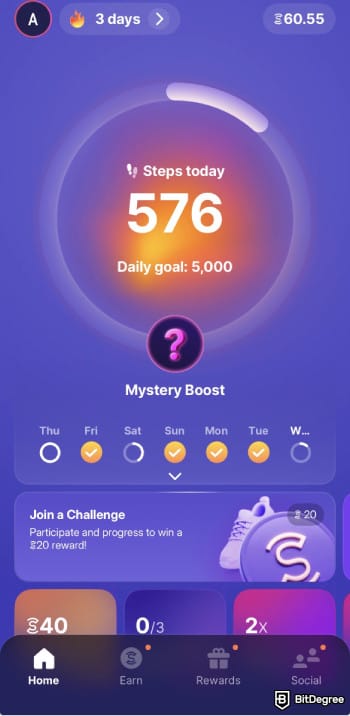
The Sweatcoins you see on the main app (represented by the same symbol as the Sweatcoin app logo) function as in-app points. To add to the confusion, they're not related to your step count. Sweatcoins can be earned by completing various tasks on the app (such as signing up for Sweatcoin's partner subscriptions) and then exchanged for gift cards from Amazon, Spotify, Google Play, and other stores.
If you're wondering, "Can you cash out on Sweatcoin directly from the app?", the answer is, unfortunately - you can't. The Sweatcoin app only stores Sweatcoin points, which can't be turned into cash and withdrawn.
Here's where SWEAT tokens come into play. You can earn them by walking (as of November 26, 2025, the exchange rate is 1 SWEAT for every 8,204 steps) or completing various quests and lottery spins on the Sweat wallet.
Looking for more in-depth information on related topics? We have gathered similar articles for you to spare your time. Take a look!


Can You Withdraw Money from Sweatcoin?
At this point, you can probably guess where I'm going with this. If you earn SWEAT tokens, can you cash out on Sweatcoin by accessing your Sweat wallet and simply withdrawing those tokens instead?
Indeed, you can! Sweat wallet technically functions just like any other cryptocurrency wallet - meaning that it can be used on its own as a self-custodial crypto wallet. As of writing this, it supports 15 other cryptocurrencies, including BTC, ETH, USDT, and USDC.
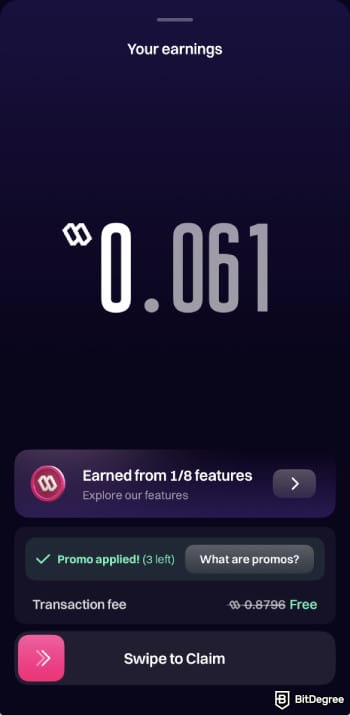
There's just one catch, however. The process of how to withdraw money from Sweatcoin will necessarily involve moving your SWEAT tokens from Sweat wallet to a crypto exchange or a money transfer app, where you can trade or convert them to fiat currency.
Unfortunately, Sweat wallet is built on the NEAR blockchain, which is fairly niche and isn't yet supported by most crypto exchanges (let alone crypto-friendly money transfer platforms, most of which are limited to the most popular cryptocurrencies).
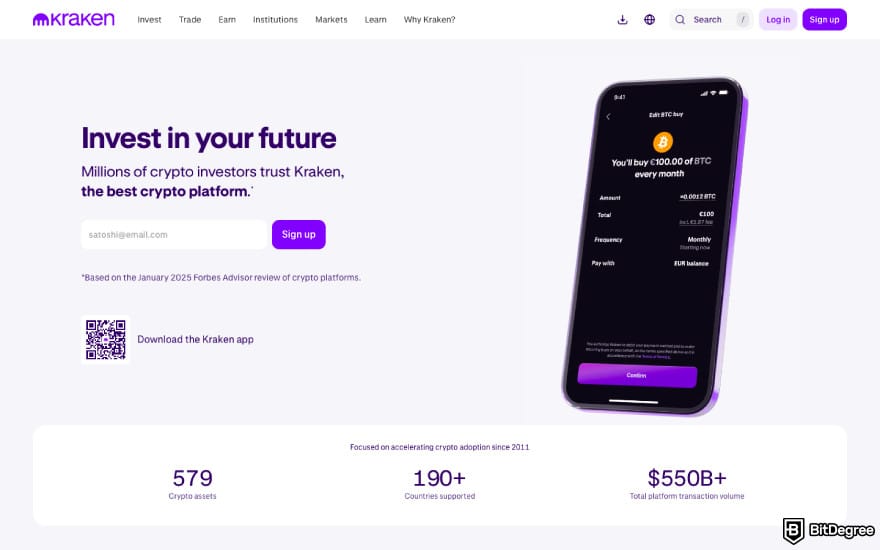
For instance, while Kraken and Binance Web3 Wallet both offer SWEAT, they only support it on Ethereum or ERC20, but not on NEAR, which means that if you tried to deposit SWEAT from your Sweat wallet, your tokens would simply get stuck and never arrive.
Thankfully, you're not completely without options here! After scouting the scene, I found three leading crypto exchanges that fit the bill. Bybit, KuCoin, and Bitget support SWEAT deposits on the NEAR blockchain.
Once you deposit your SWEAT tokens, all you need to do is sell them for fiat and then withdraw the money to your bank account, or, alternatively, send them to a money transfer app, such as Ogvio.
In summary, the solution to "Can you withdraw money from Sweatcoin?" might feel a bit clunky, but with my comprehensive step-by-step guides, you can get it done in under 10-15 minutes.
How to Withdraw Money from Sweatcoin Through Bybit
Not all centralized crypto exchanges have adequate fiat support, but Bybit is one of the few top-rated crypto trading platforms that offers plenty of options in this area.
Bybit supports depositing SWEAT crypto on ERC20 or NEAR, but in this case, you'll have to choose the latter.
There are two ways how to withdraw money from Sweatcoin app to Bybit: once you deposit your SWEAT tokens, you can either convert them to fiat or directly withdraw them to your bank account.
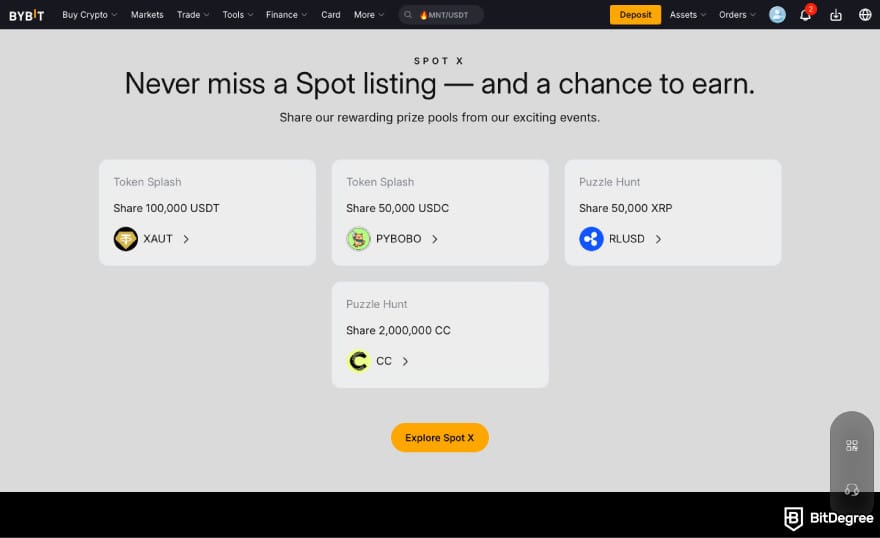
Just to be clear, the first option doesn't technically count as "withdrawal". The converted fiat currency would stay in your Bybit balance, which is where you'd want to keep it if you were planning to use it for spot trading, for example.
Bybit supports crypto conversion to 19 fiat currencies in total: EUR, USD, PLN, GBP, BRL, ARS, TRY, UAH, VND, MXN, UYU, COP, CRC, PEN, RON, IDR, HUF, CZK, and CHF.
On the other hand, if you're looking at how to transfer money from Sweatcoin to bank account, you'll need to use the One-Click Sell feature. That way, you can instantly withdraw SWEAT to Revolut or Wise, or send it to your bank account as a bank transfer or SEPA/SEPA Instant transfer. There's even an option to deliver it as a cash deposit to your bank account. All options cost around 0.92 USD per transfer.
Bybit also supports SWEAT/USDT spot trading pair. This exchange charges a 0.1% maker/taker spot trading fee.
Without further ado, here's how to withdraw money from Sweatcoin (or, more accurately, SWEAT wallet) using Bybit:
![How to withdraw money from Sweatcoin: click [Deposit].](https://assets.bitdegree.org/images/how-to-withdraw-money-from-sweatcoin-bybit-deposit.jpg "How to withdraw money from Sweatcoin: click [Deposit].")
![How to withdraw money from Sweatcoin: click [Deposit Crypto].](https://assets.bitdegree.org/images/how-to-withdraw-money-from-sweatcoin-bybit-deposit-crypto.jpg "How to withdraw money from Sweatcoin: click [Deposit Crypto].")
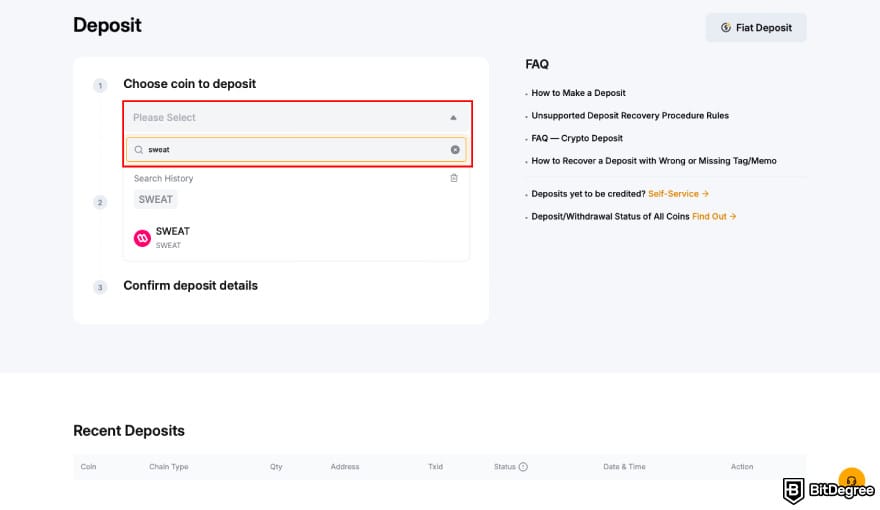
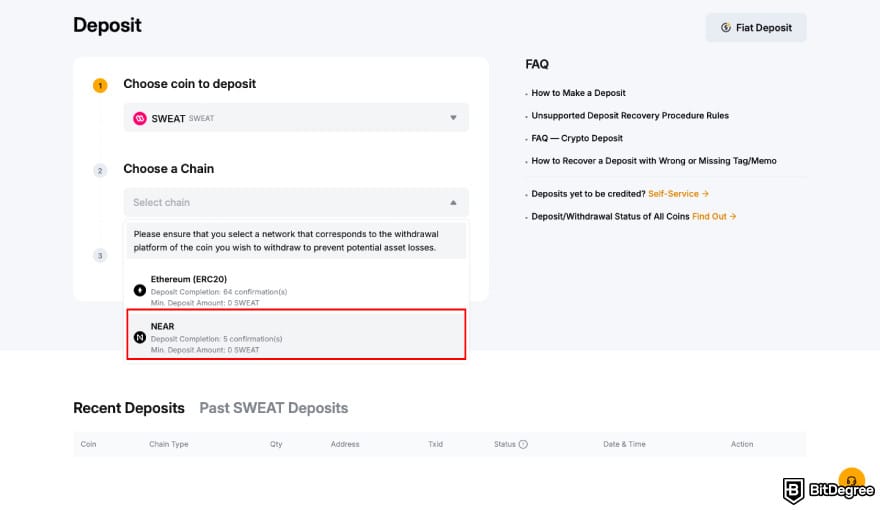
![How to withdraw money from Sweatcoin: open Sweat wallet and click [Send].](https://assets.bitdegree.org/images/how-to-withdraw-money-from-sweatcoin-send.jpg "How to withdraw money from Sweatcoin: open Sweat wallet and click [Send].")
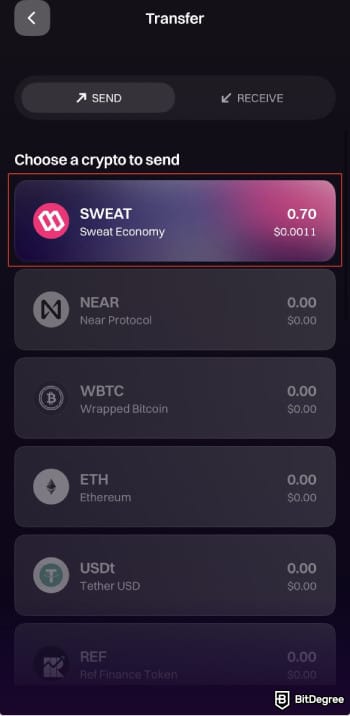
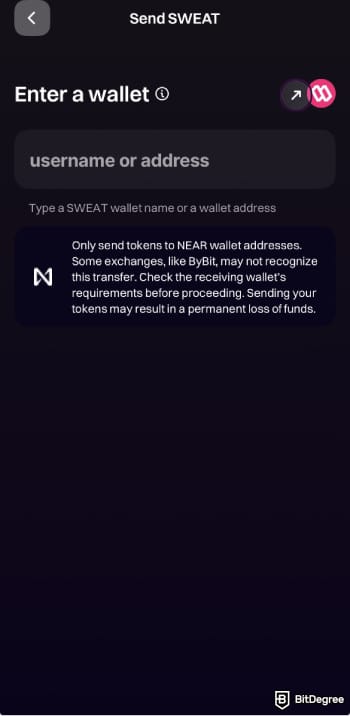
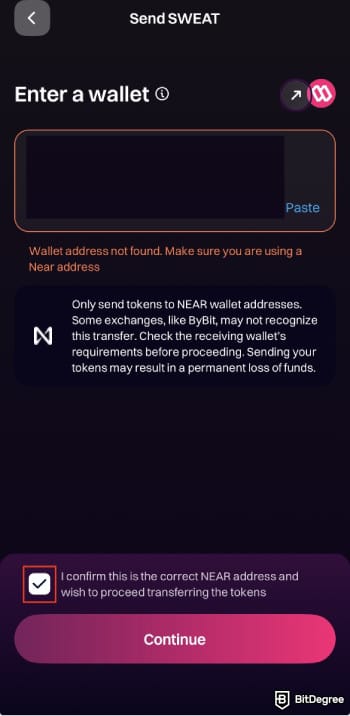
If you get a "Wallet address not found" notice, check the box to confirm that this wallet address is correct and click [Continue].
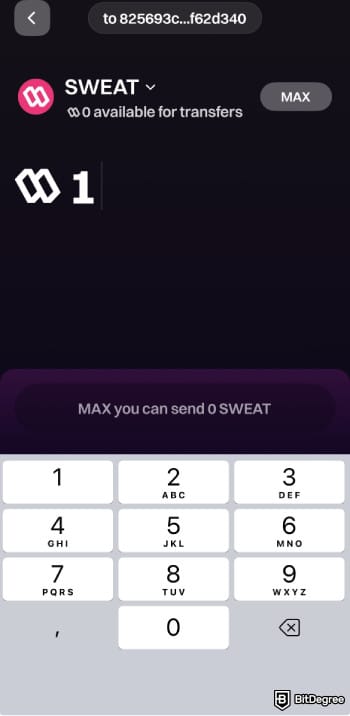
That's it for the deposit process. It might take a few minutes for the SWEAT tokens to show up on your Bybit account. Once they arrive, you can get on with the remaining bit:
![How to withdraw money from Sweatcoin: choose [One-Click Buy].](https://assets.bitdegree.org/images/how-to-withdraw-money-from-sweatcoin-bybit-one-click-buy.jpg "How to withdraw money from Sweatcoin: choose [One-Click Buy].")
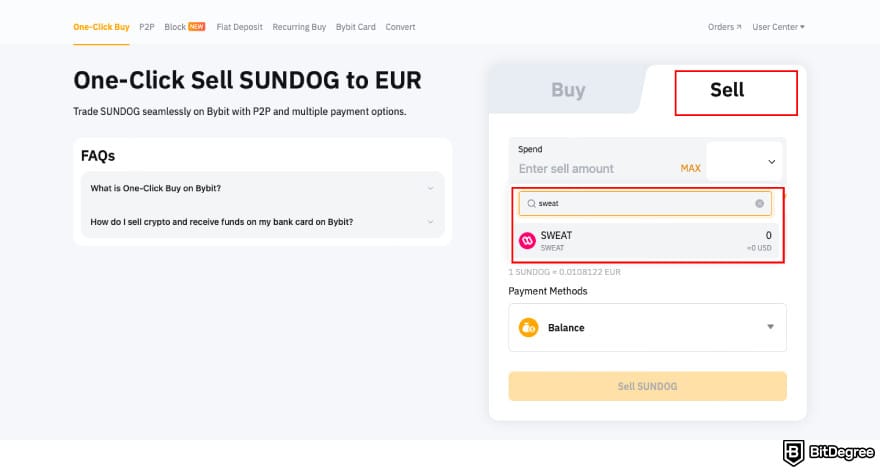
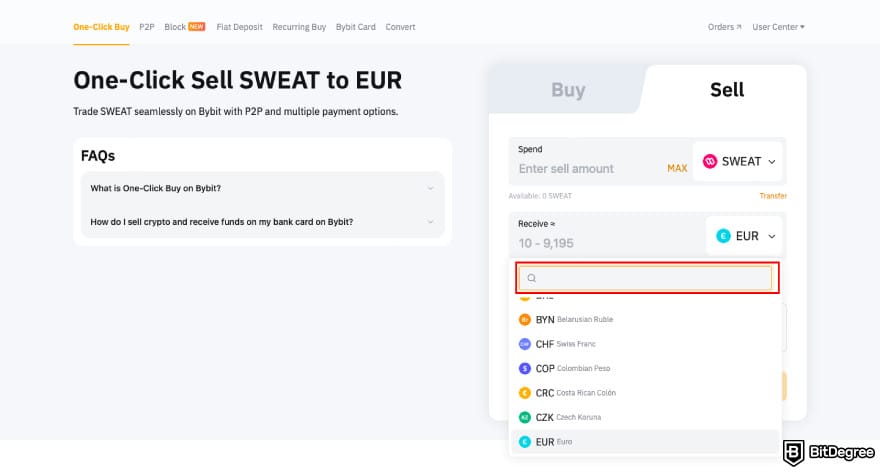
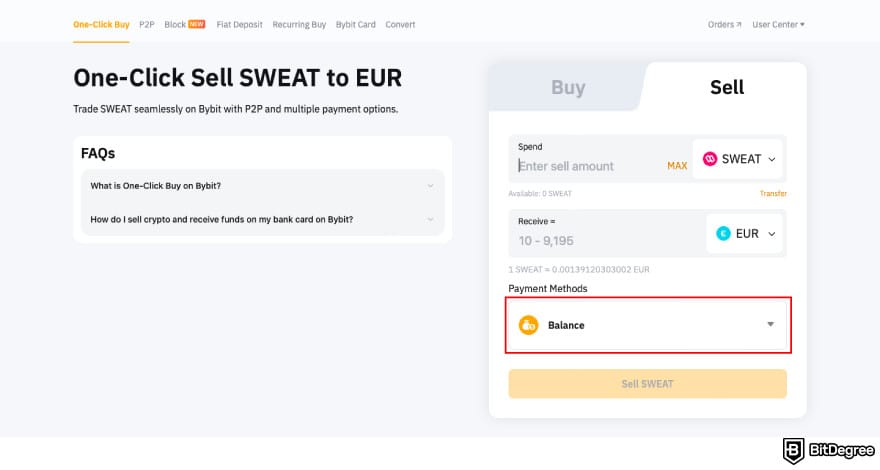
That's it! Depending on the payment method you chose, the money might take up to a few business days to arrive.
How to Withdraw Money from Sweatcoin Through KuCoin
The process of how to get your money from Sweatcoin to KuCoin is a bit less straightforward. This is because KuCoin doesn't support SWEAT conversion (either to fiat or crypto), so what you'll have to do first is exchange it for USDT on the spot trading market. KuCoin charges a 0.1% spot trading fee, so make sure you have enough funds in your account to cover it.
Once you've traded SWEAT for USDT, you can sell it to one of the 50+ supported fiat currencies and send it to your credit/debit card, withdraw it as a bank transfer, or sell it on KuCoin's P2P marketplace. The latter doesn't charge any fees, while regular fiat withdrawals cost around ~1 USD.
Keep in mind that KuCoin's minimum SWEAT deposit limit is 50 SWEAT tokens, and the minimum amount of SWEAT you can trade for USDT is 100. If you're transferring a lower amount, go with Bybit or Bitget instead.
Let's get started:
![How to withdraw money from Sweatcoin: click [Deposit] on KuCoin.](https://assets.bitdegree.org/images/how-to-withdraw-money-from-sweatcoin-kucoin-deposit.jpg "How to withdraw money from Sweatcoin: click [Deposit] on KuCoin.")
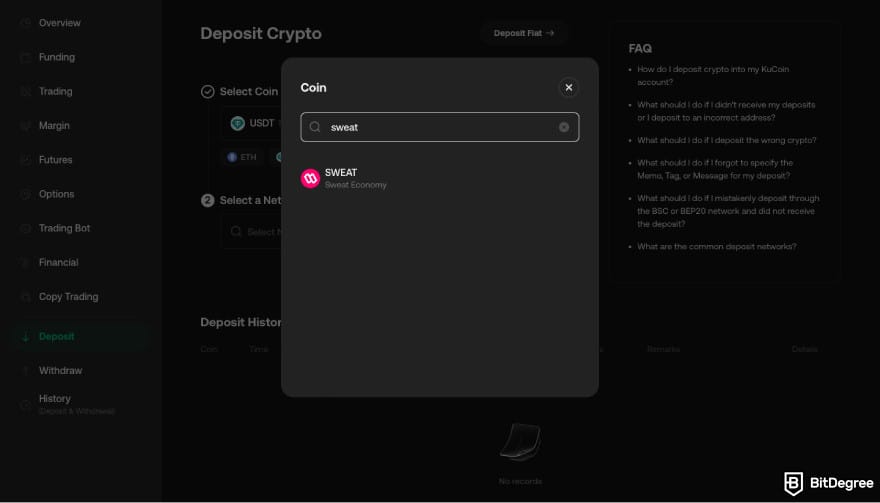
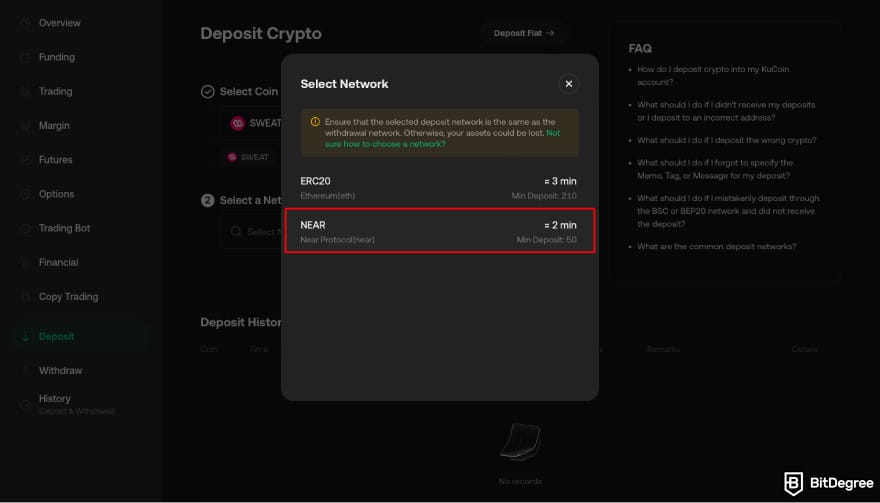
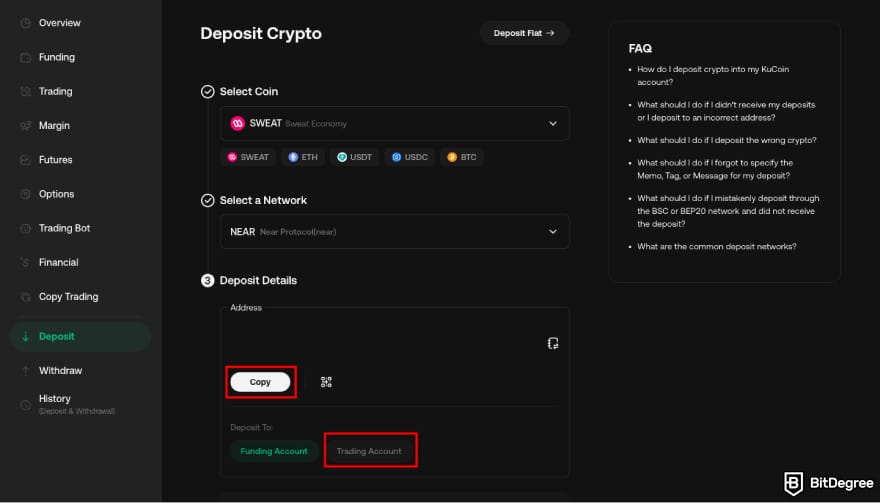
Choose SWEAT.
If you get a "Wallet address not found" notice, check the box to confirm that this wallet address is correct and click [Continue].
It could take a few minutes for the SWEAT tokens to appear on your KuCoin account. Once they get there, here's how to trade it for USDT on KuCoin's spot trading platform:
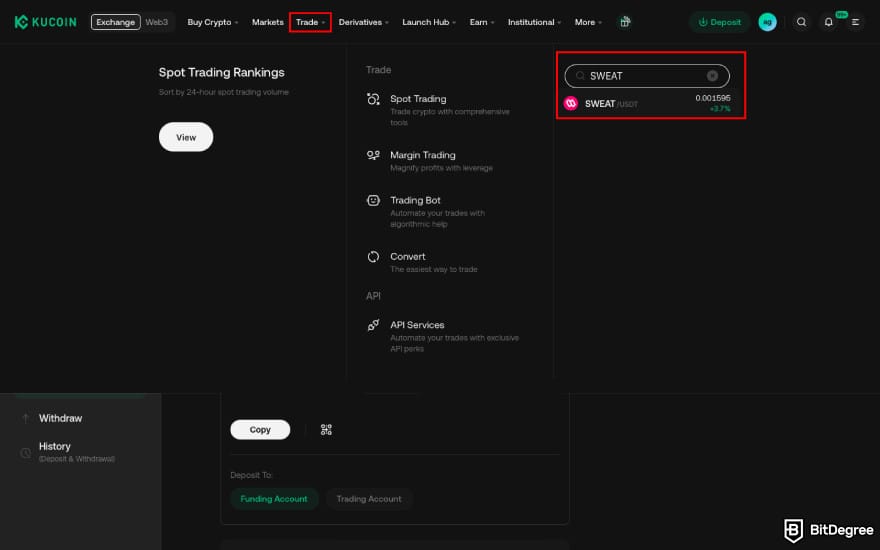
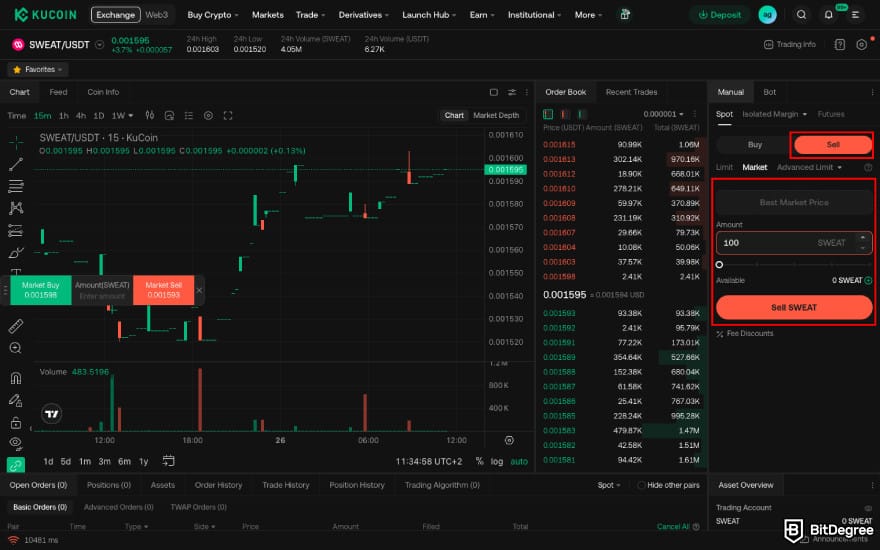
I recommend choosing a Market order for the most frictionless experience: your tokens will be sold immediately at market price, so you won't have to wait. Once you have USDT in your account, here's how to sell it for fiat:
![How to withdraw money from Sweatcoin: click [Trade Now] on KuCoin.](https://assets.bitdegree.org/images/how-to-withdraw-money-from-sweatcoin-kucoin-trade-now.jpg "How to withdraw money from Sweatcoin: click [Trade Now] on KuCoin.")
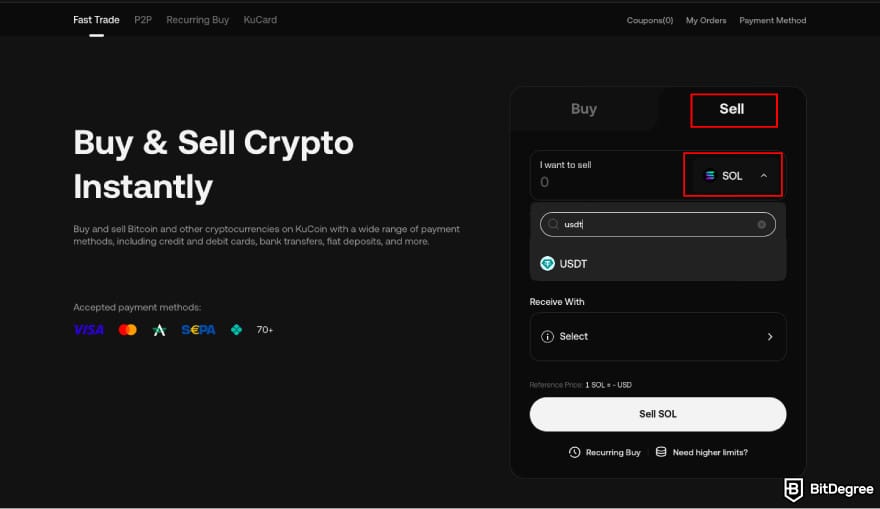
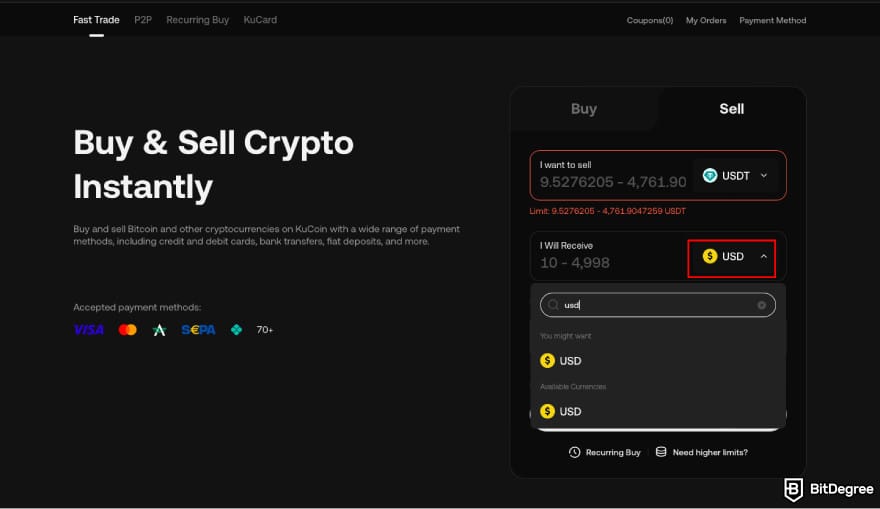
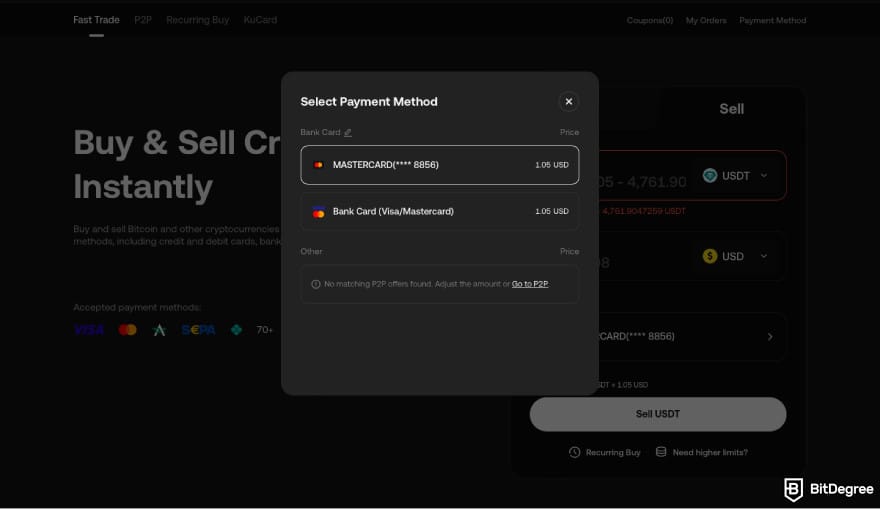
All done! Fiat withdrawals to a credit or debit card usually take around 30 minutes.
How to Withdraw Money from Sweatcoin Through Bitget
Just like KuCoin, Bitget doesn't support directly selling SWEAT for fiat. After depositing the tokens into your Bitget account, you'll first have to exchange them for USDT either by spot trading or instant conversion.
I recommend going with conversion to avoid the 0.1% spot trading fee.
Once you've replaced those SWEAT tokens with USDT, Bitget has plenty of off-ramp solutions. You can sell it for one of the available 60+ fiat currencies and choose 15+ withdrawal methods. Your options go beyond the typical credit/debit card and bank transfer package here: this exchange supports a number of third-party payment methods, including:
- Wise
- Revolut
- Uphold
- Skrill
- Paysera
- Neteller
Here's how to withdraw money from Sweatcoin app through Bitget:
![How to withdraw money from Sweatcoin: click [Deposit] on Bitget.](https://assets.bitdegree.org/images/how-to-withdraw-money-from-sweatcoin-bitget-deposit.jpg "How to withdraw money from Sweatcoin: click [Deposit] on Bitget.")
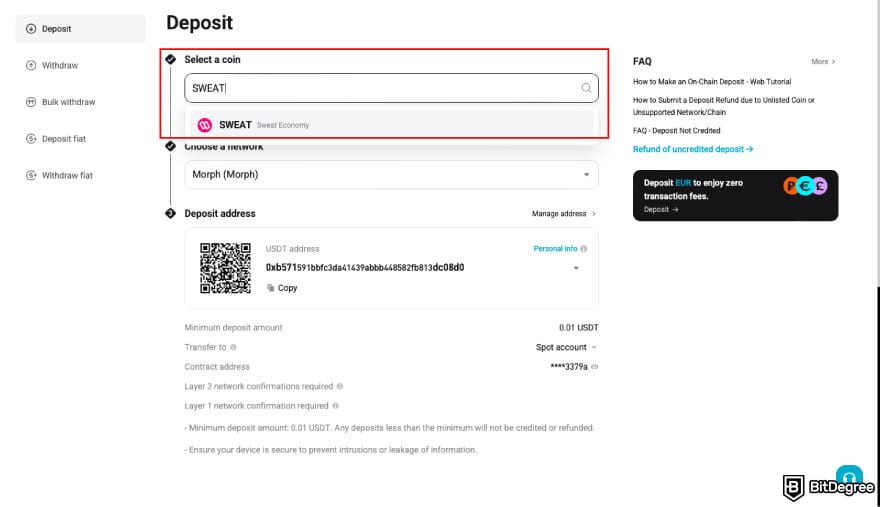
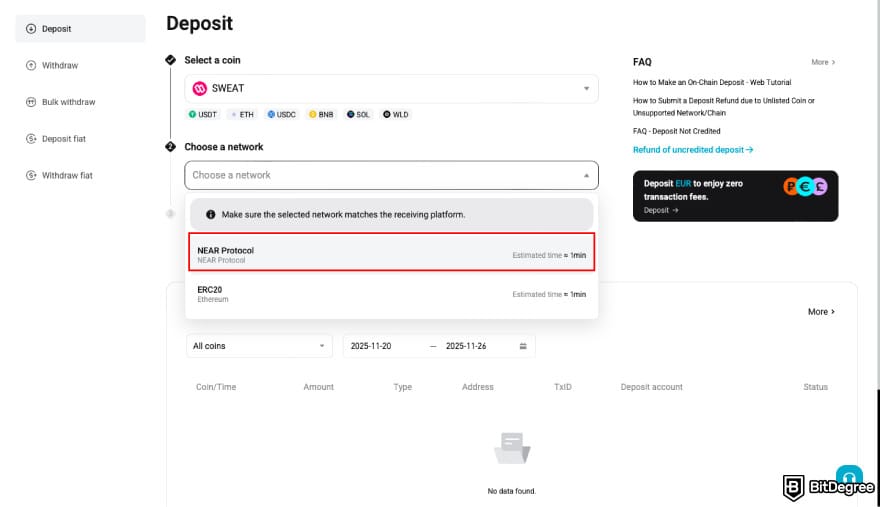
The minimum amount you have to deposit is 6 SWEAT tokens.
Choose SWEAT.
If you get a "Wallet address not found" notice, check the box to confirm that this wallet address is correct and click [Continue].
Within a few minutes, you should see your SWEAT tokens show up on your Bitget account. Once you're all set, let's move on to converting them to USDT the easiest way - through Bitget's instant crypto conversion panel:
![How to withdraw money from Sweatcoin: click [Convert & Block Trade] on Bitget.](https://assets.bitdegree.org/images/how-to-withdraw-money-from-sweatcoin-bitget-convert-block-trade.jpg "How to withdraw money from Sweatcoin: click [Convert & Block Trade] on Bitget.")
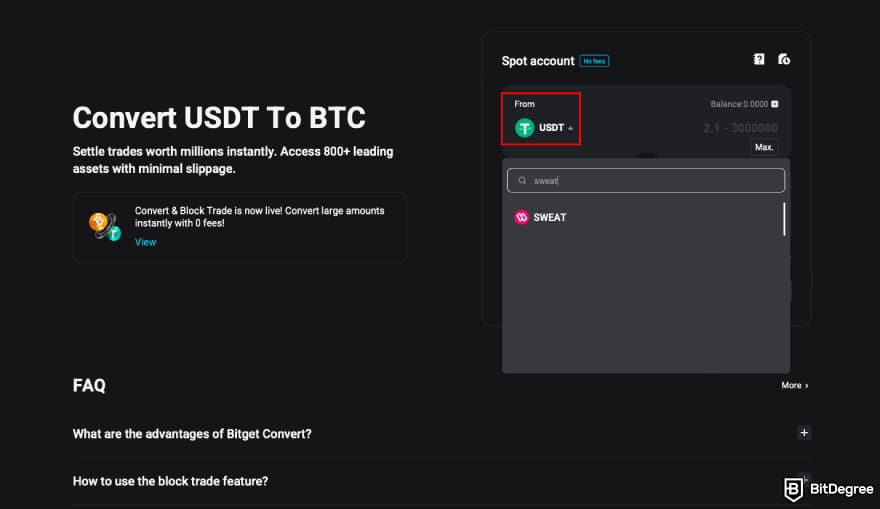
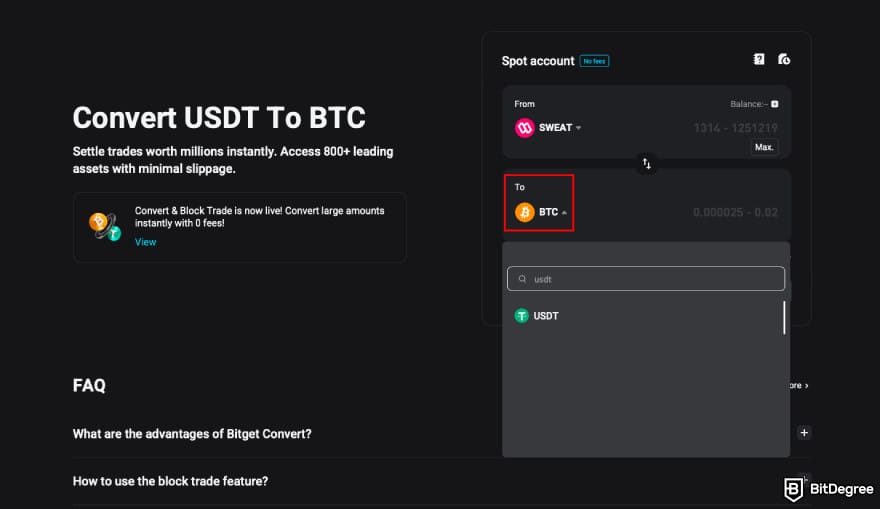
Now that you're done, it's time to turn your crypto into fiat. As I mentioned earlier, Bitget offers a pretty generous selection of payment methods, but if you want to learn how to transfer money from Sweatcoin to bank account (through a crypto exchange as an intermediary), here's what this method looks like:
![How to withdraw money from Sweatcoin: click [Buy & Sell] on Bitget.](https://assets.bitdegree.org/images/how-to-withdraw-money-from-sweatcoin-bitget-buy-sell.jpg "How to withdraw money from Sweatcoin: click [Buy & Sell] on Bitget.")
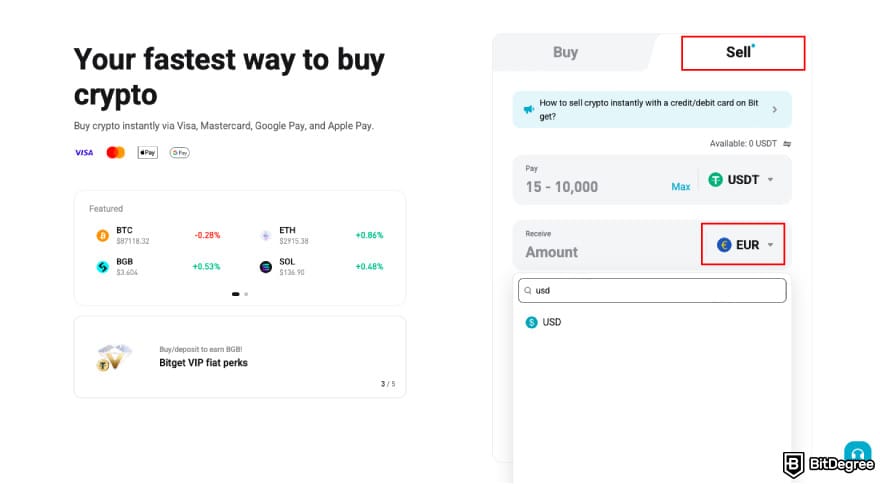
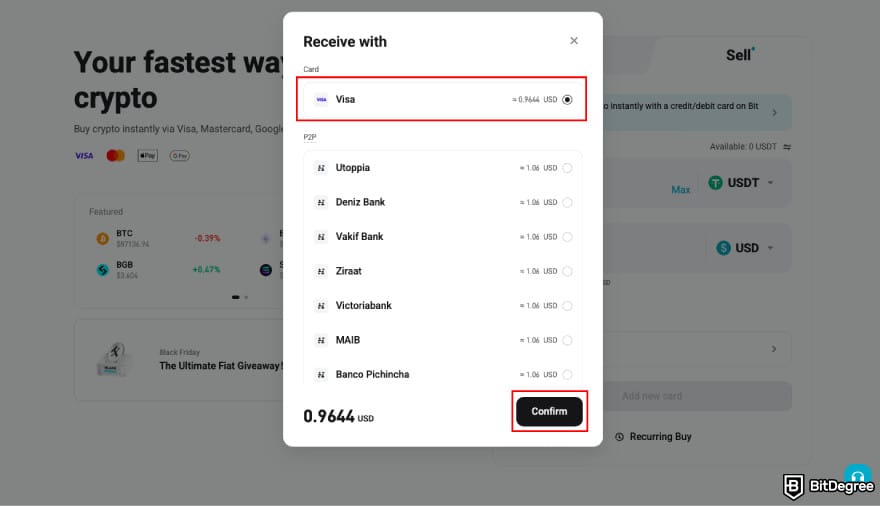
Here you go! The money should arrive in your account within a few business days (depending on your bank).
How to Withdraw Crypto from Sweatcoin to Ogvio
Ogvio is a new money transfer service that promises a lot of flexibility, thanks to its native crypto integration. Aside from its main intended purpose as a P2P transfer app, it functions as a crypto wallet, which you can use for crypto deposits or withdrawals (to other crypto wallets or directly to other Ogvio users' accounts). Another perk is that crypto transfers on Ogvio don't require KYC verification.
 | |
|---|---|
| |
| |
| |
| Visit site Read review |
Table: Ogvio features
Can you withdraw money from Sweatcoin to Ogvio? Technically, no. As of writing this, Ogvio only supports cryptocurrencies on the Base network, and SWEAT won't be among them anytime soon - which means that you won't be able to deposit your SWEAT tokens into Ogvio directly. Instead, the whole process of how to withdraw money from Sweatcoin to Ogvio looks something like this:
- Withdraw SWEAT tokens from the Sweat wallet to either Bybit or Bitget (as KuCoin doesn't support SWEAT conversions to other crypto assets).
- Convert SWEAT to USDC.
- Deposit USDC into Ogvio.
Let's get started! You've already seen how to deposit SWEAT into the above-mentioned exchanges, so I'll cut to the chase and get straight to Step 2.
SWEAT Conversion & Withdrawal to Ogvio on Bybit
Here's a comprehensive tutorial on how to withdraw money from Sweatcoin to Ogvio in the form of crypto, using Bybit as a conversion stop:
USDC withdrawals on Bybit cost 0.5 USDC, so make sure you have enough to complete the transaction.
![How to withdraw money from Sweatcoin: click [Convert] on Bybit.](https://assets.bitdegree.org/images/how-to-withdraw-money-from-sweatcoin-bybit-click-convert.jpg "How to withdraw money from Sweatcoin: click [Convert] on Bybit.")
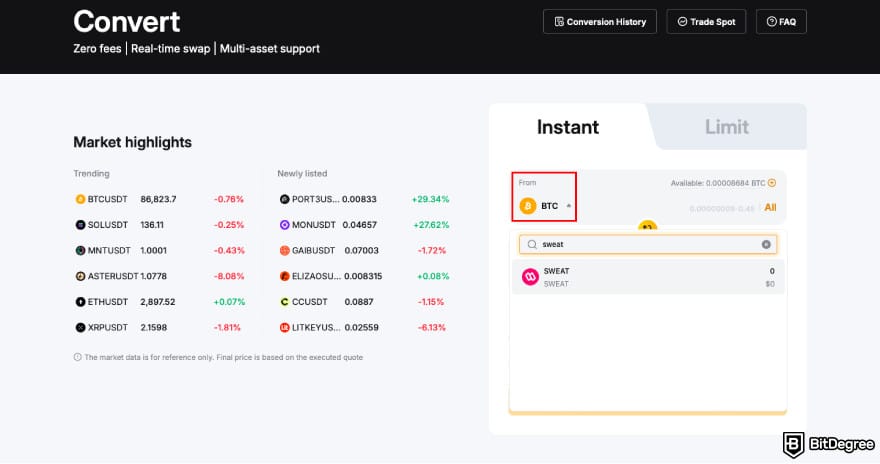
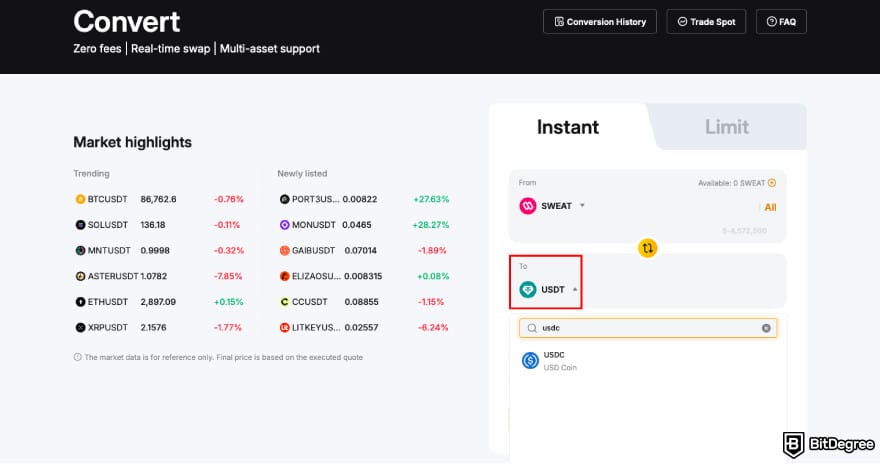
Now let's move on to the withdrawal. We'll start on Ogvio:
![How to withdraw money from Sweatcoin: click [Add Money] on Ogvio.](https://assets.bitdegree.org/images/how-to-withdraw-money-from-sweatcoin-ogvio-add-money.jpg "How to withdraw money from Sweatcoin: click [Add Money] on Ogvio.")
![How to withdraw money from Sweatcoin: click [See Your Wallet Address on Ogvio].](https://assets.bitdegree.org/images/how-to-withdraw-money-from-sweatcoin-ogvio-see-wallet.jpg "How to withdraw money from Sweatcoin: click [See Your Wallet Address on Ogvio].")
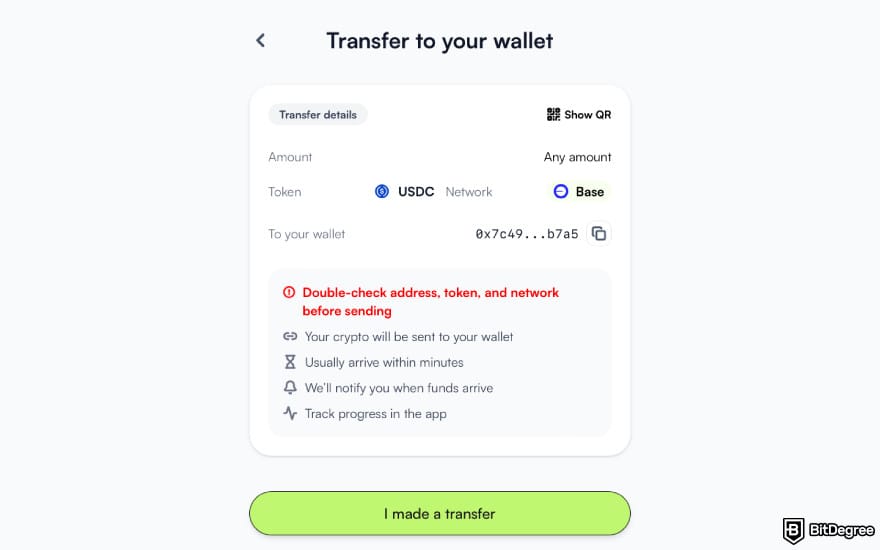
And now it's time to complete the process on Bybit:
![How to withdraw money from Sweatcoin: click [Withdraw] on Bybit.](https://assets.bitdegree.org/images/how-to-withdraw-money-from-sweatcoin-bybit-click-withdraw.jpg "How to withdraw money from Sweatcoin: click [Withdraw] on Bybit.")
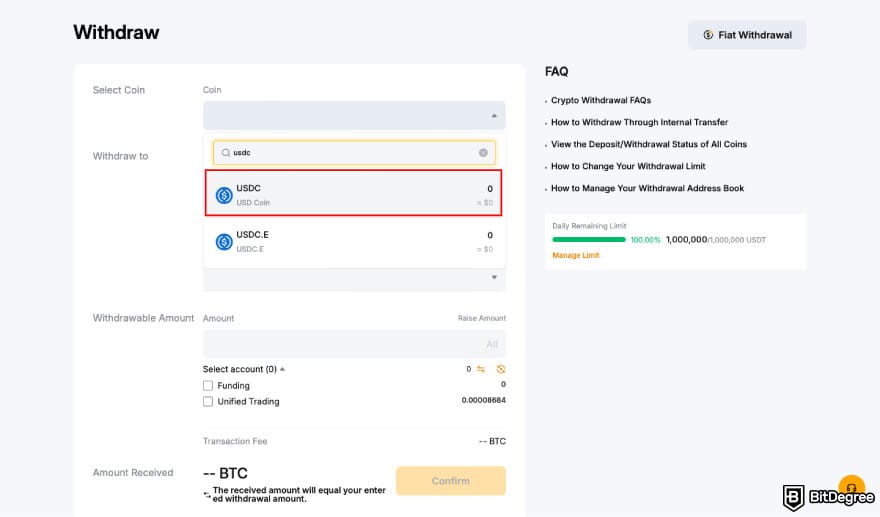
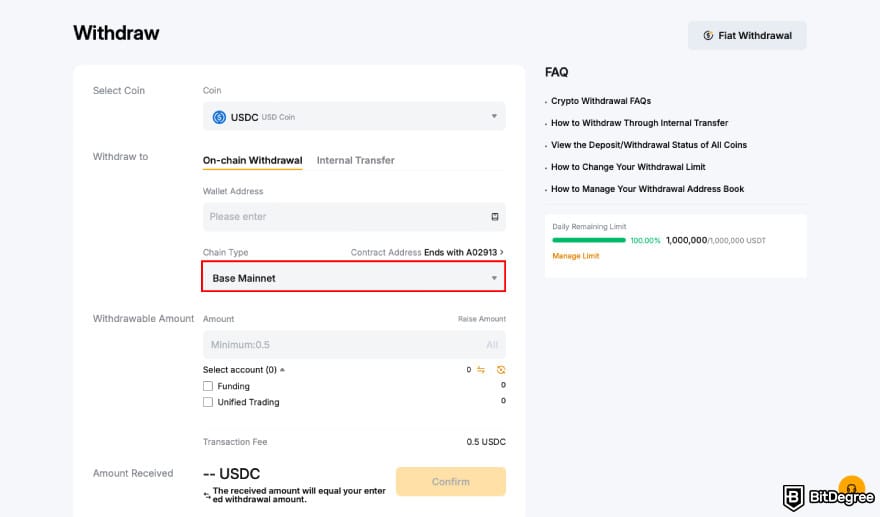
This is it! Once you're done, check your Ogvio account to see if your tokens arrived.
SWEAT Conversion & Withdrawal to Ogvio on Bitget
And here's the equivalent tutorial on how to withdraw money from Sweatcoin to Ogvio through another eligible crypto exchange, Bitget:
![How to withdraw money from Sweatcoin: click [Convert Block & Trade] on Bitget.](https://assets.bitdegree.org/images/how-to-withdraw-money-from-sweatcoin-bitget-convert-block-and-trade.jpg "How to withdraw money from Sweatcoin: click [Convert Block & Trade] on Bitget.")
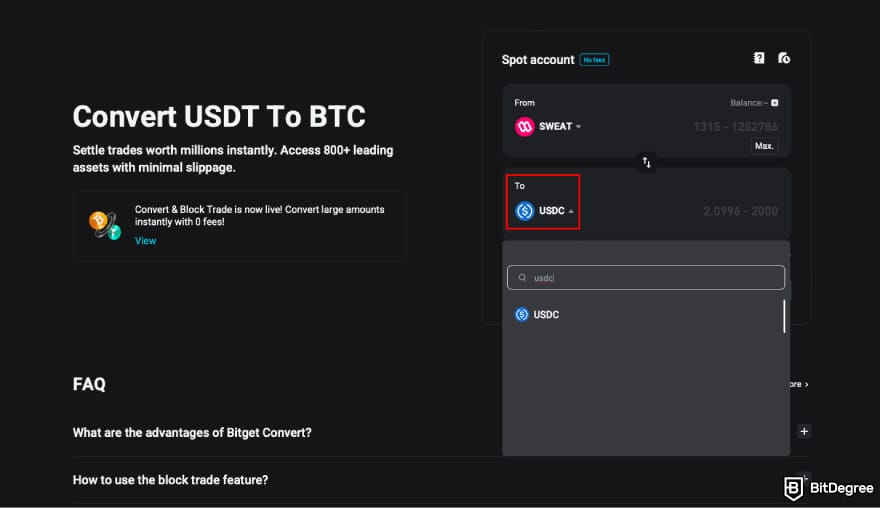
And now over to Ogvio:
You're almost through! Here are the last steps:
![How to withdraw money from Sweatcoin: click [Withdraw] on Bitget.](https://assets.bitdegree.org/images/how-to-withdraw-money-from-sweatcoin-bitget-click-withdraw.jpg "How to withdraw money from Sweatcoin: click [Withdraw] on Bitget.")
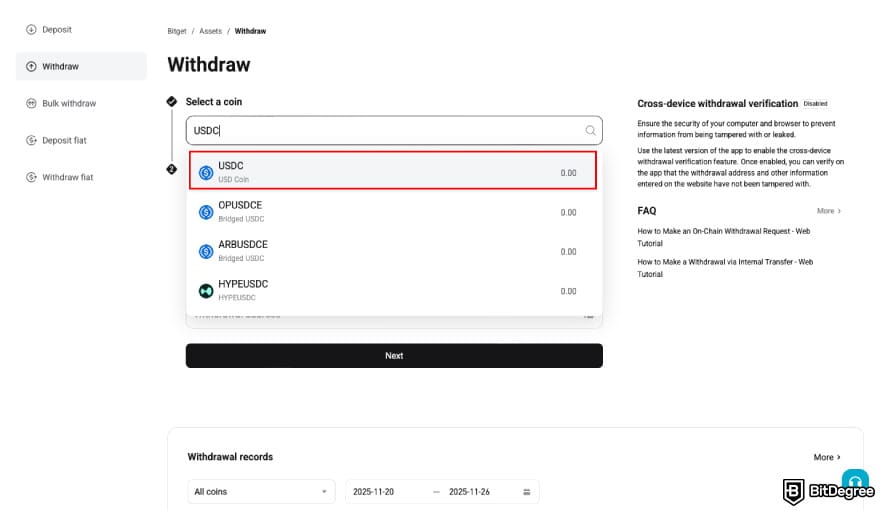
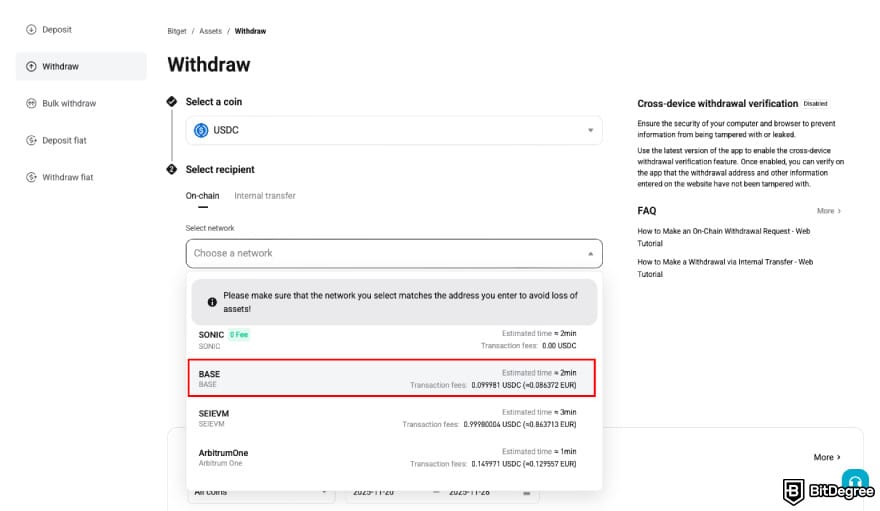
And you're all done! It should only take up to a few minutes for the tokens to arrive in your Ogvio wallet. You can keep storing them in Ogvio, withdraw them to another crypto wallet, or send them to other Ogvio users on your contact list.
Browse our collection of the most thorough Crypto Exchange related articles, guides & tutorials. Always be in the know & make informed decisions!


Conclusions
Learning how to withdraw money from Sweatcoin is trickier than it seems at first glance. For one thing, there's no way to cash it out directly, so you'll need to take a detour to one of the few crypto exchanges that support the NEAR protocol and deposit your SWEAT tokens there. Only then will you be able to sell them for fiat and withdraw the money to your bank account.
Having said that, the process itself should be intuitive enough to figure out with the help of these step-by-step tutorials. Bybit, KuCoin, and Bitget are all capable of handling SWEAT deposits on NEAR and offer a range of fiat withdrawal options. If you'd rather store your Sweatcoin rewards as crypto, I recommend withdrawing them to Ogvio.
There's still time to enter the BitDegree Airdrop Season 8! Join today and keep collecting Bits to claim your share of the 15,000 USD prize pool.
The content published on this website is not aimed to give any kind of financial, investment, trading, or any other form of advice. BitDegree.org does not endorse or suggest you to buy, sell or hold any kind of cryptocurrency. Before making financial investment decisions, do consult your financial advisor.
Scientific References
1. Mazeas A., Duclos M., Pereira B., Chalabaev A.: 'Evaluating the Effectiveness of Gamification on Physical Activity: Systematic Review and Meta-analysis of Randomized Controlled Trials';
2. Duguleană A. R., Tănăsescu C. R., Duguleană M.: 'Emerging Trends in Play-to-Earn (P2E) Games'.
About Article's Experts & Analysts