Is There a TradingView Black Friday Sale in 2026?
Unfortunately, there isn’t a confirmed TradingView Black Friday sale for 2026 yet. Its official page doesn’t list a new discount, start date, or deadline for the promotion.
Looking back at its deal history, TradingView has offered both Black Friday and Cyber Monday promotions before. That gives you something to watch for, but always remember that past offers don’t confirm which deals will return or when they’ll be available.
For now, you can take a look at the standard subscription plans and any ongoing TradingView offers. If you’re ready to commit for a year, annual billing can reduce the price by up to 17% instantly.
How Much Is the Discount?
As I’ve mentioned earlier, the TradingView Black Friday 2026 deal hasn’t been officially announced. To give you a clearer reference point, the table below compares regular subscription pricing with the discounts advertised during the last TradingView Black Friday sale:
| Regular Price | 2025 Black Friday Discount | 2026 Black Friday Discount | Valid Until |
|---|
Essential | $155.40 | 30% off | Not announced | Not announced |
|---|
Plus | $359.40 | 40% off | Not announced | Not announced |
|---|
Premium | $719.40 | 70% off | Not announced | Not announced |
|---|
Ultimate | $2,399.40 | 80% off | Not announced | Not announced |
|---|
Table: TradingView regular subscription prices with past discounts
The regular prices above are annual totals, calculated from TradingView’s displayed monthly equivalents and paid upfront. Also, keep in mind that they don’t include applicable taxes, so the final checkout amount may be higher.
Looking at the previous discounts, it’s easy to see why some users prefer to wait for a TradingView Black Friday deal before upgrading their plans. A significant discount like that can make the cost much easier to justify, particularly once the free plan starts holding you back.

You could apply last year’s percentages to today’s annual prices for a rough comparison, but I wouldn’t use the result to predict TradingView Black Friday 2026. It’s still only historical data, and the next offer could be significantly different (or there might be no offer at all).
No worries though, I’ll make sure to add the confirmed offer and checkout price once there's an official announcement.
When Does the Sale Start and End?
TradingView hasn’t confirmed the start or end of its 2026 sale. The shopping events themselves fall just after Thanksgiving, on the following dates:
- Black Friday falls on Friday, November 27, 2026.
- Cyber Monday follows on Monday, November 30, 2026.
TradingView could start its promotion earlier or keep it running beyond either day. Until it publishes a schedule, there’s no confirmed countdown or deadline to plan around. I’d suggest being patient and waiting for the official dates before planning your purchase around the sale.
TradingView Black Friday History
TradingView has offered multiple Black Friday deals over the past few years. The records below are based on archived copies of its official sale pages from 2023 to 2025:
| Date | Essential | Plus | Premium | Ultimate |
|---|
Black Friday 2023 | 20–28 November | 30% off | 40% off | 70% off | - |
|---|
Black Friday 2024 | 25–29 November | 30% off | 40% off | 70% off | - |
|---|
Black Friday 2025 | 21–28 November | 30% off | 40% off | 70% off | 80% off |
|---|
Table: TradingView Black Friday sale history
Looking at the table, TradingView Black Friday deals have been fairly consistent across recent years. Essential, Plus, and Premium saw similar percentage cuts in each of the presented campaigns, while the higher tiers generally received the biggest reductions.
The value also came from the subscription time. Previous deals bundled a year’s access with one extra month free, giving you 13 months in a single upfront purchase.
To get that bonus month, though, you had to buy through TradingView’s official website.
Just keep the next bill in mind. The Black Friday discount only covered the initial payment, and the plan renewed at the regular price once the included period ended. If a larger discount makes a higher tier more attractive, I’d still check whether the regular renewal price makes sense for you.
Which Plan Should You Buy?
I’d suggest having a plan in mind before the TradingView Black Friday excitement kicks in. A generous discount can make a higher tier tempting, but it’s still worth knowing whether its extra features fit your needs. Choosing beforehand gives you time to weigh up what you need and a better idea of which deals deserve your attention.
| Basic | Essential | Plus | Premium | Ultimate |
|---|
Charts per Tab | 1 | 2 | 4 | 8 | 16 |
|---|
Indicators per Chart | 2 | 5 | 10 | 25 | 50 |
|---|
Historical Bars | 5K | 10K | 10K | 20K | 40K |
|---|
Parallel Chart Connections | 2 | 10 | 20 | 50 | 200 |
|---|
Price Alerts | 3 | 20 | 100 | 400 | 1,000 |
|---|
Technical Alerts | - | 20 | 100 | 400 | 1,000 |
|---|
Watchlist Alerts | - | - | - | 2 | 15 |
|---|
Ad-Free | ✗ | ✓ | ✓ | ✓ | ✓ |
|---|
Chart Data Export | ✗ | ✗ | ✓ | ✓ | ✓ |
|---|
Auto Chart Patterns | ✗ | ✗ | ✗ | ✓ | ✓ |
|---|
Priority Support | ✗ | ✗ | ✗ | ✗ | ✓ |
|---|
Annual Price | Free | $155.40 | $359.40 | $719.40 | $2,399.40 |
|---|
Table: Comparison of TradingView's plans
My rule of thumb would be to upgrade based on the limits you hit, not the size of the discount. Focus on the limits that keep interrupting your charting and choose the cheapest plan that addresses them. More features don't automatically mean better analysis, and paying less for tools you'll never use still means paying for tools you'll never use.
- Essential: For a simple charting routine
Essential works well if your charting setup is fairly simple. You can compare daily and hourly views using two charts per tab, with five indicators per chart for the tools you rely on. I'd consider it if the free plan keeps getting in your way and you're ready to ditch the ads.
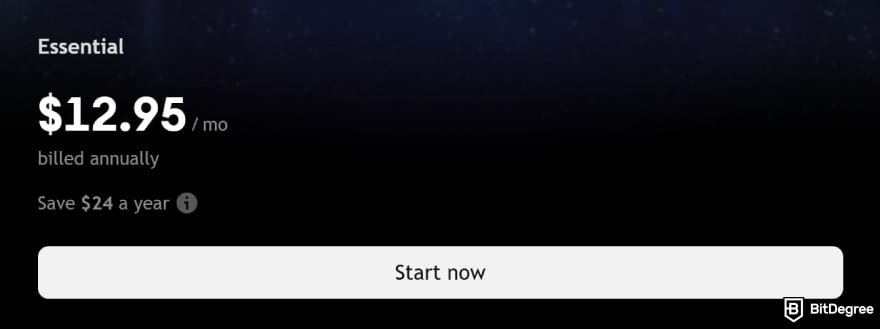
If two timeframes are all you need to compare, extra chart space probably won't add much to your routine. You can always look at a higher plan if your workflow becomes more demanding.
- Plus: For a growing charting setup
With four charts per tab and ten indicators per chart, Plus gives you more room to work. You can keep several markets or timeframes in view without constantly rearranging your charts. You can also export chart data, including ticker and indicator information, as a CSV file, which is pretty handy.
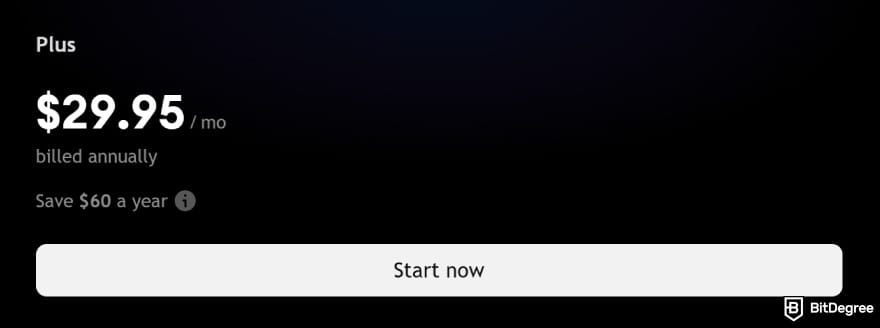
I’d put Plus on the shortlist if you’re outgrowing Essential, though I’d still compare its price with Premium. A TradingView Cyber Monday offer, Black Friday sale, or another promotion could bring the two closer together.
- Premium: For more demanding analysis
Premium is worth a look if your analysis calls for eight charts at once, more indicators, or a much higher alert allowance. Its open-ended alert option also removes the standard two-month expiry, allowing alerts to stay active indefinitely.
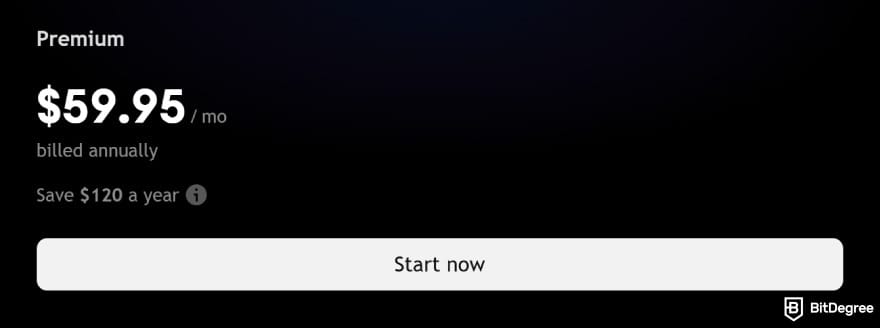
If you often use Bar Replay to revisit older intraday setups, Premium can also give you access to more historical data than Essential or Plus. The available history and replay restrictions vary, so check the coverage for the symbols you follow.
- Ultimate: For substantial capacity requirements
Ultimate raises the limits to 16 charts per tab and 50 indicators per chart. I’d consider it if you already know how you’d use that capacity in your regular analysis. It’s also the only available plan for users the platform classifies as professionals.
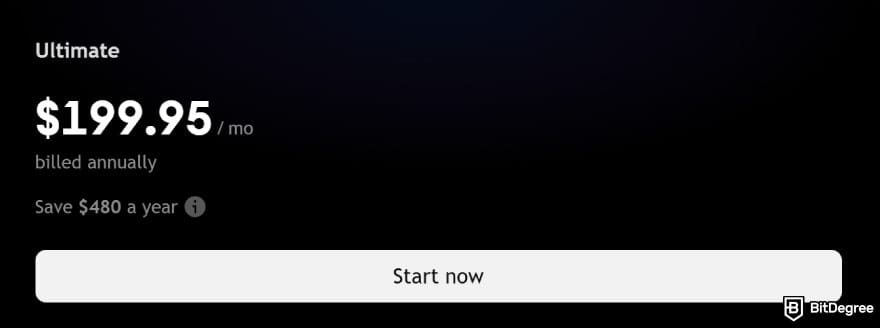
Beyond the higher limits, you can purchase real-time market data and use tick-based intervals to view trading activity in more detail when markets get volatile. And yes, you also get access to the platform's priority customer support if you need some reliable help.
How to Claim TradingView Black Friday Deal?
Once you’ve settled on a plan, the next thing to watch for is an offer worth taking. If a TradingView Black Friday deal becomes available, follow these steps to claim it:
STEP 1:
Choose the deal you want to activate and click [GET DEAL].
![TradingView Black Friday: click on the [GET DEAL] button on BitDegree's page.](https://assets.bitdegree.org/images/tradingview-black-friday-deal.jpg "TradingView Black Friday: click on the [GET DEAL] button on BitDegree's page.")
STEP 2:
Once you’re redirected to the official TradingView page, click the [Get started] button in the top-right corner.
![TradingView Black Friday: select [Get started].](https://assets.bitdegree.org/images/tradingview-black-friday-started.jpg "TradingView Black Friday: select [Get started].")
STEP 3:
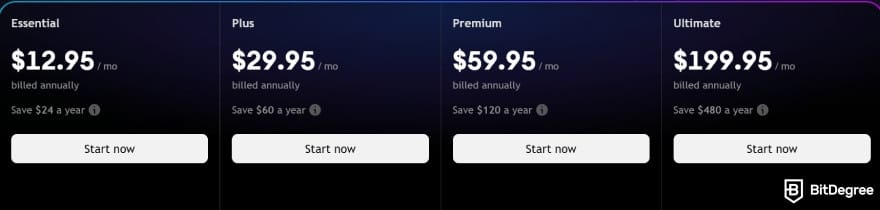
You can sign up for TradingView’s free Basic plan by clicking [Sign up]. If you’d prefer a paid plan, scroll down and choose from Essential, Plus, Premium, or Ultimate. Click [Start now] under your chosen plan.
STEP 4:
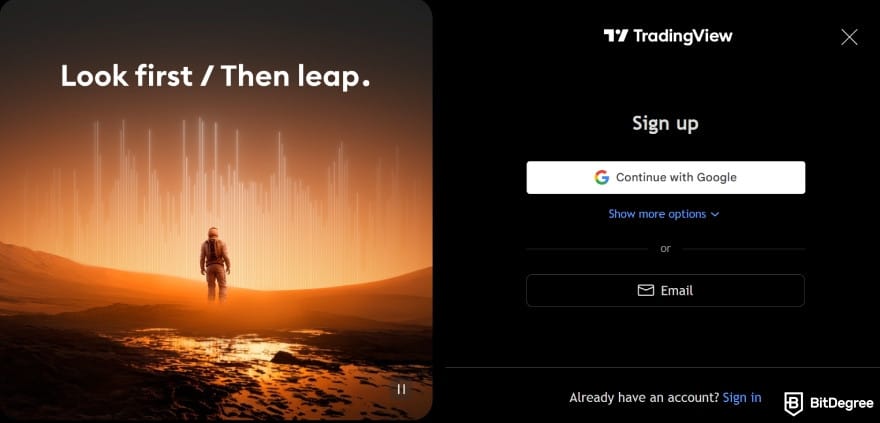
Next, choose how you’d like to sign up. You can use your Google account through [Continue with Google], select [Email], or click [Show more options] to see the alternatives.
STEP 5:
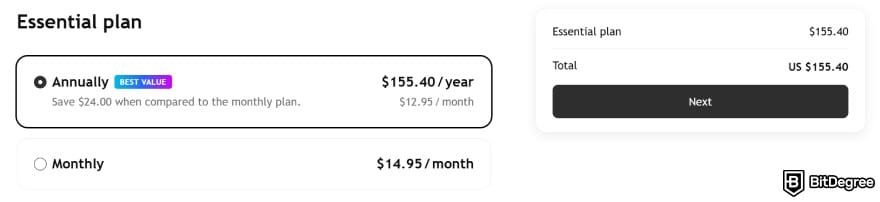
On the checkout page, choose whether you’d prefer an annual or monthly subscription.
STEP 6:
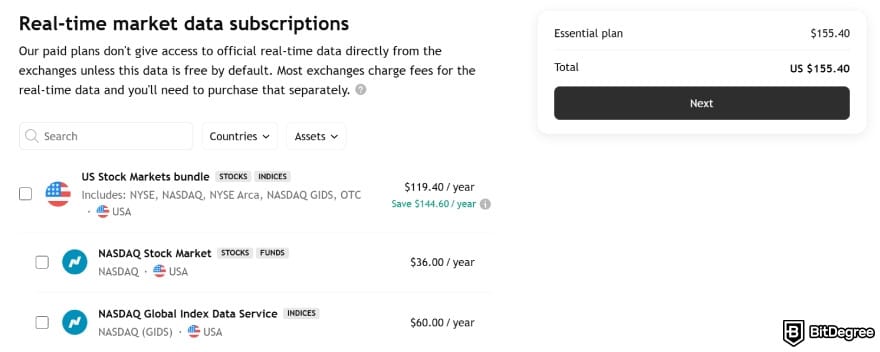
If you need real-time market data, select the subscriptions you want to add. Otherwise, leave them unchecked and click [Next].
STEP 7:
Complete your billing address and review the price and automatic renewal terms carefully. Then, tick the agreement box and click [Complete the purchase] to finish.
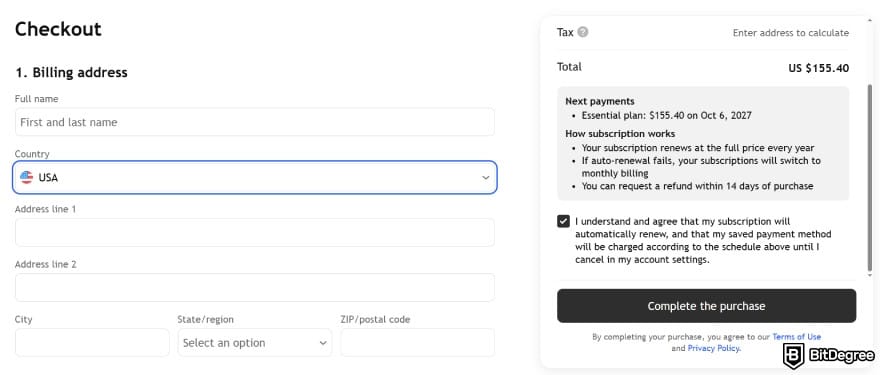
Once the payment is confirmed, check that the new plan appears on your account.
And you’re done! Whether you upgrade through a TradingView Cyber Monday deal, Black Friday promotion, or the regular plans page, you can expect a similar checkout process.
Existing Subscribers & Upgrades
A TradingView Black Friday deal can be useful even if you’re happy with your current plan. If one appears, extending that plan may be more appealing than changing tiers. Or you might be ready for more features or annual billing. Either way, make sure to check your remaining subscription time and the next payment before making a change.
Extending Your Current Subscription
If your current plan already does the job, an extension lets you buy more time on it. Start by checking your remaining subscription time and automatic billing status. If automatic billing is enabled, your plan will renew on its next payment date without you having to do anything.
You can also extend your subscription manually through the pricing page. Under the normal renewal rules, this option is available when there are 30 days or fewer before an annual plan’s auto-renewal, or 14 days or fewer for a monthly plan.

In case an offer appears, check its extension conditions while signed in to your account. Eligible promotional extensions should carry your unused subscription time forward and add it to the newly purchased period. Before confirming, review the new expiry date, the discounted total, and the later renewal price.
Upgrading to a Higher Plan
If you decide to move to a higher TradingView plan, pay attention to how your remaining subscription time is recalculated. Days on a cheaper tier don’t necessarily transfer day for day to a more expensive one.
For a standard annual upgrade, TradingView converts the value of your remaining subscription time into days on the higher tier without an additional payment. You keep that value, but it covers fewer days on the more expensive plan, bringing your next renewal forward.
If your subscription has four days or fewer until the next renewal, you’ll be offered a new paid plan instead.
To see exactly how the conversion works for your account, select [Upgrade] on the plan you want. Nothing changes until you confirm, so you can review the new terms first. Once the upgrade is confirmed, it can’t be reversed, although you can select a lower tier for your next billing period.
Switching From Monthly to Annual Billing
If you expect to keep using TradingView for another year, switching to annual billing is worth considering. You can make the change on the pricing page.

Under the normal rules, staying on the same tier or choosing a lower one means your annual subscription starts after your current monthly plan ends. You won’t be charged for the annual plan until then.
Moving to a higher annual tier activates the new plan and takes payment immediately. The value of your unused monthly time is converted into extra days on the higher tier and added to the new annual subscription.
Discounts Outside Black Friday
Not everyone will want to wait until November, especially when a TradingView Black Friday sale isn’t guaranteed. If you want to cut the cost now, check the yearly billing plan and look for any eligible regional or referral offers.
- Annual Billing Savings. Paying annually can save you up to 17%. Keep in mind that the monthly price shown for an annual plan is an average, while the full amount is paid upfront. Compare it with 12 monthly payments before deciding whether the commitment makes sense.
- Referral Rewards. If you’re already on TradingView, a referral can benefit both you and a friend. You can earn a $15 subscription reward when they join through your link and become a paid member within three months. Following that qualifying purchase, your friend gets a $15 coupon for their next subscription purchase.
- Regional Offers. You might also receive a TradingView offer based on your country or state. Check your inbox to see whether there’s a promotion you can take part in. Since these offers vary by location, a friend getting a deal overseas doesn’t mean the same sale is running in your region.
Beyond Black Friday, there have also been TradingView Cyber Monday offers and promotions for Valentine’s Day, Lunar New Year, Easter, and Boxing Day. Similar campaigns might return, although you can’t count on a repeat or matching discounts. If you’re hoping to catch a deal, keep an eye out for new offers.